編輯:關於Android編程
本文實例講述了Android4.X中SIM卡信息初始化過程詳解。分享給大家供大家參考,具體如下:
Phone 對象初始化的過程中,會加載SIM卡的部分數據信息,這些信息會保存在IccRecords 和 AdnRecordCache 中。SIM卡的數據信息的初始化過程主要分為如下幾個步驟
1.RIL 和 UiccController 建立監聽關系 ,SIM卡狀態發生變化時,UiccController 第一個去處理。
Phone 應用初始化 Phone 對象時會建立一個 RIL 和UiccController 的監聽關系:UiccController 監聽 RIL,相關代碼如下
sCommandsInterface = new RIL(context, networkMode, cdmaSubscription);   UiccController.make(context, sCommandsInterface);
UiccController 構造的過程
private UiccController(Context c, CommandsInterface ci) {
 if (DBG) log("Creating UiccController");
 mContext = c;
 mCi = ci;
 mCi.registerForIccStatusChanged(this, EVENT_ICC_STATUS_CHANGED, null);
 // TODO remove this once modem correctly notifies the unsols
 mCi.registerForOn(this, EVENT_ICC_STATUS_CHANGED, null);
}
從代碼中可以看出,UiccController 對象被注冊為RIL對象的監聽者,當 RIL 檢測到 uicc card 狀態發生變化或者 radio on UiccController 都會處理對應的數據變化。UiccController 是 SIM卡狀態發生變化後的第一個處理者。
UiccController 處理 EVENT_ICC_STATUS_CHANGED
public void handleMessage (Message msg) {
  synchronized (mLock) {
  switch (msg.what) {
   case EVENT_ICC_STATUS_CHANGED:
   if (DBG) log("Received EVENT_ICC_STATUS_CHANGED, calling getIccCardStatus");
   mCi.getIccCardStatus(obtainMessage(EVENT_GET_ICC_STATUS_DONE));
   break;
   case EVENT_GET_ICC_STATUS_DONE:
   if (DBG) log("Received EVENT_GET_ICC_STATUS_DONE");
   AsyncResult ar = (AsyncResult)msg.obj;
   onGetIccCardStatusDone(ar);
   break;
   default:
   Rlog.e(LOG_TAG, " Unknown Event " + msg.what);
  }
  }
}
從代碼中可以看出,RIL 上報 SIM卡狀態發生變化後,做了兩件事,一是獲取SIM卡的具體狀態,二是處理這個狀態。
UiccController 處理具體的SIM卡狀態
private synchronized void onGetIccCardStatusDone(AsyncResult ar) {
  if (ar.exception != null) {
  Rlog.e(LOG_TAG,"Error getting ICC status. "
   + "RIL_REQUEST_GET_ICC_STATUS should "
   + "never return an error", ar.exception);
  return;
  }
  IccCardStatus status = (IccCardStatus)ar.result;
  if (mUiccCard == null) {
  //Create new card
  mUiccCard = new UiccCard(mContext, mCi, status);
  } else {
  //Update already existing card
  mUiccCard.update(mContext, mCi , status);
  }
  if (DBG) log("Notifying IccChangedRegistrants");
  mIccChangedRegistrants.notifyRegistrants();
}
從代碼中可以看出,做了兩件事,
一是 創建或者 更新 UiccCard
二是 通知監聽 UiccController 的監聽者。
2.創建或者更新 UiccCard,UiccCard 創建或者更新與SIM卡類型對應的UiccCardApplication.
一個UiccCard 對象代表著一張SIM卡,UiccCard 根據獲取的SIM卡信息創建 UiccCardApplication,UiccCardApplication去讀取具體的SIM卡裡的信息。
更新UiccCard
public void update(Context c, CommandsInterface ci, IccCardStatus ics) {
  synchronized (mLock) {
  if (mDestroyed) {
   loge("Updated after destroyed! Fix me!");
   return;
  }
  CardState oldState = mCardState;
  mCardState = ics.mCardState;
  mUniversalPinState = ics.mUniversalPinState;
  mGsmUmtsSubscriptionAppIndex = ics.mGsmUmtsSubscriptionAppIndex;
  mCdmaSubscriptionAppIndex = ics.mCdmaSubscriptionAppIndex;
  mImsSubscriptionAppIndex = ics.mImsSubscriptionAppIndex;
  mContext = c;
  mCi = ci;
  //update applications
  if (DBG) log(ics.mApplications.length + " applications");
  for ( int i = 0; i < mUiccApplications.length; i++) {
   if (mUiccApplications[i] == null) {
   //Create newly added Applications
   if (i < ics.mApplications.length) {
    mUiccApplications[i] = new UiccCardApplication(this,
     ics.mApplications[i], mContext, mCi);
   }
   } else if (i >= ics.mApplications.length) {
   //Delete removed applications
   mUiccApplications[i].dispose();
   mUiccApplications[i] = null;
   } else {
   //Update the rest
   mUiccApplications[i].update(ics.mApplications[i], mContext, mCi);
   }
  }
  if (mUiccApplications.length > 0 && mUiccApplications[0] != null) {
   // Initialize or Reinitialize CatService
   mCatService = CatService.getInstance(mCi,
       mContext,
       this);
  } else {
   if (mCatService != null) {
   mCatService.dispose();
   }
   mCatService = null;
  }
  sanitizeApplicationIndexes();
  RadioState radioState = mCi.getRadioState();
  if (DBG) log("update: radioState=" + radioState + " mLastRadioState="
   + mLastRadioState);
  // No notifications while radio is off or we just powering up
  if (radioState == RadioState.RADIO_ON && mLastRadioState == RadioState.RADIO_ON) {
   if (oldState != CardState.CARDSTATE_ABSENT &&
    mCardState == CardState.CARDSTATE_ABSENT) {
   if (DBG) log("update: notify card removed");
   mAbsentRegistrants.notifyRegistrants();
   mHandler.sendMessage(mHandler.obtainMessage(EVENT_CARD_REMOVED, null));
   } else if (oldState == CardState.CARDSTATE_ABSENT &&
    mCardState != CardState.CARDSTATE_ABSENT) {
   if (DBG) log("update: notify card added");
   mHandler.sendMessage(mHandler.obtainMessage(EVENT_CARD_ADDED, null));
   }
  }
  mLastRadioState = radioState;
  }
}
IccCardStatus,記錄了RIL 讀取的SIM卡的信息,UiccCard 根據 IccCardStatus 中記錄的應用程序信息,創建 UiccCardApplication.
UiccCard 還創建了 CatService,用於讀取 STK 的信息。
創建或者更新 UiccCardApplication
UiccCardApplication,會記錄對應的卡的狀態,類型,以及卡的記錄信息。
//創建 UiccCardApplication
UiccCardApplication(UiccCard uiccCard,
    IccCardApplicationStatus as,
    Context c,
    CommandsInterface ci) {
  if (DBG) log("Creating UiccApp: " + as);
  mUiccCard = uiccCard;
  mAppState = as.app_state;
  mAppType = as.app_type;
  mPersoSubState = as.perso_substate;
  mAid = as.aid;
  mAppLabel = as.app_label;
  mPin1Replaced = (as.pin1_replaced != 0);
  mPin1State = as.pin1;
  mPin2State = as.pin2;
  mContext = c;
  mCi = ci;
  mIccFh = createIccFileHandler(as.app_type);
  mIccRecords = createIccRecords(as.app_type, mContext, mCi);
  ///讀取 SIM卡上的 EF 文件信息
  if (mAppState == AppState.APPSTATE_READY) {
  queryFdn(); // FDN 信息
  queryPin1State(); // Pin State
  }
 }
 //更新UiccCardApplication
 void update (IccCardApplicationStatus as, Context c, CommandsInterface ci) {
  synchronized (mLock) {
  if (mDestroyed) {
   loge("Application updated after destroyed! Fix me!");
   return;
  }
  if (DBG) log(mAppType + " update. New " + as);
  mContext = c;
  mCi = ci;
  AppType oldAppType = mAppType;
  AppState oldAppState = mAppState;
  PersoSubState oldPersoSubState = mPersoSubState;
  mAppType = as.app_type;
  mAppState = as.app_state;
  mPersoSubState = as.perso_substate;
  mAid = as.aid;
  mAppLabel = as.app_label;
  mPin1Replaced = (as.pin1_replaced != 0);
  mPin1State = as.pin1;
  mPin2State = as.pin2;
  if (mAppType != oldAppType) {
   if (mIccFh != null) { mIccFh.dispose();}
   if (mIccRecords != null) { mIccRecords.dispose();}
   mIccFh = createIccFileHandler(as.app_type);
   mIccRecords = createIccRecords(as.app_type, c, ci);
  }
  if (mPersoSubState != oldPersoSubState &&
   mPersoSubState == PersoSubState.PERSOSUBSTATE_SIM_NETWORK) {
   notifyNetworkLockedRegistrantsIfNeeded(null);
  }
  if (mAppState != oldAppState) {
   if (DBG) log(oldAppType + " changed state: " + oldAppState + " -> " + mAppState);
   // If the app state turns to APPSTATE_READY, then query FDN status,
   //as it might have failed in earlier attempt.
   if (mAppState == AppState.APPSTATE_READY) {
   queryFdn();// FDN 信息
   queryPin1State();
   }
   notifyPinLockedRegistrantsIfNeeded(null);
   notifyReadyRegistrantsIfNeeded(null);
  }
  }
}
在更新和創建UiccCardApplication的過程中,有如下幾個重要的變量
IccRecords
記錄 SIM卡上的EF 文件信息,實現類有SIMRecords,RuimRecords,IsimUiccRecords,對應於不同的類型的SIM卡。
IccFileHandler
根據SIM卡的類型,去讀取SIM卡上的信息,實現類有SIMFileHandler,RuimFileHandler,UsimFileHandler,CsimFileHandler,IsimFileHandler,對應於不同的SIM卡。
創建 IccRecords 對象
正如前面所描述的,IccRecords 記錄SIM卡的EF文件信息,具體的讀取SIM卡EF文件信息的過程是由 IccFileHandler 來實現的,以 SIMRecords 為例。
public SIMRecords(UiccCardApplication app, Context c, CommandsInterface ci) {
  super(app, c, ci);
  // 1.電話本的緩存
  mAdnCache = new AdnRecordCache(mFh);
  mVmConfig = new VoiceMailConstants();
  mSpnOverride = new SpnOverride();
  mRecordsRequested = false; // No load request is made till SIM ready
  // recordsToLoad is set to 0 because no requests are made yet
  mRecordsToLoad = 0;
  mCi.setOnSmsOnSim(this, EVENT_SMS_ON_SIM, null);
  mCi.registerForIccRefresh(this, EVENT_SIM_REFRESH, null);
  // Start off by setting empty state
  resetRecords();
  //2. 讀取 SIM卡的所有重要的記錄信息
  mParentApp.registerForReady(this, EVENT_APP_READY, null);
  if (DBG) log("SIMRecords X ctor this=" + this);
}
這個過程包含兩個重要的步驟
創建AdnRecordCache,用於保存電話本數據,根據EF的ID,可以分別讀取SIM卡和USIM卡的電話本數據。AdnRecordCache 中持有一個UsimPhoneBookManager,它就是用來讀取USIM卡電話本數據的。GSM的SIM卡和WCDMA的USIM卡都是對應的 SimRecords.
讀取SIM卡的所有重要記錄信息,在fetchSimRecords 方法中實現。
protected void fetchSimRecords() {
  mRecordsRequested = true;
  if (DBG) log("fetchSimRecords " + mRecordsToLoad);
  mCi.getIMSIForApp(mParentApp.getAid(), obtainMessage(EVENT_GET_IMSI_DONE));
  mRecordsToLoad++;
  mFh.loadEFTransparent(EF_ICCID, obtainMessage(EVENT_GET_ICCID_DONE));
  mRecordsToLoad++;
  // FIXME should examine EF[MSISDN]'s capability configuration
  // to determine which is the voice/data/fax line
  new AdnRecordLoader(mFh).loadFromEF(EF_MSISDN, EF_EXT1, 1,
   obtainMessage(EVENT_GET_MSISDN_DONE));
  mRecordsToLoad++;
  // Record number is subscriber profile
  mFh.loadEFLinearFixed(EF_MBI, 1, obtainMessage(EVENT_GET_MBI_DONE));
  mRecordsToLoad++;
  mFh.loadEFTransparent(EF_AD, obtainMessage(EVENT_GET_AD_DONE));
  mRecordsToLoad++;
  // Record number is subscriber profile
  mFh.loadEFLinearFixed(EF_MWIS, 1, obtainMessage(EVENT_GET_MWIS_DONE));
  mRecordsToLoad++;
  // Also load CPHS-style voice mail indicator, which stores
  // the same info as EF[MWIS]. If both exist, both are updated
  // but the EF[MWIS] data is preferred
  // Please note this must be loaded after EF[MWIS]
  mFh.loadEFTransparent(
   EF_VOICE_MAIL_INDICATOR_CPHS,
   obtainMessage(EVENT_GET_VOICE_MAIL_INDICATOR_CPHS_DONE));
  mRecordsToLoad++;
  // Same goes for Call Forward Status indicator: fetch both
  // EF[CFIS] and CPHS-EF, with EF[CFIS] preferred.
  mFh.loadEFLinearFixed(EF_CFIS, 1, obtainMessage(EVENT_GET_CFIS_DONE));
  mRecordsToLoad++;
  mFh.loadEFTransparent(EF_CFF_CPHS, obtainMessage(EVENT_GET_CFF_DONE));
  mRecordsToLoad++;
  getSpnFsm(true, null);
  mFh.loadEFTransparent(EF_SPDI, obtainMessage(EVENT_GET_SPDI_DONE));
  mRecordsToLoad++;
  mFh.loadEFLinearFixed(EF_PNN, 1, obtainMessage(EVENT_GET_PNN_DONE));
  mRecordsToLoad++;
  mFh.loadEFTransparent(EF_SST, obtainMessage(EVENT_GET_SST_DONE));
  mRecordsToLoad++;
  mFh.loadEFTransparent(EF_INFO_CPHS, obtainMessage(EVENT_GET_INFO_CPHS_DONE));
  mRecordsToLoad++;
  mFh.loadEFTransparent(EF_CSP_CPHS,obtainMessage(EVENT_GET_CSP_CPHS_DONE));
  mRecordsToLoad++;
  mFh.loadEFTransparent(EF_GID1, obtainMessage(EVENT_GET_GID1_DONE));
  mRecordsToLoad++;
  // XXX should seek instead of examining them all
  if (false) { // XXX
  mFh.loadEFLinearFixedAll(EF_SMS, obtainMessage(EVENT_GET_ALL_SMS_DONE));
  mRecordsToLoad++;
  }
  if (CRASH_RIL) {
  String sms = "0107912160130310f20404d0110041007030208054832b0120"
    + "fffffffffffffffffffffffffffffffffffffffffffffffffffffffffffffffffffff"
    + "fffffffffffffffffffffffffffffffffffffffffffffffffffffffffffffffffff"
    + "fffffffffffffffffffffffffffffffffffffffffffffffffffffffffffffffffffff"
    + "fffffffffffffffffffffffffffffffffffffffffffffffffffffffffffffffffff"
    + "ffffffffffffffffffffffffffffff";
  byte[] ba = IccUtils.hexStringToBytes(sms);
  mFh.updateEFLinearFixed(EF_SMS, 1, ba, null,
    obtainMessage(EVENT_MARK_SMS_READ_DONE, 1));
  }
  if (DBG) log("fetchSimRecords " + mRecordsToLoad + " requested: " + mRecordsRequested);
}
總的來說,創建 SimRecords 的過程就是讀取並且保存SIM卡重要信息的過程。其中,電話本的信息保存在 mAdnCache 中,其他信息保存在 SimRecords 中,但是在Phone對象完成初始化後,mAdnCache 裡是空的,也就是說,在IccRecords 初始化的過程中,AdnRecordCache 並沒有主動去請求SIM卡聯系人的數據。
所有的IccRecords 是通過 IccFileHandler 向Modem 發命令讀取數據的。他們之間的交互圖如下
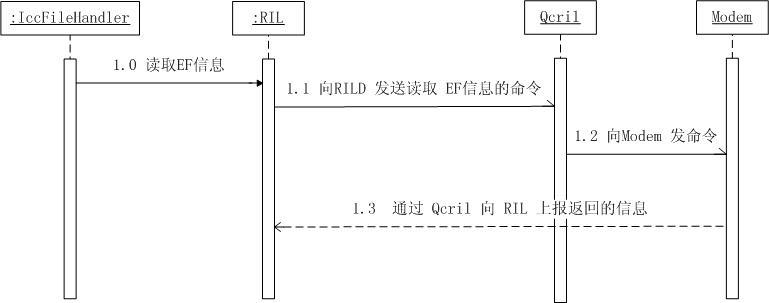
3.通知UiccController 的監聽者,與UiccCardApplication的相關信息可以更新了。根據分析源代碼,我們可以看到,PhoneBase ,ServiceStateTracker,IccCardProxy,DcTrackerBase,這些類是 UiccController 的監聽者。他們都會處理UiccController 的變化。我們可以這麼理解,這些類是SIM卡狀態發生變化後,第二批處理SIM卡狀態變化的實體。第一個處理SIM卡狀態變化的是 UiccController.
希望本文所述對大家Android程序設計有所幫助。
 Android實現閃屏及注冊和登錄界面之間的切換效果
在沒給大家介紹正文之前先給大家說下實現思路:先分別實現閃屏、注冊界面、登錄界面的活動,再用Intent將相關的活動連接起來,實現不同活動之間的跳轉。此次試驗代碼較多,我只
 MSM8909+Android5.1.1 SPI驅動開發(PSAM部分)
MSM8909+Android5.1.1SPI驅動開發(PSAM部分) 1. PSAM部分的硬件設計 圖1CS 片選信號SCK 時鐘信號MISO 主設
 Android ORMLite數據庫詳解
OrmLite是一個數據庫操作輔助的開源框架,底層還是Sqlite。O-R-M是Object relational mapping(對象關系映射)的縮寫,即業務實體對象與
 ART世界探險(17) - 中層中間代碼MIR
Dalvik字節碼的指令格式指令格式分類Dalvik指令,根據需要的寄存器數目的不同,長度也有所不同。如下面的結構所示,有下面的這些情況: enum Format {