編輯:關於Android編程
本文實例講述了Android通過應用程序創建快捷方式的方法。分享給大家供大家參考。具體如下:
Android 快捷方式是桌面最基本的組件。它用於直接啟動某一應用程序的某個組件。
一般情況下,可以在Launcher的應用程序列表上,通過長按某一個應用程序的圖標在左面上創建改該應用程序的快捷方式。另外,還可以通過兩種方式在桌面上添加快捷方式:
一:在應用程序中創建一個Intent,然後以Broadcast的形式通知Launcher創建一個快捷方式。
二:為應用程序的組件注冊某一個符合特定條件的IntentFilter,然後可以直接在Launcher的桌面添加啟動該組件的快捷方式。
下面模擬在應用程序中添加快捷方式
main.xml布局文件:
<?xml version="1.0" encoding="utf-8"?>
<LinearLayout xmlns:android="http://schemas.android.com/apk/res/android"
 android:orientation="vertical"
 android:layout_width="fill_parent"
 android:layout_height="fill_parent">
 <Button android:id="@+id/createShortcut"
  android:layout_width="fill_parent"
  android:layout_height="wrap_content"
  android:layout_gravity="center_horizontal"
  android:textSize="20px"
  android:text="創建快捷鍵"/>
 <Button android:id="@+id/exit"
  android:layout_width="fill_parent"
  android:layout_height="wrap_content"
  android:layout_gravity="center_horizontal"
  android:textSize="20px"
  android:text="退出"/>
</LinearLayout>
清單文件:
<?xml version="1.0" encoding="utf-8"?>
<manifest xmlns:android="http://schemas.android.com/apk/res/android"
 package="com.ljq.action" android:versionCode="1"
 android:versionName="1.0">
 <application android:icon="@drawable/icon"
  android:label="@string/app_name">
  <activity android:name=".ShortCutAction"
   android:label="@string/app_name">
   <intent-filter>
    <action android:name="android.intent.action.MAIN" />
    <category
     android:name="android.intent.category.LAUNCHER" />
   </intent-filter>
  </activity>
 </application>
 <uses-sdk android:minSdkVersion="7" />
 <!-- 添加快捷鍵權限 -->
 <uses-permission
  android:name="com.android.launcher.permission.INSTALL_SHORTCUT" />
</manifest>
ShortCutAction類:
package com.ljq.action;
import android.app.Activity;
import android.content.Intent;
import android.os.Bundle;
import android.os.Parcelable;
import android.view.View;
import android.view.View.OnClickListener;
import android.widget.Button;
/**
 * 通過應用程序創建快捷方式
 *
 * @author jiqinlin
 *
 */
public class ShortCutAction extends Activity implements OnClickListener{
 private Button createShortcut=null; //創建快捷鍵按鈕
 private Button exit=null;//退出系統
 @Override
 public void onCreate(Bundle savedInstanceState) {
  super.onCreate(savedInstanceState);
  setContentView(R.layout.main);
  createShortcut=(Button)findViewById(R.id.createShortcut);
  exit=(Button)findViewById(R.id.exit);
  createShortcut.setOnClickListener(this);
  exit.setOnClickListener(this);
 }
 public void onClick(View v) {
  //Button btn=(Button)v;
  switch (v.getId()) {
  case R.id.createShortcut:
   //String title=getResources().getString(R.string.title);
   Intent addIntent=new Intent("com.android.launcher.action.INSTALL_SHORTCUT");
   Parcelable icon=Intent.ShortcutIconResource.fromContext(this, R.drawable.png); //獲取快捷鍵的圖標
   Intent myIntent=new Intent(this, ShortCutAction.class);
   addIntent.putExtra(Intent.EXTRA_SHORTCUT_NAME, "快捷方式");//快捷方式的標題
   addIntent.putExtra(Intent.EXTRA_SHORTCUT_ICON_RESOURCE, icon);//快捷方式的圖標
   addIntent.putExtra(Intent.EXTRA_SHORTCUT_INTENT, myIntent);//快捷方式的動作
   sendBroadcast(addIntent);//發送廣播
   break;
  case R.id.exit:
   System.exit(0);
   break;
  }
 }
}
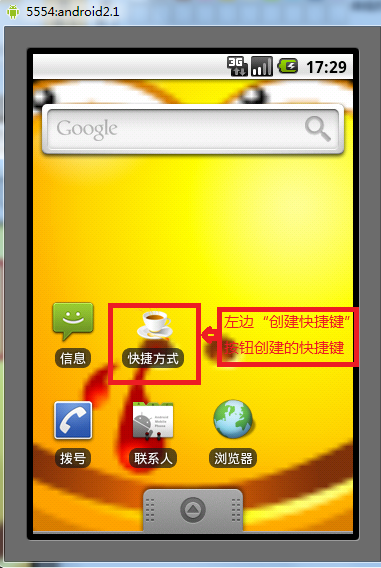
運行結果:
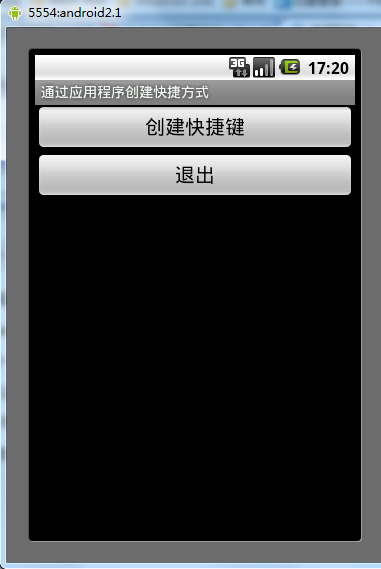
希望本文所述對大家的Android程序設計有所幫助。
 手機卡未實名會停機怎麼辦
手機卡未實名會停機、手機實名登記怎麼辦理呢?下文將為大家介紹針對即將於9月1日大規模推行的手機卡實名制認證,怎麼辦理呢?總的來說,辦理實名制可分為線下和線上
 Android登陸界面實現清除輸入框內容和震動效果
本文為大家分享Android登陸界面實現清除輸入框內容和震動效果的全部代碼,具體內容如下:效果圖:主要代碼如下自定義的一個EditText,用於實現有文字的時候顯示可以清
 Android自定義View仿QQ等級天數進度
最近一直都在看自定義View這一塊。差不多一個星期了吧。這個星期堅持每天更新博客,感覺自己的技術也有點突破,對自定義View的計算也有了更深的認識。今天看到手機一個成長天
 微信朋友圈怎麼發文字
現在,玩微信的朋友有很多,我們用微信不僅可以和朋友家人聊天聯絡,還可以隨時隨地發朋友圈,那麼微信朋友圈怎麼發文字,下面下載吧小編教你一個簡單的方法來用微信朋
 我的Android進階之旅------)Android Activity的singleTask加載模式和onActivityResult方法之間的沖突
今天調試一個bug的時候,情景如下:一個Activity A,需要用st