編輯:關於Android編程
最近學習Android應用開發,不知道寫一個什麼樣的程序來練練手,正好最近股票很火,就一個App來實時獲取股票數據,取名為Mystock。使用開發工具Android Studio,需要從Android官網下載,下載地址:http://developer.android.com/sdk/index.html。不幸的是Android是Google公司的,任何和Google公司相關的在國內都無法直接訪問,只能通過VPN訪問。
下圖為Android Studio打開一個工程的截圖:
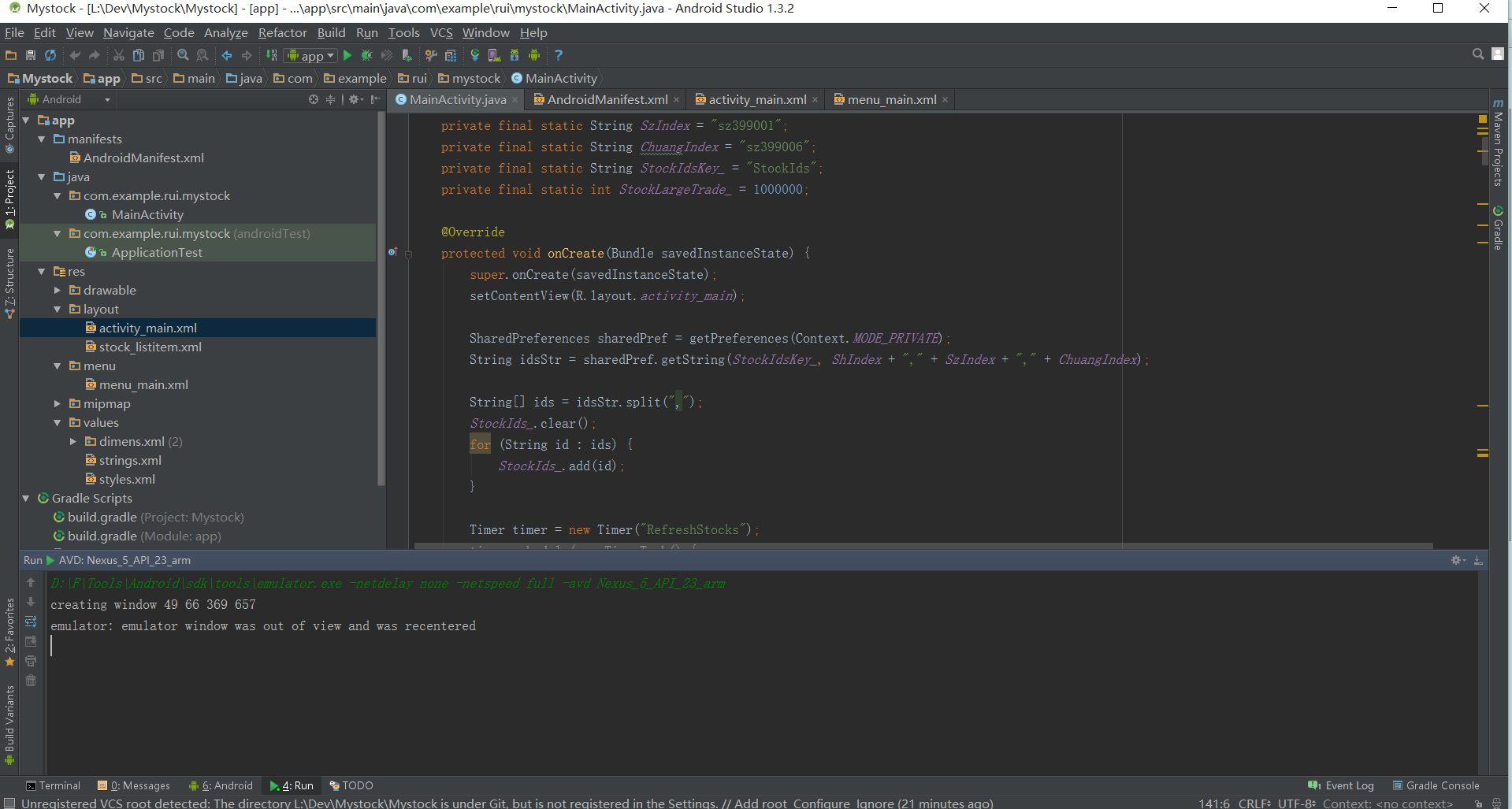
下面按步介紹Mystock的實現步驟。
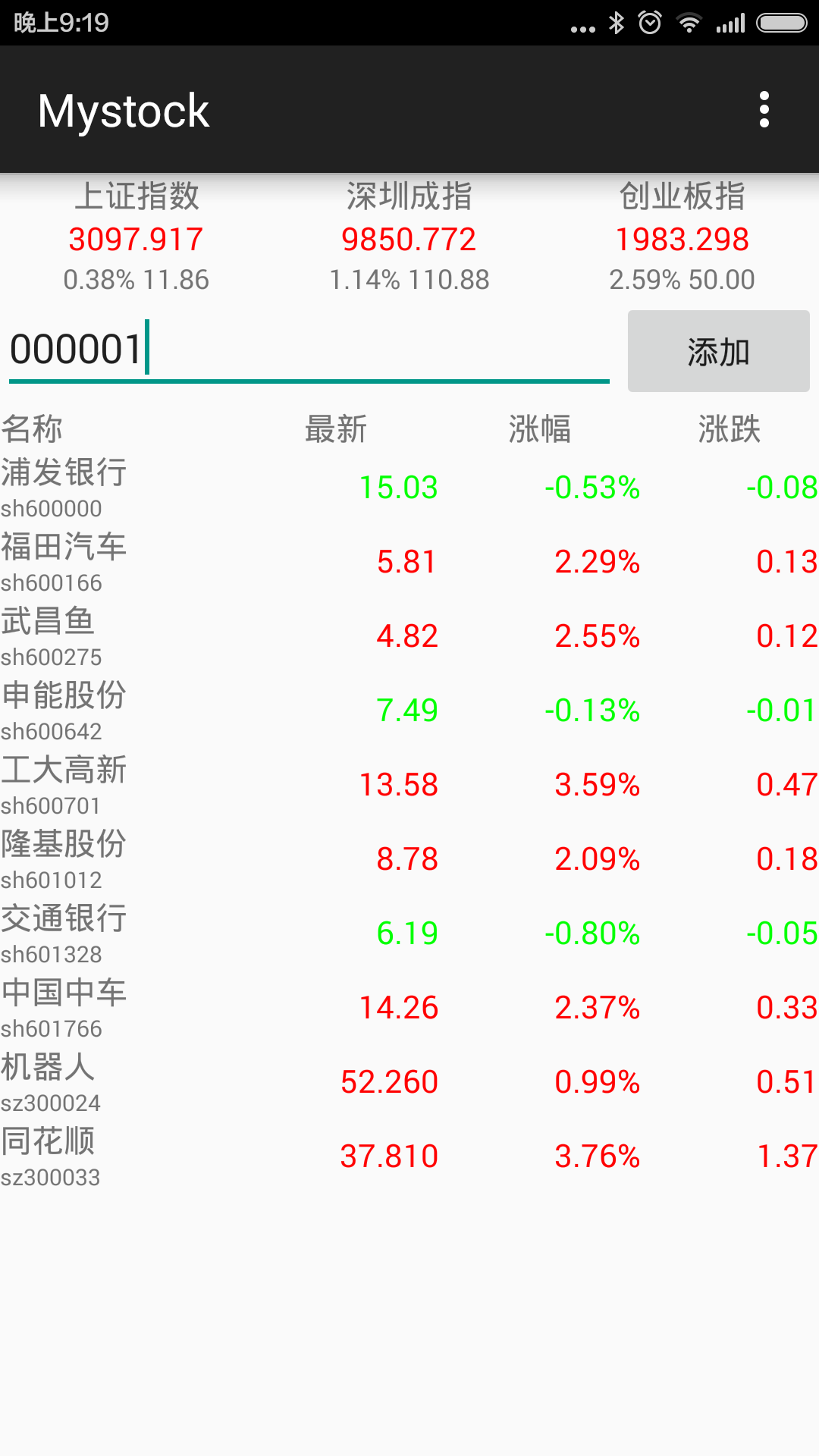
1.以下是activa_main.xml的內容。上面一排是三個TextView,分別用來顯示上證指數,深圳成指,創業板指。中間一排是一個EditText和一個Button,用來添加股票。下面是一個Table,用來顯示添加的股票列表。
<LinearLayout xmlns:android="http://schemas.android.com/apk/res/android"
  xmlns:tools="http://schemas.android.com/tools" android:layout_width="match_parent"
  android:layout_height="match_parent" android:orientation="vertical" tools:context=".MainActivity">
  <LinearLayout
    android:layout_width="match_parent"
    android:layout_height="wrap_content"
    android:orientation="horizontal">
    <LinearLayout
      android:layout_width="0dp"
      android:layout_weight="0.33"
      android:layout_height="wrap_content"
      android:orientation="vertical"
      android:gravity="center" >
      <TextView
        android:layout_width="wrap_content"
        android:layout_height="wrap_content"
        android:text="@string/stock_sh_name"/>
      <TextView
        android:layout_width="wrap_content"
        android:layout_height="wrap_content"
        android:id="@+id/stock_sh_index"/>
      <TextView
        android:layout_width="wrap_content"
        android:layout_height="wrap_content"
        android:textSize="12sp"
        android:id="@+id/stock_sh_change"/>
    </LinearLayout>
    <LinearLayout
      android:layout_width="0dp"
      android:layout_weight="0.33"
      android:layout_height="wrap_content"
      android:orientation="vertical"
      android:gravity="center" >
      <TextView
        android:layout_width="wrap_content"
        android:layout_height="wrap_content"
        android:text="@string/stock_sz_name"/>
      <TextView
        android:layout_width="wrap_content"
        android:layout_height="wrap_content"
        android:id="@+id/stock_sz_index"/>
      <TextView
        android:layout_width="wrap_content"
        android:layout_height="wrap_content"
        android:textSize="12sp"
        android:id="@+id/stock_sz_change"/>
    </LinearLayout>
    <LinearLayout
      android:layout_width="0dp"
      android:layout_weight="0.33"
      android:layout_height="wrap_content"
      android:orientation="vertical"
      android:gravity="center" >
      <TextView
        android:layout_width="wrap_content"
        android:layout_height="wrap_content"
        android:text="@string/stock_chuang_name"/>
      <TextView
        android:layout_width="wrap_content"
        android:layout_height="wrap_content"
        android:id="@+id/stock_chuang_index"/>
      <TextView
        android:layout_width="wrap_content"
        android:layout_height="wrap_content"
        android:textSize="12sp"
        android:id="@+id/stock_chuang_change"/>
    </LinearLayout>
  </LinearLayout>
  <LinearLayout
    android:orientation="horizontal"
    android:layout_width="match_parent"
    android:layout_height="wrap_content">
    <EditText
      android:layout_width="wrap_content"
      android:layout_height="wrap_content"
      android:inputType="number"
      android:maxLength="6"
      android:id="@+id/editText_stockId"
      android:layout_weight="1" />
    <Button
      android:layout_width="wrap_content"
      android:layout_height="wrap_content"
      android:text="@string/button_add_label"
      android:onClick="addStock" />
  </LinearLayout>
  <!--ListView
    android:layout_width="wrap_content"
    android:layout_height="wrap_content"
    android:id="@+id/listView" /-->
  <ScrollView
    android:layout_width="match_parent"
    android:layout_height="wrap_content">
    <TableLayout
      android:layout_width="match_parent"
      android:layout_height="wrap_content"
      android:id="@+id/stock_table"></TableLayout>
  </ScrollView>
</LinearLayout>
應用截圖如下:
2.數據獲取,這裡使用sina提供的接口來實時獲取股票數據,代碼如下:
public void querySinaStocks(String list){
    // Instantiate the RequestQueue.
    RequestQueue queue = Volley.newRequestQueue(this);
    String url ="http://hq.sinajs.cn/list=" + list;
    //http://hq.sinajs.cn/list=sh600000,sh600536
    // Request a string response from the provided URL.
    StringRequest stringRequest = new StringRequest(Request.Method.GET, url,
        new Response.Listener<String>() {
          @Override
          public void onResponse(String response) {
            updateStockListView(sinaResponseToStocks(response));
          }
        },
        new Response.ErrorListener() {
          @Override
          public void onErrorResponse(VolleyError error) {
          }
        });
    queue.add(stringRequest);
  }
這裡發送Http請求用到了Volley,需要在build.gradle裡面添加dependencies:compile 'com.mcxiaoke.volley:library:1.0.19'。
3.定時刷新股票數據,使用了Timer,每隔兩秒發送請求獲取數據,代碼如下:
  Timer timer = new Timer("RefreshStocks");
    timer.schedule(new TimerTask() {
      @Override
      public void run() {
        refreshStocks();
      }
    }, 0, 2000);

  private void refreshStocks(){
    String ids = "";
    for (String id : StockIds_){
      ids += id;
      ids += ",";
    }
    querySinaStocks(ids);
  }
4.在程序退出時存儲股票代碼,下次打開App時,可以顯示上次的股票列表。代碼如下。
 private void saveStocksToPreferences(){
    String ids = "";
    for (String id : StockIds_){
      ids += id;
      ids += ",";
    }
    SharedPreferences sharedPref = getPreferences(Context.MODE_PRIVATE);
    SharedPreferences.Editor editor = sharedPref.edit();
    editor.putString(StockIdsKey_, ids);
    editor.commit();
  }
  @Override
  public void onDestroy() {
    super.onDestroy(); // Always call the superclass
    saveStocksToPreferences();
  }
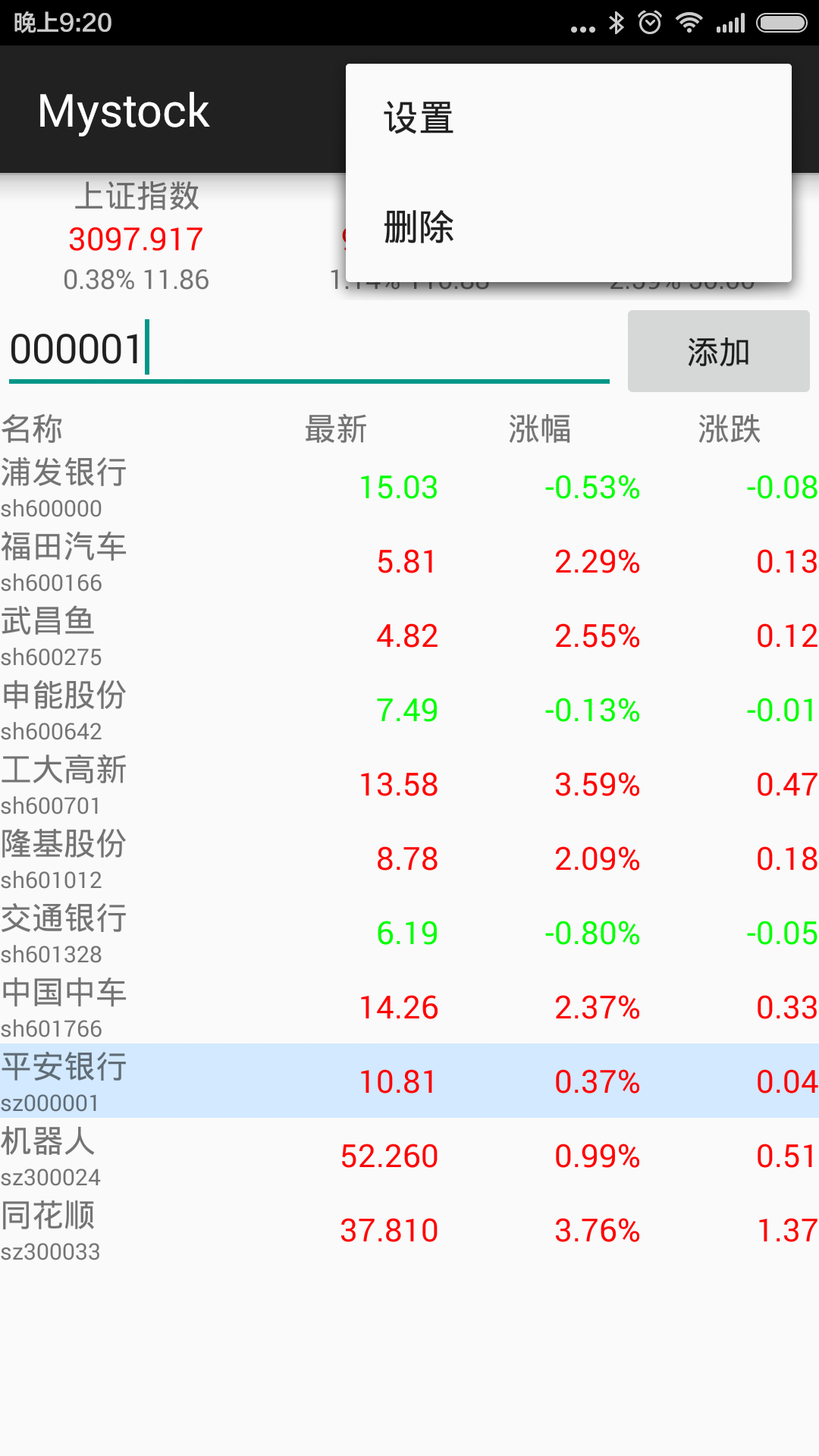
5.刪除選中的股票,在menu_main.xml裡面添加一個action。
<menu xmlns:android="http://schemas.android.com/apk/res/android"
  xmlns:app="http://schemas.android.com/apk/res-auto"
  xmlns:tools="http://schemas.android.com/tools" tools:context=".MainActivity">
  <item android:id="@+id/action_settings" android:title="@string/action_settings"
    android:orderInCategory="100" app:showAsAction="never" />
  <item android:id="@+id/action_delete" android:title="@string/action_delete"
    android:orderInCategory="100" app:showAsAction="never" />
</menu>
代碼響應事件並刪除:
 @Override
  public boolean onOptionsItemSelected(MenuItem item) {
    // Handle action bar item clicks here. The action bar will
    // automatically handle clicks on the Home/Up button, so long
    // as you specify a parent activity in AndroidManifest.xml.
    int id = item.getItemId();
    //noinspection SimplifiableIfStatement
    if (id == R.id.action_settings) {
      return true;
    }
    else if(id == R.id.action_delete){
      if(SelectedStockItems_.isEmpty())
        return true;
      for (String selectedId : SelectedStockItems_){
        StockIds_.remove(selectedId);
        TableLayout table = (TableLayout)findViewById(R.id.stock_table);
        int count = table.getChildCount();
        for (int i = 1; i < count; i++){
          TableRow row = (TableRow)table.getChildAt(i);
          LinearLayout nameId = (LinearLayout)row.getChildAt(0);
          TextView idText = (TextView)nameId.getChildAt(1);
          if(idText != null && idText.getText().toString() == selectedId){
            table.removeView(row);
            break;
          }
        }
      }
      SelectedStockItems_.clear();
    }
    return super.onOptionsItemSelected(item);
  }
屏幕截圖:
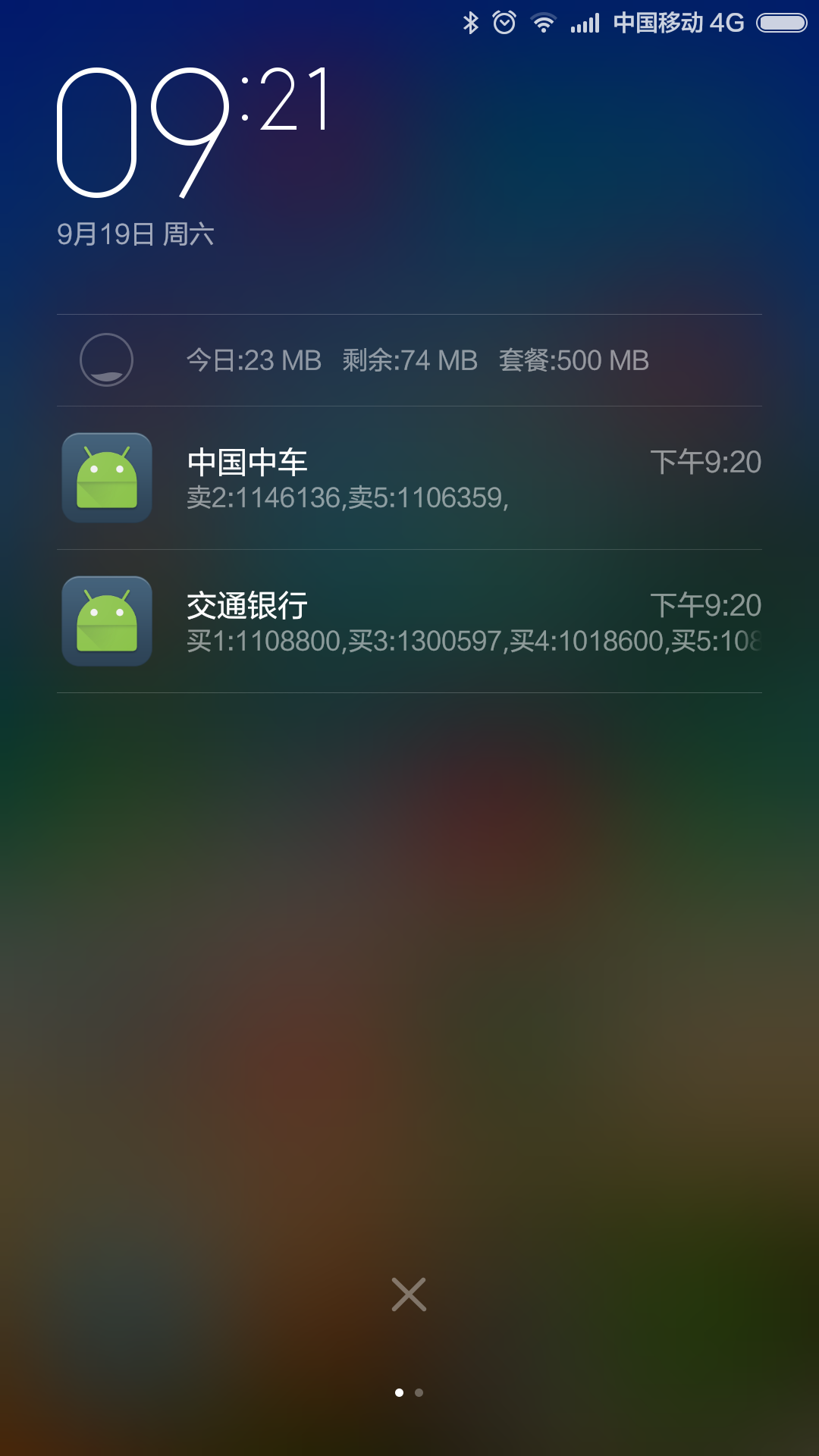
6.當有大額委托掛單時,發送消息提醒,代碼如下:
{
...
      String text = "";
      String sBuy = getResources().getString(R.string.stock_buy);
      String sSell = getResources().getString(R.string.stock_sell);
      if(Double.parseDouble(stock.b1_ )>= StockLargeTrade_) {
        text += sBuy + "1:" + stock.b1_ + ",";
      }
      if(Double.parseDouble(stock.b2_ )>= StockLargeTrade_) {
        text += sBuy + "2:" + stock.b2_ + ",";
      }
      if(Double.parseDouble(stock.b3_ )>= StockLargeTrade_) {
        text += sBuy + "3:" + stock.b3_ + ",";
      }
      if(Double.parseDouble(stock.b4_ )>= StockLargeTrade_) {
        text += sBuy + "4:" + stock.b4_ + ",";
      }
      if(Double.parseDouble(stock.b5_ )>= StockLargeTrade_) {
        text += sBuy + "5:" + stock.b5_ + ",";
      }
      if(Double.parseDouble(stock.s1_ )>= StockLargeTrade_) {
        text += sSell + "1:" + stock.s1_ + ",";
      }
      if(Double.parseDouble(stock.s2_ )>= StockLargeTrade_) {
        text += sSell + "2:" + stock.s2_ + ",";
      }
      if(Double.parseDouble(stock.s3_ )>= StockLargeTrade_) {
        text += sSell + "3:" + stock.s3_ + ",";
      }
      if(Double.parseDouble(stock.s4_ )>= StockLargeTrade_) {
        text += sSell + "4:" + stock.s4_ + ",";
      }
      if(Double.parseDouble(stock.s5_ )>= StockLargeTrade_) {
        text += sSell + "5:" + stock.s5_ + ",";
      }
      if(text.length() > 0)
        sendNotifation(Integer.parseInt(sid), stock.name_, text);
...
}

  public void sendNotifation(int id, String title, String text){
    NotificationCompat.Builder nBuilder =
        new NotificationCompat.Builder(this);
    nBuilder.setSmallIcon(R.drawable.ic_launcher);
    nBuilder.setContentTitle(title);
    nBuilder.setContentText(text);
    nBuilder.setVibrate(new long[]{100, 100, 100});
    nBuilder.setLights(Color.RED, 1000, 1000);
    NotificationManager notifyMgr = (NotificationManager) getSystemService(NOTIFICATION_SERVICE);
    notifyMgr.notify(id, nBuilder.build());
  }
屏幕截圖:
以上通過圖文並茂的方式給大家分享了一個實時獲取股票數據的android app應用程序源碼,希望大家喜歡。
 android 自定義toast width height 背景圖片
Android 自定義toast 寬高大小 背景圖片 RelativeLayout layout = (RelativeLayout) getLayoutInfl
 Android相冊效果(使用C#和Java分別實現)
運行效果C#實現using Android.App;using Android.OS;using Android.Widget;namespace ImageDemo{
 Android百度地圖poi范圍搜索
我想大家可能都有過這樣的經歷:兜裡揣著一張銀行卡,在街上到處找自動取款機(ATM)。在這個場景中,ATM就是的興趣點,我們想做的事情就是找到離自己較近的一些ATM然後取款
 Android下拉刷新控件SwipeRefreshLayout源碼解析
SwipeRefreshLayout是Android官方的下拉刷新控件,使用簡單,界面美觀,不熟悉的朋友可以隨便搜索了解一下,這裡就不廢話了,直接進入正題。 首