編輯:關於Android編程
在模仿 IOS 密碼輸入頁面的時候發現其背景有模糊處理,於是了解了一下並記錄下來,以便使用.在Android 中具體實現方法如下
查考 http://www.jb51.net/article/64781.htm
private void applyBlur() {

  // 獲取壁紙管理器
  WallpaperManager wallpaperManager = WallpaperManager.getInstance(this.getContext());
  // 獲取當前壁紙
  Drawable wallpaperDrawable = wallpaperManager.getDrawable();
  // 將Drawable,轉成Bitmap
  Bitmap bmp = ((BitmapDrawable) wallpaperDrawable).getBitmap();

  blur(bmp);
}
下面之所以要進行small 和big的處理,是因為僅僅靠ScriptIntrinsicBlur 來處理模式,不能到達更模式的效果,如果需要加深模式效果就需要先把背景圖片縮小,在處理完之後再放大.這個可以使用Matrix 來實現,而且這樣可以縮短模糊化得時間
@TargetApi(Build.VERSION_CODES.JELLY_BEAN_MR1)
private void blur(Bitmap bkg) {
  long startMs = System.currentTimeMillis();
  float radius = 20;

  bkg = small(bkg);
  Bitmap bitmap = bkg.copy(bkg.getConfig(), true);

  final RenderScript rs = RenderScript.create(this.getContext());
  final Allocation input = Allocation.createFromBitmap(rs, bkg, Allocation.MipmapControl.MIPMAP_NONE,
      Allocation.USAGE_SCRIPT);
  final Allocation output = Allocation.createTyped(rs, input.getType());
  final ScriptIntrinsicBlur script = ScriptIntrinsicBlur.create(rs, Element.U8_4(rs));
  script.setRadius(radius);
  script.setInput(input);
  script.forEach(output);
  output.copyTo(bitmap);

  bitmap = big(bitmap);
  setBackground(new BitmapDrawable(getResources(), bitmap));
  rs.destroy();
  Log.d("zhangle","blur take away:" + (System.currentTimeMillis() - startMs )+ "ms");
}

private static Bitmap big(Bitmap bitmap) {
   Matrix matrix = new Matrix();
   matrix.postScale(4f,4f); //長和寬放大縮小的比例
   Bitmap resizeBmp = Bitmap.createBitmap(bitmap,0,0,bitmap.getWidth(),bitmap.getHeight(),matrix,true);
   return resizeBmp;
 }

 private static Bitmap small(Bitmap bitmap) {
   Matrix matrix = new Matrix();
   matrix.postScale(0.25f,0.25f); //長和寬放大縮小的比例
   Bitmap resizeBmp = Bitmap.createBitmap(bitmap,0,0,bitmap.getWidth(),bitmap.getHeight(),matrix,true);
   return resizeBmp;
}
 試水高德LBS開放平台-HelloWord(文末小彩蛋)
這次我們試水高德LBS開放平台,那麼,什麼是LBS?基於位置的服務,它是通過電信移動運營商的無線電通訊網絡(如GSM網、CDMA網)或外部定位方式(如GPS)獲取移動終端
 Android實現評論欄隨Recyclerview滑動左右移動
最近在玩一個叫“約會吧”的應用,也是在看直播app,默認下載安裝的,安裝點進去看這個應用做的不錯,就留下來了。然後看他們動態詳情頁底部有一個效果:Recyclerview
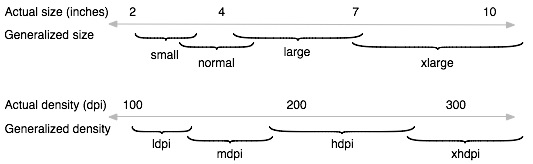 Android分辨率適配
Android的分辨率適配問題一直是Android所讓人诟病的主要問題,這裡參考了官方的開發文檔和實際開發中的一些處理分辨率的技巧來和大家交流一下。官方的關於分辨率適配的
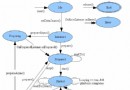 Android多媒體播放之音樂播放狀態和步驟
多媒體播放的狀態圖: public class MainActivity extends Activity implements OnClickListener {