編輯:關於Android編程
本文實例介紹了安卓Android實現字幕滾動效果的方法。主要是一個現成的Java類文件實現的,該程序由Android達人Tony編寫,本次是轉發,還望原作者Tony不要介意。這個Android字幕滾動類的自定義功能比較多,可定義當前滾動到結尾時的停頓時間,單位:毫秒,還可設置當前的滾動速度,值越小,速度越快。
主要實現代碼如下:
package com.tony.autoscroll;
import android.content.Context;
import android.os.Handler;
import android.util.AttributeSet;
import android.util.Log;
import android.view.MotionEvent;
import android.widget.ScrollView;
/**
 * @author Tony
 */
public class AutoScrollView extends ScrollView {
 private final Handler handler   = new Handler();
 private long     duration   = 50;
 private boolean    isScrolled  = false;
 private int      currentIndex = 0;
 private long     period    = 1000;
 private int      currentY   = -1;
 private double   x;
 private double   y;
 private int type = -1;
 /**
 * @param context
 */
 public AutoScrollView(Context context) {
 this(context, null);
 }
 /**
 * @param context
 * @param attrs
 */
 public AutoScrollView(Context context, AttributeSet attrs) {
 this(context, attrs, 0);
 }
 /**
 * @param context
 * @param attrs
 * @param defStyle
 */
 public AutoScrollView(Context context, AttributeSet attrs, int defStyle) {
 super(context, attrs, defStyle);
 }
 public boolean onTouchEvent(MotionEvent event) {
 int Action = event.getAction();
 switch (Action) {
  case MotionEvent.ACTION_DOWN:
  x=event.getX();
  y=event.getY();
  if (type == 0) {
   setScrolled(false);
        }
  break;
  case MotionEvent.ACTION_MOVE:
  double moveY = event.getY() - y;
  double moveX = event.getX() - x;
  Log.d("test", "moveY = " + moveY + " moveX = " + moveX );
  if ((moveY>20||moveY<-20) && (moveX < 50 || moveX > -50) && getParent() != null) {
   getParent().requestDisallowInterceptTouchEvent(true);
        }
  break;
  case MotionEvent.ACTION_UP:
  if (type == 0) {
   currentIndex = getScrollY();
   setScrolled(true);
        }
  break;
  default:
  break;
 }
    return super.onTouchEvent(event);
 }
  @Override
   public boolean onInterceptTouchEvent(MotionEvent p_event)
   {
  Log.d("test", "onInterceptTouchEvent");
     return true;
   }
 /**
 * 判斷當前是否為滾動狀態
 * @return the isScrolled
 */
 public boolean isScrolled() {
 return isScrolled;
 }
 /**
 * 開啟或者關閉自動滾動功能
 * @param isScrolled
 *      true為開啟,false為關閉
 */
 public void setScrolled(boolean isScrolled) {
 this.isScrolled = isScrolled;
 autoScroll();
 }
 /**
 * 獲取當前滾動到結尾時的停頓時間,單位:毫秒
 * @return the period
 */
 public long getPeriod() {
 return period;
 }
 /**
 * 設置當前滾動到結尾時的停頓時間,單位:毫秒
 * @param period
 *the period to set
 */
 public void setPeriod(long period) {
 this.period = period;
 }
 /**
 * 獲取當前的滾動速度,單位:毫秒,值越小,速度越快。
 * @return the speed
 */
 public long getSpeed() {
 return duration;
 }
 /**
 * 設置當前的滾動速度,單位:毫秒,值越小,速度越快。
 * @param speed
 *the duration to set
 */
 public void setSpeed(long speed) {
 this.duration = speed;
 }
 public void setType(int type){
 this.type = type;
 }
 private void autoScroll() {
 handler.postDelayed(new Runnable() {
  @Override
  public void run() {
  boolean flag = isScrolled;
  if (flag) {
   //Log.d("test", "currentY = " + currentY + " getScrollY() = "+ getScrollY() );
   if (currentY == getScrollY()) {
   try {
    Thread.sleep(period);
   } catch (InterruptedException e) {
    e.printStackTrace();
   }
   currentIndex = 0;
   scrollTo(0, 0);
   handler.postDelayed(this, period);
   } else {
   currentY = getScrollY();
   handler.postDelayed(this, duration);
   currentIndex++;
   scrollTo(0, currentIndex * 1);
   }
  } else {
  //currentIndex = 0;
  //scrollTo(0, 0);
  }
  }
 }, duration);
 }
}
 Android群英傳知識點回顧——第三章:Android控件架構與自定義控件詳解
知識點目錄 3.1 Android控件架構 3.2 View的測量 3.3 View的繪制 3.4 ViewGroup的測量 3.5 ViewGroup的繪制 3.6 自
 Android自定義控件實現底部菜單(下)
在app中經常會用到底部菜單的控件,每次都需要寫好多代碼,今天我們用到了前幾篇博客裡的控件來進一步封裝底部菜單。先看效果圖:主要包括以下功能: 1 設置icon以及點擊之
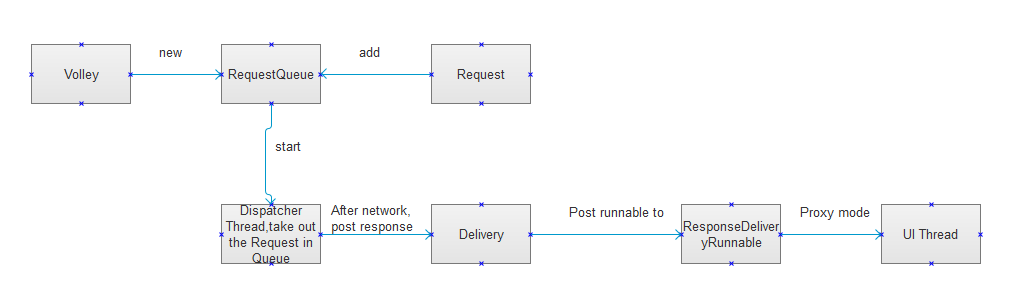 Volley 源碼分析
Volley基本使用 //聲明一個請求隊列,請求隊列最好全局唯一。 RequestQueue mQueue = Volley.newReque
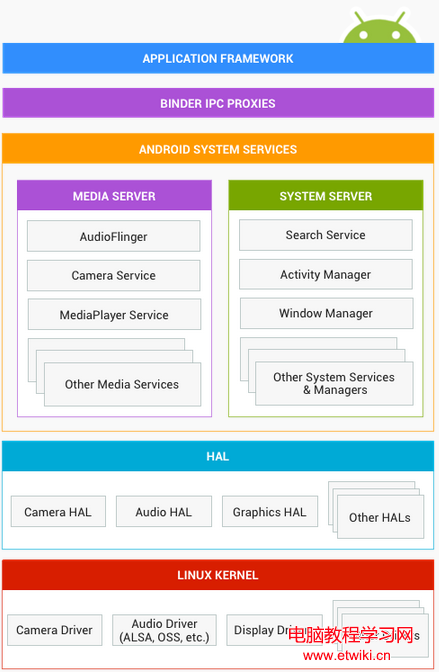 Android體系架構詳解
本文講述的Android系統體系架構,是指應用層之下的整個系統內部的架構層級關系。而並非常說的4層架構:應用層,framework,運行庫與環境,Linux