編輯:關於Android編程
在activity中添加:
2. 初始化時代碼:
Intent nfcIntent = new Intent(this, getClass());
nfcIntent.addFlags(Intent.FLAG_ACTIVITY_SINGLE_TOP);
mPendingIntent =
        PendingIntent.getActivity(this, 0,nfcIntent , 0);


mAdapter = NfcAdapter.getDefaultAdapter(this);
if (mAdapter == null) {
    Toast.makeText(getApplicationContext(), "NFC feature is supported on this device.", Toast.LENGTH_SHORT).show();
    return;
}
需要Override的函數:
 private NfcAdapter mAdapter;
    private PendingIntent mPendingIntent;
    @TargetApi(Build.VERSION_CODES.GINGERBREAD_MR1)
    protected void onResume() {
        super.onResume();
        mAdapter.enableForegroundDispatch(this, mPendingIntent, null, null);
    }


    @Override
    protected void onNewIntent(Intent intent){
        getTagInfo(intent);
    }
    @TargetApi(Build.VERSION_CODES.GINGERBREAD_MR1)
    private void getTagInfo(Intent intent) {
        Tag tag = intent.getParcelableExtra(NfcAdapter.EXTRA_TAG);
        byte[] tagId = tag.getId();
        String str = ByteArrayToHexString(tagId);
        str = flipHexStr(str);
        Long cardNo = Long.parseLong(str, 16);


        String ignoreOperationId = m_operationid;
        if(m_isOnline){
            // if select all , pass in the operation id encoded in ticket
            // there should NOT be many operations, take the only one

            new CardValidationAsyncTask().execute(cardNo.toString());
        }
    }


    @TargetApi(Build.VERSION_CODES.GINGERBREAD_MR1)
    @Override
    protected void onPause() {
        super.onPause();
        if (mAdapter != null) {
            mAdapter.disableForegroundDispatch(this);
        }
    }
以下為helper函數:
 private String flipHexStr(String s){
        StringBuilder  result = new StringBuilder();
        for (int i = 0; i <=s.length()-2; i=i+2) {
            result.append(new StringBuilder(s.substring(i,i+2)).reverse());
        }
        return result.reverse().toString();
    }


    private String ByteArrayToHexString(byte[] inarray) {
        int i, j, in;
        String[] hex = { "0", "1", "2", "3", "4", "5", "6", "7", "8", "9", "A",
                "B", "C", "D", "E", "F" };
        String out = "";


        for (j = 0; j < inarray.length; ++j) {
            in = (int) inarray[j] & 0xff;
            i = (in >> 4) & 0x0f;
            out += hex[i];
            i = in & 0x0f;
            out += hex[i];
        }
        return out;
    }
 HorizontalScrollView仿QQ側滑刪除
效果:需求:不論什麼領域,在模仿一個東西的時候,我們首先要對它進行需求提取,這樣才能保證做到”惟妙惟肖”。通過對QQ側滑功能的分析,提取出了以下需
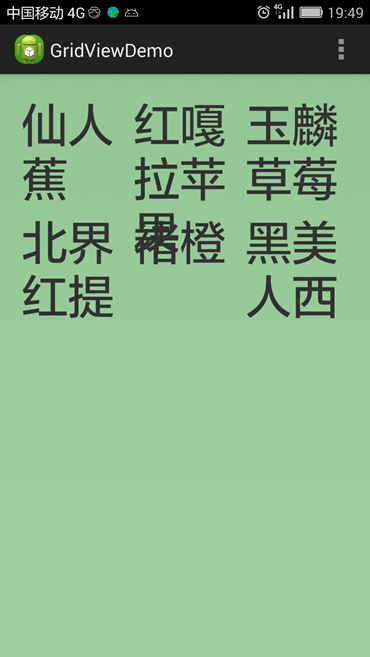 解決GridView內容顯示不全問題
我用GridView來顯示一些字符串,而字符串的長度是不固定的,然後就遇到問題了:有時字符重疊,有時顯示不全,有時兩種問題同時出現。見下圖: 圖一 GridView顯示重
 Android實現評論欄隨Recyclerview滑動左右移動
最近在玩一個叫“約會吧”的應用,也是在看直播app,默認下載安裝的,安裝點進去看這個應用做的不錯,就留下來了。然後看他們動態詳情頁底部有一個效果:Recyclerview
 android6.0 Activity(三) Activity與WMS通信過程
Activity在窗口和ViewRootImpl創建後會請求WMS創建一個連接,請求WMS為其創建一個WindowState對象用來描述窗口狀態。Activity與WMS