編輯:關於Android編程
這種方法主要用於實現一些不規則的效果.一般需要重寫onDraw方法.
自定義View注意點 :
1. 需要自己支持 wrap_content 屬性.
2. 需要自己支持 padding 屬性.
3. 添加自定義屬性 .
處理wrap_content代碼
    // 默認尺寸.
    private int mWidht = 200;
    private int mHeight = 200;
    @Override
    protected void onMeasure(int widthMeasureSpec, int heightMeasureSpec) {
        // 默認設置View尺寸但是wrap_content會失效
        super.onMeasure(widthMeasureSpec, heightMeasureSpec);
        // 獲取尺寸.
        int widthSpecMode = MeasureSpec.getMode(widthMeasureSpec);
        int heightSpecMode = MeasureSpec.getMode(heightMeasureSpec);
        int widthSpecSize = MeasureSpec.getSize(widthMeasureSpec);
        int heightSpecSize = MeasureSpec.getSize(heightMeasureSpec);
        // 對於使用wrap_content 使用默認尺寸.
        if (widthSpecMode == MeasureSpec.AT_MOST && heightSpecMode == MeasureSpec.AT_MOST){
            setMeasuredDimension(mWidht,mHeight);
        }else if (widthSpecMode == MeasureSpec.AT_MOST){
            setMeasuredDimension(mWidht,heightSpecSize);
        }else if (heightSpecSize == MeasureSpec.AT_MOST){
            setMeasuredDimension(widthSpecSize,mHeight);
        }
    }
處理代碼 :
    @Override
    protected void onDraw(Canvas canvas) {
        super.onDraw(canvas);
        // 處理padding.
        final int paddingLeft = getPaddingLeft();
        final int paddingRight = getPaddingRight();
        final int paddingTop = getPaddingTop();
        final int paddingBottom = getPaddingBottom();
        // 可用尺寸需要在總尺寸中減去padding值
        int w = getWidth() - paddingLeft - paddingRight;
        int h = getHeight() - paddingTop - paddingBottom;
        int radius = Math.min(w,h)/2;
        canvas.drawCircle(getWidth() / 2, getHeight() / 2,radius,mPaint);
    }
   public CircleView(Context context, AttributeSet attrs, int defStyleAttr) {
        super(context, attrs, defStyleAttr);
        // 解析自定義屬性值.
        TypedArray a = context.obtainStyledAttributes(attrs,R.styleable.CircleView);
        mColor = a.getColor(R.styleable.CircleView_circle_color,Color.RED);
        a.recycle();

        init();
    }
使用自定義文件注意點 :
需要在布局文件中添加 schemeas 聲明 :
xmlns:app=”http://schemas.android.com/apk/res-auto”在這個聲明中app是自定義屬性前綴,自定義屬性前綴必須和這裡的一樣.
import android.content.Context;
import android.content.res.TypedArray;
import android.graphics.Canvas;
import android.graphics.Color;
import android.graphics.Paint;
import android.util.AttributeSet;
import android.view.View;

/**
 * 自定義View 繪制圓形.
 * Created by WSJ on 2016/12/15.
 */

public class CircleView extends View {

    private int mColor = Color.RED;
    private Paint mPaint = new Paint(Paint.ANTI_ALIAS_FLAG);


    public CircleView(Context context) {
        this(context,null);
    }

    public CircleView(Context context, AttributeSet attrs) {
        this(context, attrs,0);
    }

    public CircleView(Context context, AttributeSet attrs, int defStyleAttr) {
        super(context, attrs, defStyleAttr);
        // 解析自定義屬性值.
        TypedArray a = context.obtainStyledAttributes(attrs,R.styleable.CircleView);
        mColor = a.getColor(R.styleable.CircleView_circle_color,Color.RED);
        a.recycle();
        init();
    }

    private void init() {
        mPaint.setColor(mColor);
    }

    /**
     * 在這個方法中處理padding失效問題.
     */
    @Override
    protected void onDraw(Canvas canvas) {
        super.onDraw(canvas);
        // 處理padding.
        final int paddingLeft = getPaddingLeft();
        final int paddingRight = getPaddingRight();
        final int paddingTop = getPaddingTop();
        final int paddingBottom = getPaddingBottom();
        int w = getWidth() - paddingLeft - paddingRight;
        int h = getHeight() - paddingTop - paddingBottom;
        int radius = Math.min(w,h)/2;
        canvas.drawCircle(getWidth() / 2, getHeight() / 2,radius,mPaint);
    }
    // 默認尺寸.
    private int mWidht = 200;
    private int mHeight = 200;

    /**
     * 在這個方法中處理wrap_content失效問題.
     */
    @Override
    protected void onMeasure(int widthMeasureSpec, int heightMeasureSpec) {
        super.onMeasure(widthMeasureSpec, heightMeasureSpec);
        // 處理Wrap_content 方式.
        int widthSpecMode = MeasureSpec.getMode(widthMeasureSpec);
        int heightSpecMode = MeasureSpec.getMode(heightMeasureSpec);
        int widthSpecSize = MeasureSpec.getSize(widthMeasureSpec);
        int heightSpecSize = MeasureSpec.getSize(heightMeasureSpec);

        if (widthSpecMode == MeasureSpec.AT_MOST && heightSpecMode == MeasureSpec.AT_MOST){
            setMeasuredDimension(mWidht,mHeight);
        }else if (widthSpecMode == MeasureSpec.AT_MOST){
            setMeasuredDimension(mWidht,heightSpecSize);
        }else if (heightSpecSize == MeasureSpec.AT_MOST){
            setMeasuredDimension(widthSpecSize,mHeight);
        }
    }
}
 Android Studio設置logcat顏色
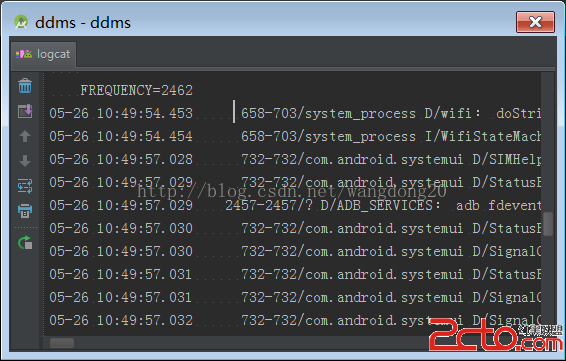
在Android Studio裡面默認的logcat顯示顏色是灰色的,不同等級的log是沒有顏色分別的,如圖這一點遠不如Eclipse好看,但是Android Studi
 Android設備間實現藍牙(Bluetooth)共享上網
Android設備之間可以除了通過wifi熱點共享上網,還可以通過藍牙共享上網,後面這個功能很少人使用,但適合某台設備沒有wifi卻有藍牙的情況。一、設置WT19i,系統
 Android下拉刷新與輪播圖滑動沖突解決方案
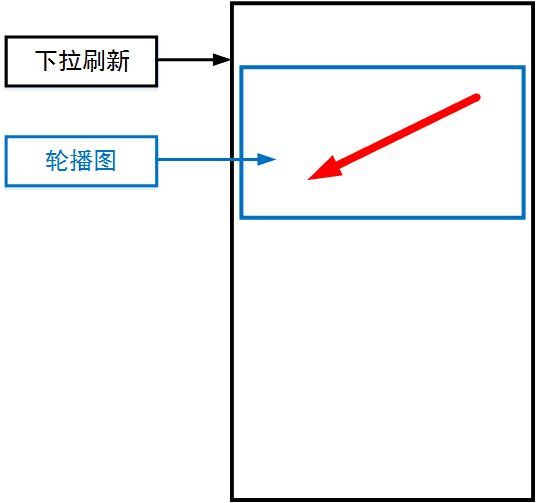
最近在開發中遇到了這樣一個問題,在下拉刷新組件中包含了一個輪播圖組件,當左右滑動的圖片時很容易觸發下拉刷新,如下圖所示:如圖中紅色箭頭所示方向切換輪播圖,很容易觸發下拉刷
 java/android 設計模式學習筆記(23)---解釋器模式
這篇博客我們來介紹一下解釋器模式(Interpreter Pattern),也是行為型設計模式之一,是一種用的比較少的設計模式,其提供了一種解釋語言的語法或表達式的方式,