編輯:關於Android編程
代碼:
Main:
package com.example.arjun02;

import android.content.Intent;
import android.graphics.Bitmap;
import android.graphics.BitmapFactory;
import android.media.ExifInterface;
import android.net.Uri;
import android.os.Environment;
import android.os.Message;
import android.provider.MediaStore;
import android.provider.SyncStateContract;
import android.support.v7.app.AppCompatActivity;
import android.os.Bundle;
import android.util.Log;
import android.view.View;
import android.widget.Button;
import android.widget.TextView;
import android.widget.Toast;

import com.amap.api.location.AMapLocation;
import com.amap.api.location.AMapLocationClient;
import com.amap.api.location.AMapLocationClientOption;
import com.amap.api.location.AMapLocationListener;
import com.amap.api.maps2d.AMap;
import com.amap.api.maps2d.MapView;
import com.amap.api.maps2d.model.BitmapDescriptor;
import com.amap.api.maps2d.model.BitmapDescriptorFactory;
import com.amap.api.maps2d.model.LatLng;
import com.amap.api.maps2d.model.Marker;
import com.amap.api.maps2d.model.MarkerOptions;

import java.io.File;
import java.io.IOException;
import java.text.SimpleDateFormat;
import java.util.Date;
import java.util.logging.Handler;

import static com.example.arjun02.R.id.mapView;
import static com.example.arjun02.R.id.textView;

public class MainActivity extends AppCompatActivity {

    private static final String TAG = "Arjun";
    private static final int MEDIA_TYPE_IMAGE = 0x001;
    private static final int CAPTURE_IMAGE_REQUEST_CODE = 0x100;
    private Button button;
    private static String path;
    private TextView txt;
    private float lat, lng;
    private MapView mMapView = null;
    private AMap aMap;
    private MarkerOptions markerOption;
    private Button btnLocation;
    //聲明mLocationOption對象
    public AMapLocationClientOption mLocationOption = null;
    private AMapLocationClient mlocationClient;


    @Override
    protected void onCreate(Bundle savedInstanceState) {
        super.onCreate(savedInstanceState);
        setContentView(R.layout.activity_main);

        initView(savedInstanceState);
        initLocation();
    }


    private void initView(Bundle savedInstanceState) {
        button = (Button) findViewById(R.id.button);
        btnLocation = (Button) findViewById(R.id.btn_location);
        txt = (TextView) findViewById(R.id.textView);

        //獲取地圖控件引用
        mMapView = (MapView) findViewById(R.id.mapView);
        //在activity執行onCreate時執行mMapView.onCreate(savedInstanceState),實現地圖生命周期管理
        mMapView.onCreate(savedInstanceState);

        button.setOnClickListener(new View.OnClickListener() {
            @Override
            public void onClick(View v) {
                takePic();
            }
        });

        btnLocation.setOnClickListener(new View.OnClickListener() {
            @Override
            public void onClick(View v) {
                takeGPS();
            }
        });
    }

    /**
     * 定位
     */
    private void takeGPS() {
        ////啟動定位
        mlocationClient.startLocation();
    }

    android.os.Handler handler = new android.os.Handler() {
        @Override
        public void handleMessage(Message msg) {
            super.handleMessage(msg);
            String info = String.valueOf(msg.obj);
            txt.setText(info);
        }
    };

    private void initLocation() {
        mlocationClient = new AMapLocationClient(this);
        ////初始化定位參數
        mLocationOption = new AMapLocationClientOption();

////設置定位監聽
        mlocationClient.setLocationListener(new AMapLocationListener() {
            @Override
            public void onLocationChanged(AMapLocation amapLocation) {
                StringBuilder stringBuilder = new StringBuilder();
                if (amapLocation != null) {
                    if (amapLocation.getErrorCode() == 0) {
                        //定位成功回調信息,設置相關消息

                        stringBuilder.append("\n類型:" + amapLocation.getLocationType());//獲取當前定位結果來源,如網絡定位結果,詳見定位類型表
                        stringBuilder.append("\n緯度:" + amapLocation.getLatitude());//獲取緯度
                        stringBuilder.append("\n經度:" + amapLocation.getLongitude());//獲取經度
                        stringBuilder.append("\n精度:" + amapLocation.getAccuracy());//獲取精度信息
                        stringBuilder.append("\n地址:" + amapLocation.getAddress());//獲取地址信息
                        SimpleDateFormat df = new SimpleDateFormat("yyyy-MM-dd HH:mm:ss");
                        Date date = new Date(amapLocation.getTime());
                        stringBuilder.append("\n" + "時間:").append(df.format(date));//定位時間

                        if (aMap == null) {
                            aMap = mMapView.getMap();
                        }
                        aMap.clear();
                        LatLng latLng = new LatLng(amapLocation.getLatitude(), amapLocation.getLongitude());
                        final Marker marker = aMap.addMarker(new MarkerOptions().
                                position(latLng).
                                title("詳細地址:").
                                snippet(amapLocation.getAddress()));

                    } else {
                        //顯示錯誤信息ErrCode是錯誤碼,errInfo是錯誤信息,詳見錯誤碼表。
                        Log.e("AmapError", "location Error, ErrCode:"
                                + amapLocation.getErrorCode() + ", errInfo:"
                                + amapLocation.getErrorInfo());
                        stringBuilder.append("定位錯誤:" + amapLocation.getErrorInfo());
                    }


                } else {
                    stringBuilder.append("定位失敗");
                }
                Message msg = Message.obtain();
                msg.obj = stringBuilder.toString();
                handler.sendMessage(msg);
            }
        });

        ////設置定位模式為高精度模式,Battery_Saving為低功耗模式,Device_Sensors是僅設備模式
        mLocationOption.setLocationMode(AMapLocationClientOption.AMapLocationMode.Hight_Accuracy);

////設置定位間隔,單位毫秒,默認為2000ms
//        mLocationOption.setInterval(2000);
        ////設置定位參數
        mlocationClient.setLocationOption(mLocationOption);
//        /設置是否返回地址信息(默認返回地址信息)
        mLocationOption.setNeedAddress(true);
    }

    /*
    拍照
     */
    private void takePic() {
        Intent intent = new Intent(MediaStore.ACTION_IMAGE_CAPTURE);
        Uri uri = Uri.fromFile(getOutputMediaFile(MEDIA_TYPE_IMAGE));
        intent.putExtra(MediaStore.EXTRA_OUTPUT, uri);
        startActivityForResult(intent, CAPTURE_IMAGE_REQUEST_CODE);

    }

    private static File getOutputMediaFile(int type) {
        File mediaStorageDir = new File(Environment.getExternalStoragePublicDirectory(
                Environment.DIRECTORY_PICTURES), "arjun_app");

        if (!mediaStorageDir.exists()) {
            if (!mediaStorageDir.mkdirs()) {
                Log.d(TAG, "目錄創建失敗");
                return null;
            }
        }
        String timeStamp = new SimpleDateFormat("yyyyMMdd_HHmmss").format(new Date());
        File mediaFile = null;
        if (type == MEDIA_TYPE_IMAGE) {
            mediaFile = new File(mediaStorageDir.getPath() + File.separator +
                    "IMG_" + timeStamp + ".jpg");
        }
        path = mediaFile.getPath();
        return mediaFile;
    }

    @Override
    protected void onActivityResult(int requestCode, int resultCode, Intent data) {
        super.onActivityResult(requestCode, resultCode, data);
        if (requestCode == CAPTURE_IMAGE_REQUEST_CODE) {
            if (resultCode == RESULT_OK) {
                Toast.makeText(this, path, Toast.LENGTH_LONG).show();
                setPicInfo();

            } else if (resultCode == RESULT_CANCELED) {
                Toast.makeText(this, "capture image canceled.",
                        Toast.LENGTH_LONG).show();
            } else {
                Toast.makeText(this, "Image capture failed.",
                        Toast.LENGTH_LONG).show();
            }
        }

    }

    private void setPicInfo() {
        try {
            ExifInterface exifInterface = new ExifInterface(path);

            String datetime = exifInterface.getAttribute(ExifInterface.TAG_DATETIME);// 拍攝時間
            String deviceName = exifInterface.getAttribute(ExifInterface.TAG_MAKE);// 設備品牌
            String deviceModel = exifInterface.getAttribute(ExifInterface.TAG_MODEL); // 設備型號
            String latValue = exifInterface.getAttribute(ExifInterface.TAG_GPS_LATITUDE);
            String lngValue = exifInterface.getAttribute(ExifInterface.TAG_GPS_LONGITUDE);
            String latRef = exifInterface.getAttribute(ExifInterface.TAG_GPS_LATITUDE_REF);
            String lngRef = exifInterface.getAttribute
                    (ExifInterface.TAG_GPS_LONGITUDE_REF);
            if (latValue != null && latRef != null && lngValue != null && lngRef != null) {
                try {
                    lat = convertRationalLatLonToFloat(latValue, latRef);
                    lng = convertRationalLatLonToFloat(lngValue, lngRef);
                    txt.setText("  " + lat + "\n" + lng);

                    LatLng latLng = new LatLng(lat, lng);
                    aMap = mMapView.getMap();
                    aMap.clear();
                    final Marker marker = aMap.addMarker(new MarkerOptions().
                            position(latLng).
                            title("北京").
                            snippet("自己的位置自己的位置自己的位置"));


//                    markerOption = new MarkerOptions();
//                    markerOption.position(latLng);
//                    markerOption.title("自己的位置").snippet("自己的位置自己的位置自己的位置自己的位置");
//
//                    markerOption.draggable(true);

//                    Bitmap bitmap = BitmapFactory.decodeResource(getResources(), R.mipmap.ic_launcher);
//                    BitmapFactory.Options options = new BitmapFactory.Options();
//                    options.inJustDecodeBounds = true;
//                    Bitmap bitmap = BitmapFactory.decodeFile(path,options);
//                    int height = options.outHeight * 200 / options.outWidth;
//                    options.outWidth = 200;
//                    options.outHeight = 200;

                    BitmapDescriptor var1 = BitmapDescriptorFactory.fromBitmap(decodeFile(path, 100));
//                    markerOption.icon(var1);
//                    markerOption.icon( BitmapDescriptorFactory.fromBitmap());
                    // 將Marker設置為貼地顯示,可以雙指下拉看效果
//                    markerOption.setGps(true);
                    marker.setIcon(var1);


                } catch (IllegalArgumentException e) {
                    e.printStackTrace();
                }
            }

        } catch (IOException e) {
            e.printStackTrace();
        }


    }

    public static Bitmap decodeFile(String pathName, int reqWidth) {
        final BitmapFactory.Options options = new BitmapFactory.Options();
        options.inJustDecodeBounds = true;
        BitmapFactory.decodeFile(pathName, options);
// 源圖片的寬度
        final int width = options.outWidth;
        // 調用上面定義的方法計算inSampleSize值(inSampleSize值為圖片壓縮比例)
        options.inSampleSize = calculateInSampleSize(options, reqWidth);
        /**
         * 第二輪解析,負責具體壓縮
         */
        // 使用獲取到的inSampleSize值再次解析圖片
        options.inJustDecodeBounds = false;
        return BitmapFactory.decodeFile(pathName, options);
    }

    public static int calculateInSampleSize(BitmapFactory.Options options,
                                            int reqWidth) {
        // 源圖片的寬度
        final int width = options.outWidth;
        int inSampleSize = 1;
        if (width > reqWidth) {
            // 計算出實際寬度和目標寬度的比率
            final int widthRatio = Math.round((float) width / (float) reqWidth);
            inSampleSize = widthRatio;
        }
        return inSampleSize;
    }

    private static float convertRationalLatLonToFloat(
            String rationalString, String ref) {

        String[] parts = rationalString.split(",");

        String[] pair;
        pair = parts[0].split("/");
        double degrees = Double.parseDouble(pair[0].trim())
                / Double.parseDouble(pair[1].trim());

        pair = parts[1].split("/");
        double minutes = Double.parseDouble(pair[0].trim())
                / Double.parseDouble(pair[1].trim());

        pair = parts[2].split("/");
        double seconds = Double.parseDouble(pair[0].trim())
                / Double.parseDouble(pair[1].trim());

        double result = degrees + (minutes / 60.0) + (seconds / 3600.0);
        if ((ref.equals("S") || ref.equals("W"))) {
            return (float) -result;
        }
        return (float) result;
    }


    @Override
    protected void onDestroy() {
        super.onDestroy();
        //在activity執行onDestroy時執行mMapView.onDestroy(),實現地圖生命周期管理
        mMapView.onDestroy();
    }

    @Override
    protected void onResume() {
        super.onResume();
        //在activity執行onResume時執行mMapView.onResume (),實現地圖生命周期管理
        mMapView.onResume();
    }

    @Override
    protected void onPause() {
        super.onPause();
        //在activity執行onPause時執行mMapView.onPause (),實現地圖生命周期管理
        mMapView.onPause();
    }

    @Override
    protected void onSaveInstanceState(Bundle outState) {
        super.onSaveInstanceState(outState);
        //在activity執行onSaveInstanceState時執行mMapView.onSaveInstanceState (outState),實現地圖生命周期管理
        mMapView.onSaveInstanceState(outState);
    }
}
build.gradle
 compile files('libs/AMap_Location_V3.00_20160922.jar')
 compile files('libs/Amap_2DMap_V2.9.1_20160825.jar')
AndroidManifest.xml
 Android實現屏蔽微信拉黑和刪除聯系人功能示例
Android實現屏蔽微信拉黑和刪除聯系人功能,廢話不多說,具體如下:實現效果:讓微信永遠彈不出那個刪除的對話框不就相當於屏蔽掉該功能了嗎?哈哈效果如圖:實現原理:1.我
 android NinePatch圖片制做
NinePatch圖片以*.9.png結尾,和普通圖片的區別是四周多了一個邊框如上圖所示,左邊那條黑色線代表圖片垂直拉伸的區域,上邊的那條黑色線代表水平拉伸區域,右邊的黑
 Android React Native組件的生命周期
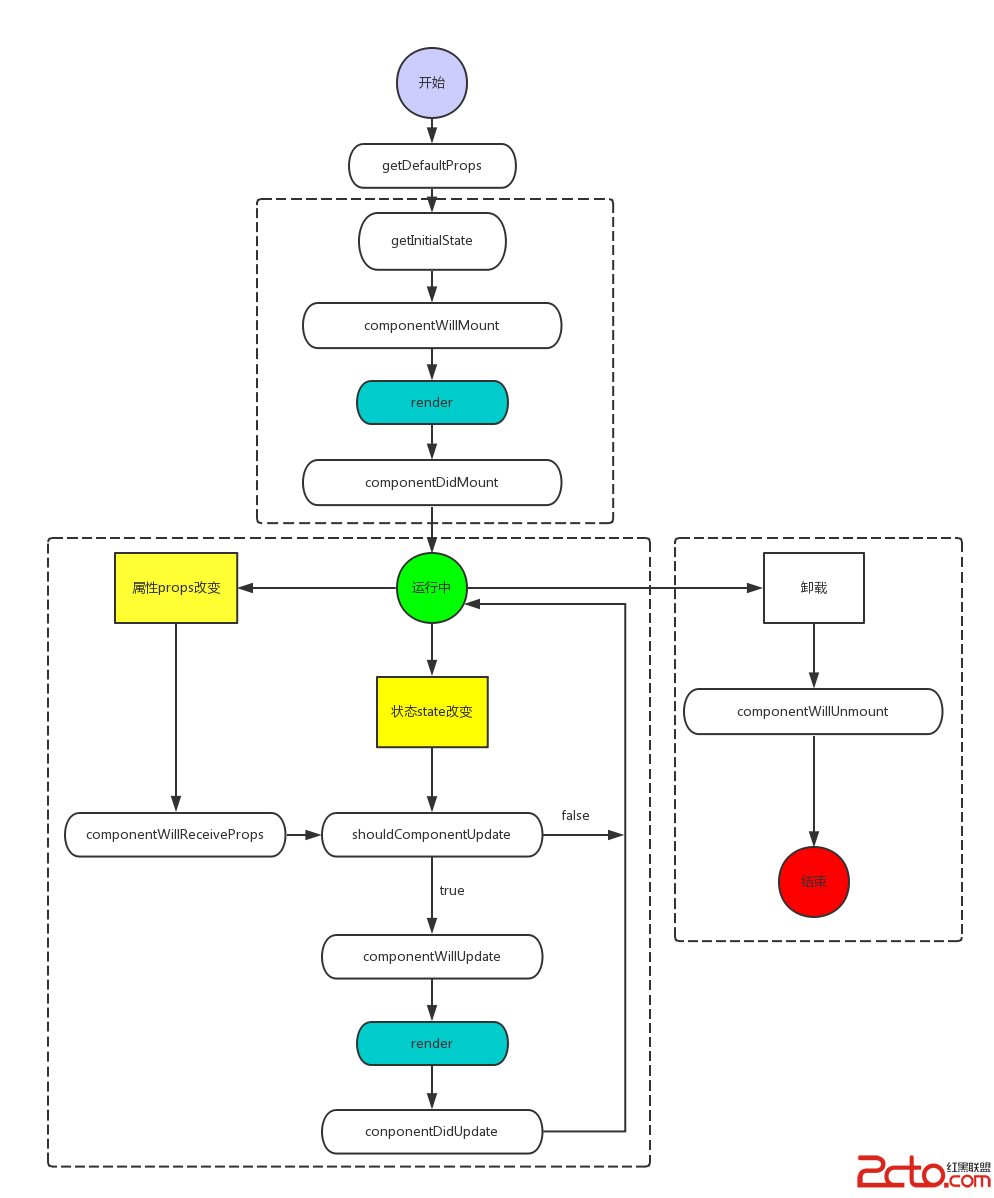
和Android一樣,React的組件也有對應的生命周期。Android React Native組件的生命周期可以總的概括為下面這一張圖。可以把組件生命周期大致分為三個
 Android版九連環NingRings
喜歡九連環以及想玩九連環的小伙伴們,送福利了,Android版本的九連環小游戲上線了!!!快來嘗鮮吧,如果覺得好玩,請幫忙轉發。游戲演示及下載地址http://onest