編輯:關於Android編程
以前的Android(4.1之前的版本)中,SDcard跟路徑通過“/sdcard”或者“/mnt/sdcard”來表示存儲卡,而在Jelly Bean系統中修改為了“/storage/sdcard0”,以後可能還會有多個SDcard的情況。
目前為了保持和之前代碼的兼容,sdcard路徑做了link映射。
為了使您的代碼更加健壯並且能夠兼容以後的Android版本和新的設備,請通過Environment.getExternalStorageDirect
Environment.getExternalStorageDirectory().getPath()當外置sd卡不存在的情況下,這條語句是獲取的內置sd卡的路徑。外置sd卡存在,獲取是外置sd卡。獲取出來的值是/storage/sdcard0
	public static String getSoftwareStorageDirectory() {
		Map sysInfo=System.getenv();
		//獲取外置的sd卡
		String sd_defult = sysInfo.get("SECONDARY_STORAGE");
	    return sd_defult;
	}
獲取出來的值是/storage/sdcard1,看序號一個是0,一個是1。我在網上看到有人說,這種獲取方法,在api23中將不存在,我還沒驗證,沒有相應 的機子測試,以及查看api23的源碼。就是這個字段在API 23版本中 SECONDARY_STORAGE 被移除。這種獲取方法也是類似於源碼獲取方式。
調試時候Map
	{ANDROID_SOCKET_zygote=9,
			SECONDARY_STORAGE=/storage/sdcard1,
			ANDROID_STORAGE=/storage, ANDROID_BOOTLOGO=1,
			EXTERNAL_STORAGE=/storage/sdcard0,
			ANDROID_ASSETS=/system/app,
			ASEC_MOUNTPOINT=/mnt/asec,
			PATH=/sbin:/vendor/bin:/system/sbin:/system/bin:/system/xbin,
			LOOP_MOUNTPOINT=/mnt/obb,
			BOOTCLASSPATH=/system/framework/core.jar:/system/framework/core-junit.jar:
			/system/framework/bouncycastle.jar:/system/framework/ext.jar:/system/framework/framework.jar:
			/system/framework/telephony-common.jar:/system/framework/mms-common.jar:
			/system/framework/android.policy.jar:/system/framework/services.jar:
			/system/framework/apache-xml.jar:/system/framework/mediatek-common.jar:
			/system/framework/mediatek-framework.jar:/system/framework/secondary-framework.jar:
			/system/framework/CustomProperties.jar:/system/framework/mediatek-telephony-common.jar:
			/system/framework/mediatek-op.jar,
			ANDROID_DATA=/data,
			ANDROID_PROPERTY_WORKSPACE=8,49664,
			ANDROID_ROOT=/system,
			LD_LIBRARY_PATH=/vendor/lib:/system/lib}
api17源碼,部分源碼Environment
    private static final String ENV_EXTERNAL_STORAGE = "EXTERNAL_STORAGE";
    private static final String ENV_EMULATED_STORAGE_SOURCE = "EMULATED_STORAGE_SOURCE";
    private static final String ENV_EMULATED_STORAGE_TARGET = "EMULATED_STORAGE_TARGET";
    private static final String ENV_MEDIA_STORAGE = "MEDIA_STORAGE";
        public UserEnvironment(int userId) {
            // See storage config details at http://source.android.com/tech/storage/
            String rawExternalStorage = System.getenv(ENV_EXTERNAL_STORAGE);
            String rawEmulatedStorageTarget = System.getenv(ENV_EMULATED_STORAGE_TARGET);
            String rawMediaStorage = System.getenv(ENV_MEDIA_STORAGE);
            if (TextUtils.isEmpty(rawMediaStorage)) {
                rawMediaStorage = "/data/media";
            }

            if (!TextUtils.isEmpty(rawEmulatedStorageTarget)) {
                // Device has emulated storage; external storage paths should have
                // userId burned into them.
                final String rawUserId = Integer.toString(userId);
                final File emulatedBase = new File(rawEmulatedStorageTarget);
                final File mediaBase = new File(rawMediaStorage);

                // /storage/emulated/0
                mExternalStorage = buildPath(emulatedBase, rawUserId);
                // /data/media/0
                mMediaStorage = buildPath(mediaBase, rawUserId);

            } else {
                // Device has physical external storage; use plain paths.
                if (TextUtils.isEmpty(rawExternalStorage)) {
                    Log.w(TAG, "EXTERNAL_STORAGE undefined; falling back to default");
                    rawExternalStorage = "/storage/sdcard0";
                }

                // /storage/sdcard0
                mExternalStorage = new File(rawExternalStorage);
                // /data/media
                mMediaStorage = new File(rawMediaStorage);
            }

            mExternalStorageAndroidObb = buildPath(mExternalStorage, DIRECTORY_ANDROID, "obb");
            mExternalStorageAndroidData = buildPath(mExternalStorage, DIRECTORY_ANDROID, "data");
            mExternalStorageAndroidMedia = buildPath(mExternalStorage, DIRECTORY_ANDROID, "media");
        }
在上面的源碼當中String sdcardPath = System.getenv("EXTERNAL_STORAGE"); 獲取也是外置sd卡。
可是在源碼中也是沒有看到String extSdcardPath = System.getenv("SECONDARY_STORAGE"); 。SECONDARY_STORAGE這個變量是沒有,我也納悶,怎麼也可以使用。這就有點疑問了。
獲取外置sd卡是否存在的源碼
    /**
     * Gets the current state of the primary "external" storage device.
     *
     * @see #getExternalStorageDirectory()
     */
    public static String getExternalStorageState() {
        try {
            IMountService mountService = IMountService.Stub.asInterface(ServiceManager
                    .getService("mount"));
            final StorageVolume primary = getPrimaryVolume();
            return mountService.getVolumeState(primary.getPath());
        } catch (RemoteException rex) {
            Log.w(TAG, "Failed to read external storage state; assuming REMOVED: " + rex);
            return Environment.MEDIA_REMOVED;
        }
    }
一些映射關系
    private static StorageVolume getPrimaryVolume() {
        if (sPrimaryVolume == null) {
            synchronized (sLock) {
                if (sPrimaryVolume == null) {
                    try {
                        IMountService mountService = IMountService.Stub.asInterface(ServiceManager
                                .getService("mount"));
                        final StorageVolume[] volumes = mountService.getVolumeList();
                        sPrimaryVolume = StorageManager.getPrimaryVolume(volumes);
                    } catch (Exception e) {
                        Log.e(TAG, "couldn't talk to MountService", e);
                    }
                }
            }
        }
        return sPrimaryVolume;
    }
那麼,在android上是怎麼判斷的。
	/**
	 * getExternalStorageState() returns MEDIA_CHECKING if the media is present and being disk-checked
	 * 要獲取SD卡首先要確認SD卡是否裝載
	 * @return
	 */
	public boolean getExternalStorageState(){
		return Environment.getExternalStorageState().equals(Environment.MEDIA_CHECKING);
	}
判斷是都可以讀寫
	/**
	 * getExternalStorageState() returns MEDIA_MOUNTED
	 * if the media is present and mounted at its mount point with read/write access.
	 * 要獲取SD卡是否可以讀寫
	 * @return
	 */
	public boolean getExternalStorageStateMOUNTED(){
		return Environment.getExternalStorageState().equals(Environment.MEDIA_MOUNTED);
	}
這裡判斷讀寫跟判斷是都存在是有歧義的,我測試時候,沒有放sd卡,判斷讀寫是可以的,可是外置sd卡根本不存在。寫程序時候是不是先要判斷存在,再判斷能不能讀寫。
還有一個問題就是,既然外置sd卡不存在時候Environment.getExternalStorageDirectory().getPath()這條語句獲取的是內置的sd卡,那麼判斷是否是內置sd卡的讀寫呢?
方法一
	/**
	 * 獲取外置SD卡路徑
	 *
	 * @return 應該就一條記錄或空
	 */
	public List getExtSDCardPath() {
		List lResult = new ArrayList();
		try {
			Runtime rt = Runtime.getRuntime();
			Process proc = rt.exec("mount");
			InputStream is = proc.getInputStream();
			InputStreamReader isr = new InputStreamReader(is);
			BufferedReader br = new BufferedReader(isr);
			String line;
			//rootfs / rootfs ro,relatime 0 0
			while ((line = br.readLine()) != null) {
				if (line.contains("extSdCard")) {
					String[] arr = line.split(" ");
					String path = arr[1];
					File file = new File(path);
					if (file.isDirectory()) {
						lResult.add(path);
					}
				}
			}
			isr.close();
		} catch (Exception e) {
		}
		return lResult;
	}
	//獲取外置存儲卡的根路徑,如果沒有外置存儲卡,則返回null
	public String getExtSDCardPath2() {
		String sdcard_path = null;
		String sd_default = Environment.getExternalStorageDirectory()
				.getAbsolutePath();
		if (sd_default.endsWith("/")) {
			sd_default = sd_default.substring(0, sd_default.length() - 1);
		}
		// 得到路徑
		try {
			Runtime runtime = Runtime.getRuntime();
			Process proc = runtime.exec("mount");
			InputStream is = proc.getInputStream();
			InputStreamReader isr = new InputStreamReader(is);
			String line;
			BufferedReader br = new BufferedReader(isr);
			//rootfs / rootfs ro,relatime 0 0
			while ((line = br.readLine()) != null) {
				if (line.contains("secure"))
					continue;
				if (line.contains("asec"))
					continue;
				if (line.contains("fat") && line.contains("/mnt/")) {
					String columns[] = line.split(" ");
					if (columns != null && columns.length > 1) {
						if (sd_default.trim().equals(columns[1].trim())) {
							continue;
						}
						sdcard_path = columns[1];
					}
				} else if (line.contains("fuse") && line.contains("/mnt/")) {
					String columns[] = line.split(" ");
					if (columns != null && columns.length > 1) {
						if (sd_default.trim().equals(columns[1].trim())) {
							continue;
						}
						sdcard_path = columns[1];
					}
				}
			}
		} catch (Exception e) {
			// TODO Auto-generated catch block
			e.printStackTrace();
		}
		return sdcard_path;
	}
我用機子測試時候,獲取出來的值都是//rootfs / rootfs ro,relatime 0 0
根本沒有想要的。
manifest權限
最後總結一下
Environment.getExternalStorageDirect
不過app應用來說是需要固定一個路徑的。
我現在使用的是
	public String getSoftwareStorageDirectory() {
		String strDirectory;
		Map sysInfo=System.getenv();
		String sd_defult = sysInfo.get("SECONDARY_STORAGE");
		if (!CheckDirectoryExists(sd_defult))
		{
			sd_defult = Environment.getExternalStorageDirectory().getPath();
		}
	    return strDirectory;
	}

	//判斷檢出目錄是否存在
	private boolean CheckDirectoryExists(String fileName) {
		if (fileName == null || fileName.length()<=0) {
			return false;
		}
		File temFile = new File(fileName);
		File[] childFiles = null;

		if (temFile != null)
			childFiles = temFile.listFiles();

		if (childFiles == null) {
			return false;
		}

		//目錄是否可以寫
		File testFile = new File(temFile, "com_testDir");
		if (!testFile.exists()) {
			if (!testFile.mkdir()) {
				return false;
			}
			testFile.delete();
		}

		return true;
	}
 Android開發之Git代碼托管—Coding.net代碼托管架構
說起架構的話,稍微有點寫程序經驗的人來說,都可以理解架構對於整個服務的重要性。架構最核心的三個點就是:穩定性、擴展性、性能。一個好的架構主要通過這三點來看。會不會宕機,你
 android應用啟動頁面顯示
像QQ,微博,360等手機應用大部分的應用啟動的一個頁面都是顯示自己產品的logo,不但可以打下廣告還可以掩飾後台加載的行為,今天在自己的應用加上了這個功能,簡單的記錄總
 struts2的Action(四)
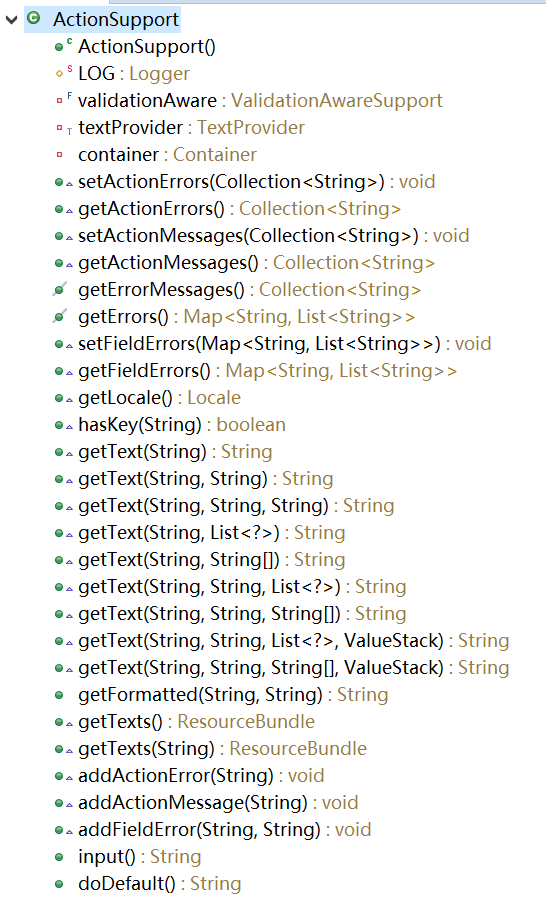
實現ActionAction是struts2應用的核心,開發中需要大量的Action類,並在struts.xml中配置Action。Action中包含了對用戶請求的處理邏
 Android-AndFix 熱修復框架原理及源碼解析
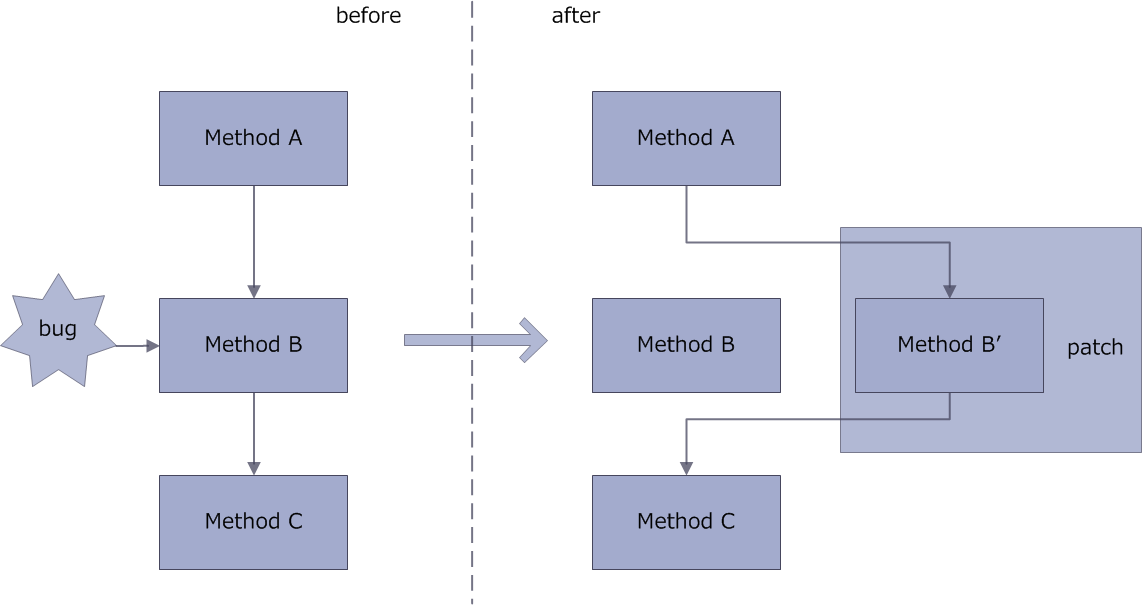
AndFix原理AndFix的原理就是通過c++指針進行方法的替換,把有bug的方法替換成補丁文件中的方法。方法替換過程:源碼解析解析源碼從使用的方法一一解析。在自定義A