編輯:關於Android編程
今天做項目需要用到簡單的橫向的柱狀圖,上網查了一下,沒找到合適的框架,於是決定自己動手寫一個自定義View,來實現三種柱狀圖。
那麼先看效果圖
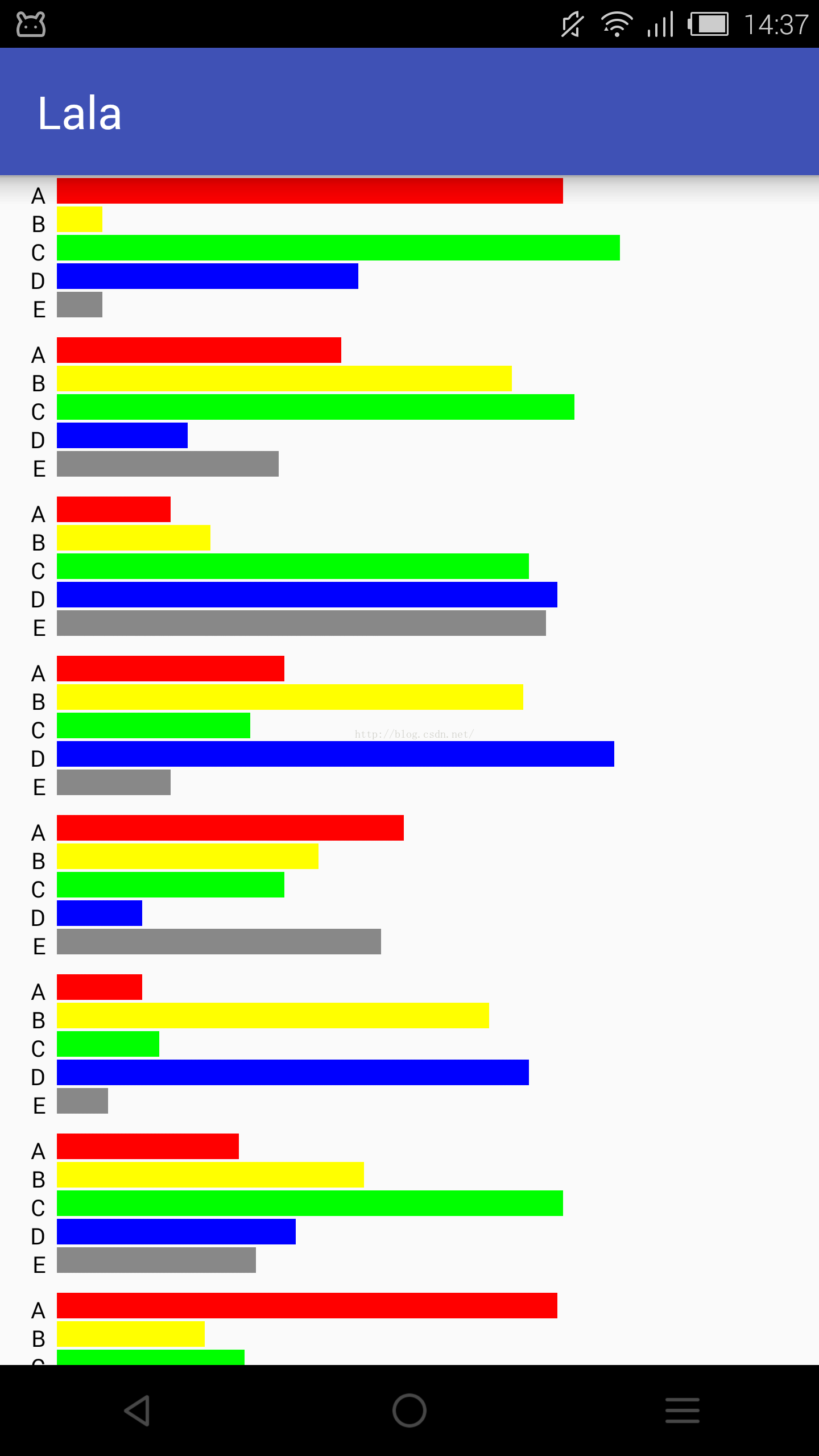
橫向的柱狀圖,只有柱子的比例和文字。
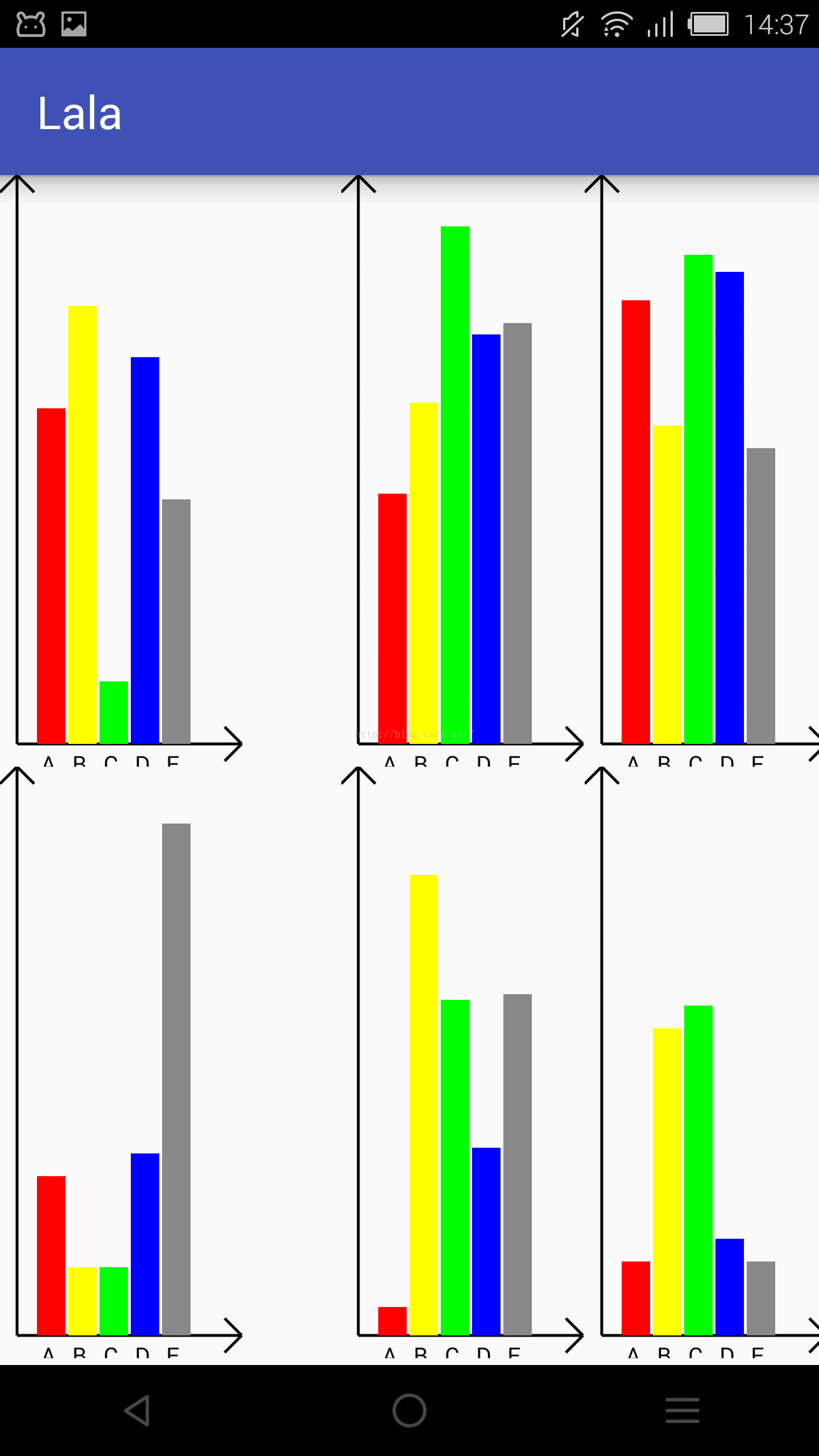
縱向的柱狀圖,加上了坐標軸的繪制。
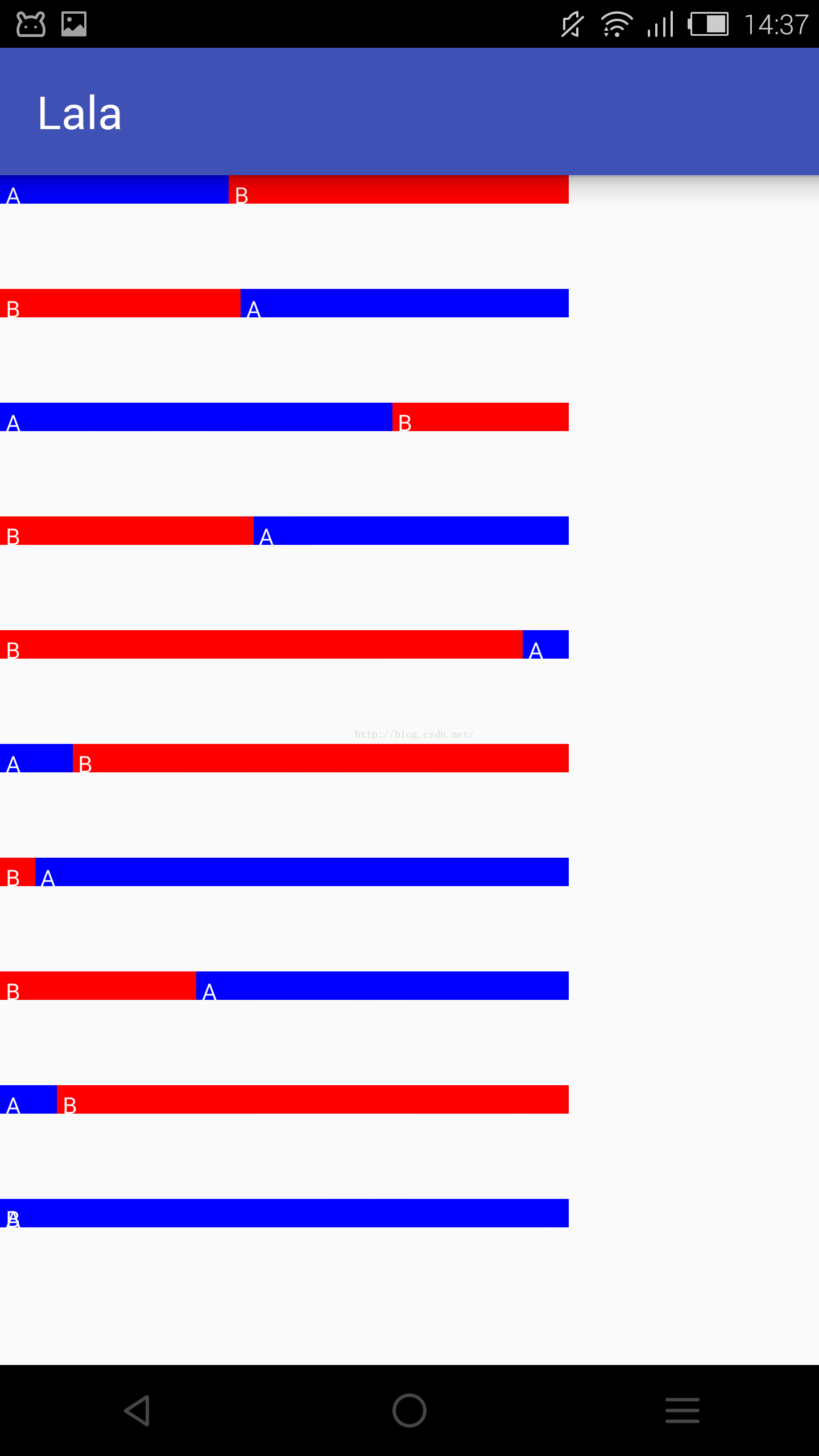
比例式柱狀圖,只接受長度為2的數組,會自己判斷將長的置於背景。
那麼我們看一下這個自定義View的代碼:
package com.example.day09;

import android.content.Context;
import android.graphics.Canvas;
import android.graphics.Color;
import android.graphics.Paint;
import android.util.AttributeSet;
import android.view.View;
import android.view.animation.Animation;
import android.view.animation.ScaleAnimation;

/**
 * Created by Administrator on 2016/11/3.
 */

public class Histogram extends View {
    private int[] nums;
    private String[] names;
    private int[] colors;
    private Context context;
    private int max = 0;
    private int type;
    private int wheretext;
    private int maxlong;
    private int j;
    private int width;
    private int kong;
    private boolean useAnimation;
    private Histogram v;

    public void setNames(String[] names) {
        this.names = names;
    }

    public void setMax(int max) {
        this.max = max;
    }

    public void setType(int type) {
        this.type = type;
    }

    public void setWheretext(int wheretext) {
        this.wheretext = wheretext;
    }

    public void setMaxlong(int maxlong) {
        this.maxlong = maxlong;
    }

    public void setWidth(int width) {
        this.width = width;
    }

    public void setKong(int kong) {
        this.kong = kong;
    }


    public void setUseAnimation(boolean useAnimation) {
        this.useAnimation = useAnimation;
    }


    public Histogram(Context context, AttributeSet attrs, int defStyle) {
        super(context, attrs, defStyle);
        this.context = context;
        v = this;
    }

    public Histogram(Context context, AttributeSet attrs) {
        super(context, attrs);
        this.context = context;
        v = this;
    }

    public Histogram(Context context) {
        super(context);
        v = this;
        this.context = context;
    }

    /**
     * 初始化柱狀圖的方法
     *
     * @param nums      存放每個元素數量的數組
     * @param names     存放每個元素文字的數組
     * @param colors    存放每個元素使用的顏色的數組
     * @param type      定義柱狀圖的類型 1為橫向,2為縱向,其余為比例
     * @param wheretext 定義柱狀圖文字的位置  (若橫向)1為圖前,2為圖後,其余為無文字;(若縱向)1為圖下,其余無文字
     * @param maxlong   柱狀圖的最大長度(px)
     * @param max       最大長度對應的數值
     * @param width     每條柱子的寬度
     * @param kong      柱子之間的空隙寬度
     */
    public void SetHistogram(int[] nums, String[] names, int[] colors, int type, int wheretext, int maxlong, int max, int width, int kong, boolean useAnimation) {
        this.colors = colors;
        this.names = names;
        this.nums = nums;
        this.type = type;
        this.wheretext = wheretext;
        this.maxlong = maxlong;
        this.max = max;
        j = maxlong / max;
        this.width = width;
        this.kong = kong;
        this.useAnimation = useAnimation;
    }

    public void SetHistogram(int[] nums, int[] colors, int type) {
        SetHistogram(nums, null, colors, type, 0, 800, 100, 50, 0, false);
    }

    public void SetHistogram(int[] nums, int[] colors) {
        SetHistogram(nums, colors, 1);
    }

    @Override
    protected void onDraw(Canvas canvas) {
        super.onDraw(canvas);
        Paint p = new Paint(Paint.ANTI_ALIAS_FLAG);
        switch (type) {
            case 1:
                DrawHeng(canvas, p);
                break;
            case 2:
                DrawShu(canvas, p);
                break;
            default:
                DrawBiLi(canvas, p);
                break;
        }

    }

    /**
     * 畫橫向比例柱狀圖
     *
     * @param canvas
     * @param p
     */
    private void DrawBiLi(Canvas canvas, Paint p) {
        int i, j;
        if (nums[0] > nums[1]) {
            i = 0;
            j = 1;
        } else {
            i = 1;
            j = 0;
        }
        int[] numss = new int[]{nums[i], nums[j]};
        int[] colorss = new int[]{colors[i], colors[j]};
        String[] namess = new String[]{names[i], names[j]};
        float bili = (0.0F + numss[0]) / (0.0F + numss[1]);
        switch (wheretext) {
            case 1:
                p.setColor(colorss[0]);
                canvas.drawRect(0, 0, maxlong, width, p);
                p.setColor(colorss[1]);
                canvas.drawRect(0, 0, maxlong / bili, width, p);
                //寫字
                p.setColor(Color.WHITE);
                p.setTextSize(width - 10);
                p.setTextAlign(Paint.Align.LEFT);
                canvas.drawText(namess[0], 10, width, p);
                canvas.drawText(namess[1], maxlong / bili + 10, width, p);
                if (useAnimation) {
                    setAnimationHeng();
                }
                break;
            default:
                p.setColor(colorss[0]);
                canvas.drawRect(0, 0, maxlong, width, p);
                p.setColor(colorss[1]);
                canvas.drawRect(0, 0, maxlong / bili, width, p);
                if (useAnimation) {
                    setAnimationHeng();
                }
                break;
        }

    }

    /**
     * 畫縱向柱狀圖
     *
     * @param canvas
     * @param p
     */
    private void DrawShu(Canvas canvas, Paint p) {
        switch (wheretext) {
            case 1:
                //畫坐標軸
                p.setStrokeWidth(5);
                p.setColor(Color.BLACK);
                canvas.drawLine(30, maxlong, nums.length * (width + kong) + 150, maxlong, p);
                canvas.drawLine(nums.length * (width + kong) + 150, maxlong, nums.length * (width + kong) + 120, maxlong - 30, p);
                canvas.drawLine(nums.length * (width + kong) + 150, maxlong, nums.length * (width + kong) + 120, maxlong + 30, p);
                canvas.drawLine(30, maxlong, 30, 0, p);
                canvas.drawLine(30, 0, 0, 30, p);
                canvas.drawLine(30, 0, 60, 30, p);
                //畫柱子
                for (int i = 0; i < nums.length; i++) {
                    p.setColor(colors[i]);
                    canvas.drawRect(60 + kong + (i * (kong + width)), maxlong - (j * nums[i]), 60 + kong + (i * (kong + width)) + width, maxlong, p);
                    p.setColor(Color.BLACK);
                    p.setTextSize(width - 10);
                    p.setTextAlign(Paint.Align.LEFT);
                    canvas.drawText(names[i], 60 + ((width + kong) * i) + width / 4, maxlong + width, p);
                }
                if (useAnimation) {
                    setAnimationShu();
                }
                break;

            default:
                //畫坐標軸
                p.setStrokeWidth(5);
                p.setColor(Color.BLACK);
                canvas.drawLine(30, maxlong, nums.length * (width + kong) + 150, maxlong, p);
                canvas.drawLine(nums.length * (width + kong) + 150, maxlong, nums.length * (width + kong) + 120, maxlong - 30, p);
                canvas.drawLine(nums.length * (width + kong) + 150, maxlong, nums.length * (width + kong) + 120, maxlong + 30, p);
                canvas.drawLine(30, maxlong, 30, 0, p);
                canvas.drawLine(30, 0, 0, 30, p);
                canvas.drawLine(30, 0, 60, 30, p);
                //畫柱子
                for (int i = 0; i < nums.length; i++) {
                    p.setColor(colors[i]);
                    canvas.drawRect(60 + kong + (i * (kong + width)), maxlong - (j * nums[i]), 60 + kong + (i * (kong + width)) + width, maxlong, p);
                }
                if (useAnimation) {
                    setAnimationShu();
                }
                break;
        }

    }

    /**
     * 畫橫向柱狀圖
     *
     * @param canvas
     * @param p
     */
    private void DrawHeng(Canvas canvas, Paint p) {
        switch (wheretext) {
            case 1:
                for (int i = 0; i < nums.length; i++) {
                    p.setColor(Color.BLACK);
                    p.setTextSize(width - 10);
                    p.setTextAlign(Paint.Align.RIGHT);
                    canvas.drawText(names[i], 80, width + width * i, p);
                    p.setColor(colors[i]);
                    canvas.drawRect(100, i * width + kong, 100 + nums[i] * j, width + i * width, p);
                    if (useAnimation) {
                        setAnimationHeng();
                    }
                }
                break;
            case 2:
                for (int i = 0; i < nums.length; i++) {

                    p.setColor(colors[i]);
                    canvas.drawRect(0, i * width + kong, nums[i] * j, width + i * width, p);
                    p.setColor(Color.BLACK);
                    p.setTextSize(width - 10);
                    p.setTextAlign(Paint.Align.LEFT);
                    canvas.drawText(names[i], nums[i] * j + 20, width + width * i, p);
                    if (useAnimation) {
                        setAnimationHeng();
                    }
                }
                break;
            default:
                for (int i = 0; i < nums.length; i++) {

                    p.setColor(colors[i]);
                    canvas.drawRect(0, i * width + kong, nums[i] * j, width + i * width, p);
                    if (useAnimation) {
                        setAnimationHeng();
                    }
                }
                break;
        }

    }

    /**
     * 設置動畫(橫向)
     */
    private void setAnimationHeng() {
        ScaleAnimation scaleAnimation = new ScaleAnimation(0.0f, 1.0f, 1.0f, 1.0f
                , Animation.RELATIVE_TO_SELF, 0.0f, Animation.RELATIVE_TO_SELF, 0.0f);
        scaleAnimation.setDuration(1000);
        this.setAnimation(scaleAnimation);
        scaleAnimation.startNow();
    }

    /**
     * 設置動畫(橫向)
     */
    private void setAnimationShu() {
        ScaleAnimation scaleAnimation = new ScaleAnimation(1.0f, 1.0f, 0.0f, 1.0f
                , Animation.RELATIVE_TO_SELF, 0.0f, Animation.RELATIVE_TO_SELF, 0.0f);
        scaleAnimation.setDuration(1000);
        this.setAnimation(scaleAnimation);
        scaleAnimation.startNow();
    }
}
 /**
     * 初始化柱狀圖的方法
     *
     * @param nums      存放每個元素數量的數組
     * @param names     存放每個元素文字的數組
     * @param colors    存放每個元素使用的顏色的數組
     * @param type      定義柱狀圖的類型 1為橫向,2為縱向,其余為比例
     * @param wheretext 定義柱狀圖文字的位置  (若橫向)1為圖前,2為圖後,其余為無文字;(若縱向)1為圖下,其余無文字
     * @param maxlong   柱狀圖的最大長度(px)
     * @param max       最大長度對應的數值
     * @param width     每條柱子的寬度
     * @param kong      柱子之間的空隙寬度
     */
    public void SetHistogram(int[] nums, String[] names, int[] colors, int type, int wheretext, int maxlong, int max, int width, int kong, boolean useAnimation) {
        this.colors = colors;
        this.names = names;
        this.nums = nums;
        this.type = type;
        this.wheretext = wheretext;
        this.maxlong = maxlong;
        this.max = max;
        j = maxlong / max;
        this.width = width;
        this.kong = kong;
        this.useAnimation = useAnimation;
    }
後面的代碼都是根據這個方法傳進來的參數做出相應的繪制,當然,大多數有用的屬性也單獨提供了Set方法;
接下來我們簡單的試驗一下一個縱向的柱狀圖,代碼如下:
MainActivity:
package com.example.day09;

import android.app.Activity;
import android.graphics.Color;
import android.os.Bundle;
import android.view.View;
import android.view.animation.Animation;
import android.view.animation.ScaleAnimation;

public class MainActivity extends Activity {
	Histogram histogram;
			int[] nums;
	int[] colors;
	String[] names;
	@Override
	protected void onCreate(Bundle savedInstanceState) {
		super.onCreate(savedInstanceState);
		setContentView(R.layout.activity_main);
		histogram= (Histogram) findViewById(R.id.imageId);
		nums=new int[]{55,24,64,35,100};
		colors=new int[]{Color.BLUE,Color.YELLOW,0Xffabcdef,Color.GREEN,Color.RED};
		names=new String[]{"A","B","C","D","E"};
		histogram.SetHistogram(nums,names,colors,2,1,1000,100,80,10,false);
		ScaleAnimation scaleAnimation = new ScaleAnimation(0.0f, 1.0f, 1.0f, 1.0f
				, Animation.RELATIVE_TO_SELF, 0.0f, Animation.RELATIVE_TO_SELF, 0.0f);
		scaleAnimation.setDuration(1000);
		histogram.setAnimation(scaleAnimation);
		scaleAnimation.startNow();
		scaleAnimation.setAnimationListener(new Animation.AnimationListener() {
			@Override
			public void onAnimationStart(Animation animation) {

			}

			@Override
			public void onAnimationEnd(Animation animation) {
				histogram.setVisibility(View.VISIBLE);
			}

			@Override
			public void onAnimationRepeat(Animation animation) {

			}
		});
	}


}
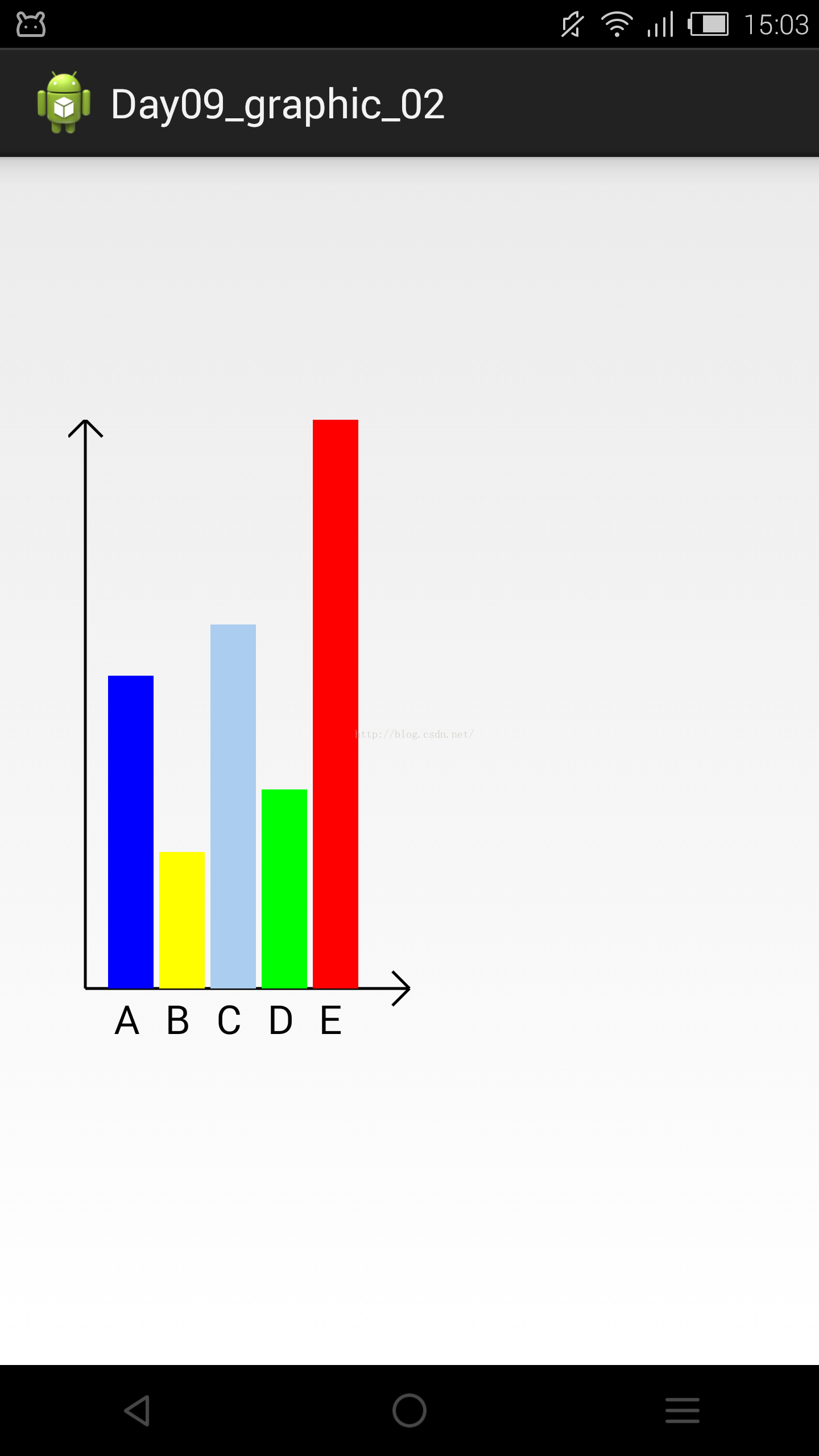
這樣就做出了一個簡單的柱狀圖了,截圖效果:
 android 自定義組件隨著手指自動畫圓
首先自定義一個View子類: package com.example.androidtest0.myView; import android.content.Conte
 NFC的android實現
NFC簡介:Near Field Communication 近場通信,是一種數據傳輸技術。與wifi、藍牙、紅外線等數據傳輸技術的一個主要差異就是有效距離一般不能超過4
 Android中編寫屬性動畫PropertyAnimation的進階實例
0、基礎回顧PropertyAnimation,屬性動畫,顧名思義就是利用對象的屬性變化形成動畫的效果。屬性動畫的類可以用Animator這個抽象類來表示,通常使用它的子
 android之屬性動畫
屬性動畫---res/animator屬性動畫故名思議就是通過動畫的方式改變對象的屬性了,我們首先需要了解幾個屬性:Duration動畫的持續時間,默認300ms。Tim