編輯:關於Android編程
前面分析了電話撥號界面及電話呼叫界面,由於Android的電話Phone設計的很復雜,因此先從UI層入手分析。想要了解Android的電話撥號UI,請查看Android電話撥號UI分析,電話撥號UI在Contacts包中。想要了解Android電話呼叫UI,請查看Android電話Phone UI分析,該UI在Phone包中,了解完電話想要UI後,還必須首先了解Android的Phone設計框架,Android電話Phone設計框架介紹介紹了Phone的框架設計及Phone進程的啟動,本文以源碼的形式介紹Android的電話撥打流程。點擊Launcher上的撥號圖標,首先進入電話撥號界面,前面已經分析了,該UI在Contacts包中,啟動顯示的是DialtactsActivity,關於DialtactsActivity的布局解析、UI布局在Android電話撥號UI分析中有詳細的分析,這裡不在重復介紹。我們從點擊撥號按鈕開始分析電話的撥號流程:
DialpadFragment.java

[html] view plaincopy

publicViewonCreateView(LayoutInflaterinflater,ViewGroupcontainer,BundlesavedState){...

//Checkwhetherweshouldshowtheonscreen"Dial"button.mDialButton=mAdditionalButtonsRow.findViewById(R.id.dialButton);

if(r.getBoolean(R.bool.config_show_onscreen_dial_button)){mDialButton.setOnClickListener(this);

}else{mDialButton.setVisibility(View.GONE);//It'sVISIBLEbydefault

mDialButton=null;}

...

撥號按鈕的單擊事件響應:

[java] view plaincopy

publicvoidonClick(Viewview){switch(view.getId()){

caseR.id.dialButton:{mHaptic.vibrate();

dialButtonPressed();return;

}...

}}

調用dialButtonPressed()函數發起電話呼叫

[java] view plaincopy

publicvoiddialButtonPressed(){if(mDigits==null){

Log.e(TAG,"dialButtonPressed,mDigits==null");return;

}//未輸入號碼處理

if(isDigitsEmpty()){handleDialButtonClickWithEmptyDigits();

}else{finalStringnumber=mDigits.getText().toString();

//"persist.radio.otaspdial"isatemporaryhackneededforonecarrier'sautomated//testequipment.

if(number!=null&&!TextUtils.isEmpty(mProhibitedPhoneNumberRegexp)&&number.matches(mProhibitedPhoneNumberRegexp)

&&(SystemProperties.getInt("persist.radio.otaspdial",0)!=1)){Log.i(TAG,"Thephonenumberisprohibitedexplicitlybyarule.");

if(getActivity()!=null){DialogFragmentdialogFragment=ErrorDialogFragment.newInstance(

R.string.dialog_phone_call_prohibited_title);dialogFragment.show(getFragmentManager(),"phone_prohibited_dialog");

}//號碼輸入不正確.

mDigits.getText().clear();}elseif(number!=null&&(number.startsWith(",")||number.startsWith(";"))){

mDigits.getText().clear();if(getActivity()!=null){

Toast.makeText(getActivity(),getText(R.string.invalid_number),Toast.LENGTH_SHORT).show();

}}else{

//啟動電話呼叫界面finalIntentintent=ContactsUtils.getCallIntent(number,(getActivity()instanceofDialtactsActivity?

((DialtactsActivity)getActivity()).getCallOrigin():null));startActivity(intent);

mClearDigitsOnStop=true;mDigits.getText().clear();

if(mFlagIntentNumber){getActivity().finish();

}}

}}

函數首先對輸入的號碼進行檢查,如果沒有輸入號碼,直接按下撥號按鈕,則調用handleDialButtonClickWithEmptyDigits函數來處理

[java] view plaincopy

privatevoidhandleDialButtonClickWithEmptyDigits(){if(phoneIsCdma()&&phoneIsOffhook()){

//ThisisreallyCDMAspecific.OnGSMisitpossible//tobeoffhookandwantedtoadda3rdpartyusing

//theredialfeature.startActivity(newFlashIntent());

}else{if(mDigits!=null&&!TextUtils.isEmpty(mLastNumberDialed)){

//Recallthelastnumberdialed.mDigits.setText(mLastNumberDialed);

//...andmovethecursortotheendofthedigitsstring,

//soyou'llbeabletodeletedigitsusingtheDelete//button(justasifyouhadtypedthenumbermanually.)

////NoteweusemDigits.getText().length()here,not

//mLastNumberDialed.length(),sincetheEditTextwidgetnow//containsa*formatted*versionofmLastNumberDialed(dueto

//mTextWatcher)anditslengthmayhavechanged.mDigits.setSelection(mDigits.getText().length());

}else{//There'sno"lastnumberdialed"orthe

//backgroundqueryisstillrunning.There's//nothingusefulfortheDialbuttontodoin

//thiscase.Note:withasoftdialbutton,this//canneverhappenssincethedialbuttonis

//disabledundertheseconditons.playTone(ToneGenerator.TONE_PROP_NACK);

}}

}

如果號碼輸入正確合法,則使用ContactsUtils工具類來創建一個Intent。

DialtactsActivity.java

[java] view plaincopy

publicStringgetCallOrigin(){return!isDialIntent(getIntent())?CALL_ORIGIN_DIALTACTS:null;

}

/**Returnstrueifthegivenintentcontainsaphonenumbertopopulatethedialerwith*/privatebooleanisDialIntent(Intentintent){

finalStringaction=intent.getAction();if(Intent.ACTION_DIAL.equals(action)||ACTION_TOUCH_DIALER.equals(action)){

returntrue;}

if(Intent.ACTION_VIEW.equals(action)){finalUridata=intent.getData();

if(data!=null&&Constants.SCHEME_TEL.equals(data.getScheme())){returntrue;

}}

returnfalse;}

從Launcher點擊撥號圖標進入的,因此isDialIntent返回true,getCallOrigin返回null

ContactsUtils.java

[java] view plaincopy

publicstaticIntentgetCallIntent(Stringnumber,StringcallOrigin){returngetCallIntent(getCallUri(number),callOrigin);

}

publicstaticIntentgetCallIntent(Uriuri,StringcallOrigin){finalIntentintent=newIntent(Intent.ACTION_CALL_PRIVILEGED,uri);

intent.setFlags(Intent.FLAG_ACTIVITY_NEW_TASK);if(callOrigin!=null){

intent.putExtra(DialtactsActivity.EXTRA_CALL_ORIGIN,callOrigin);}

returnintent;}

action為Intent.ACTION_CALL_PRIVILEGED,因此使用隱式啟動OutgoingCallBroadcaster
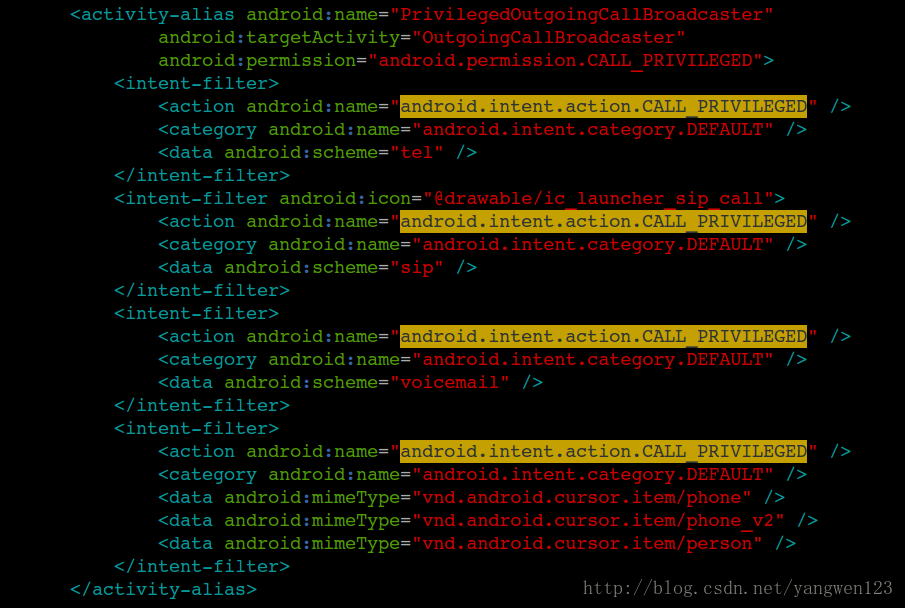
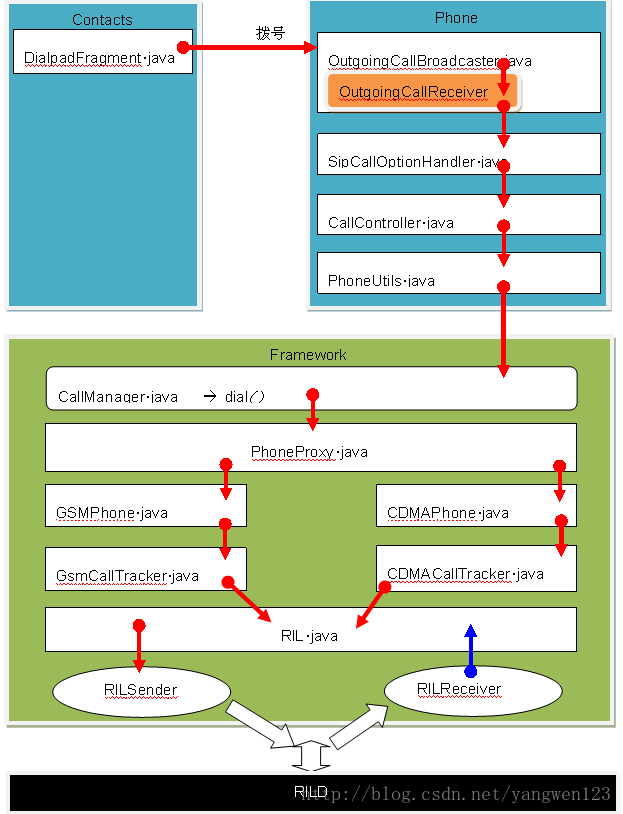
因此Phone進程中的OutgoingCallBroadcaster將被啟動。google對電話撥號步驟有詳細的說明:
/*

* Here's the most typical outgoing call sequence:

*

* (1) OutgoingCallBroadcaster receives a CALL intent and sends the

* NEW_OUTGOING_CALL broadcast

*

* (2) The broadcast finally reaches OutgoingCallReceiver, which stashes

* away a copy of the original CALL intent and launches

* SipCallOptionHandler

*

* (3) SipCallOptionHandler decides whether this is a PSTN or SIP call (and

* in some cases brings up a dialog to let the user choose), and

* ultimately calls CallController.placeCall() (from the

* setResultAndFinish() method) with the stashed-away intent from step

* (2) as the "intent" parameter.

*

* (4) Here in CallController.placeCall() we read the phone number or SIP

* address out of the intent and actually initiate the call, and

* simultaneously launch the InCallScreen to display the in-call UI.

*

* (5) We handle various errors by directing the InCallScreen to

* display error messages or dialogs (via the InCallUiState

* "pending call status code" flag), and in some cases we also

* sometimes continue working in the background to resolve the

* problem (like in the case of an emergency call while in

* airplane mode). Any time that some onscreen indication to the

* user needs to change, we update the "status dialog" info in

* the inCallUiState and (re)launch the InCallScreen to make sure

* it's visible.

*/
 Android通過手勢實現答題器翻頁效果
本文實例為大家分享了Android答題器翻頁功能,主要使用ViewFilpper和GestureDetector來實現,供大家參考,具體內容如下1.效果圖2.實現思路把A
 android如何取得本地通訊錄的頭像的原圖
上幾篇講contact的時候,取得的頭像都是存在數據庫中,通過: cursor = context.getContentResolver().query(
 Android自定義View實現帶數字的進度條實例代碼
第一步、效果展示圖1、藍色的進度條 圖2、紅色的進度條 圖3、多條顏色不同的進度條 圖4、多條顏色不同的進度條第二步、自定義ProgressBar實現帶數字的進度條0、項
 qq空間打賞功能是什麼 qq空間打賞紅包有什麼用
qq空間現在也可以打賞紅包啦啦!據了解,QQ空間打賞紅包在上個月QQ6.5版中就有了,現在打賞的最高金額是200元!那麼晚qq空間打賞功能是什麼?qq空間打