編輯:關於Android編程
1、支持幾乎所有安卓版本,從安卓2.x~7.0
安卓4.4、4.4.1和4.4.2是無法支持的,因為當時Google說WebView上傳文件不安全,就去掉了。所以這3個版本沒有解決辦法。不過現在基本沒有這3個系統版本的設備了吧。
4.4.3和4.4.4是支持的
2、支持指定accept="",限制選擇文件的類型
如果指定了accept="image/*",那麼就會支持選擇圖片;如果不指定,那就可以選擇任何文件。等等。
3、支持拍照上傳
指定了accept="image/*",除了支持選擇圖片,還可以拍照
下面提供InAppBrowser插件的改進:
先上效果圖(文件選擇控件指定了accept="image/*")
下圖是安卓4.4.4的效果
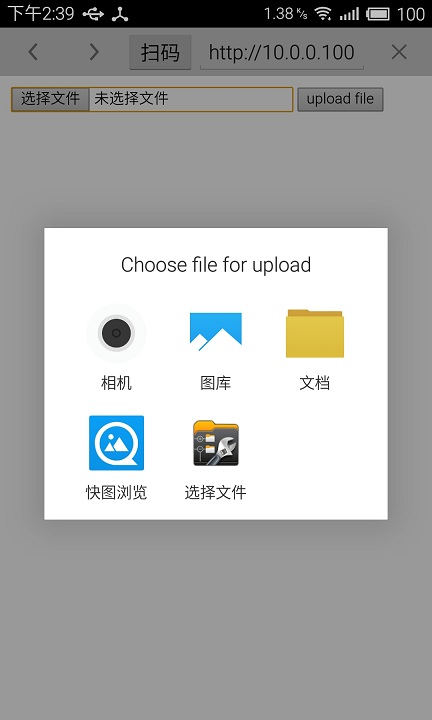
下圖是安卓6.0的效果
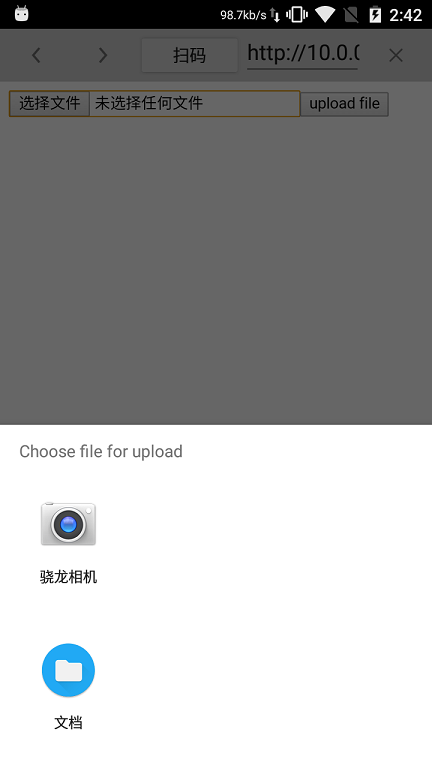
下圖是安卓7.0的效果
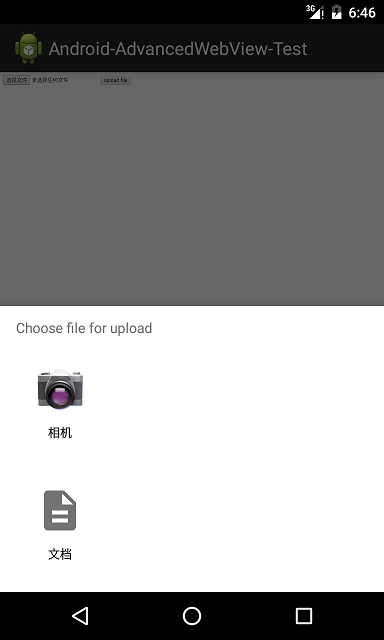
1、修改cordova-plugin-inappbrowser\src\android\InAppChromeClient.java
增加成員變量
    //added
    private CordovaPlugin plugin;
    public UploadHandler mUploadHandler;
增加構造函數
    //added
    public InAppChromeClient(CordovaWebView webView, CordovaPlugin plugin) {
        super();
        this.webView = webView;
        this.plugin = plugin;
    }
增加成員函數和內部類
    //added all below
    // Android 2.x
    public void openFileChooser(ValueCallback uploadMsg) {
        openFileChooser(uploadMsg, "");
    }

    // Android 3.0
    public void openFileChooser(ValueCallback uploadMsg, String acceptType) {
        openFileChooser(uploadMsg, "", "filesystem");
    }

    // Android 4.1
    public void openFileChooser(ValueCallback uploadMsg, String acceptType, String capture) {
        mUploadHandler = new UploadHandler(new Controller());
        mUploadHandler.openFileChooser(uploadMsg, acceptType, capture);
    }

    // Android 4.4, 4.4.1, 4.4.2
    // openFileChooser function is not called on Android 4.4, 4.4.1, 4.4.2,
    // you may use your own java script interface or other hybrid framework.

    // Android 5.0.1
    @SuppressLint("NewApi")
    public boolean onShowFileChooser(
            WebView webView, ValueCallback filePathCallback,
            FileChooserParams fileChooserParams) {

        String acceptTypes[] = fileChooserParams.getAcceptTypes();

        String acceptType = "";
        for (int i = 0; i < acceptTypes.length; ++ i) {
            if (acceptTypes[i] != null && acceptTypes[i].length() != 0)
                acceptType += acceptTypes[i] + ";";
        }
        if (acceptType.length() == 0)
            acceptType = "*/*";

        final ValueCallback finalFilePathCallback = filePathCallback;

        ValueCallback vc = new ValueCallback() {

            @Override
            public void onReceiveValue(Uri value) {

                Uri[] result;
                if (value != null)
                    result = new Uri[]{value};
                else
                    result = null;

                finalFilePathCallback.onReceiveValue(result);

            }
        };

        openFileChooser(vc, acceptType, "filesystem");


        return true;
    }

    public class Controller {
        final static int FILE_SELECTED = 4;

        CordovaInterface getCordova(){ return plugin.cordova; }
    }

    // copied from android-4.4.3_r1/src/com/android/browser/UploadHandler.java
    //////////////////////////////////////////////////////////////////////

    /*
     * Copyright (C) 2010 The Android Open Source Project
     *
     * Licensed under the Apache License, Version 2.0 (the "License");
     * you may not use this file except in compliance with the License.
     * You may obtain a copy of the License at
     *
     *      http://www.apache.org/licenses/LICENSE-2.0
     *
     * Unless required by applicable law or agreed to in writing, software
     * distributed under the License is distributed on an "AS IS" BASIS,
     * WITHOUT WARRANTIES OR CONDITIONS OF ANY KIND, either express or implied.
     * See the License for the specific language governing permissions and
     * limitations under the License.
     */
    class UploadHandler {
        /*
         * The Object used to inform the WebView of the file to upload.
         */
        private ValueCallback mUploadMessage;
        private String mCameraFilePath;
        private boolean mHandled;
        private boolean mCaughtActivityNotFoundException;
        private Controller mController;
        public UploadHandler(Controller controller) {
            mController = controller;
        }
        String getFilePath() {
            return mCameraFilePath;
        }
        boolean handled() {
            return mHandled;
        }
        void onResult(int resultCode, Intent intent) {
            if (resultCode == Activity.RESULT_CANCELED && mCaughtActivityNotFoundException) {
                // Couldn't resolve an activity, we are going to try again so skip
                // this result.
                mCaughtActivityNotFoundException = false;
                return;
            }
            Uri result = intent == null || resultCode != Activity.RESULT_OK ? null
                    : intent.getData();
            // As we ask the camera to save the result of the user taking
            // a picture, the camera application does not return anything other
            // than RESULT_OK. So we need to check whether the file we expected
            // was written to disk in the in the case that we
            // did not get an intent returned but did get a RESULT_OK. If it was,
            // we assume that this result has came back from the camera.
            if (result == null && intent == null && resultCode == Activity.RESULT_OK) {
                File cameraFile = new File(mCameraFilePath);
                if (cameraFile.exists()) {
                    result = Uri.fromFile(cameraFile);
                    // Broadcast to the media scanner that we have a new photo
                    // so it will be added into the gallery for the user.
                    mController.getCordova().getActivity().sendBroadcast(
                            new Intent(Intent.ACTION_MEDIA_SCANNER_SCAN_FILE, result));
                }
            }
            mUploadMessage.onReceiveValue(result);
            mHandled = true;
            mCaughtActivityNotFoundException = false;
        }
        void openFileChooser(ValueCallback uploadMsg, String acceptType, String capture) {
            final String imageMimeType = "image/*";
            final String videoMimeType = "video/*";
            final String audioMimeType = "audio/*";
            final String mediaSourceKey = "capture";
            final String mediaSourceValueCamera = "camera";
            final String mediaSourceValueFileSystem = "filesystem";
            final String mediaSourceValueCamcorder = "camcorder";
            final String mediaSourceValueMicrophone = "microphone";
            // According to the spec, media source can be 'filesystem' or 'camera' or 'camcorder'
            // or 'microphone' and the default value should be 'filesystem'.
            String mediaSource = mediaSourceValueFileSystem;
            if (mUploadMessage != null) {
                // Already a file picker operation in progress.
                return;
            }
            mUploadMessage = uploadMsg;
            // Parse the accept type.
            String params[] = acceptType.split(";");
            String mimeType = params[0];
            if (capture.length() > 0) {
                mediaSource = capture;
            }
            if (capture.equals(mediaSourceValueFileSystem)) {
                // To maintain backwards compatibility with the previous implementation
                // of the media capture API, if the value of the 'capture' attribute is
                // "filesystem", we should examine the accept-type for a MIME type that
                // may specify a different capture value.
                for (String p : params) {
                    String[] keyValue = p.split("=");
                    if (keyValue.length == 2) {
                        // Process key=value parameters.
                        if (mediaSourceKey.equals(keyValue[0])) {
                            mediaSource = keyValue[1];
                        }
                    }
                }
            }
            //Ensure it is not still set from a previous upload.
            mCameraFilePath = null;
            if (mimeType.equals(imageMimeType)) {
                if (mediaSource.equals(mediaSourceValueCamera)) {
                    // Specified 'image/*' and requested the camera, so go ahead and launch the
                    // camera directly.
                    startActivity(createCameraIntent());
                    return;
                } else {
                    // Specified just 'image/*', capture=filesystem, or an invalid capture parameter.
                    // In all these cases we show a traditional picker filetered on accept type
                    // so launch an intent for both the Camera and image/* OPENABLE.
                    Intent chooser = createChooserIntent(createCameraIntent());
                    chooser.putExtra(Intent.EXTRA_INTENT, createOpenableIntent(imageMimeType));
                    startActivity(chooser);
                    return;
                }
            } else if (mimeType.equals(videoMimeType)) {
                if (mediaSource.equals(mediaSourceValueCamcorder)) {
                    // Specified 'video/*' and requested the camcorder, so go ahead and launch the
                    // camcorder directly.
                    startActivity(createCamcorderIntent());
                    return;
                } else {
                    // Specified just 'video/*', capture=filesystem or an invalid capture parameter.
                    // In all these cases we show an intent for the traditional file picker, filtered
                    // on accept type so launch an intent for both camcorder and video/* OPENABLE.
                    Intent chooser = createChooserIntent(createCamcorderIntent());
                    chooser.putExtra(Intent.EXTRA_INTENT, createOpenableIntent(videoMimeType));
                    startActivity(chooser);
                    return;
                }
            } else if (mimeType.equals(audioMimeType)) {
                if (mediaSource.equals(mediaSourceValueMicrophone)) {
                    // Specified 'audio/*' and requested microphone, so go ahead and launch the sound
                    // recorder.
                    startActivity(createSoundRecorderIntent());
                    return;
                } else {
                    // Specified just 'audio/*',  capture=filesystem of an invalid capture parameter.
                    // In all these cases so go ahead and launch an intent for both the sound
                    // recorder and audio/* OPENABLE.
                    Intent chooser = createChooserIntent(createSoundRecorderIntent());
                    chooser.putExtra(Intent.EXTRA_INTENT, createOpenableIntent(audioMimeType));
                    startActivity(chooser);
                    return;
                }
            }
            // No special handling based on the accept type was necessary, so trigger the default
            // file upload chooser.
            startActivity(createDefaultOpenableIntent());
        }
        private void startActivity(Intent intent) {
            try {
                mController.getCordova().startActivityForResult(plugin, intent, Controller.FILE_SELECTED);
            } catch (ActivityNotFoundException e) {
                // No installed app was able to handle the intent that
                // we sent, so fallback to the default file upload control.
                try {
                    mCaughtActivityNotFoundException = true;
                    mController.getCordova().startActivityForResult(plugin, createDefaultOpenableIntent(),
                            Controller.FILE_SELECTED);
                } catch (ActivityNotFoundException e2) {
                    // Nothing can return us a file, so file upload is effectively disabled.
                    Toast.makeText(mController.getCordova().getActivity(), "File uploads are disabled.",
                            Toast.LENGTH_LONG).show();
                }
            }
        }
        private Intent createDefaultOpenableIntent() {
            // Create and return a chooser with the default OPENABLE
            // actions including the camera, camcorder and sound
            // recorder where available.
            Intent i = new Intent(Intent.ACTION_GET_CONTENT);
            i.addCategory(Intent.CATEGORY_OPENABLE);
            i.setType("*/*");
            Intent chooser = createChooserIntent(createCameraIntent(), createCamcorderIntent(),
                    createSoundRecorderIntent());
            chooser.putExtra(Intent.EXTRA_INTENT, i);
            return chooser;
        }
        private Intent createChooserIntent(Intent... intents) {
            Intent chooser = new Intent(Intent.ACTION_CHOOSER);
            chooser.putExtra(Intent.EXTRA_INITIAL_INTENTS, intents);
            chooser.putExtra(Intent.EXTRA_TITLE,
                    "Choose file for upload");
            return chooser;
        }
        private Intent createOpenableIntent(String type) {
            Intent i = new Intent(Intent.ACTION_GET_CONTENT);
            i.addCategory(Intent.CATEGORY_OPENABLE);
            i.setType(type);
            return i;
        }
        private Intent createCameraIntent() {
            Intent cameraIntent = new Intent(MediaStore.ACTION_IMAGE_CAPTURE);
            File externalDataDir = Environment.getExternalStoragePublicDirectory(
                    Environment.DIRECTORY_DCIM);
            File cameraDataDir = new File(externalDataDir.getAbsolutePath() +
                    File.separator + "browser-photos");
            cameraDataDir.mkdirs();
            mCameraFilePath = cameraDataDir.getAbsolutePath() + File.separator +
                    System.currentTimeMillis() + ".jpg";
            cameraIntent.putExtra(MediaStore.EXTRA_OUTPUT, Uri.fromFile(new File(mCameraFilePath)));
            return cameraIntent;
        }
        private Intent createCamcorderIntent() {
            return new Intent(MediaStore.ACTION_VIDEO_CAPTURE);
        }
        private Intent createSoundRecorderIntent() {
            return new Intent(MediaStore.Audio.Media.RECORD_SOUND_ACTION);
        }
    }
//added
import org.apache.cordova.CordovaPlugin;
import org.apache.cordova.CordovaInterface;
import android.annotation.SuppressLint;
import android.app.Activity;
import android.content.ActivityNotFoundException;
import android.content.Intent;
import android.net.Uri;
import android.os.Environment;
import android.provider.MediaStore;
import android.webkit.ValueCallback;
import android.widget.Toast;
import java.io.File;
2、修改cordova-plugin-inappbrowser\src\android\InAppBrowser.java
增加成員變量
    //added
    private InAppChromeClient chromeClient;
修改showWebPage方法裡
// WebView
inAppWebView = new WebView(cordova.getActivity());
inAppWebView.setLayoutParams(new LinearLayout.LayoutParams(LayoutParams.MATCH_PARENT, LayoutParams.MATCH_PARENT));
inAppWebView.setId(Integer.valueOf(6));
//inAppWebView.setWebChromeClient(new InAppChromeClient(thatWebView));//注釋掉這一句
//加上下面2句
chromeClient = new InAppChromeClient(thatWebView, InAppBrowser.this);
inAppWebView.setWebChromeClient(chromeClient);
WebViewClient client = new InAppBrowserClient(thatWebView, edittext);
增加一個Override方法
    @Override
    public void onActivityResult(int requestCode, int resultCode, Intent intent) {
        if (requestCode == InAppChromeClient.Controller.FILE_SELECTED) {
            // Chose a file from the file picker.
            if (chromeClient != null && chromeClient.mUploadHandler != null) {
                chromeClient.mUploadHandler.onResult(resultCode, intent);
            }
        }
        super.onActivityResult(requestCode, resultCode, intent);
    }
 Android 支付寶以及微信支付快速接入流程
隨著移動支付的普及,越來越多的App采用第三發支付,在這裡我們以支付寶為例,做一個快速集成!一、Android快速實現支付寶支付1、首先,我們需要前往支付寶開放平台,申請
 Android開發之Activity和Fragment生命周期對比圖
一、Activity 生命周期 二、Fragment 生命周期 三、對比圖 四、測試代碼 [java] pa
 Android側滑導航欄的實例代碼
今天學習的新內容是側滑導航欄,我想大家肯定都比較熟悉了,因為這個效果在qq裡面也有,最近一直跟室友們玩的游戲是快速讓自己的頭像的點贊量上千。當然我的效果跟qq是沒有辦法比
 鵝廠系列一 : 仿QQ側滑菜單
好了,跟隨潮流,還是先看下效果,不然可能都沒人想看下去了(不會看到效果後不想看了吧O(∩_∩)O~)嗯,就是讓左面板在主面板的下面,所以我們自定義的控件S