編輯:關於Android編程
基於Android 7.0源碼,分析zygote進程的啟動過程。
??Zygote是由init進程通過解析init.zygoteXX.rc文件而創建的,其中的“XX”根據CPU平台的不同,可能是不同的數字。
??init進程會首先解析在\system\core\rootdir\init.rc文件內容,咋一看init.rc文件中並沒有發現與zygote有關的語句;仔細看init.rc文件的前5行,發現已經隱蔽的import了init.${ro.zygote}.rc。
import /init.environ.rc
import /init.usb.rc
import /init.${ro.hardware}.rc
import /init.${ro.zygote}.rc
import /init.trace.rc

......
??ro.zygote是一個屬性值,對於Nexus 7二代平板而言,由於其使用的是高通的32位處理器,故ro.zygote的值為zygote32。

??我們以Nexus 7二代硬件平台為例,接著看\system\core\rootdir\init.zygote32.rc文件。
service zygote /system/bin/app_process -Xzygote /system/bin --zygote --start-system-server
    class main #指定入口為main函數
    socket zygote stream 660 root system #指定zygote服務所使用到的socket,該socket的名稱為zygote,類型為stream,讀寫權限為660,用戶為root,用戶組為system
    onrestart write /sys/android_power/request_state wake
    onrestart write /sys/power/state on
    onrestart restart media
    onrestart restart netd
??這裡可明顯,Zygote的所對應的可執行程序是app_process,位於手機中的/system/bin/目錄下,是一個可執行bin文件,並且也指明了四個啟動參數,分別是”-Xzygote”、”/system/bin”、”–zygote”和”–start-system-server”。
-Xzygote
??該參數將作為虛擬機啟動時所需要的參數,是在AndroidRuntime.cpp類的startVm()函數中調用JNI_CreateJavaVM()時被使用的。
/system/bin
??代表虛擬機程序所在目錄,因為app_process完全可以不和虛擬機在同一個目錄,而在app_process內部的AndroidRuntime類內部需要知道虛擬機所在的目錄。
–zygote
??指明以ZygoteInit類作為虛擬機執行的入口,如果沒有–zygote參數,則需要明確指定需要執行的類名。
–start-system-server
??僅在指定–zygote參數時才有效,意思是告知ZygoteInit啟動完畢後孵化出第一個進程SystemServer。
??命令”socket zygote stream 660 root system”,用於指定zygote服務所使用到的socket,該socket的名稱為zygote,類型為stream,讀寫權限為660,用戶為root,用戶組為system。

??那麼這個位於/system/bin目錄下的app_process這個bin文件又是如何生成的呢?
??通過在代碼中全局搜索”app_process”,我們查找到負責編譯生成”app_process”模塊的Android.mk文件存放在\frameworks\base\cmds\app_process這個目錄下。
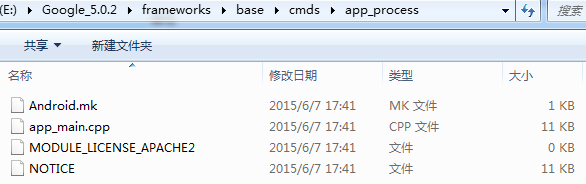
??app_process的入口是該目錄下的app_main.cpp中的main函數。下面就從該文件入手,分析Zygote進程的啟動流程。
app_main.main
[===>frameworks\base\cmds\app_process\app_main.cpp]
#if defined(__LP64__)
static const char ABI_LIST_PROPERTY[] = "ro.product.cpu.abilist64";
static const char ZYGOTE_NICE_NAME[] = "zygote64";
#else
static const char ABI_LIST_PROPERTY[] = "ro.product.cpu.abilist32";
static const char ZYGOTE_NICE_NAME[] = "zygote";
#endif

int main(int argc, char* const argv[])
{
    ......

    AppRuntime runtime(argv[0], computeArgBlockSize(argc, argv));
    // Process command line arguments
    // ignore argv[0]
    argc--;
    argv++;

    // Everything up to '--' or first non '-' arg goes to the vm.
    //
    // The first argument after the VM args is the "parent dir", which
    // is currently unused.
    //
    // After the parent dir, we expect one or more the following internal
    // arguments :
    //
    // --zygote : Start in zygote mode
    // --start-system-server : Start the system server.
    // --application : Start in application (stand alone, non zygote) mode.
    // --nice-name : The nice name for this process.
    //
    // For non zygote starts, these arguments will be followed by
    // the main class name. All remaining arguments are passed to
    // the main method of this class.
    //
    // For zygote starts, all remaining arguments are passed to the zygote.
    // main function.
    //
    // Note that we must copy argument string values since we will rewrite the
    // entire argument block when we apply the nice name to argv0.

    int i;
    for (i = 0; i < argc; i++) {
        if (argv[i][0] != '-') {
            break;
        }
        if (argv[i][1] == '-' && argv[i][2] == 0) {
            ++i; // Skip --.
            break;
        }
        runtime.addOption(strdup(argv[i]));
    }

    // Parse runtime arguments.  Stop at first unrecognized option.
    bool zygote = false;
    bool startSystemServer = false;
    bool application = false;
    String8 niceName;
    String8 className;

    ++i;  // Skip unused "parent dir" argument.
    while (i < argc) {
        const char* arg = argv[i++];
        if (strcmp(arg, "--zygote") == 0) {//條件成立
            zygote = true;
            niceName = ZYGOTE_NICE_NAME;//將niceName設置為"zygote"或者"zygote64"
        } else if (strcmp(arg, "--start-system-server") == 0) {//條件成立
            startSystemServer = true;
        } else if (strcmp(arg, "--application") == 0) {//條件不成立
            application = true;
        } else if (strncmp(arg, "--nice-name=", 12) == 0) {//條件不成立
            niceName.setTo(arg + 12);
        } else if (strncmp(arg, "--", 2) != 0) {//條件不成立
            className.setTo(arg);
            break;
        } else {
            --i;
            break;
        }
    }

    Vector args;//該參數接下來要傳入AndroidRuntime.start函數
    if (!className.isEmpty()) {//條件不成立
        // We're not in zygote mode, the only argument we need to pass
        // to RuntimeInit is the application argument.
        //
        // The Remainder of args get passed to startup class main(). Make
        // copies of them before we overwrite them with the process name.
        args.add(application ? String8("application") : String8("tool"));
        runtime.setClassNameAndArgs(className, argc - i, argv + i);
    } else {
        // We're in zygote mode.
        maybeCreateDalvikCache();//進入zygote模式,創建/data/dalvik-cache路徑

        if (startSystemServer) {
            args.add(String8("start-system-server"));
        }

        char prop[PROP_VALUE_MAX];
        if (property_get(ABI_LIST_PROPERTY, prop, NULL) == 0) {
            ......
        }

        String8 abiFlag("--abi-list=");
        abiFlag.append(prop);
        args.add(abiFlag);

        // In zygote mode, pass all remaining arguments to the zygote
        // main() method.
        for (; i < argc; ++i) {
            args.add(String8(argv[i]));
        }
    }

    if (!niceName.isEmpty()) {//條件不成立
        ......
    }

    if (zygote) {//條件成立
        runtime.start("com.android.internal.os.ZygoteInit", args, zygote);
    } else if (className) {//條件不成立
        runtime.start("com.android.internal.os.RuntimeInit", args, zygote);
    } else {//條件不成立
      return 10;//沒有指定類名或zygote,參數錯誤
    }
}
??根據init.zygote.rc文件內容,之前提到傳入main函數四個參數(”-Xzygote“、”/system/bin“、”–zygote“和”–start-system-server“),因此我們知道argc和argv分別為:
int argc = 4;
char* const argv[] = "-Xzygote /system/bin --zygote --start-system-server\0";//參數之間為一個空格
[===>frameworks\base\cmds\app_process\app_main.cpp]
static size_t computeArgBlockSize(int argc, char* const argv[]) {
    // TODO: This assumes that all arguments are allocated in
    // contiguous memory. There isn't any documented guarantee
    // that this is the case, but this is how the kernel does it
    // (see fs/exec.c).
    //
    // Also note that this is a constant for "normal" android apps.
    // Since they're forked from zygote, the size of their command line
    // is the size of the zygote command line.
    //
    // We change the process name of the process by over-writing
    // the start of the argument block (argv[0]) with the new name of
    // the process, so we'd mysteriously start getting truncated process
    // names if the zygote command line decreases in size.
    uintptr_t start = reinterpret_cast(argv[0]);
    uintptr_t end = reinterpret_cast(argv[argc - 1]);
    end += strlen(argv[argc - 1]) + 1;
    return (end - start);
}
??這裡計算並且返回了傳入參數的字節數,這樣的目的可以確保傳入的四個參數是在一個連續的內存中。
// TODO: This assumes that all arguments are allocated incontiguous memory.
??回到app_main.main函數,在知道了傳入參數的字節長度後,創建了AppRuntime。
[===>frameworks\base\cmds\app_process\app_main.cpp]
class AppRuntime : public AndroidRuntime
{
public:
    AppRuntime(char* argBlockStart, const size_t argBlockLength)
        : AndroidRuntime(argBlockStart, argBlockLength)
        , mClass(NULL)
    {
    }
    ......
}
[===>frameworks\base\core\jni\AndroidRuntime.cpp]
static AndroidRuntime* gCurRuntime = NULL;
AndroidRuntime::AndroidRuntime(char* argBlockStart, const size_t argBlockLength) :
        mExitWithoutCleanup(false),
        mArgBlockStart(argBlockStart),
        mArgBlockLength(argBlockLength)
{
    SkGraphics::Init();
    // There is also a global font cache, but its budget is specified in code
    // see SkFontHost_android.cpp

    // Pre-allocate enough space to hold a fair number of options.
    mOptions.setCapacity(20);

    assert(gCurRuntime == NULL);        // one per process
    gCurRuntime = this;
}
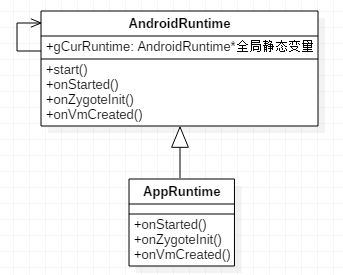
??靜態全局變量gCurRuntime指向AndroidRuntime對象本身,這樣之後如果我們需要獲取AndroidRuntime對象時,只要獲取gCurRuntime即可。
??在啟動zygote進程流程中,需要為zygote創建/data/dalvik-cache路徑。
[===>frameworks\base\core\jni\AndroidRuntime.cpp]
static void maybeCreateDalvikCache() {
    #if defined(__aarch64__)
        static const char kInstructionSet[] = "arm64";
    #elif defined(__x86_64__)
        static const char kInstructionSet[] = "x86_64";
    #elif defined(__arm__)
        static const char kInstructionSet[] = "arm";
    #elif defined(__i386__)
        static const char kInstructionSet[] = "x86";
    #elif defined (__mips__) && !defined(__LP64__)
        static const char kInstructionSet[] = "mips";
    #elif defined (__mips__) && defined(__LP64__)
        static const char kInstructionSet[] = "mips64";
    #else
    #error "Unknown instruction set"
    #endif
    const char* androidRoot = getenv("ANDROID_DATA");//androidRoot為“data”
    LOG_ALWAYS_FATAL_IF(androidRoot == NULL, "ANDROID_DATA environment variable unset");

    char dalvikCacheDir[PATH_MAX];
    const int numChars = snprintf(dalvikCacheDir, PATH_MAX,
            "%s/dalvik-cache/%s", androidRoot, kInstructionSet);
    LOG_ALWAYS_FATAL_IF((numChars >= PATH_MAX || numChars < 0),
            "Error constructing dalvik cache : %s", strerror(errno));

    int result = mkdir(dalvikCacheDir, 0711);//創建/data/dalvik-cache路徑
    LOG_ALWAYS_FATAL_IF((result < 0 && errno != EEXIST),
            "Error creating cache dir %s : %s", dalvikCacheDir, strerror(errno));

    // We always perform these steps because the directory might
    // already exist, with wider permissions and a different owner
    // than we'd like.
    result = chown(dalvikCacheDir, AID_ROOT, AID_ROOT);//更改/data/dalvik-cache路徑的用戶與用戶組為root用戶、root用戶組
    LOG_ALWAYS_FATAL_IF((result < 0), "Error changing dalvik-cache ownership : %s", strerror(errno));

    result = chmod(dalvikCacheDir, 0711);//更改/data/dalvik-cache路徑的權限
    LOG_ALWAYS_FATAL_IF((result < 0),
            "Error changing dalvik-cache permissions : %s", strerror(errno));
}
??這裡創建了/data/dalvik-cache路徑,並修改該路徑的用戶、用戶組和權限信息。這裡暫時還不清楚/data/dalvik-cache路徑的作用,得留意一下,看看後面有沒有用到。
??在分析AndroidRuntime.start之前,根據zygote的啟動參數,參數zygote為true,變量args的實際值為:
"start-system-server"
"--abi-list=ro.product.cpu.abilist32"
"-Xzygote"
"/system/bin"
"--zygote"
"--start-system-server"
??參數中帶有“–zygote,所以bool型變量zygote的值為true,就執行runtime.start(“com.android.internal.os.ZygoteInit”, args),調用了runtime.start函數。

??由於AppRuntime繼承自AndroidRuntime,但是又未實現其start函數,故這裡實際上調用的是AndroidRuntime.start函數。
[===>frameworks\base\core\jni\AndroidRuntime.cpp]
/*
 1. Start the Android runtime.  This involves starting the virtual machine
 2. and calling the "static void main(String[] args)" method in the class
 3. named by "className".
 4.  5. Passes the main function two arguments, the class name and the specified
 5. options string.
 */
 //className為"com.android.internal.os.ZygoteInit"
void AndroidRuntime::start(const char* className, const Vector& options)
{
    ......

    static const String8 startSystemServer("start-system-server");

    ......

    const char* rootDir = getenv("ANDROID_ROOT");//設置rootDir為"/system"目錄,ANDROID_ROOT為"/system"
    if (rootDir == NULL) {
        rootDir = "/system";
        if (!hasDir("/system")) {
            LOG_FATAL("No root directory specified, and /android does not exist.");
            return;
        }
        setenv("ANDROID_ROOT", rootDir, 1);
    }

    ......

    /* start the virtual machine */
    JniInvocation jni_invocation;
    jni_invocation.Init(NULL);
    JNIEnv* env;
    if (startVm(&mJavaVM, &env) != 0) {//啟動虛擬機
        return;
    }
    onVmCreated(env);

    /*
     * Register android functions.
     */
    if (startReg(env) < 0) {//注冊Jni函數
        ALOGE("Unable to register all android natives\n");
        return;
  }

    /*
     * We want to call main() with a String array with arguments in it.
     * At present we have two arguments, the class name and an option string.
     * Create an array to hold them.
     */
    jclass stringClass;
    jobjectArray strArray;
    jstring classNameStr;

    stringClass = env->FindClass("java/lang/String");
    assert(stringClass != NULL);
    strArray = env->NewObjectArray(options.size() + 1, stringClass, NULL);
    assert(strArray != NULL);
    classNameStr = env->NewStringUTF(className);
    assert(classNameStr != NULL);
    env->SetObjectArrayElement(strArray, 0, classNameStr);

    for (size_t i = 0; i < options.size(); ++i) {
        jstring optionsStr = env->NewStringUTF(options.itemAt(i).string());
        assert(optionsStr != NULL);
        env->SetObjectArrayElement(strArray, i + 1, optionsStr);
    }

    /*
     * Start VM.  This thread becomes the main thread of the VM, and will
     * not return until the VM exits.
     */
    char* slashClassName = toSlashClassName(className);
    jclass startClass = env->FindClass(slashClassName);
    if (startClass == NULL) {
        ......
    } else {
        jmethodID startMeth = env->GetStaticMethodID(startClass, "main",
            "([Ljava/lang/String;)V");//獲取"com.android.internal.os.ZygoteInit"類main函數
        if (startMeth == NULL) {
            ......
        } else {
            env->CallStaticVoidMethod(startClass, startMeth, strArray);//調用ZygoteInit.main函數
        }
    }
    free(slashClassName);

    ......
}
??AndroidRuntime.start函數主要做了三個工作:
??1、啟動虛擬機
??調用AndroidRuntime.startVm啟動虛擬機
??2、注冊jni函數
??調用AndroidRuntime.startReg注冊jni函數
??3、調用ZygoteInit.main函數
??下面分別來看看這三個步驟的工作內容。
[===>frameworks\base\core\jni\AndroidRuntime.cpp]
??創建Java虛擬機方法的主要篇幅是關於虛擬機參數的設置,下面只列舉部分在調試優化過程中常用參數。
int AndroidRuntime::startVm(JavaVM** pJavaVM, JNIEnv** pEnv, bool zygote)
{
    // JNI檢測功能,用於native層調用jni函數時進行常規檢測,比較弱字符串格式是否符合要求,資源是否正確釋放。該功能一般用於早期系統調試或手機Eng版,對於User版往往不會開啟,引用該功能比較消耗系統CPU資源,降低系統性能。
    bool checkJni = false;
    property_get("dalvik.vm.checkjni", propBuf, "");
    if (strcmp(propBuf, "true") == 0) {
        checkJni = true;
    } else if (strcmp(propBuf, "false") != 0) {
        property_get("ro.kernel.android.checkjni", propBuf, "");
        if (propBuf[0] == '1') {
            checkJni = true;
        }
    }
    if (checkJni) {
        addOption("-Xcheck:jni");
    }

    //虛擬機產生的trace文件,主要用於分析系統問題,路徑默認為/data/anr/traces.txt
    parseRuntimeOption("dalvik.vm.stack-trace-file", stackTraceFileBuf, "-Xstacktracefile:");

    //對於不同的軟硬件環境,這些參數往往需要調整、優化,從而使系統達到最佳性能
    parseRuntimeOption("dalvik.vm.heapstartsize", heapstartsizeOptsBuf, "-Xms", "4m");
    parseRuntimeOption("dalvik.vm.heapsize", heapsizeOptsBuf, "-Xmx", "16m");
    parseRuntimeOption("dalvik.vm.heapgrowthlimit", heapgrowthlimitOptsBuf, "-XX:HeapGrowthLimit=");
    parseRuntimeOption("dalvik.vm.heapminfree", heapminfreeOptsBuf, "-XX:HeapMinFree=");
    parseRuntimeOption("dalvik.vm.heapmaxfree", heapmaxfreeOptsBuf, "-XX:HeapMaxFree=");
    parseRuntimeOption("dalvik.vm.heaptargetutilization",
                       heaptargetutilizationOptsBuf, "-XX:HeapTargetUtilization=");

    //preloaded-classes文件內容是由WritePreloadedClassFile.java生成的,在ZygoteInit類中會預加載工作將其中的classes提前加載到內存,以提高系統性能
    if (!hasFile("/system/etc/preloaded-classes")) {
        return -1;
    }

    //創建虛擬機
    if (JNI_CreateJavaVM(pJavaVM, pEnv, &initArgs) < 0) {
        ALOGE("JNI_CreateJavaVM failed\n");
        return -1;
    }
}
[===>frameworks\base\core\jni\AndroidRuntime.cpp]
/*
 * Register android native functions with the VM.
 */
/*static*/ int AndroidRuntime::startReg(JNIEnv* env)
{
    ATRACE_NAME("RegisterAndroidNatives");
    /*
     * This hook causes all future threads created in this process to be
     * attached to the JavaVM.  (This needs to go away in favor of JNI
     * Attach calls.)
     */
    androidSetCreateThreadFunc((android_create_thread_fn) javaCreateThreadEtc);

    ALOGV("--- registering native functions ---\n");

    /*
     * Every "register" function calls one or more things that return
     * a local reference (e.g. FindClass).  Because we haven't really
     * started the VM yet, they're all getting stored in the base frame
     * and never released.  Use Push/Pop to manage the storage.
     */
    env->PushLocalFrame(200);

    if (register_jni_procs(gRegJNI, NELEM(gRegJNI), env) < 0) {
        env->PopLocalFrame(NULL);
        return -1;
    }
    env->PopLocalFrame(NULL);

    //createJavaThread("fubar", quickTest, (void*) "hello");

    return 0;
}
Threads.androidSetCreateThreadFunc
[===>system\core\libutils\Threads.cpp]
void androidSetCreateThreadFunc(android_create_thread_fn func)
{
    gCreateThreadFn = func;
}
??具體分析下來,虛擬機啟動後,在startReg()注冊過程,會設置線程創建函數指針gCreateThreadFn指向javaCreateThreadEtc。
??回到AndroidRuntime.startReg(),緊接著會調用register_jni_procs,進行jni接口的注冊工作。
AndroidRuntime.register_jni_procs
static int register_jni_procs(const RegJNIRec array[], size_t count, JNIEnv* env)
{
    for (size_t i = 0; i < count; i++) {
        if (array[i].mProc(env) < 0) {
#ifndef NDEBUG
            ALOGD("----------!!! %s failed to load\n", array[i].mName);
#endif
            return -1;
        }
    }
    return 0;
}
RegJNIRec.mProc
#ifdef NDEBUG
    #define REG_JNI(name)      { name }
    struct RegJNIRec {
        int (*mProc)(JNIEnv*);
    };
#else
    ......
#endif

typedef void (*RegJAMProc)();

static const RegJNIRec gRegJNI[] = {
    REG_JNI(register_com_android_internal_os_RuntimeInit),
    REG_JNI(register_android_os_SystemClock),
    REG_JNI(register_android_util_EventLog),
    ......
}
??array[i]是指gRegJNI數組, 該數組有100多個成員。其中每一項成員都是通過REG_JNI宏定義的。gRegJNI數組array[i]的某一項調用mProc(env),就等價於調用其參數名所指向的函數。 例如REG_JNI(register_com_android_internal_os_RuntimeInit).mProc也就是指進入register_com_android_internal_os_RuntimeInit方法,接下來就繼續以此為例來說明:
/*
 * JNI registration.
 */
static const JNINativeMethod gMethods[] = {//java層方法名與jni層的方法的一一映射關系
    { "nativeFinishInit", "()V",
        (void*) com_android_internal_os_RuntimeInit_nativeFinishInit },
    { "nativeZygoteInit", "()V",
        (void*) com_android_internal_os_RuntimeInit_nativeZygoteInit },
    { "nativeSetExitWithoutCleanup", "(Z)V",
        (void*) com_android_internal_os_RuntimeInit_nativeSetExitWithoutCleanup },
};

int register_com_android_internal_os_RuntimeInit(JNIEnv* env)
{
    return jniRegisterNativeMethods(env, "com/android/internal/os/RuntimeInit",
        gMethods, NELEM(gMethods));
}
??好了,已經粗略的看過啟動虛擬機和注冊jni函數代碼了,現在就要分析ZygoteInit.main函數了,做好准備,start。
[===>frameworks\base\core\java\com\android\internal\os\ZygoteInit.java]
public class ZygoteInit {
  ......

  public static void main(String argv[]) {
      // Mark zygote start. This ensures that thread creation will throw
      // an error.
      ZygoteHooks.startZygoteNoThreadCreation();

      try {
          Trace.traceBegin(Trace.TRACE_TAG_DALVIK, "ZygoteInit");
          RuntimeInit.enableDdms();//開啟DDMS
          // Start profiling the zygote initialization.
          SamplingProfilerIntegration.start();

          boolean startSystemServer = false;
          String socketName = "zygote";
          String abiList = null;
          for (int i = 1; i < argv.length; i++) {
              if ("start-system-server".equals(argv[i])) {//條件成立
                  startSystemServer = true;
              } else if (argv[i].startsWith(ABI_LIST_ARG)) {//條件成立
                  abiList = argv[i].substring(ABI_LIST_ARG.length());//ro.product.cpu.abilist32
              } else if (argv[i].startsWith(SOCKET_NAME_ARG)) {//條件成立
                  socketName = argv[i].substring(SOCKET_NAME_ARG.length());//zygote
              } else {
                  throw new RuntimeException("Unknown command line argument: " + argv[i]);
              }
          }

          ......

          registerZygoteSocket(socketName);
          ......
          preload();//預加載類、資源、OpenGL和共享庫等
          ......

          // Finish profiling the zygote initialization.
          SamplingProfilerIntegration.writeZygoteSnapshot();

          // Do an initial gc to clean up after startup
          ......
          gcAndFinalize();
          ......

          // Disable tracing so that forked processes do not inherit stale tracing tags from
          // Zygote.
          Trace.setTracingEnabled(false);

          // Zygote process unmounts root storage spaces.
          Zygote.nativeUnmountStorageOnInit();

          ZygoteHooks.stopZygoteNoThreadCreation();

          if (startSystemServer) {//條件成立
              startSystemServer(abiList, socketName);//啟動SystemServer
          }

          Log.i(TAG, "Accepting command socket connections");
          runSelectLoop(abiList);

          closeServerSocket();
      } catch (MethodAndArgsCaller caller) {
          caller.run();
      } catch (RuntimeException ex) {
          Log.e(TAG, "Zygote died with exception", ex);
          closeServerSocket();
          throw ex;
      }
  }

  ......
}
??ZygoteInit.main主要做了三項工作:
調用registerZygoteSocket,注冊zygote的socket。 調用startSystemServer,啟動SystemServer。 調用runSelectLoop,zygote無限循環等待創建進程的請求。[===>frameworks\base\core\java\com\android\internal\os\ZygoteInit.java]
public class ZygoteInit {
    ......

    private static final String ANDROID_SOCKET_PREFIX = "ANDROID_SOCKET_";

    ......
    /**
     * Registers a server socket for zygote command connections
     *
     * @throws RuntimeException when open fails
     */
    private static void registerZygoteSocket(String socketName) {//socketName為"zygote"
        if (sServerSocket == null) {
            int fileDesc;
            final String fullSocketName = ANDROID_SOCKET_PREFIX + socketName;//fullSocketName為"ANDROID_SOCKET_zygote"
            try {
                String env = System.getenv(fullSocketName);
                fileDesc = Integer.parseInt(env);//實際上獲得/dev/socket/zygote的文件描述符
            } catch (RuntimeException ex) {
                ......
            }

            try {
                sServerSocket = new LocalServerSocket(
                        createFileDescriptor(fileDesc));//創建Socket的本地服務端
            } catch (IOException ex) {
                ......
            }
        }
    }
    ......
}
??這裡根據zygote的socket的文件描述符創建了LocalServerSocket對象並保存在zygoteInit的類型LocalServerSocket的靜態成員變量sServerSocket中,若又想反過來獲得zygote的socket的文件描述符,只要調用LocalServerSocket.getFileDescriptor即可。
??我們知道,在進行經典的socket網絡編程時,需要有服務端等待客戶端的連接,需要客戶端向服務端進行連接請求。
??這裡,將zygote的socket注冊成服務端的過程實際上也是這個過程,是通過構造LocalServerSocket對象時完成注冊的。
??來看看LocalServerSocket,代碼位於\frameworks\base\core\java\android\net\LocalServerSocket.java文件中。
/**
 * Non-standard class for creating an inbound UNIX-domain socket
 * in the Linux abstract namespace.
 */
public class LocalServerSocket {
    private final LocalSocketImpl impl;//Framework層socket的實現,JNI調用系統socket的API
  private final LocalSocketAddress localAddress;//unix域socket地址及其所處的空間

  ......

    /**
     * Creates a new server socket listening at specified name.
     * On the Android platform, the name is created in the Linux
     * abstract namespace (instead of on the filesystem).
     *
     * @param name address for socket
     * @throws IOException
     */
    public LocalServerSocket(String name) throws IOException
    {
        impl = new LocalSocketImpl();

        impl.create(LocalSocket.SOCKET_STREAM);

        localAddress = new LocalSocketAddress(name);
        impl.bind(localAddress);

        impl.listen(LISTEN_BACKLOG);
    }

  ......
}
??LocalSocketImpl類的實現代碼位於\frameworks\base\core\java\android\net\LocalSocketImpl.java文件中。
??LocalSocketAddress類的實現代碼位於\frameworks\base\core\java\android\net\LocalSocketAddress.java文件中。
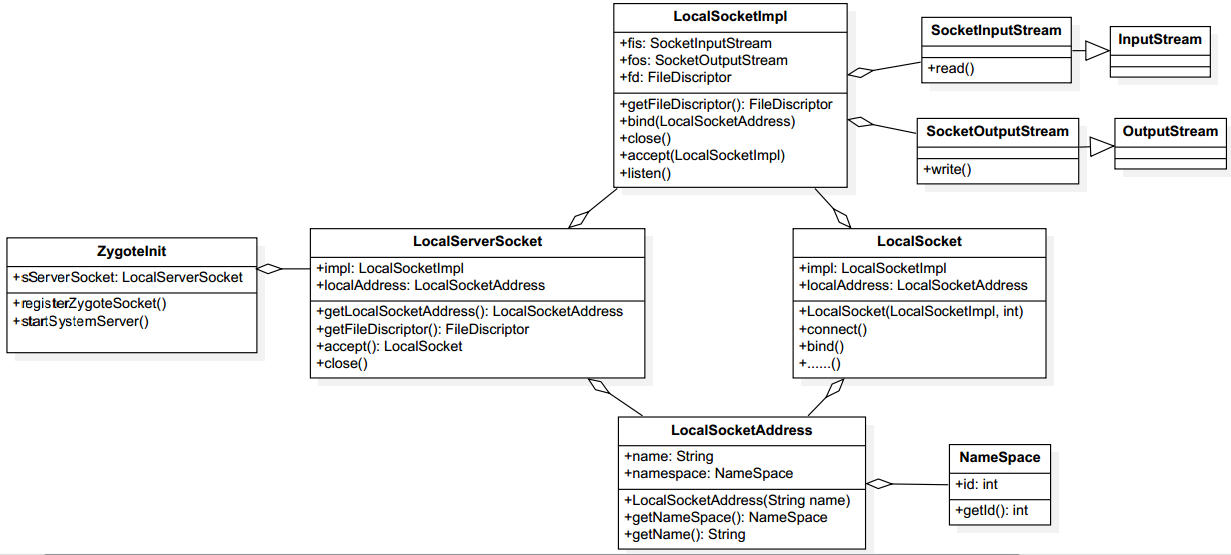
??與經典的socket服務端注冊過程對比如下表:
??至於socket的創建、綁定和監聽工作,LocalSocketImpl也是通過jni調用c層的socket API函數完成,這個部分略去了。
??到這裡,就將zygote的socket注冊成為服務端,ZygoteInit.sServerSocket就是位於服務端的zygote的socket。
然後就會調用startSystemServer來創建SystemServer進程。
[===>frameworks\base\core\java\com\android\internal\os\ZygoteInit.java]
static void preload() {

    preloadClasses();//預加載/system/etc/preloaded-classes文件中的類

    preloadResources();//預加載drawable和color資源

    preloadOpenGL();//預加載OpenGL

    preloadSharedLibraries();//通過System.loadLibrary的方式加載"android"、"compiler_rt"和"jnigraphics"共享庫
    preloadTextResources();
    // Ask the WebViewFactory to do any initialization that must run in the zygote process,
    // for memory sharing purposes.
    WebViewFactory.prepareWebViewInZygote();//在zygote進程中初始化WebView,用於內存共享

}
??這裡暫時要知道的有兩點:
-1、zygote在啟動過程中會通過Class.forName的方式預加載/system/etc/preloaded-classes文件中的類,該文件中指定的類有很多,因此如果需要優化開機時間的話,完全可以暫時不加載一些不必要的類,來達到縮短開機時間的目的;
-2、在preloadResources()預加載com.android.internal.R.array.preloaded_drawables和com.android.internal.R.array.preloaded_color_state_lists或者com.android.internal.R.array.preloaded_freeform_multi_window_drawables中指定的drawable和color資源。
[===>frameworks\base\core\java\com\android\internal\os\ZygoteInit.java]
/**
 * Startup class for the zygote process.
 *
 * Pre-initializes some classes, and then waits for commands on a UNIX domain
 * socket. Based on these commands, forks off child processes that inherit
 * the initial state of the VM.
 *
 * Please see {@link ZygoteConnection.Arguments} for documentation on the
 * client protocol.
 *
 * @hide
 */
public class ZygoteInit {
  ......

    /**
     * Prepare the arguments and fork for the system server process.
     */
    private static boolean startSystemServer(String abiList, String socketName)
            throws MethodAndArgsCaller, RuntimeException {
        long capabilities = posixCapabilitiesAsBits(
            OsConstants.CAP_BLOCK_SUSPEND,
            OsConstants.CAP_KILL,
            OsConstants.CAP_NET_ADMIN,
            OsConstants.CAP_NET_BIND_SERVICE,
            OsConstants.CAP_NET_BROADCAST,
            OsConstants.CAP_NET_RAW,
            OsConstants.CAP_SYS_MODULE,
            OsConstants.CAP_SYS_NICE,
            OsConstants.CAP_SYS_RESOURCE,
            OsConstants.CAP_SYS_TIME,
            OsConstants.CAP_SYS_TTY_CONFIG
        );
        /* Hardcoded command line to start the system server */
        String args[] = {//進行參數准備
            "--setuid=1000",//SystemServer進程uid
            "--setgid=1000",//SystemServer進程gid
            "--setgroups=1001,1002,1003,1004,1005,1006,1007,1008,1009,1010,1018,1032,3001,3002,3003,3006,3007",
            "--capabilities=" + capabilities + "," + capabilities,
            "--runtime-init",
            "--nice-name=system_server",//SystemServer進程名
            "com.android.server.SystemServer",//startClass名稱
        };
        ZygoteConnection.Arguments parsedArgs = null;

        int pid;

        try {
            parsedArgs = new ZygoteConnection.Arguments(args);
                ZygoteConnection.applyDebuggerSystemProperty(parsedArgs);
            ZygoteConnection.applyInvokeWithSystemProperty(parsedArgs);

            /* Request to fork the system server process */
            //對zygote進程進行fork,得到的子進程就是SystemServer進程,返回的子進程pid為0
            pid = Zygote.forkSystemServer(
                    parsedArgs.uid, parsedArgs.gid,
                    parsedArgs.gids,
                    parsedArgs.debugFlags,
                    null,
                    parsedArgs.permittedCapabilities,
                    parsedArgs.effectiveCapabilities);
        } catch (IllegalArgumentException ex) {
            throw new RuntimeException(ex);
        }

        /* For child process */
        if (pid == 0) {//此時處於SystemServer進程中
            if (hasSecondZygote(abiList)) {
                waitForSecondaryZygote(socketName);
            }

            handleSystemServerProcess(parsedArgs);//完成SystemServer進程的剩余工作
        }

        return true;
    }

  ......
}
??代碼首先通過ZygoteConnection來解析出將來創建SystemServer進程時所需的參數。除了能夠解析參數外,ZygoteConnection另外一個功能就是記錄zygote的socket套接字連接。
??准備參數並fork新進程,從上面可以看出system server進程參數信息為uid=1000,gid=1000,進程名為sytem_server,從zygote進程fork新進程後,需要關閉zygote原有的socket。另外,對於有兩個zygote進程情況,需等待第2個zygote創建完成。
??具體啟動SystemServer的流程,打算專門寫一篇文章來說明,這裡直接看ZygoteInit.runSelectLoop函數。
??在創建好SysteServer進程後,在SystemServer進程中調用handleSystemServerProcess處理。
Step 10. zygoteInit.handleSystemServerProcess
[===>frameworks\base\core\java\com\android\internal\os\ZygoteInit.java]
    /**
     * Finish remaining work for the newly forked system server process.
     */
    private static void handleSystemServerProcess(
            ZygoteConnection.Arguments parsedArgs)
            throws ZygoteInit.MethodAndArgsCaller {

        closeServerSocket();//SystemServer進程不需要接受socket請求

        // set umask to 0077 so new files and directories will default to owner-only permissions.
        Os.umask(S_IRWXG | S_IRWXO);

        if (parsedArgs.niceName != null) {
            Process.setArgV0(parsedArgs.niceName);
        }

        final String systemServerClasspath = Os.getenv("SYSTEMSERVERCLASSPATH");
        if (systemServerClasspath != null) {
            performSystemServerDexOpt(systemServerClasspath);
        }

        if (parsedArgs.invokeWith != null) {
            String[] args = parsedArgs.remainingArgs;
            // If we have a non-null system server class path, we'll have to duplicate the
            // existing arguments and append the classpath to it. ART will handle the classpath
            // correctly when we exec a new process.
            if (systemServerClasspath != null) {
                String[] amendedArgs = new String[args.length + 2];
                amendedArgs[0] = "-cp";
                amendedArgs[1] = systemServerClasspath;
                System.arraycopy(parsedArgs.remainingArgs, 0, amendedArgs, 2, parsedArgs.remainingArgs.length);
            }

            WrapperInit.execApplication(parsedArgs.invokeWith,
                    parsedArgs.niceName, parsedArgs.targetSdkVersion,
                    null, args);
        } else {
            ClassLoader cl = null;
            if (systemServerClasspath != null) {
                cl = new PathClassLoader(systemServerClasspath, ClassLoader.getSystemClassLoader());
                Thread.currentThread().setContextClassLoader(cl);
            }

            /*
             * Pass the remaining arguments to SystemServer.
             */
            RuntimeInit.zygoteInit(parsedArgs.targetSdkVersion, parsedArgs.remainingArgs, cl);
        }

        /* should never reach here */
    }
Step 11. RuntimeInit.zygoteInit
[===>frameworks\base\core\java\com\android\internal\os\RuntimeInit.java]
/**
 * Main entry point for runtime initialization.  Not for
 * public consumption.
 * @hide
 */
public class RuntimeInit {
  ......

    /**
     * The main function called when started through the zygote process. This
     * could be unified with main(), if the native code in nativeFinishInit()
     * were rationalized with Zygote startup.
* @param targetSdkVersion target SDK version * @param argv arg strings */ public static final void zygoteInit(int targetSdkVersion, String[] argv, ClassLoader classLoader) throws ZygoteInit.MethodAndArgsCaller { if (DEBUG) Slog.d(TAG, "RuntimeInit: Starting application from zygote"); redirectLogStreams(); commonInit();//常規的初始化 nativeZygoteInit();//bind通信機制的准備工作 applicationInit(targetSdkVersion, argv, classLoader); } ...... }
Step 11. RuntimeInit.applicationInit
[===>frameworks\base\core\java\com\android\internal\os\RuntimeInit.java]
    private static void applicationInit(int targetSdkVersion, String[] argv, ClassLoader classLoader)
            throws ZygoteInit.MethodAndArgsCaller {
        // If the application calls System.exit(), terminate the process
        // immediately without running any shutdown hooks.  It is not possible to
        // shutdown an Android application gracefully.  Among other things, the
        // Android runtime shutdown hooks close the Binder driver, which can cause
        // leftover running threads to crash before the process actually exits.
        nativeSetExitWithoutCleanup(true);

        // We want to be fairly aggressive about heap utilization, to avoid
        // holding on to a lot of memory that isn't needed.
        VMRuntime.getRuntime().setTargetHeapUtilization(0.75f);
        VMRuntime.getRuntime().setTargetSdkVersion(targetSdkVersion);

        final Arguments args;
        try {
            args = new Arguments(argv);
        } catch (IllegalArgumentException ex) {
            Slog.e(TAG, ex.getMessage());
            // let the process exit
            return;
        }

        // Remaining arguments are passed to the start class's static main
        invokeStaticMain(args.startClass, args.startArgs, classLoader);//args.startClass為"com.android.server.SystemServer"
    }
??最後調用了com.android.server.SystemServer類的main函數。
Step 12. SystemServer.main
??這裡就進行了SystemServer的初始化工作,這裡不重點分析。
??在啟動完成SystemServer後,就又執行了ZygoteInit.runSelectLoop函數。
[===>frameworks\base\core\java\com\android\internal\os\ZygoteInit.java]
    /**
     * Runs the zygote process's select loop. Accepts new connections as
     * they happen, and reads commands from connections one spawn-request's
     * worth at a time.
     *
     * @throws MethodAndArgsCaller in a child process when a main() should
     * be executed.
     */
    private static void runSelectLoop(String abiList) throws MethodAndArgsCaller {
        ArrayList fds = new ArrayList();
        ArrayList peers = new ArrayList();

        fds.add(sServerSocket.getFileDescriptor());//fds[0]為sServerSocket,即sServerSocket為位於zygote進程中的socket服務端;
        peers.add(null);

        while (true) {
            StructPollfd[] pollFds = new StructPollfd[fds.size()];
            for (int i = 0; i < pollFds.length; ++i) {
                pollFds[i] = new StructPollfd();
                pollFds[i].fd = fds.get(i);//pollFds[0].fd即為sServerSocket,位於zygote進程中的socket服務端
                pollFds[i].events = (short) POLLIN;
            }
            try {
                Os.poll(pollFds, -1);
            } catch (ErrnoException ex) {
                throw new RuntimeException("poll failed", ex);
            }
            for (int i = pollFds.length - 1; i >= 0; --i) {
                if ((pollFds[i].revents & POLLIN) == 0) {
                    continue;
                }
                if (i == 0) {
                    //客戶端第一次請求服務端,服務端調用accept與客戶端建立連接,客戶端在zygote中以ZygoteConnection對象表示。
                    ZygoteConnection newPeer = acceptCommandPeer(abiList);
                    peers.add(newPeer);
                    fds.add(newPeer.getFileDesciptor());
                } else {//經過上個if操作後,客戶端與服務端已經建立連接,並開始發送數據;peers.get(index)取得發送數據客戶端的ZygoteConnection對象,之後調用runOnce函數處理具體的請求。
                    boolean done = peers.get(i).runOnce();
                    if (done) {//請求處理完成之後,移除與該客戶端的連接
                        peers.remove(i);
                        fds.remove(i);
                    }
                }
            }
        }
    }
??runSelectLoop函數的邏輯比較簡單,主要有兩點:
??1. 處理客戶端的連接和請求。其中客戶端在zygote進程中使用ZygoteConnection對象表示。
??2. 客戶的請求經由ZygoteConnection的runOnce來處理。
??Zygote是在android系統中創建java世界的盤古,它創建了第一個java虛擬機。同時,它又是女娲,它成功的繁殖了framework的核心system_server進程。主要步驟如下:
??1. 創建AppRuntime對象,並調用其start函數。之後zygote的核心初始化都由AppRuntime中。
??2. 調用startVm創建java虛擬機,然後調用startReg來注冊JNI函數。
??3. 通過JNI調用com.android.internal.os.ZygoteInit類的main函數,從此進入了java世界。
??4. 調用registerZygoteSocket創建可以響應子孫後代請求的socket。同時,zygote調用preload函數預加載了常用的類、資源等,為java世界添磚加瓦。
??5. 調用startSystemServer函數分裂了一個子進程system_server來為java世界服務。
??6. Zygote完成了java世界的初創工作,便調用runSelectLoop來讓自己無限循環等待。之後,如果收到子孫後代的請求,它便會醒來為他們工作。
 仿映客送禮特效
仿映客送小禮物的特效,順便復習一下屬性動畫,話不多說先看效果圖。需求分析可以看到整個動畫有幾部分組成,那我們就把每個部分拆分出來各個擊破。1.要顯示那些內容以及內容間的位
 Android實戰之PreferenceActivity使用詳解
一、寫作前面 當我們做應用的時候,需要用戶配置一些信息,而這就是通常所說的應用設置。 對於Android系統來說,系統本身的設置帶來的用戶體驗和習慣已經深入人心,在我們
 深入理解ButterKnife源碼並掌握原理(一)
前言話說在android這座大山裡,有一座廟(方塊公司-square),廟裡住著一個神-jake(我是這麼叫的嘻嘻)。不要小看這個小jake,這個神可是為android應
 Android開發之Mediaplayer狀態轉換圖及音頻焦點
前言 之前博客裡已經將了MediaPlayer的簡單應用,如何使用MediaPlayer在Android應用中播放音頻。這篇博客在MediaPlayer使用的基礎