編輯:關於Android編程
我們寫程序的時候都希望能寫出一個沒有任何Bug的程序,期望在任何情況下都不會發生程序崩潰。不過理想是豐滿的,現實是骨感的。沒有一個程序員能保證自己寫的程序絕對不會出現異常崩潰。特別是針對用戶數達到幾十萬幾百萬的程序,當你用戶數達到一定數量級後,就算你的程序出現個別異常崩潰情況也不用驚訝。此時及時收集用戶的日志成了解決問題的關鍵。看了網上大部分是采用日志收集的第三方jar包來完成的,還有一種是自定義一個自己的CrashHandler實現UncaughtExceptionHandler接口來捕獲閃退信息然後上傳到自己的服務器。這樣的實現方式總覺得如果用戶誤刪了閃退的日志文件那麼就會導致無法及時上報閃退日志,也就無從分析隱藏的Bug了,於是采用另一種實現思路,即:在程序發生異常時提醒用戶發生了什麼樣的異常,同時把本次捕獲的Exception的字段寫入到自己定義的log文件中,然後上報異常字段到自己的異常服務器上,從手機端或者後台都可以看到發生的異常堆棧。日志記錄系統不借助與任何第三方jar包。說干就干,
項目目錄如下:
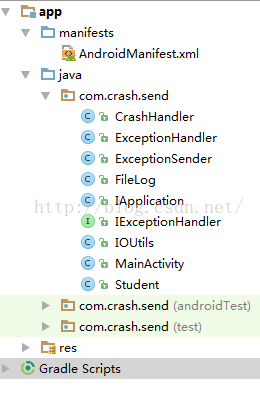
關鍵代碼如下:
1、定義IExceptionHandler接口
/** *異常處理類 * */ public interface IExceptionHandler { /** * 異常處理類. * @param t * @param db */ public String handlerException(Throwable t, SQLiteDatabase db); /** * 異常處理類. * @param t */ public String handlerException(Throwable t); /** * 異常處理類. * @param t */ public void sendException(Throwable t); /** * 給用戶提示 * @param errorMsg */ public void showTipMessgae(String errorMsg); }
2、定義ExceptionHandler實現自IExceptionHandler
/**
 * 異常處理類
 */

public class ExceptionHandler implements IExceptionHandler{

    private Context context;

    private ExceptionSender exceptionSender;

    public ExceptionHandler(Context context)
    {
        this.context = context;
        exceptionSender = new ExceptionSender(context);
    }

    @Override
    public String handlerException(Throwable t) {
        return handlerException(t, null);
    }

    @Override
    public String handlerException(Throwable exception, SQLiteDatabase db) {
        String message = "";
        if (exception instanceof ConnectException)
        {
            message = "網絡連接有問題!";
        }
        else if (exception instanceof SocketTimeoutException)
        {
            message = "連接超時!";
        }
        else if (exception instanceof NullPointerException)
        {
            message = "程序出錯,空指針錯誤!";
        }
        else if (exception instanceof IllegalArgumentException)
        {
            message = "程序出錯,錯誤的請求參數!";
        }
        else if (exception instanceof ArithmeticException)
        {
            message = "程序出錯,數值計算出錯!";
        }
        else if (exception instanceof NetworkOnMainThreadException)
        {
            message = "程序出錯,網絡請求放在主線程中運行!";
        }
        else if (exception instanceof IllegalStateException)
        {
            message = "程序出錯,網絡請求要放在主線程中運行!";
        }
        else if (exception instanceof IndexOutOfBoundsException)
        {
            message = "數組越界異常!";
        }
        else if (exception instanceof IOException)
        {
            message = "程序出錯,IO錯誤!";
        }
        else
        {
            message = exception.getMessage();
        }
        showTipMessgae(message);
        exceptionSender.send(exception);
        return message;
    }

    @Override
    public void sendException(Throwable t) {
        exceptionSender.send(t);
    }

    @Override
    public void showTipMessgae(final String msg)
    {
        if (context != null)
        {
            Toast.makeText(context, msg, Toast.LENGTH_SHORT).show();
        }
    }
}
3、在AndroidManifest.xml裡面配置自己的Application:IApplication,並在裡面初始化app日志文件目錄
public class IApplication extends Application{

    /**
     * 應用根目錄
     */
    private File rootFile;
    /**
     * log目錄
     */
    private File logFile;

    private static final SimpleDateFormat df = new SimpleDateFormat("yyyy-MM-dd");

    private static IApplication INSTANCE = null;

    public static IApplication getInstance()
    {
        return INSTANCE;
    }

    private FileLog fileLog;

    @Override
    public void onCreate() {
        super.onCreate();
        INSTANCE = this;
        initDataRoot();
        File log = new File(logFile, df.format(new Date()) + ".log");
        PrintWriter pw = null;
        try {
            pw = new PrintWriter(new FileOutputStream(log, true), true);
        } catch (FileNotFoundException e1) {
        }
        fileLog = new FileLog(pw);
        fileLog.setLevel(FileLog.LEVEL_INFO);//設置日志系統的等級
        CrashHandler crashHandler = CrashHandler.getInstance();
        crashHandler.init(this);
    }

    /**
     * 初始化log目錄
     */
    private void initDataRoot() {
        String state = android.os.Environment.getExternalStorageState();
        if (Environment.MEDIA_MOUNTED.equals(state)) {
            rootFile =new File(Environment.getExternalStorageDirectory(),"11");
            if (!rootFile.exists()) {
                rootFile.mkdirs();
            }
        }else {
            rootFile = getDatabasePath("11");
        }
        logFile = new File(rootFile, "logs");
        if (!logFile.exists()) {
            logFile.mkdirs();
        }
    }

    public FileLog getFileLog() {
        return fileLog;
    }
}
4、采用HTTP方式將實時catch的異常發送到異常服務器,並將異常的堆棧信息寫入到SDcard中
/** * 異常發送類 */ public class ExceptionSender { private Context context; private String url="你的收集異常信息的服務器的地址"; //版本名稱 private String app_name; //版本號 private String app_version; //設備名稱 private String device_name; //操作系統 private String os_name; //操作系統版本號 private String os_version; private ExecutorService cachedThreadPool = Executors.newCachedThreadPool(); private FileLog fileLog; public ExceptionSender(Context context) { init(context); this.context = context; this.fileLog = IApplication.getInstance().getFileLog(); } private void init(Context context) { PackageInfo packInfo; try { packInfo = context.getPackageManager().getPackageInfo(context.getPackageName(), 0); if (packInfo != null) { app_name = packInfo.packageName; app_version = packInfo.versionName; } device_name = android.os.Build.MODEL; os_name = "Android"; os_version = android.os.Build.VERSION.RELEASE; } catch (PackageManager.NameNotFoundException e) { } } /** * 發送錯誤信息到錯誤收集中心. * * @param ex */ public void send(final Throwable ex) { fileLog.e(ex.getClass().getSimpleName(), ex); cachedThreadPool.execute(new Runnable() { @Override public void run() { try { DefaultHttpClient httpClient = new DefaultHttpClient(); HttpPost httpPost = new HttpPost(url); ByteArrayOutputStream out = new ByteArrayOutputStream(); PrintStream ps = new PrintStream(out); ex.printStackTrace(ps); ps.flush(); String err_msg = new String(out.toByteArray(), "UTF-8"); Map params = new HashMap(); List parameters = new ArrayList(); addParameter(params, parameters, "class_name", ex.getClass().getSimpleName()); addParameter(params, parameters, "app_name", app_name); addParameter(params, parameters, "app_version", app_version); addParameter(params, parameters, "device_name", device_name); addParameter(params, parameters, "os_name", os_name); addParameter(params, parameters, "os_version", os_version); parameters.add(new BasicNameValuePair("err_msg", err_msg)); parameters.add(new BasicNameValuePair("stack_msg", "")); addParameter(params, parameters, "error_time", Long.toString(System.currentTimeMillis())); httpPost.setEntity(new UrlEncodedFormEntity(parameters, HTTP.UTF_8)); httpClient.execute(httpPost); } catch (Throwable e) { } } }); } private void addParameter(Map params, List parameters, String key, String value) { value = value == null ? "" : value; params.put(key, value); parameters.add(new BasicNameValuePair(key, value)); } }
4、使用方式:在程序裡面采用try catch捕獲可能會出現的異常的代碼塊(界面給出提示,程序不閃退),另一種是沒有進行try catch應用程序直接閃退
public class MainActivity extends AppCompatActivity implements View.OnClickListener{ private IExceptionHandler exceptionHandler; private Button btn1, btn2; private Student student; @Override protected void onCreate(Bundle savedInstanceState) { super.onCreate(savedInstanceState); setContentView(R.layout.activity_main); exceptionHandler = new ExceptionHandler(getApplicationContext()); btn1 = (Button)findViewById(R.id.button1); btn1.setOnClickListener(this); btn2 = (Button)findViewById(R.id.button2); btn2.setOnClickListener(this); } @Override public void onClick(View v) { switch (v.getId()){ case R.id.button1: try{//捕獲了異常,異常的堆棧信息寫入了SDcard中同時也上報到了後台 int m = 1/0; System.out.print(m); }catch (Exception e){ exceptionHandler..handlerException(e); } break; case R.id.button2://沒有捕獲異常,應用程序直接退了,異常的堆棧信息寫入了SDcard中同時也上報到了後台 System.out.print(student.getId()); break; } } }
 android imageButton 使用透明圖片
在Android上有很多不規則按鈕。如: vcv7o6zV4rj2yrG68s7Sw8e74beiz9ajrLu5w7vT0LTvtb3SqrXE0Ke5+6Osu7nT
 android之App Widget開發實例代碼解析
Android Widget開發案例實現是本文要介紹的內容,主要是來了解並學習Android Widget開發應用,今天我們要寫一下Android Widget的開發,由
 Android編程開發之TextView單擊鏈接彈出Activity的方法
本文實例講述了Android編程開發之TextView單擊鏈接彈出Activity的方法。分享給大家供大家參考,具體如下:話不多說直接上碼:核心源碼:package co
 【Android】實現底部彈出PopupWindow並讓背景逐漸變暗
在android開發中,經常需要通過點擊某個按鈕彈出對話框或者選擇框,通過Dialog或者PopupMenu、PopupWindow都能實現。這裡主要介紹後兩者:Popu