編輯:關於Android編程
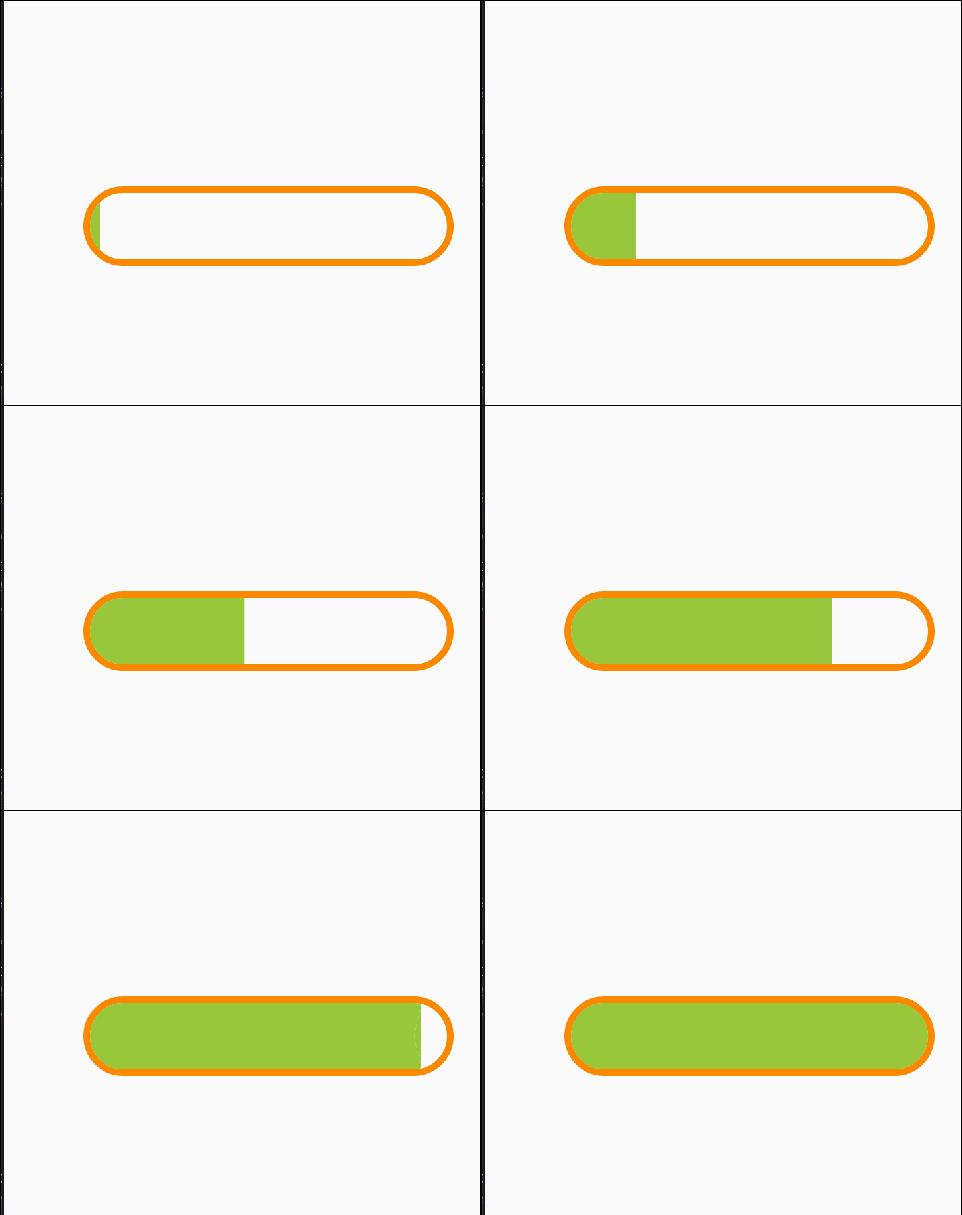
1、首先繪制得底部的邊框:
左右兩個半圓環,中間上下兩條平行線
                  //邊框背景
        mPaint.setColor(mProgressBankgroundColor);
        mPaint.setStrokeWidth(mProgressBarFrameHeight);
        //移動到第一個半圓圓心
        canvas.translate(mRadius + mProgressBarFrameHeight, mProgressBarHeight / 2);
        switch (mProgressBarBankgroundStyle) {
            case SOLID:
                //進度條實心
                mPaint.setStyle(Paint.Style.FILL);
                canvas.drawCircle(0, 0, mRadius, mPaint);
                RectF rectF_Center = new RectF(0, -mRadius, mRectWidth, mRadius);
                canvas.drawRect(rectF_Center, mPaint);
                canvas.drawCircle(mRectWidth, 0, mRadius, mPaint);
                break;
            case SOLID_AND_FRAME:
                //進度條實心加邊框
                mPaint.setStyle(Paint.Style.FILL);//FILL_AND_STROKE畫時候  筆觸右半邊會和內容重合 差一半筆觸!!!
                float radiusTemp = mRadius + mProgressBarFrameHeight;
                canvas.drawCircle(0, 0, radiusTemp, mPaint);
                RectF rectF = new RectF(0, -radiusTemp, mRectWidth, radiusTemp);
                canvas.drawRect(rectF, mPaint);
                canvas.drawCircle(mRectWidth, 0, radiusTemp, mPaint);
                break;
            case HOLLOW:
                //進度條空心
                mPaint.setStyle(Paint.Style.STROKE);//STROKE畫時候  筆觸右半邊會和內容重合 差一半筆觸!!!
                //
                //畫 左邊半圓環
                float newRadius = mRadius + mProgressBarFrameHeight / 2;
                RectF rectF_Left_Right = new RectF(-newRadius, -newRadius, newRadius, newRadius);
                canvas.drawArc(rectF_Left_Right, mStartAngle_LeftArc, 180, false, mPaint);
                canvas.save();
                canvas.translate(mRectWidth, 0);
                //畫 右邊半圓環
                canvas.drawArc(rectF_Left_Right, -mStartAngle_LeftArc, 180, false, mPaint);
                canvas.restore();
                //畫 兩條平行線
                canvas.drawLine(0, -newRadius, mRectWidth, -newRadius, mPaint);
                canvas.drawLine(0, newRadius, mRectWidth, newRadius, mPaint);
                break;
        }
2、繪制中間的填充進度
(1)畫半圓左側的任意部分,畫個坐標系方便理解
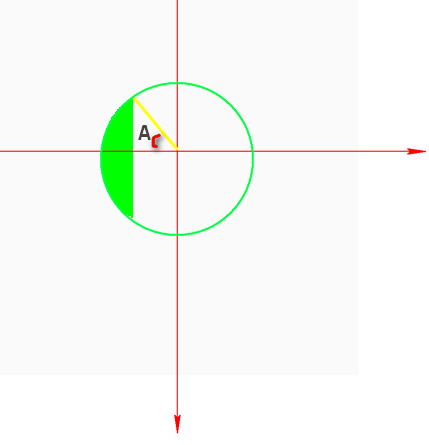
        float progressBarWidthNowTemp = mProgressLoadingWidth < mRadius ? mProgressLoadingWidth : mRadius;//當前進度條不能超過左邊圓的半徑
        float leftArcWidth = progressBarWidthNowTemp;
        RectF rectF = new RectF(-mRadius, -mRadius, mRadius, mRadius);
        /**
         * ∠A 指的是  x軸和豎直切線的夾角  demo圖見 https://code.aliyun.com/hi31588535/outside_chain/raw/master/blog_custom_view_show_pic.png
         */
        double LinBian = mRadius - leftArcWidth;//直角三角形∠A鄰邊
        double cosValue = LinBian / mRadius;//cosA=鄰邊/斜邊

        double radian = Math.acos(cosValue);//反余弦   返回值單位是弧度
        // 用角度表示的角
        double angle = Math.toDegrees(radian);//轉化角度

        float startAngle = (float) (mStartAngle_LeftArc + (90 - angle));
        float sweepAngle = (float) angle * 2;

        // Log.d(TAG, "onDraw: angle" + angle);//直角三角形 銳角A (∠A的) sinA=對邊/斜邊  cosA=鄰邊/斜邊  tanA=對邊/鄰邊
        canvas.drawArc(rectF, startAngle, sweepAngle, false, mPaint);
(2)畫中間矩形部分
  float rectAndLeftArcMaxWidth = mProgressMaxWidth - mRadius;//所有進度條減去右邊 就是左邊和矩形

        float progressBarWidthNowTemp = mProgressLoadingWidth < rectAndLeftArcMaxWidth ? mProgressLoadingWidth : rectAndLeftArcMaxWidth;
        float rectWidth = progressBarWidthNowTemp - mRadius;//當前進度條減去左邊半圓

        rectWidth = rectWidth < rectAndLeftArcMaxWidth ? rectWidth : rectAndLeftArcMaxWidth;
        RectF rectFCenter = new RectF(0, -mRadius, rectWidth, mRadius);
        canvas.drawRect(rectFCenter, mPaint);
(3)畫半圓右側的任意部分 分2個圓弧 1個三角形
ps:這裡直接放在之前畫好的坐標系上,將就看看吧
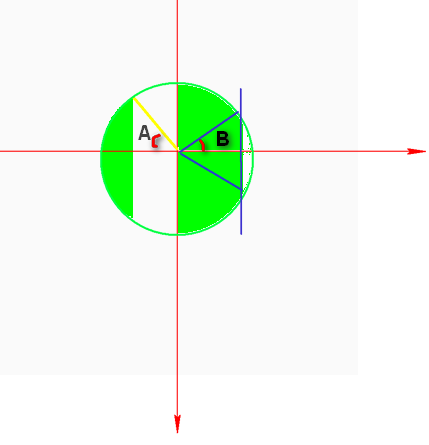
  float rectAndLeftArcMaxWidth = mProgressMaxWidth - mRadius;//所有進度條減去右邊 就是左邊和矩形

        float progressBarWidthNowTemp = mProgressLoadingWidth < mProgressMaxWidth ? mProgressLoadingWidth : mProgressMaxWidth;

        float rightArcWidth = progressBarWidthNowTemp - rectAndLeftArcMaxWidth;//當前進度條減去左邊半圓和矩形

        float rectWidth = rectAndLeftArcMaxWidth - mRadius;

        canvas.translate(rectWidth, 0);//

        RectF rectF = new RectF(-mRadius, -mRadius, mRadius, mRadius);

        double LinBian = rightArcWidth;//直角三角形∠B鄰邊
        double cosValue = LinBian / mRadius;//cosB=鄰邊/斜邊

        double radian = Math.acos(cosValue);//反余弦   返回值單位是弧度
        // 用角度表示的角
        double angle = Math.toDegrees(radian);//轉化角度

        float sweepAngle = (float) (90 - angle);

        float startAngleOne = (float) mStartAngle_RightArc_One;
        float startAngleTwo = (float) (mStartAngle_RightArc_Two + angle);


        canvas.drawArc(rectF, startAngleOne, sweepAngle, true, mPaint);//繪制上面的圓弧
        canvas.drawArc(rectF, startAngleTwo, sweepAngle, true, mPaint);//繪制下面的圓弧

        //畫三角形
        Path pathTriangle = new Path();
        double DuiBian = Math.sqrt((mRadius * mRadius - LinBian * LinBian));//開平方   鄰邊的平方加上對邊的平方的斜邊的平方
        pathTriangle.moveTo(0, 0);
        pathTriangle.lineTo((float) LinBian, (float) DuiBian);
        pathTriangle.lineTo((float) LinBian, -(float) DuiBian);
        pathTriangle.close();
        canvas.drawPath(pathTriangle, mPaint);
3、另外控制進度改變的code,通過ValueAnimator 動畫 0-1執行 更新回調返回的值用來充當進度變化0-1,期間不斷的執行重繪(可選,只是自動設置進度)
  ValueAnimator valueAnimator = ValueAnimator.ofFloat(0f, 1f).setDuration(mDuration);
        valueAnimator.addUpdateListener(new ValueAnimator.AnimatorUpdateListener() {
            @Override
            public void onAnimationUpdate(ValueAnimator valueAnimator) {
                mProgress = (float) valueAnimator.getAnimatedValue();
                invalidate();
            }
        });
        valueAnimator.start();
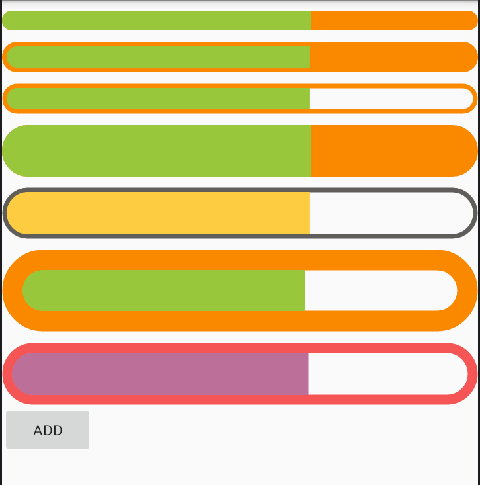
4、附加2個樣式,code見完整代碼:
SOLID
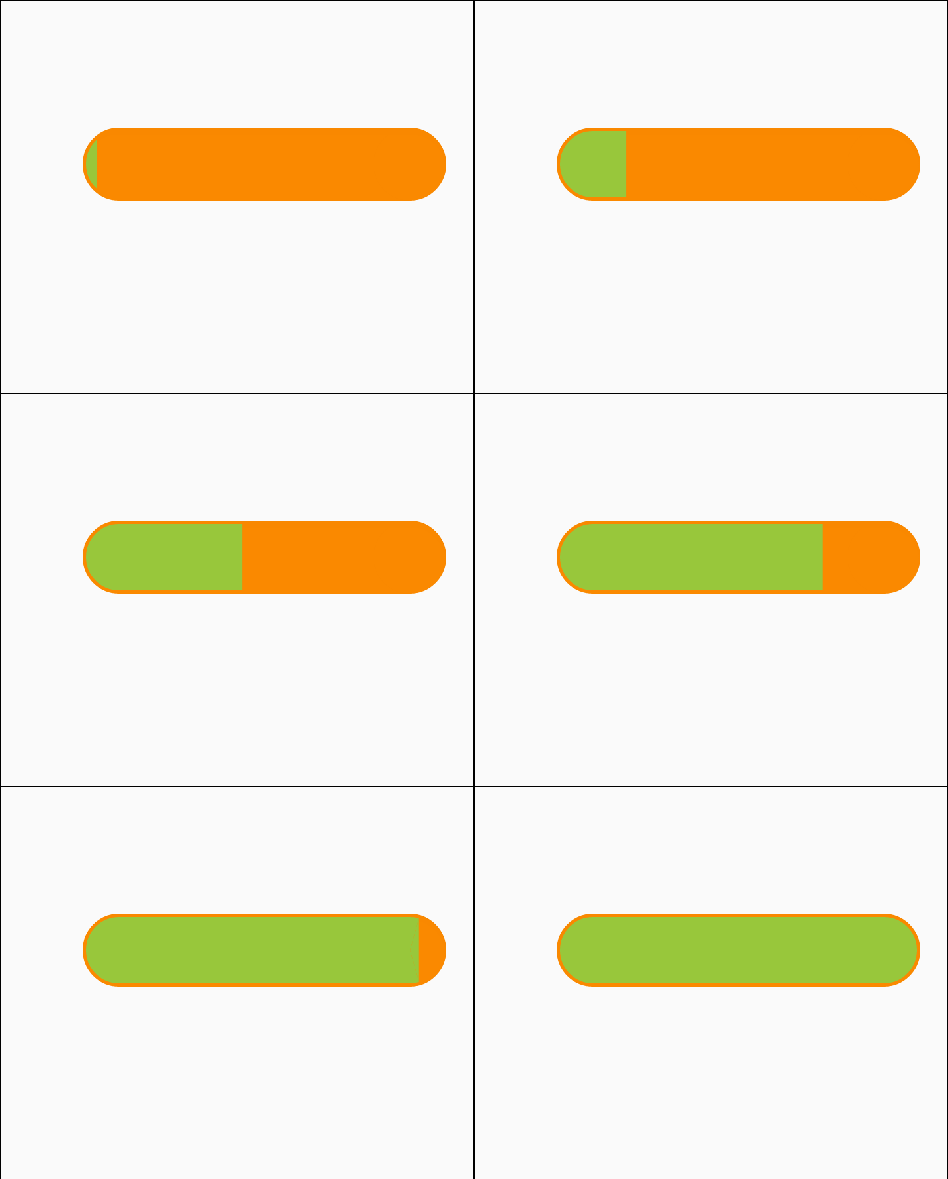
SOLID_AND_FRAME:
demo圖
5、完整代碼
package com.louisgeek.louiscustomviewstudy;

import android.animation.ValueAnimator;
import android.content.Context;
import android.content.res.Resources;
import android.content.res.TypedArray;
import android.graphics.Canvas;
import android.graphics.Color;
import android.graphics.Paint;
import android.graphics.Path;
import android.graphics.RectF;
import android.util.AttributeSet;
import android.util.DisplayMetrics;
import android.util.Log;
import android.util.TypedValue;
import android.view.View;

/**
 * Created by louisgeek on 2016/10/19.
 */
public class LoadingCustomView04 extends View {
    private static final String TAG = "LoadingCustomView04";

    private static final int PROGRESSBAR_WIDTH = 550;
    /*進度條樣式*/
    public static final int SOLID = 1;//實心
    public static final int SOLID_AND_FRAME = 2;//實心加邊框
    public static final int HOLLOW = 3;//空心

    /***/
    private int mStartAngle_LeftArc = 90;//左邊半圓或弧度的初始角度
    private int mStartAngle_RightArc_One = -90;//右邊半圓或弧度上面的那部分的初始角度
    private int mStartAngle_RightArc_Two = 0;//右邊半圓或弧度下面的那部分的初始角度


    private int mProgressBankgroundColor = Color.parseColor("#FA8900");
    private int mProgressColor = Color.parseColor("#98C73B");
    private float mProgress;//當前的進度
    private int mProgressBarFrameHeight = this.dp2px(5);
    private int mProgressBarBankgroundStyle = SOLID;//默認實心
    private int mProgressBarHeight = this.dp2px(20);//進度條總高度
    private int mProgressBarWidth = PROGRESSBAR_WIDTH;//進度條總長度
    //
    private boolean mHasCoordinate = false;//是否繪制參考坐標系

    /***/
    private Paint mPaint;
    private int mViewWidth, mViewHeight;
    private int mScreenWidth, mScreenHeight;
    private boolean mHasBankground = true;//是否繪制背景
    private float mProgressMaxWidth;//進度最大寬度
    private float mProgressLoadingWidth;//當前進度條寬度

    private float mOneArcProgress;//半圓占用的最大的進度
    private float mRectWidth;//進度條中間矩形的最大寬度
    private int mProgressBarWidthWithoutFrame;
    private int mProgressBarHeightWithoutFrame;

    private float mRadius;//進度條內左右兩個半圓的最大半徑

    private int mDuration = 5 * 1000;//動畫執行時間
    private Context mContext;

    public LoadingCustomView04(Context context) {
        this(context, null);
    }

    public LoadingCustomView04(Context context, AttributeSet attrs) {
        this(context, attrs, 0);
    }

    public LoadingCustomView04(Context context, AttributeSet attrs, int defStyleAttr) {
        super(context, attrs, defStyleAttr);
        mContext = context;

        TypedArray ta = getContext().obtainStyledAttributes(attrs, R.styleable.LoadingCustomView04);
        mProgressBankgroundColor = ta.getColor(R.styleable.LoadingCustomView04_progressBankgroundColor, mProgressBankgroundColor);
        mProgressColor = ta.getColor(R.styleable.LoadingCustomView04_progressColor, mProgressColor);
        mProgress = ta.getFloat(R.styleable.LoadingCustomView04_progress, mProgress);
        mProgress=mProgress/100;//目標進度0-1
        mProgressBarFrameHeight = ta.getDimensionPixelOffset(R.styleable.LoadingCustomView04_progressBarFrameHeight, mProgressBarFrameHeight);
        mProgressBarBankgroundStyle = ta.getInteger(R.styleable.LoadingCustomView04_progressBarBankgroundStyle, mProgressBarBankgroundStyle);
        //
        ta.recycle();

        init();
    }

    private void init() {
        mPaint = new Paint();
        mPaint.setAntiAlias(true);
        /*mPaint.setStyle(Paint.Style.FILL);
        mPaint.setStrokeWidth(mStrokeWidth);
        mPaint.setColor(Color.GREEN);*/

        mScreenWidth = getScreenWidth(mContext);
        Log.d(TAG, "init: mScreenWidth:" + mScreenWidth);
        mScreenHeight = getScreenHeight(mContext);
        Log.d(TAG, "init: mScreenHeight:" + mScreenHeight);

        ValueAnimator valueAnimator = ValueAnimator.ofFloat(0f, 1f).setDuration(mDuration);
        valueAnimator.addUpdateListener(new ValueAnimator.AnimatorUpdateListener() {
            @Override
            public void onAnimationUpdate(ValueAnimator valueAnimator) {
                //##mProgress = (float) valueAnimator.getAnimatedValue();
                //invalidate();
            }
        });
        valueAnimator.start();
    }

    @Override
    protected void onMeasure(int widthMeasureSpec, int heightMeasureSpec) {
        super.onMeasure(widthMeasureSpec, heightMeasureSpec);
        // mWidth =getMeasuredWidth();
        //mHeight = getMeasuredHeight();
        int widthSize = MeasureSpec.getSize(widthMeasureSpec);
        int heightSize = MeasureSpec.getSize(heightMeasureSpec);
        int width = resolveSize(widthSize, widthMeasureSpec);
        int height = resolveSize(heightSize, heightMeasureSpec);


        //
        mViewWidth = width;
        mViewHeight = height>width?width:height;//
        //
        mProgressBarWidth = mViewWidth;
        mProgressBarHeight = mViewHeight;
        setMeasuredDimension(width, mViewHeight);
    }

    @Override
    protected void onDraw(Canvas canvas) {
        super.onDraw(canvas);

        if (mHasCoordinate) {
            drawCoordinate(canvas);
            drawCoordinateOnCenter(canvas);
        }
        //
        switch (mProgressBarBankgroundStyle) {
            case SOLID:
                mProgressBarFrameHeight = 0;
                break;
            case SOLID_AND_FRAME:
                //mProgressBarFrameHeight=0;
                break;
            case HOLLOW:
                //mProgressBarFrameHeight=0;
                break;
        }
        /**
         * 處理筆觸的大小
         */
        mProgressBarWidthWithoutFrame = mProgressBarWidth - mProgressBarFrameHeight * 2;//不包含邊框的進度條寬
        mProgressBarHeightWithoutFrame = mProgressBarHeight - mProgressBarFrameHeight * 2;//不包含邊框的進度條高
        //
        mRadius = mProgressBarHeightWithoutFrame / 2;
        //
        mRectWidth = mProgressBarWidthWithoutFrame - 2 * mRadius;//矩形的寬度
        mProgressMaxWidth = mProgressBarWidthWithoutFrame;
        mOneArcProgress = mRadius / mProgressBarWidth;//半圓最大的 進度
        if (mHasBankground) {
            drawBankground(canvas);
        }


        mProgressLoadingWidth = mProgressMaxWidth * mProgress;

        mPaint.setStyle(Paint.Style.FILL);
        mPaint.setColor(mProgressColor);
        //

        //canvas.translate(-(mRadiusMax-mArcLeftWidth),0);//向左偏移半圓剩余的寬  保證左邊對齊

        if (mProgress <= 0){
            return;
        }
        if (mProgress <= mOneArcProgress) {
            drawLeftArc(canvas);

        } else if (mProgress > mOneArcProgress && mProgress <= (1 - mOneArcProgress)) {
            drawLeftArc(canvas);
            drawCenterRect(canvas);

        } else {
            drawLeftArc(canvas);
            drawCenterRect(canvas);
            drawRightArc(canvas);
        }
        // Log.d(TAG, "onDraw: mProgressNow:"+mProgressNow);

    }

    /**
     * 畫默認坐標系
     *
     * @param canvas
     */
    private void drawCoordinate(Canvas canvas) {
        mPaint.setStyle(Paint.Style.FILL_AND_STROKE);
        mPaint.setColor(Color.RED);
        mPaint.setStrokeWidth(6f);
        canvas.drawLine(0, 0, mViewWidth, 0, mPaint);//X 軸
        canvas.drawLine(0, 0, 0, mViewHeight, mPaint);//y 軸
    }

    /**
     * 畫居中坐標系
     *
     * @param canvas
     */
    private void drawCoordinateOnCenter(Canvas canvas) {
        canvas.save();
        canvas.translate(mViewWidth / 2, mViewHeight / 2);
        mPaint.setStyle(Paint.Style.FILL_AND_STROKE);
        mPaint.setColor(Color.YELLOW);
        mPaint.setStrokeWidth(6f);
        canvas.drawLine(-mViewWidth / 2, 0, mViewWidth / 2, 0, mPaint);//X 軸
        canvas.drawLine(0, -mViewHeight / 2, 0, mViewHeight / 2, mPaint);//y 軸
        canvas.restore();
    }

    /**
     * 畫邊框背景
     */
    private void drawBankground(Canvas canvas) {
        //邊框背景
        mPaint.setColor(mProgressBankgroundColor);
        mPaint.setStrokeWidth(mProgressBarFrameHeight);
        //移動到第一個半圓圓心
        canvas.translate(mRadius + mProgressBarFrameHeight, mProgressBarHeight / 2);
        switch (mProgressBarBankgroundStyle) {
            case SOLID:
                //進度條實心
                mPaint.setStyle(Paint.Style.FILL);
                canvas.drawCircle(0, 0, mRadius, mPaint);
                RectF rectF_Center = new RectF(0, -mRadius, mRectWidth, mRadius);
                canvas.drawRect(rectF_Center, mPaint);
                canvas.drawCircle(mRectWidth, 0, mRadius, mPaint);
                break;
            case SOLID_AND_FRAME:
                //進度條實心加邊框
                mPaint.setStyle(Paint.Style.FILL);//FILL_AND_STROKE畫時候  筆觸右半邊會和內容重合 差一半筆觸!!!
                float radiusTemp = mRadius + mProgressBarFrameHeight;
                canvas.drawCircle(0, 0, radiusTemp, mPaint);
                RectF rectF = new RectF(0, -radiusTemp, mRectWidth, radiusTemp);
                canvas.drawRect(rectF, mPaint);
                canvas.drawCircle(mRectWidth, 0, radiusTemp, mPaint);
                break;
            case HOLLOW:
                //進度條空心
                mPaint.setStyle(Paint.Style.STROKE);//STROKE畫時候  筆觸右半邊會和內容重合 差一半筆觸!!!
                //
                //畫 左邊半圓環
                float newRadius = mRadius + mProgressBarFrameHeight / 2;
                RectF rectF_Left_Right = new RectF(-newRadius, -newRadius, newRadius, newRadius);
                canvas.drawArc(rectF_Left_Right, mStartAngle_LeftArc, 180, false, mPaint);
                canvas.save();
                canvas.translate(mRectWidth, 0);
                //畫 右邊半圓環
                canvas.drawArc(rectF_Left_Right, -mStartAngle_LeftArc, 180, false, mPaint);
                canvas.restore();
                //畫 兩條平行線
                canvas.drawLine(0, -newRadius, mRectWidth, -newRadius, mPaint);
                canvas.drawLine(0, newRadius, mRectWidth, newRadius, mPaint);
                break;
        }
    }

    /**
     * 畫半圓左側的任意部分
     */
    private void drawLeftArc(Canvas canvas) {

        float progressBarWidthNowTemp = mProgressLoadingWidth < mRadius ? mProgressLoadingWidth : mRadius;//當前進度條不能超過左邊圓的半徑
        float leftArcWidth = progressBarWidthNowTemp;
        RectF rectF = new RectF(-mRadius, -mRadius, mRadius, mRadius);
        /**
         * ∠A 指的是  x軸和豎直切線的夾角  demo圖見 https://code.aliyun.com/hi31588535/outside_chain/raw/master/blog_custom_view_show_pic.png
         */
        double LinBian = mRadius - leftArcWidth;//直角三角形∠A鄰邊
        double cosValue = LinBian / mRadius;//cosA=鄰邊/斜邊

        double radian = Math.acos(cosValue);//反余弦   返回值單位是弧度
        // 用角度表示的角
        double angle = Math.toDegrees(radian);//轉化角度

        float startAngle = (float) (mStartAngle_LeftArc + (90 - angle));
        float sweepAngle = (float) angle * 2;

        // Log.d(TAG, "onDraw: angle" + angle);//直角三角形 銳角A (∠A的) sinA=對邊/斜邊  cosA=鄰邊/斜邊  tanA=對邊/鄰邊
        canvas.drawArc(rectF, startAngle, sweepAngle, false, mPaint);
    }

    /**
     * 畫中間矩形部分
     */
    private void drawCenterRect(Canvas canvas) {
        float rectAndLeftArcMaxWidth = mProgressMaxWidth - mRadius;//所有進度條減去右邊 就是左邊和矩形

        float progressBarWidthNowTemp = mProgressLoadingWidth < rectAndLeftArcMaxWidth ? mProgressLoadingWidth : rectAndLeftArcMaxWidth;
        float rectWidth = progressBarWidthNowTemp - mRadius;//當前進度條減去左邊半圓

        rectWidth = rectWidth < rectAndLeftArcMaxWidth ? rectWidth : rectAndLeftArcMaxWidth;
        RectF rectFCenter = new RectF(0, -mRadius, rectWidth, mRadius);
        canvas.drawRect(rectFCenter, mPaint);
    }

    /**
     * 畫半圓右側的任意部分  分2個圓弧  1個三角形  demo圖 見https://code.aliyun.com/hi31588535/outside_chain/raw/master/blog_custom_view_show_pic2.png
     */
    private void drawRightArc(Canvas canvas) {
        float rectAndLeftArcMaxWidth = mProgressMaxWidth - mRadius;//所有進度條減去右邊 就是左邊和矩形

        float progressBarWidthNowTemp = mProgressLoadingWidth < mProgressMaxWidth ? mProgressLoadingWidth : mProgressMaxWidth;

        float rightArcWidth = progressBarWidthNowTemp - rectAndLeftArcMaxWidth;//當前進度條減去左邊半圓和矩形

        float rectWidth = rectAndLeftArcMaxWidth - mRadius;

        canvas.translate(rectWidth, 0);//

        RectF rectF = new RectF(-mRadius, -mRadius, mRadius, mRadius);

        double LinBian = rightArcWidth;//直角三角形∠B鄰邊
        double cosValue = LinBian / mRadius;//cosB=鄰邊/斜邊

        double radian = Math.acos(cosValue);//反余弦   返回值單位是弧度
        // 用角度表示的角
        double angle = Math.toDegrees(radian);//轉化角度

        float sweepAngle = (float) (90 - angle);

        float startAngleOne = (float) mStartAngle_RightArc_One;
        float startAngleTwo = (float) (mStartAngle_RightArc_Two + angle);


        canvas.drawArc(rectF, startAngleOne, sweepAngle, true, mPaint);//繪制上面的圓弧
        canvas.drawArc(rectF, startAngleTwo, sweepAngle, true, mPaint);//繪制下面的圓弧

        //畫三角形
        Path pathTriangle = new Path();
        double DuiBian = Math.sqrt((mRadius * mRadius - LinBian * LinBian));//開平方   鄰邊的平方加上對邊的平方的斜邊的平方
        pathTriangle.moveTo(0, 0);
        pathTriangle.lineTo((float) LinBian, (float) DuiBian);
        pathTriangle.lineTo((float) LinBian, -(float) DuiBian);
        pathTriangle.close();
        canvas.drawPath(pathTriangle, mPaint);

    }

    public void setProgress(float progress) {
        mProgress = progress/100;
        invalidate();
    }

    public void setProgressBarBankgroundStyle(int progressBarBankgroundStyle) {
        mProgressBarBankgroundStyle = progressBarBankgroundStyle;
        invalidate();
    }

    public void setProgressColor(int progressColor) {
        mProgressColor = progressColor;
        invalidate();
    }

    public void setProgressBankgroundColor(int progressBankgroundColor) {
        mProgressBankgroundColor = progressBankgroundColor;
        invalidate();
    }
    public void setProgressBarFrameHeight(int progressBarFrameHeight) {
        mProgressBarFrameHeight = progressBarFrameHeight;
        invalidate();
    }

    //
    public int dp2px(int dpValue) {
        int px = (int) TypedValue.applyDimension(TypedValue.COMPLEX_UNIT_DIP, dpValue, getResources().getDisplayMetrics());
        return px;
    }

    //獲取屏幕的寬度
    public static int getScreenWidth(Context context) {
        Resources resources = context.getResources();
        DisplayMetrics displayMetrics = resources.getDisplayMetrics();
        float density = displayMetrics.density;
        int width = displayMetrics.widthPixels;
        int height = displayMetrics.heightPixels;
        return width;
    }

    //獲取屏幕的高度
    public static int getScreenHeight(Context context) {
        Resources resources = context.getResources();
        DisplayMetrics displayMetrics = resources.getDisplayMetrics();
        float density = displayMetrics.density;
        int width = displayMetrics.widthPixels;
        int height = displayMetrics.heightPixels;
        return height;
    }
}
 Android ContentProvider獲取手機聯系人實例
在做項目的時候,因為要用到我們自動獲取聯系人的姓名和電話,就想到了ContentProvider分享數據的功能,這樣做既節省了時間,也減少了我們輸入錯誤號碼的幾率,所以,
 Android學習之SQL基礎使用
SQLITE 構化查詢語言 (Structured Query Language)是什麼SQLite是一個輕量型的數據庫。怎麼樣輕量級 : SQLite數據庫是一個輕量級
 android快捷方式shortcut 管理
如下58同城快捷方式的效果: /** * 啟動某個activity是需要在manifest裡面定義 */ private void addShortCut
 Android實現登陸頁logo隨鍵盤收放動態伸縮(完美解決鍵盤彈出遮擋控件的問題)
在最近的兩個項目中,項目需求要求我們實現 /*登陸頁面的內容能夠隨著鍵盤的彈出而被頂上去,避免鍵盤遮擋住登陸按鈕*/ 這樣的效果,寶寶心裡苦呀,本來半天搞定的事還非得折騰