編輯:關於Android編程
1、獲取升級包,可以從服務端下載,也可以直接拷貝到SD卡中
2、獲取升級包路徑,驗證簽名,通過installPackage接口升級
3、系統重啟進入Recovery模式
4、在install.cpp進行升級操作
5、try_update_binary執行升級腳本
6、finish_recovery,重啟一、獲取升級包,可以從服務端下載,也可以直接拷貝到SD卡中 假設SD卡中已有升級包update.zip 二、獲取升級包路徑,驗證簽名,通過installPackage接口升級
1、調用RecoverySystem類提供的verifyPackage方法進行簽名驗證
    public static void verifyPackage(File packageFile,
                                     ProgressListener listener,
                                     File deviceCertsZipFile)
        throws IOException, GeneralSecurityException
簽名驗證函數,實現過程就不貼出來了,參數, packageFile--升級文件 listener--進度監督器 deviceCertsZipFile--簽名文件,如果為空,則使用系統默認的簽名 只有當簽名驗證正確才返回,否則將拋出異常。 在Recovery模式下進行升級時候也是會進行簽名驗證的,如果這裡先不進行驗證也不會有什麼問題。但是我們建議在重啟前,先驗證,以便及早發現問題。 如果簽名驗證沒有問題,就執行installPackage開始升級。 2、installPackage開始升級 如果簽名驗證沒有問題,就進行重啟升級,
    public static void installPackage(Context context, File packageFile)
        throws IOException {
        String filename = packageFile.getCanonicalPath();
        Log.w(TAG, "!!! REBOOTING TO INSTALL " + filename + " !!!");

        final String filenameArg = "--update_package=" + filename;
        final String localeArg = "--locale=" + Locale.getDefault().toString();
        bootCommand(context, filenameArg, localeArg);
    }
這裡定義了兩個參數,我們接著看,
    private static void bootCommand(Context context, String... args) throws IOException {
        RECOVERY_DIR.mkdirs();  // In case we need it
        COMMAND_FILE.delete();  // In case it's not writable
        LOG_FILE.delete();

        FileWriter command = new FileWriter(COMMAND_FILE);
        try {
            for (String arg : args) {
                if (!TextUtils.isEmpty(arg)) {
                    command.write(arg);
                    command.write("\n");
                }
            }
        } finally {
            command.close();
        }

        // Having written the command file, go ahead and reboot
        PowerManager pm = (PowerManager) context.getSystemService(Context.POWER_SERVICE);
        pm.reboot(PowerManager.REBOOT_RECOVERY);

        throw new IOException("Reboot failed (no permissions?)");
    }
創建目錄/cache/recovery/,command文件保存在該目錄下;如果存在command文件,將其刪除;然後將上面一步生成的兩個參數寫入到command文件。 最後重啟設備,重啟過程就不再詳述了。 三、系統重啟進入Recovery模式 系統重啟時會判斷/cache/recovery目錄下是否有command文件,如果存在就進入recovery模式,否則就正常啟動。 進入到Recovery模式下,將執行recovery.cpp的main函數,下面貼出關鍵代碼片段,
    int arg;
    while ((arg = getopt_long(argc, argv, "", OPTIONS, NULL)) != -1) {
        switch (arg) {
        case 's': send_intent = optarg; break;
        case 'u': update_package = optarg; break;
        case 'w': wipe_data = wipe_cache = 1; break;
        case 'c': wipe_cache = 1; break;
        case 't': show_text = 1; break;
        case 'x': just_exit = true; break;
        case 'l': locale = optarg; break;
        case 'g': {
            if (stage == NULL || *stage == '\0') {
                char buffer[20] = "1/";
                strncat(buffer, optarg, sizeof(buffer)-3);
                stage = strdup(buffer);
            }
            break;
        }
        case 'p': shutdown_after = true; break;
        case 'r': reason = optarg; break;
        case '?':
            LOGE("Invalid command argument\n");
            continue;
        }
    }
這是一個While循環,用來讀取recovery的command參數,OPTIONS的不同選項定義如下,
static const struct option OPTIONS[] = {
  { "send_intent", required_argument, NULL, 's' },
  { "update_package", required_argument, NULL, 'u' },
  { "wipe_data", no_argument, NULL, 'w' },
  { "wipe_cache", no_argument, NULL, 'c' },
  { "show_text", no_argument, NULL, 't' },
  { "just_exit", no_argument, NULL, 'x' },
  { "locale", required_argument, NULL, 'l' },
  { "stages", required_argument, NULL, 'g' },
  { "shutdown_after", no_argument, NULL, 'p' },
  { "reason", required_argument, NULL, 'r' },
  { NULL, 0, NULL, 0 },
};
顯然,根據第二步寫入的命令文件內容,將為update_package 賦值。
接著看,
    if (update_package) {
        // For backwards compatibility on the cache partition only, if
        // we're given an old 'root' path "CACHE:foo", change it to
        // "/cache/foo".
        if (strncmp(update_package, "CACHE:", 6) == 0) {
            int len = strlen(update_package) + 10;
            char* modified_path = (char*)malloc(len);
            strlcpy(modified_path, "/cache/", len);
            strlcat(modified_path, update_package+6, len);
            printf("(replacing path \"%s\" with \"%s\")\n",
                   update_package, modified_path);
            update_package = modified_path;
        }
    }
兼容性處理。
    int status = INSTALL_SUCCESS;

    if (update_package != NULL) {
        status = install_package(update_package, &wipe_cache, TEMPORARY_INSTALL_FILE, true);
        if (status == INSTALL_SUCCESS && wipe_cache) {
            if (erase_volume("/cache")) {
                LOGE("Cache wipe (requested by package) failed.");
            }
        }
        if (status != INSTALL_SUCCESS) {
            ui->Print("Installation aborted.\n");

            // If this is an eng or userdebug build, then automatically
            // turn the text display on if the script fails so the error
            // message is visible.
            char buffer[PROPERTY_VALUE_MAX+1];
            property_get("ro.build.fingerprint", buffer, "");
            if (strstr(buffer, ":userdebug/") || strstr(buffer, ":eng/")) {
                ui->ShowText(true);
            }
        }
    } else if (wipe_data) {
        if (device->WipeData()) status = INSTALL_ERROR;
        if (erase_volume("/data")) status = INSTALL_ERROR;
        if (wipe_cache && erase_volume("/cache")) status = INSTALL_ERROR;
        if (erase_persistent_partition() == -1 ) status = INSTALL_ERROR;
        if (status != INSTALL_SUCCESS) ui->Print("Data wipe failed.\n");
    } else if (wipe_cache) {
        if (wipe_cache && erase_volume("/cache")) status = INSTALL_ERROR;
        if (status != INSTALL_SUCCESS) ui->Print("Cache wipe failed.\n");
    } else if (!just_exit) {
        status = INSTALL_NONE;  // No command specified
        ui->SetBackground(RecoveryUI::NO_COMMAND);
    }
update_package不為空,執行install_package方法。
我們也可以看到擦除數據、緩存的實現也是在這個裡執行的,這裡就不展開了。
四、在install.cpp進行升級操作
具體的升級過程都是在install.cpp中執行的,先看install_package方法,
int
install_package(const char* path, int* wipe_cache, const char* install_file,
                bool needs_mount)
{
    FILE* install_log = fopen_path(install_file, "w");
    if (install_log) {
        fputs(path, install_log);
        fputc('\n', install_log);
    } else {
        LOGE("failed to open last_install: %s\n", strerror(errno));
    }
    int result;
    if (setup_install_mounts() != 0) {
        LOGE("failed to set up expected mounts for install; aborting\n");
        result = INSTALL_ERROR;
    } else {
        result = really_install_package(path, wipe_cache, needs_mount);
    }
    if (install_log) {
        fputc(result == INSTALL_SUCCESS ? '1' : '0', install_log);
        fputc('\n', install_log);
        fclose(install_log);
    }
    return result;
}
這個方法中首先創建了log文件,升級過程包括出錯的信息都會寫到這個文件中,便於後續的分析工作。繼續跟進,really_install_package,
static int
really_install_package(const char *path, int* wipe_cache, bool needs_mount)
{
    ui->SetBackground(RecoveryUI::INSTALLING_UPDATE);
    ui->Print("Finding update package...\n");
    // Give verification half the progress bar...
    ui->SetProgressType(RecoveryUI::DETERMINATE);
    ui->ShowProgress(VERIFICATION_PROGRESS_FRACTION, VERIFICATION_PROGRESS_TIME);
    LOGI("Update location: %s\n", path);

    // Map the update package into memory.
    ui->Print("Opening update package...\n");

    if (path && needs_mount) {
        if (path[0] == '@') {
            ensure_path_mounted(path+1);
        } else {
            ensure_path_mounted(path);
        }
    }

    MemMapping map;
    if (sysMapFile(path, &map) != 0) {
        LOGE("failed to map file\n");
        return INSTALL_CORRUPT;
    }

    // 裝入簽名文件
    int numKeys;
    Certificate* loadedKeys = load_keys(PUBLIC_KEYS_FILE, &numKeys);
    if (loadedKeys == NULL) {
        LOGE("Failed to load keys\n");
        return INSTALL_CORRUPT;
    }
    LOGI("%d key(s) loaded from %s\n", numKeys, PUBLIC_KEYS_FILE);

    ui->Print("Verifying update package...\n");

    // 驗證簽名
    int err;
    err = verify_file(map.addr, map.length, loadedKeys, numKeys);
    free(loadedKeys);
    LOGI("verify_file returned %d\n", err);
    // 簽名失敗的處理
    if (err != VERIFY_SUCCESS) {
        LOGE("signature verification failed\n");
        sysReleaseMap(&map);
        return INSTALL_CORRUPT;
    }

    /* Try to open the package.
     */
    // 打開升級包
    ZipArchive zip;
    err = mzOpenZipArchive(map.addr, map.length, &zip);
    if (err != 0) {
        LOGE("Can't open %s\n(%s)\n", path, err != -1 ? strerror(err) : "bad");
        sysReleaseMap(&map);
        return INSTALL_CORRUPT;
    }

    /* Verify and install the contents of the package.
     */
    ui->Print("Installing update...\n");
    ui->SetEnableReboot(false);
    // 執行升級腳本文件,開始升級
    int result = try_update_binary(path, &zip, wipe_cache);
    ui->SetEnableReboot(true);
    ui->Print("\n");

    sysReleaseMap(&map);

    return result;
}
該方法主要做了三件事 1、驗證簽名
    int numKeys;
    Certificate* loadedKeys = load_keys(PUBLIC_KEYS_FILE, &numKeys);
    if (loadedKeys == NULL) {
        LOGE("Failed to load keys\n");
        return INSTALL_CORRUPT;
    }
裝載簽名文件,如果為空 ,終止升級;
    int err;
    err = verify_file(map.addr, map.length, loadedKeys, numKeys);
    free(loadedKeys);
    LOGI("verify_file returned %d\n", err);
    // 簽名失敗的處理
    if (err != VERIFY_SUCCESS) {
        LOGE("signature verification failed\n");
        sysReleaseMap(&map);
        return INSTALL_CORRUPT;
    }
調用verify_file進行簽名驗證,這個方法定義在verifier.cpp文件中,此處不展開,如果驗證失敗立即終止升級。
2、讀取升級包信息
    ZipArchive zip;
    err = mzOpenZipArchive(map.addr, map.length, &zip);
    if (err != 0) {
        LOGE("Can't open %s\n(%s)\n", path, err != -1 ? strerror(err) : "bad");
        sysReleaseMap(&map);
        return INSTALL_CORRUPT;
    }
執行mzOpenZipArchive方法,打開升級包並掃描,將包的內容拷貝到變量zip中,該變量將作為參數用來執行升級腳本。
int result = try_update_binary(path, &zip, wipe_cache);
try_update_binary方法用來處理升級包,執行制作升級包中的腳本文件update_binary,進行系統更新。
// If the package contains an update binary, extract it and run it.
static int
try_update_binary(const char *path, ZipArchive *zip, int* wipe_cache) {
	// 檢查update-binary是否存在
    const ZipEntry* binary_entry =
            mzFindZipEntry(zip, ASSUMED_UPDATE_BINARY_NAME);
    if (binary_entry == NULL) {
        mzCloseZipArchive(zip);
        return INSTALL_CORRUPT;
    }

    const char* binary = "/tmp/update_binary";
    unlink(binary);
    int fd = creat(binary, 0755);
    if (fd < 0) {
        mzCloseZipArchive(zip);
        LOGE("Can't make %s\n", binary);
        return INSTALL_ERROR;
    }
    // update-binary拷貝到"/tmp/update_binary"
    bool ok = mzExtractZipEntryToFile(zip, binary_entry, fd);
    close(fd);
    mzCloseZipArchive(zip);

    if (!ok) {
        LOGE("Can't copy %s\n", ASSUMED_UPDATE_BINARY_NAME);
        return INSTALL_ERROR;
    }

    // 創建管道,用於下面的子進程和父進程之間的通信
    int pipefd[2];
    pipe(pipefd);

    // When executing the update binary contained in the package, the
    // arguments passed are:
    //
    //   - the version number for this interface
    //
    //   - an fd to which the program can write in order to update the
    //     progress bar.  The program can write single-line commands:
    //
    //        progress
    //            fill up the next  part of of the progress bar
    //            over  seconds.  If  is zero, use
    //            set_progress commands to manually control the
    //            progress of this segment of the bar
    //
    //        set_progress
    //             should be between 0.0 and 1.0; sets the
    //            progress bar within the segment defined by the most
    //            recent progress command.
    //
    //        firmware <"hboot"|"radio">
    //            arrange to install the contents of  in the
    //            given partition on reboot.
    //
    //            (API v2:  may start with "PACKAGE:" to
    //            indicate taking a file from the OTA package.)
    //
    //            (API v3: this command no longer exists.)
    //
    //        ui_print
    //            display  on the screen.
    //
    //   - the name of the package zip file.
    //

    const char** args = (const char**)malloc(sizeof(char*) * 5);
    args[0] = binary;
    args[1] = EXPAND(RECOVERY_API_VERSION);   // defined in Android.mk
    char* temp = (char*)malloc(10);
    sprintf(temp, "%d", pipefd[1]);
    args[2] = temp;
    args[3] = (char*)path;
    args[4] = NULL;

    // 創建子進程。負責執行binary腳本
    pid_t pid = fork();
    if (pid == 0) {
        umask(022);
        close(pipefd[0]);
        execv(binary, (char* const*)args);// 執行binary腳本
        fprintf(stdout, "E:Can't run %s (%s)\n", binary, strerror(errno));
        _exit(-1);
    }
    close(pipefd[1]);

    *wipe_cache = 0;

    // 父進程負責接受子進程發送的命令去更新ui顯示
    char buffer[1024];
    FILE* from_child = fdopen(pipefd[0], "r");
    while (fgets(buffer, sizeof(buffer), from_child) != NULL) {
        char* command = strtok(buffer, " \n");
        if (command == NULL) {
            continue;
        } else if (strcmp(command, "progress") == 0) {
            char* fraction_s = strtok(NULL, " \n");
            char* seconds_s = strtok(NULL, " \n");

            float fraction = strtof(fraction_s, NULL);
            int seconds = strtol(seconds_s, NULL, 10);

            ui->ShowProgress(fraction * (1-VERIFICATION_PROGRESS_FRACTION), seconds);
        } else if (strcmp(command, "set_progress") == 0) {
            char* fraction_s = strtok(NULL, " \n");
            float fraction = strtof(fraction_s, NULL);
            ui->SetProgress(fraction);
        } else if (strcmp(command, "ui_print") == 0) {
            char* str = strtok(NULL, "\n");
            if (str) {
                ui->Print("%s", str);
            } else {
                ui->Print("\n");
            }
            fflush(stdout);
        } else if (strcmp(command, "wipe_cache") == 0) {
            *wipe_cache = 1;
        } else if (strcmp(command, "clear_display") == 0) {
            ui->SetBackground(RecoveryUI::NONE);
        } else if (strcmp(command, "enable_reboot") == 0) {
            // packages can explicitly request that they want the user
            // to be able to reboot during installation (useful for
            // debugging packages that don't exit).
            ui->SetEnableReboot(true);
        } else {
            LOGE("unknown command [%s]\n", command);
        }
    }
    fclose(from_child);

    int status;
    waitpid(pid, &status, 0);
    if (!WIFEXITED(status) || WEXITSTATUS(status) != 0) {
        LOGE("Error in %s\n(Status %d)\n", path, WEXITSTATUS(status));
        return INSTALL_ERROR;
    }

    return INSTALL_SUCCESS;
}
try_update_binary函數,是真正實現讀取升級包中的腳本文件並執行相應的函數的地方。在此函數中,通過調用fork函數創建出一個子進程,在子進程中開始讀取並執行升級腳本文件。在此需要注意的是函數fork的用法,fork被調用一次,將做兩次返回,在父進程中返回的是子進程的進程ID,為正數;而在子進程中,則返回0。子進程創建成功後,開始執行升級代碼,並通過管道與父進程交互,父進程則通過讀取子進程傳遞過來的信息更新UI。
六、finish_recovery,重啟 上一步完成之後,回到main函數,
    // Save logs and clean up before rebooting or shutting down.
    finish_recovery(send_intent);
保存升級過程中的log,清除臨時文件,包括command文件(不清除的話,下次重啟還會進入recovery模式),最後重啟。
以上就是升級的一個流程。
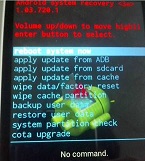
手動升級的流程也基本差不多,通過power key + volume上鍵組合,進入recovery模式,進入prompt_and_wait函數等待用戶按鍵事件。
recovery.cpp的main函數,
    Device::BuiltinAction after = shutdown_after ? Device::SHUTDOWN : Device::REBOOT;
    if (status != INSTALL_SUCCESS || ui->IsTextVisible()) {
        Device::BuiltinAction temp = prompt_and_wait(device, status);
        if (temp != Device::NO_ACTION) after = temp;
    }
根據用戶選擇進入到相應的分支進行處理,如下圖,
        int chosen_item = get_menu_selection(headers, device->GetMenuItems(), 0, 0, device);

        // device-specific code may take some action here.  It may
        // return one of the core actions handled in the switch
        // statement below.
        Device::BuiltinAction chosen_action = device->InvokeMenuItem(chosen_item);
            case Device::APPLY_EXT: {
                ensure_path_mounted(SDCARD_ROOT);
                char* path = browse_directory(SDCARD_ROOT, device);
                if (path == NULL) {
                    ui->Print("\n-- No package file selected.\n", path);
                    break;
                }

                ui->Print("\n-- Install %s ...\n", path);
                set_sdcard_update_bootloader_message();
                void* token = start_sdcard_fuse(path);

                int status = install_package(FUSE_SIDELOAD_HOST_PATHNAME, &wipe_cache,
                                             TEMPORARY_INSTALL_FILE, false);

                finish_sdcard_fuse(token);
                ensure_path_unmounted(SDCARD_ROOT);

                if (status == INSTALL_SUCCESS && wipe_cache) {
                    ui->Print("\n-- Wiping cache (at package request)...\n");
                    if (erase_volume("/cache")) {
                        ui->Print("Cache wipe failed.\n");
                    } else {
                        ui->Print("Cache wipe complete.\n");
                    }
                }

                if (status >= 0) {
                    if (status != INSTALL_SUCCESS) {
                        ui->SetBackground(RecoveryUI::ERROR);
                        ui->Print("Installation aborted.\n");
                    } else if (!ui->IsTextVisible()) {
                        return Device::NO_ACTION;  // reboot if logs aren't visible
                    } else {
                        ui->Print("\nInstall from sdcard complete.\n");
                    }
                }
                break;
            }
char*path=browse_directory(SDCARD_ROOT,device);這個函數浏覽SD card下的文件,並把路徑記錄下來,然後根據名稱排序,並處理用戶按鍵。
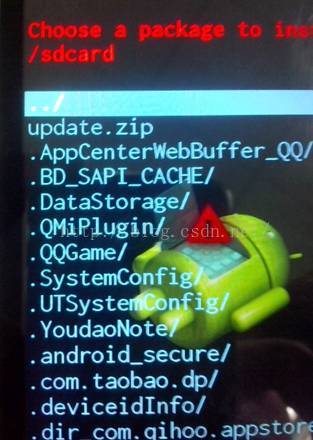
·當用戶選擇第一個條目“../”,直接跳轉到上級目錄,並且繼續浏覽文件
·當用戶選擇的條目以"/"開頭,直接進入子目錄
·其它情況表明,該條目就是zip包.寫入BCB,copy更新包至臨時目錄,直接轉入install_package
選擇zip包後,同樣也是執行install_package函數,後面與自動升級的流程是一樣的。
    int status = install_package(FUSE_SIDELOAD_HOST_PATHNAME, &wipe_cache,
                                             TEMPORARY_INSTALL_FILE, false);
 深入理解Android事件分發機制
Android事件分發,參考了網上的很多資料。基本基於android2.2的源碼來分析,因為即使是新的版本,裡面的原理思想也沒有改變。有了大神的肩膀,我在理解了其原理的基
 Android Studio EditText點擊圖標清除文本內容的實例解析
這篇文章是繼自定義EditText樣式之後的功能強化,對於實際應用項目有很大的參考意見,感興趣的朋友可以移步上一篇,”Android Studion自定義Ed
 Android編程布局(Layout)之AbsoluteLayout用法實例分析
本文實例講述了Android編程布局(Layout)之AbsoluteLayout用法。分享給大家供大家參考,具體如下:AbsoluteLayout,顧名思義,就是絕對位
 Android Fragment 詳解 2016 干貨
最近看了很多動畫和一些效果很好的自定義控件,發現了一件事,就是Android的View層設計思想和古老的JavaSwing是如此的相似。這是在原來的基礎上加入了一些輸入移