編輯:關於Android編程
不是自己不想總結,是因為這篇博客總結的太好了,自己總結估計總結不到這麼全。所以轉來分享。謝謝該博主的共享精神。開篇如下:
在Android中實現異步任務機制有兩種方式,Handler和AsyncTask。
Handler模式需要為每一個任務創建一個新的線程,任務完成後通過Handler實例向UI線程發送消息,完成界面的更新,這種方式對於整個過程的控制比較精細,但也是有缺點的,例如代碼相對臃腫,在多個任務同時執行時,不易對線程進行精確的控制。
為了簡化操作,Android1.5提供了工具類android.os.AsyncTask,它使創建異步任務變得更加簡單,不再需要編寫任務線程和Handler實例即可完成相同的任務。
先來看看AsyncTask的定義:
publicabstractclassAsyncTask三種泛型類型分別代表“啟動任務執行的輸入參數”、“後台任務執行的進度”、“後台計算結果的類型”。在特定場合下,並不是所有類型都被使用,如果沒有被使用,可以用java.lang.Void類型代替。
一個異步任務的執行一般包括以下幾個步驟:
1.execute(Params... params),執行一個異步任務,需要我們在代碼中調用此方法,觸發異步任務的執行。
2.onPreExecute(),在execute(Params... params)被調用後立即執行,一般用來在執行後台任務前對UI做一些標記。
3.doInBackground(Params... params),在onPreExecute()完成後立即執行,用於執行較為費時的操作,此方法將接收輸入參數和返回計算結果。在執行過程中可以調用publishProgress(Progress... values)來更新進度信息。
4.onProgressUpdate(Progress... values),在調用publishProgress(Progress... values)時,此方法被執行,直接將進度信息更新到UI組件上。
5.onPostExecute(Result result),當後台操作結束時,此方法將會被調用,計算結果將做為參數傳遞到此方法中,直接將結果顯示到UI組件上。
在使用的時候,有幾點需要格外注意:
1.異步任務的實例必須在UI線程中創建。
2.execute(Params... params)方法必須在UI線程中調用。
3.不要手動調用onPreExecute(),doInBackground(Params... params),onProgressUpdate(Progress... values),onPostExecute(Result result)這幾個方法。
4.不能在doInBackground(Params... params)中更改UI組件的信息。
5.一個任務實例只能執行一次,如果執行第二次將會拋出異常。
接下來,我們來看看如何使用AsyncTask執行異步任務操作,我們先建立一個項目,結構如下:
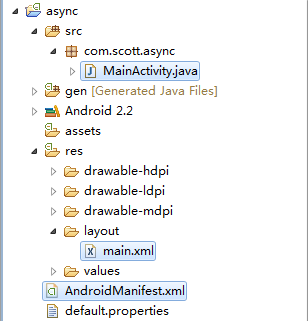
結構相對簡單一些,讓我們先看看MainActivity.java的代碼:
    package com.scott.async;

    import java.io.ByteArrayOutputStream;
    import java.io.InputStream;

    import org.apache.http.HttpEntity;
    import org.apache.http.HttpResponse;
    import org.apache.http.HttpStatus;
    import org.apache.http.client.HttpClient;
    import org.apache.http.client.methods.HttpGet;
    import org.apache.http.impl.client.DefaultHttpClient;

    import android.app.Activity;
    import android.os.AsyncTask;
    import android.os.Bundle;
    import android.util.Log;
    import android.view.View;
    import android.widget.Button;
    import android.widget.ProgressBar;
    import android.widget.TextView;

    public class MainActivity extends Activity {

        private static final String TAG = "ASYNC_TASK";

        private Button execute;
        private Button cancel;
        private ProgressBar progressBar;
        private TextView textView;

        private MyTask mTask;

        @Override
        public void onCreate(Bundle savedInstanceState) {
            super.onCreate(savedInstanceState);
            setContentView(R.layout.main);

            execute = (Button) findViewById(R.id.execute);
            execute.setOnClickListener(new View.OnClickListener() {
                @Override
                public void onClick(View v) {
                    //注意每次需new一個實例,新建的任務只能執行一次,否則會出現異常
                    mTask = new MyTask();
                    mTask.execute("http://www.baidu.com");

                    execute.setEnabled(false);
                    cancel.setEnabled(true);
                }
            });
            cancel = (Button) findViewById(R.id.cancel);
            cancel.setOnClickListener(new View.OnClickListener() {
                @Override
                public void onClick(View v) {
                    //取消一個正在執行的任務,onCancelled方法將會被調用
                    mTask.cancel(true);
                }
            });
            progressBar = (ProgressBar) findViewById(R.id.progress_bar);
            textView = (TextView) findViewById(R.id.text_view);

        }

        private class MyTask extends AsyncTask {
            //onPreExecute方法用於在執行後台任務前做一些UI操作
            @Override
            protected void onPreExecute() {
                Log.i(TAG, "onPreExecute() called");
                textView.setText("loading...");
            }

            //doInBackground方法內部執行後台任務,不可在此方法內修改UI
            @Override
            protected String doInBackground(String... params) {
                Log.i(TAG, "doInBackground(Params... params) called");
                try {
                    HttpClient client = new DefaultHttpClient();
                    HttpGet get = new HttpGet(params[0]);
                    HttpResponse response = client.execute(get);
                    if (response.getStatusLine().getStatusCode() == HttpStatus.SC_OK) {
                        HttpEntity entity = response.getEntity();
                        InputStream is = entity.getContent();
                        long total = entity.getContentLength();
                        ByteArrayOutputStream baos = new ByteArrayOutputStream();
                        byte[] buf = new byte[1024];
                        int count = 0;
                        int length = -1;
                        while ((length = is.read(buf)) != -1) {
                            baos.write(buf, 0, length);
                            count += length;
                            //調用publishProgress公布進度,最後onProgressUpdate方法將被執行
                            publishProgress((int) ((count / (float) total) * 100));
                            //為了演示進度,休眠500毫秒
                            Thread.sleep(500);
                        }
                        return new String(baos.toByteArray(), "gb2312");
                    }
                } catch (Exception e) {
                    Log.e(TAG, e.getMessage());
                }
                return null;
            }

            //onProgressUpdate方法用於更新進度信息
            @Override
            protected void onProgressUpdate(Integer... progresses) {
                Log.i(TAG, "onProgressUpdate(Progress... progresses) called");
                progressBar.setProgress(progresses[0]);
                textView.setText("loading..." + progresses[0] + "%");
            }

            //onPostExecute方法用於在執行完後台任務後更新UI,顯示結果
            @Override
            protected void onPostExecute(String result) {
                Log.i(TAG, "onPostExecute(Result result) called");
                textView.setText(result);

                execute.setEnabled(true);
                cancel.setEnabled(false);
            }

            //onCancelled方法用於在取消執行中的任務時更改UI
            @Override
            protected void onCancelled() {
                Log.i(TAG, "onCancelled() called");
                textView.setText("cancelled");
                progressBar.setProgress(0);

                execute.setEnabled(true);
                cancel.setEnabled(false);
            }
        }
    }
布局文件main.xml代碼如下:
    private static abstract class WorkerRunnable implements Callable {
        Params[] mParams;
    }
而mFuture實際上是java.util.concurrent.FutureTask的實例,下面是它的FutureTask類的相關信息:
    /**
     * A cancellable asynchronous computation.
     * ...
     */
    public class FutureTask implements RunnableFuture {
    public interface RunnableFuture extends Runnable, Future {
        /**
         * Sets this Future to the result of its computation
         * unless it has been cancelled.
         */
        void run();
    }
下面是mWorker和mFuture實例在AsyncTask中的體現:
    private final WorkerRunnable mWorker;
    private final FutureTask mFuture;

    public AsyncTask() {
        mWorker = new WorkerRunnable() {
            //call方法被調用後,將設置優先級為後台級別,然後調用AsyncTask的doInBackground方法
            public Result call() throws Exception {
                Process.setThreadPriority(Process.THREAD_PRIORITY_BACKGROUND);
                return doInBackground(mParams);
            }
        };

        //在mFuture實例中,將會調用mWorker做後台任務,完成後會調用done方法
        mFuture = new FutureTask(mWorker) {
            @Override
            protected void done() {
                Message message;
                Result result = null;

                try {
                    result = get();
                } catch (InterruptedException e) {
                    android.util.Log.w(LOG_TAG, e);
                } catch (ExecutionException e) {
                    throw new RuntimeException("An error occured while executing doInBackground()",
                            e.getCause());
                } catch (CancellationException e) {
                    //發送取消任務的消息
                    message = sHandler.obtainMessage(MESSAGE_POST_CANCEL,
                            new AsyncTaskResult(AsyncTask.this, (Result[]) null));
                    message.sendToTarget();
                    return;
                } catch (Throwable t) {
                    throw new RuntimeException("An error occured while executing "
                            + "doInBackground()", t);
                }

                //發送顯示結果的消息
                message = sHandler.obtainMessage(MESSAGE_POST_RESULT,
                        new AsyncTaskResult(AsyncTask.this, result));
                message.sendToTarget();
            }
        };
    }
    private static final int MESSAGE_POST_RESULT = 0x1; //顯示結果
    private static final int MESSAGE_POST_PROGRESS = 0x2;   //更新進度
    private static final int MESSAGE_POST_CANCEL = 0x3; //取消任務

    private static final InternalHandler sHandler = new InternalHandler();

    private static class InternalHandler extends Handler {
        @SuppressWarnings({"unchecked", "RawUseOfParameterizedType"})
        @Override
        public void handleMessage(Message msg) {
            AsyncTaskResult result = (AsyncTaskResult) msg.obj;
            switch (msg.what) {
                case MESSAGE_POST_RESULT:
                    // There is only one result
                    //調用AsyncTask.finish方法
                    result.mTask.finish(result.mData[0]);
                    break;
                case MESSAGE_POST_PROGRESS:
                    //調用AsyncTask.onProgressUpdate方法
                    result.mTask.onProgressUpdate(result.mData);
                    break;
                case MESSAGE_POST_CANCEL:
                    //調用AsyncTask.onCancelled方法
                    result.mTask.onCancelled();
                    break;
            }
        }
    }
    private void finish(Result result) {
        if (isCancelled()) result = null;
        onPostExecute(result);  //調用onPostExecute顯示結果
        mStatus = Status.FINISHED;  //改變狀態為FINISHED
    }
另外,在mFuture對象的done()方法裡,構建一個消息時,這個消息包含了一個AsyncTaskResult類型的對象,然後在sHandler實例對象的handleMessage(Message msg)方法裡,使用下面這種方式取得消息中附帶的對象:
AsyncTaskResult result = (AsyncTaskResult) msg.obj;
    @SuppressWarnings({"RawUseOfParameterizedType"})
    private static class AsyncTaskResult {
        final AsyncTask mTask;
        final Data[] mData;

        AsyncTaskResult(AsyncTask task, Data... data) {
            mTask = task;
            mData = data;
        }
    }
    //發送取消任務的消息
    message = sHandler.obtainMessage(MESSAGE_POST_CANCEL,
            new AsyncTaskResult(AsyncTask.this, (Result[]) null));
    message.sendToTarget();


    //發送顯示結果的消息
    message = sHandler.obtainMessage(MESSAGE_POST_RESULT,
             new AsyncTaskResult(AsyncTask.this, result));
    message.sendToTarget();
在處理消息時是如何使用這個對象呢,我們再來看一下:
result.mTask.finish(result.mData[0]);
result.mTask.onProgressUpdate(result.mData);
經過上面的介紹,相信朋友們都已經認識到AsyncTask的本質了,它對Thread+Handler的良好封裝,減少了開發者處理問題的復雜度,提高了開發效率,希望朋友們能多多體會一下。
 Android文件夾管理器源碼實現
一、資源管理器介紹現在在一些移動終端上面都會有自帶的資源管理器,其實其並非是Android系統自帶,而是手機產商與app開發商的合作而導致融合,借助第三方的開發軟件預裝在
 Android - 通過Intent啟動Activity
通過Intent啟動Activity 為了動態關聯Activity界面,使用Intent啟動,可以靈活綁定。 在Intent靜態
 Android項目——傳感器的使用
public classvc3Ryb25nPiBNYWluQWN0aXZpdHkgPHN0cm9uZz5leHRlbmRzPC9zdHJvbmc+IEFjdGl2
 微信刪除好友對方知道嗎?微信刪除好友後對方還能看到我的朋友圈嗎?
微信刪除好友對方知道嗎?微信刪除好友後對方還能看到我的朋友圈嗎?小伙伴們在玩微信的過程中,想必也經常會收到一些無聊的廣告消息,雖然自己刪除了對方,但由於微信