編輯:關於Android編程
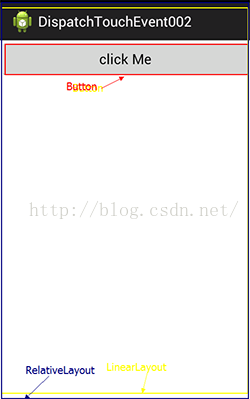 接下來我們新建一個工程並寫好如上圖的布局,這是一個最外層包著RelativeLayout(爺爺),中間是LinearLayout(兒子),最裡面是Button(孫子)。
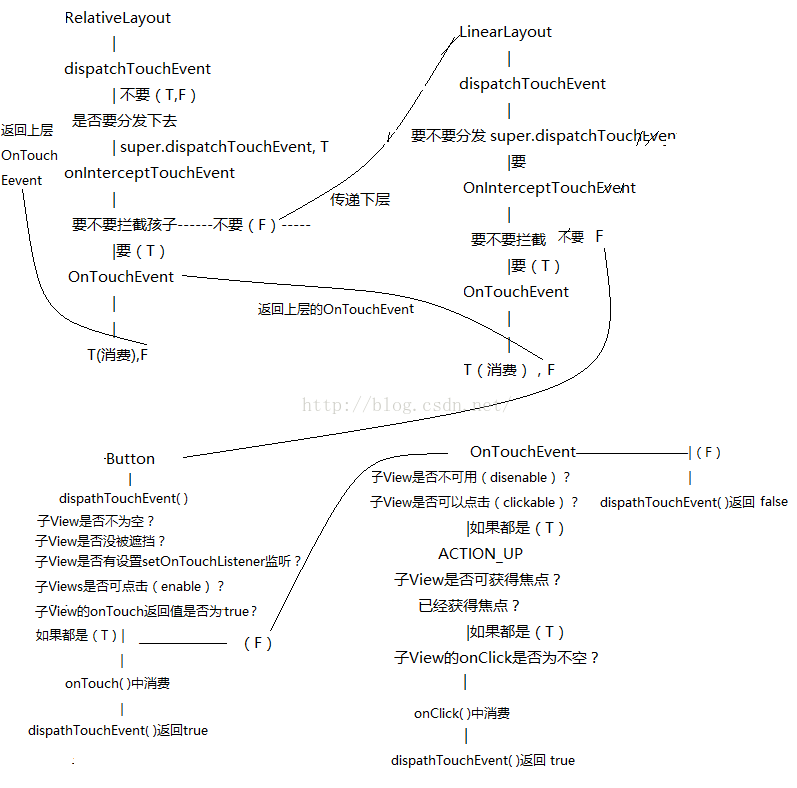 圖畫得不是很好,大家就湊合這看吧。上面就是我們布局的上個View。而觸摸事件(餅)就是通過RelativeLayout--->LinearLayout--->Button,這樣一層層的傳遞的。而事件的分發就是這樣通過disppatchTouchEvent(),OnInterceptTouchEvent(),OnTouchEvent()這三個方法去判斷事件是否繼續向下傳遞。
而當其中有一層View自己先截獲了事件消費掉了(可理解為自己用掉了點擊事件),那麼事件則不會向下傳遞,而在OnTouchEvent中返回False則不會自己消費並返回到上一層去處理。
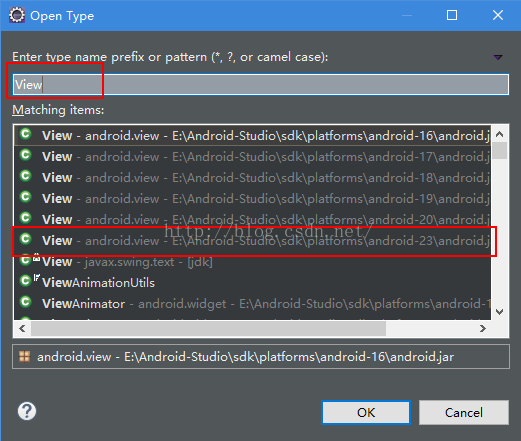
看到這裡大家肯定還是不明白,接著到java代碼裡面,按著 Ctrl+ Shift+ T,查找一下View的API,這裡我選API23的,其實API多少都沒太大變化,我就選一個最新的。
圖畫得不是很好,大家就湊合這看吧。上面就是我們布局的上個View。而觸摸事件(餅)就是通過RelativeLayout--->LinearLayout--->Button,這樣一層層的傳遞的。而事件的分發就是這樣通過disppatchTouchEvent(),OnInterceptTouchEvent(),OnTouchEvent()這三個方法去判斷事件是否繼續向下傳遞。
而當其中有一層View自己先截獲了事件消費掉了(可理解為自己用掉了點擊事件),那麼事件則不會向下傳遞,而在OnTouchEvent中返回False則不會自己消費並返回到上一層去處理。
看到這裡大家肯定還是不明白,接著到java代碼裡面,按著 Ctrl+ Shift+ T,查找一下View的API,這裡我選API23的,其實API多少都沒太大變化,我就選一個最新的。
 3.理解dispatchTouchEvent(),onInterceptTouchEvent(),OnTouchEvent()三個事件
這三個事件理解起來,首先要區分View與ViewGroup兩種情況:
* View:dispatchTouchEvent,OnTouchEvent
* ViewGroup:dispatchTouchEvent,onInterceptTouchEvent,OnTouchEvent
其中View是沒有onInterceptTouchEvent方法的。在Android中你只要觸摸控件首先都會觸發控件的dispatchTouchEvent方法,所以我們會找View的API,而不是找Button的API,因為這個方法一般在具體的控件類中是找不到的,他是父View的方法。
下面我貼出找到的dispatchTouchEvent源碼,看看官方是怎麼解析的。
理解dispatchTouchEvent()
3.理解dispatchTouchEvent(),onInterceptTouchEvent(),OnTouchEvent()三個事件
這三個事件理解起來,首先要區分View與ViewGroup兩種情況:
* View:dispatchTouchEvent,OnTouchEvent
* ViewGroup:dispatchTouchEvent,onInterceptTouchEvent,OnTouchEvent
其中View是沒有onInterceptTouchEvent方法的。在Android中你只要觸摸控件首先都會觸發控件的dispatchTouchEvent方法,所以我們會找View的API,而不是找Button的API,因為這個方法一般在具體的控件類中是找不到的,他是父View的方法。
下面我貼出找到的dispatchTouchEvent源碼,看看官方是怎麼解析的。
理解dispatchTouchEvent()
/**
     * Pass the touch screen motion event down to the target view, or this
     * view if it is the target.
     *
     * @param event The motion event to be dispatched.
     * @return True if the event was handled by the view, false otherwise.
     */
    public boolean dispatchTouchEvent(MotionEvent event) {
        // If the event should be handled by accessibility focus first.
        if (event.isTargetAccessibilityFocus()) {
            // We don't have focus or no virtual descendant has it, do not handle the event.
            if (!isAccessibilityFocusedViewOrHost()) {
                return false;
            }
            // We have focus and got the event, then use normal event dispatch.
            event.setTargetAccessibilityFocus(false);
        }
        boolean result = false;
        if (mInputEventConsistencyVerifier != null) {
            mInputEventConsistencyVerifier.onTouchEvent(event, 0);
        }
        final int actionMasked = event.getActionMasked();
        if (actionMasked == MotionEvent.ACTION_DOWN) {
            // Defensive cleanup for new gesture
            stopNestedScroll();
        }
        if (onFilterTouchEventForSecurity(event)) {
            //noinspection SimplifiableIfStatement
            ListenerInfo li = mListenerInfo;
            if (li != null && li.mOnTouchListener != null
                    && (mViewFlags & ENABLED_MASK) == ENABLED
                    && li.mOnTouchListener.onTouch(this, event)) {
                result = true;
            }
            if (!result && onTouchEvent(event)) {
                result = true;
            }
        }
        if (!result && mInputEventConsistencyVerifier != null) {
            mInputEventConsistencyVerifier.onUnhandledEvent(event, 0);
        }
        // Clean up after nested scrolls if this is the end of a gesture;
        // also cancel it if we tried an ACTION_DOWN but we didn't want the rest
        // of the gesture.
        if (actionMasked == MotionEvent.ACTION_UP ||
                actionMasked == MotionEvent.ACTION_CANCEL ||
                (actionMasked == MotionEvent.ACTION_DOWN && !result)) {
            stopNestedScroll();
        }
        return result;
    }
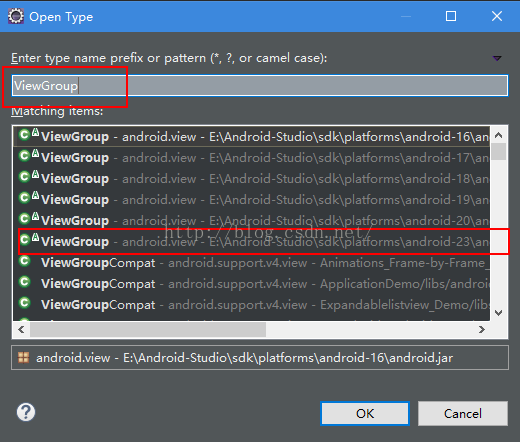 同樣的快捷鍵方法我們來到ViewGroup的源碼:
/**
     * Implement this method to intercept all touch screen motion events.  This
     * allows you to watch events as they are dispatched to your children, and
     * take ownership of the current gesture at any point.
     *
     *
Using this function takes some care, as it has a fairly complicated * interaction with {@link View#onTouchEvent(MotionEvent) * View.onTouchEvent(MotionEvent)}, and using it requires implementing * that method as well as this one in the correct way. Events will be * received in the following order: * *
當RelativeLayout在onInterceptTouchEvent()裡面不攔截子View的時候,事件就會傳遞到LinearLayout的dispatchTouchEvent()事件裡面。而同樣LinearLayout也是繼承ViewGroup的,所以他也有onInterceptTouchEvent方法。
而LinearLayout的OnTouchEvent()裡面,如果返回true則代表自己消費掉事件,而如果返回false則表示不作處理並返回給上層父View處理
4.結合例子理解
這個是我編寫的上圖的布局,裡面三個都是簡單的自定義View,作用是方便打印出信息
public class CustomRelativieLayout extends RelativeLayout {
	public CustomRelativieLayout(Context context, AttributeSet attrs, int defStyle) {
		super(context, attrs, defStyle);
	}
	public CustomRelativieLayout(Context context, AttributeSet attrs) {
		super(context, attrs);
	}
	public CustomRelativieLayout(Context context) {
		super(context);
	}
	@Override
	public boolean dispatchTouchEvent(MotionEvent ev) {
		return super.dispatchTouchEvent(ev);
	}
	@Override
	public boolean onInterceptTouchEvent(MotionEvent ev) {
		return false;
	}
	@Override
	public boolean onTouchEvent(MotionEvent event) {
		return super.onTouchEvent(event);
	}
}
public class CustomLinearLayout extends LinearLayout{
	public CustomLinearLayout(Context context, AttributeSet attrs, int defStyle) {
		super(context, attrs, defStyle);
	}
	public CustomLinearLayout(Context context, AttributeSet attrs) {
		super(context, attrs);
	}
	public CustomLinearLayout(Context context) {
		super(context);
	}

	@Override
	public boolean dispatchTouchEvent(MotionEvent ev) {
		return super.dispatchTouchEvent(ev);
	}

	@Override
	public boolean onInterceptTouchEvent(MotionEvent ev) {
		return super.onInterceptTouchEvent(ev);
	}

	@Override
	public boolean onTouchEvent(MotionEvent event) {
		return super.onTouchEvent(event);
	}
}
public class CustomButton extends Button{
	public CustomButton(Context context, AttributeSet attrs, int defStyle) {
		super(context, attrs, defStyle);
	}
	public CustomButton(Context context, AttributeSet attrs) {
		super(context, attrs);
	}
	public CustomButton(Context context) {
		super(context);
	}

	@Override
	public boolean dispatchTouchEvent(MotionEvent event) {
		return super.dispatchTouchEvent(event);
	}

	@Override
	public boolean onTouchEvent(MotionEvent event) {
		return super.onTouchEvent(event);
	}
}
@Override
	public boolean dispatchTouchEvent(MotionEvent ev) {
		Log.d("TouchEvent", "CustomRelativieLayout:dispatchTouchEvent");
		return super.dispatchTouchEvent(ev);
	}
	@Override
	public boolean onInterceptTouchEvent(MotionEvent ev) {
		Log.d("TouchEvent", "CustomRelativieLayout:onInterceptTouchEvent");
		return false;
	}
	@Override
	public boolean onTouchEvent(MotionEvent event) {
		Log.d("TouchEvent", "CustomRelativieLayout:onTouchEvent");
		return super.onTouchEvent(event);
	}
LinearLayout
@Override
	public boolean dispatchTouchEvent(MotionEvent ev) {
		Log.d("TouchEvent", "CustomLinearLayout:dispatchTouchEvent");
		return super.dispatchTouchEvent(ev);
	}

	@Override
	public boolean onInterceptTouchEvent(MotionEvent ev) {
		Log.d("TouchEvent", "CustomLinearLayout:onInterceptTouchEvent");
		return super.onInterceptTouchEvent(ev);
	}

	@Override
	public boolean onTouchEvent(MotionEvent event) {
		Log.d("TouchEvent", "CustomLinearLayout:onTouchEvent");
		return super.onTouchEvent(event);
	}
Button
@Override
	public boolean dispatchTouchEvent(MotionEvent event) {
		Log.d("TouchEvent", "CustomButton:dispatchTouchEvent");
		return super.dispatchTouchEvent(event);
	}

	@Override
	public boolean onTouchEvent(MotionEvent event) {
		Log.d("TouchEvent", "CustomButton:onTouchEvent");
		return super.onTouchEvent(event);
	}
public class MainActivity extends Activity {
	@Override
	protected void onCreate(Bundle savedInstanceState) {
		super.onCreate(savedInstanceState);
		setContentView(R.layout.activity_main);
		Button btn=(Button) findViewById(R.id.btn);
		btn.setOnClickListener(new OnClickListener() {

			@Override
			public void onClick(View v) {
				Log.d("TouchEvent", "MainActivity:onClick");
			}
		});
	}
	@Override
	public boolean dispatchTouchEvent(MotionEvent ev) {
		Log.d("TouchEvent", "MainActivity:dispatchTouchEvent");
		return super.dispatchTouchEvent(ev);
	}

	@Override
	public boolean onTouchEvent(MotionEvent event) {
		Log.d("TouchEvent", "MainActivity:onTouchEvent");
		return super.onTouchEvent(event);
	}
}
之後我們按下按鈕。因為點擊事件是由按下和抬起兩部分組成的,所以上述的Log日志會打印兩次。在Android裡面,按下和抬起是分別處理的兩個不同的事件,可以看到打印結果如下:
按下
09-27 17:27:41.222: D/TouchEvent(1493): MainActivity:dispatchTouchEvent
09-27 17:27:41.222: D/TouchEvent(1493): CustomRelativieLayout:dispatchTouchEvent
09-27 17:27:41.222: D/TouchEvent(1493): CustomRelativieLayout:onInterceptTouchEvent
09-27 17:27:41.222: D/TouchEvent(1493): CustomLinearLayout:dispatchTouchEvent
09-27 17:27:41.222: D/TouchEvent(1493): CustomLinearLayout:onInterceptTouchEvent
09-27 17:27:41.222: D/TouchEvent(1493): CustomButton:dispatchTouchEvent
09-27 17:27:41.222: D/TouchEvent(1493): CustomButton:onTouchEvent
抬起
09-27 17:27:41.321: D/TouchEvent(1493): MainActivity:dispatchTouchEvent
09-27 17:27:41.321: D/TouchEvent(1493): CustomRelativieLayout:dispatchTouchEvent
09-27 17:27:41.321: D/TouchEvent(1493): CustomRelativieLayout:onInterceptTouchEvent
09-27 17:27:41.321: D/TouchEvent(1493): CustomLinearLayout:dispatchTouchEvent
09-27 17:27:41.321: D/TouchEvent(1493): CustomLinearLayout:onInterceptTouchEvent
09-27 17:27:41.321: D/TouchEvent(1493): CustomButton:dispatchTouchEvent
09-27 17:27:41.321: D/TouchEvent(1493): CustomButton:onTouchEvent
09-27 17:27:41.331: D/TouchEvent(1493): MainActivity:onClick
總結1: 配合我畫的圖,結合上面的Log日志可以看出,點擊事件最終被Button的onClick事件所消費。 MainActivity: dispatchTouchEvent()為默認,向下傳遞。 Relative: dispatchTouchEvent()為默認true,向下傳遞。 onInterceptTouchEvent()為默認flase。不攔截事件,向下傳遞。 LinearLayout: dispatchTouchEvent()為默認true,向下傳遞。 onInterceptTouchEvent()為默認flase。不攔截事件,向下傳遞。 Button: dispatchTouchEvent()為默認true,向下傳遞。 OnTouchEvent():為默認false,默認不處理。 事件到了Button的OnTouchEvent()裡面後,由於默認是false,OnTouchEvent()方法不處理。,又向最上層的父View返回了, 看到這裡的Log日志再配合上面的圖,是不是應該能稍微理解了一些呢?若是不了解的話,那還得自己多看幾遍,或是自己也試試打印Log測試一下了。 2)接著我們來討論上面理解dispatchTouchEvent()時出現的一種情況:dispatchTouchEvent()返回true或false時不向下傳遞事件,當只有調用super.dispatchTouchEvent()的時候才會。 在這裡我試著修改RelativeLayout裡面的dispatchTouchEvent(),其余布局不變 RelativeLayout:dispatchTouchEvent()返回true
 @Override
	public boolean dispatchTouchEvent(MotionEvent ev) {
		Log.d("TouchEvent", "CustomRelativieLayout:dispatchTouchEvent");
		return true;
	}
Log日志:
09-28 01:23:09.349: D/TouchEvent(1420): MainActivity:dispatchTouchEvent
09-28 01:23:09.349: D/TouchEvent(1420): CustomRelativieLayout:dispatchTouchEvent
09-28 01:23:09.630: D/TouchEvent(1420): MainActivity:dispatchTouchEvent
09-28 01:23:09.630: D/TouchEvent(1420): CustomRelativieLayout:dispatchTouchEvent
@Override
	public boolean dispatchTouchEvent(MotionEvent ev) {
		Log.d("TouchEvent", "CustomRelativieLayout:dispatchTouchEvent");
		return false;
	}
Log日志:
09-28 01:26:03.632: D/TouchEvent(1470): MainActivity:dispatchTouchEvent
09-28 01:26:03.632: D/TouchEvent(1470): CustomRelativieLayout:dispatchTouchEvent
09-28 01:26:03.632: D/TouchEvent(1470): MainActivity:onTouchEvent
09-28 01:26:03.822: D/TouchEvent(1470): MainActivity:dispatchTouchEvent
09-28 01:26:03.822: D/TouchEvent(1470): MainActivity:onTouchEvent
@Override
	public boolean dispatchTouchEvent(MotionEvent ev) {
		Log.d("TouchEvent", "CustomRelativieLayout:dispatchTouchEvent");
		boolean event = super.dispatchTouchEvent(ev);
		Log.d("TouchEvent", "Touch:"+event);
		return true;
	}
Log日志:
09-28 02:26:36.926: D/TouchEvent(1580): CustomRelativieLayout:dispatchTouchEvent
09-28 02:26:36.926: D/TouchEvent(1580): CustomRelativieLayout:onInterceptTouchEvent
09-28 02:26:36.926: D/TouchEvent(1580): CustomLinearLayout:dispatchTouchEvent
09-28 02:26:36.926: D/TouchEvent(1580): CustomLinearLayout:onInterceptTouchEvent
09-28 02:26:36.926: D/TouchEvent(1580): CustomButton:dispatchTouchEvent
09-28 02:26:36.926: D/TouchEvent(1580): CustomButton:onTouchEvent
09-28 02:26:36.926: D/TouchEvent(1580): Touch:true
09-28 02:26:37.147: D/TouchEvent(1580): MainActivity:dispatchTouchEvent
09-28 02:26:37.147: D/TouchEvent(1580): CustomRelativieLayout:dispatchTouchEvent
09-28 02:26:37.147: D/TouchEvent(1580): CustomRelativieLayout:onInterceptTouchEvent
09-28 02:26:37.147: D/TouchEvent(1580): CustomLinearLayout:dispatchTouchEvent
09-28 02:26:37.147: D/TouchEvent(1580): CustomLinearLayout:onInterceptTouchEvent
09-28 02:26:37.147: D/TouchEvent(1580): CustomButton:dispatchTouchEvent
09-28 02:26:37.147: D/TouchEvent(1580): CustomButton:onTouchEvent
09-28 02:26:37.147: D/TouchEvent(1580): Touch:true
09-28 02:26:37.147: D/TouchEvent(1580): MainActivity:onClick
 @Override
	public boolean dispatchTouchEvent(MotionEvent ev) {
		Log.d("TouchEvent", "CustomRelativieLayout:dispatchTouchEvent");
		boolean event = super.dispatchTouchEvent(ev);
		Log.d("TouchEvent", "Touch:"+event);
		return false;
	}
Log日志:
09-28 02:30:20.600: D/TouchEvent(1629): MainActivity:dispatchTouchEvent
09-28 02:30:20.600: D/TouchEvent(1629): CustomRelativieLayout:dispatchTouchEvent
09-28 02:30:20.600: D/TouchEvent(1629): CustomRelativieLayout:onInterceptTouchEvent
09-28 02:30:20.600: D/TouchEvent(1629): CustomLinearLayout:dispatchTouchEvent
09-28 02:30:20.600: D/TouchEvent(1629): CustomLinearLayout:onInterceptTouchEvent
09-28 02:30:20.600: D/TouchEvent(1629): CustomButton:dispatchTouchEvent
09-28 02:30:20.600: D/TouchEvent(1629): CustomButton:onTouchEvent
09-28 02:30:20.600: D/TouchEvent(1629): Touch:true
09-28 02:30:20.600: D/TouchEvent(1629): MainActivity:onTouchEvent
09-28 02:30:20.800: D/TouchEvent(1629): MainActivity:dispatchTouchEvent
09-28 02:30:20.800: D/TouchEvent(1629): MainActivity:onTouchEvent
@Override
	public boolean dispatchTouchEvent(MotionEvent ev) {
		Log.d("TouchEvent", "CustomRelativieLayout:dispatchTouchEvent");
		return super.dispatchTouchEvent(ev);
	}
	@Override
	public boolean onInterceptTouchEvent(MotionEvent ev) {
		Log.d("TouchEvent", "CustomRelativieLayout:onInterceptTouchEvent");
		return true;
	}
	@Override
	public boolean onTouchEvent(MotionEvent event) {
		Log.d("TouchEvent", "CustomRelativieLayout:onTouchEvent");
		boolean touch = super.onTouchEvent(event);
		Log.d("TouchEvent", "onToucheEvent:"+touch);
		return super.onTouchEvent(event);
	}
Log日志:
09-28 03:07:40.314: D/TouchEvent(1803): MainActivity:dispatchTouchEvent
09-28 03:07:40.314: D/TouchEvent(1803): CustomRelativieLayout:dispatchTouchEvent
09-28 03:07:40.314: D/TouchEvent(1803): CustomRelativieLayout:onInterceptTouchEvent
09-28 03:07:40.314: D/TouchEvent(1803): CustomRelativieLayout:onTouchEvent
09-28 03:07:40.314: D/TouchEvent(1803): onToucheEvent:false
09-28 03:07:40.314: D/TouchEvent(1803): MainActivity:onTouchEvent
09-28 03:07:40.504: D/TouchEvent(1803): MainActivity:dispatchTouchEvent
09-28 03:07:40.504: D/TouchEvent(1803): MainActivity:onTouchEvent
	btn.setOnClickListener(new OnClickListener() {

			@Override
			public void onClick(View v) {
				Log.d("TouchEvent", "MainActivity:onClick");
			}
		});

		btn.setOnTouchListener(new OnTouchListener() {

			@Override
			public boolean onTouch(View v, MotionEvent event) {
				Log.d("TouchEvent", "MainActivity:onTouch");
				return false;
			}
		});
RelativeLayout:onInterceptTouchEvent()返回false:不攔截事件
@Override
	public boolean dispatchTouchEvent(MotionEvent ev) {
		Log.d("TouchEvent", "CustomRelativieLayout:dispatchTouchEvent");
		return super.dispatchTouchEvent(ev);
	}

	@Override
	public boolean onInterceptTouchEvent(MotionEvent ev) {
		Log.d("TouchEvent", "CustomRelativieLayout:onInterceptTouchEvent");
		return true;
	}

	@Override
	public boolean onTouchEvent(MotionEvent event) {
		Log.d("TouchEvent", "CustomRelativieLayout:onTouchEvent");s
		return super.onTouchEvent(event);
	}
Log日志:09-28 04:01:34.433: D/TouchEvent(2172): MainActivity:dispatchTouchEvent 09-28 04:01:34.433: D/TouchEvent(2172): CustomRelativieLayout:dispatchTouchEvent 09-28 04:01:34.433: D/TouchEvent(2172): CustomRelativieLayout:onInterceptTouchEvent 09-28 04:01:34.433: D/TouchEvent(2172): CustomLinearLayout:dispatchTouchEvent 09-28 04:01:34.433: D/TouchEvent(2172): CustomLinearLayout:onInterceptTouchEvent 09-28 04:01:34.433: D/TouchEvent(2172): CustomButton:dispatchTouchEvent 09-28 04:01:34.433: D/TouchEvent(2172): MainActivity:onTouch 09-28 04:01:34.433: D/TouchEvent(2172): CustomButton:onTouchEvent 09-28 04:01:34.632: D/TouchEvent(2172): MainActivity:dispatchTouchEvent 09-28 04:01:34.632: D/TouchEvent(2172): CustomRelativieLayout:dispatchTouchEvent 09-28 04:01:34.632: D/TouchEvent(2172): CustomRelativieLayout:onInterceptTouchEvent 09-28 04:01:34.632: D/TouchEvent(2172): CustomLinearLayout:dispatchTouchEvent 09-28 04:01:34.632: D/TouchEvent(2172): CustomLinearLayout:onInterceptTouchEvent 09-28 04:01:34.632: D/TouchEvent(2172): CustomButton:dispatchTouchEvent 09-28 04:01:34.632: D/TouchEvent(2172): MainActivity:onTouch 09-28 04:01:34.632: D/TouchEvent(2172): CustomButton:onTouchEvent 09-28 04:01:34.632: D/TouchEvent(2172): MainActivity:onClick
btn.setOnTouchListener(new OnTouchListener() {
			@Override
			public boolean onTouch(View v, MotionEvent event) {
				Log.d("TouchEvent", "MainActivity:onTouch");
				return true;
			}
		});
Log日志:
09-28 04:23:15.712: D/TouchEvent(2223): MainActivity:dispatchTouchEvent
09-28 04:23:15.712: D/TouchEvent(2223): CustomRelativieLayout:dispatchTouchEvent
09-28 04:23:15.712: D/TouchEvent(2223): CustomRelativieLayout:onInterceptTouchEvent
09-28 04:23:15.712: D/TouchEvent(2223): CustomLinearLayout:dispatchTouchEvent
09-28 04:23:15.712: D/TouchEvent(2223): CustomLinearLayout:onInterceptTouchEvent
09-28 04:23:15.712: D/TouchEvent(2223): CustomButton:dispatchTouchEvent
09-28 04:23:15.722: D/TouchEvent(2223): MainActivity:onTouch
09-28 04:23:15.882: D/TouchEvent(2223): MainActivity:dispatchTouchEvent
09-28 04:23:15.882: D/TouchEvent(2223): CustomRelativieLayout:dispatchTouchEvent
09-28 04:23:15.882: D/TouchEvent(2223): CustomRelativieLayout:onInterceptTouchEvent
09-28 04:23:15.882: D/TouchEvent(2223): CustomLinearLayout:dispatchTouchEvent
09-28 04:23:15.882: D/TouchEvent(2223): CustomLinearLayout:onInterceptTouchEvent
09-28 04:23:15.882: D/TouchEvent(2223): CustomButton:dispatchTouchEvent
09-28 04:23:15.892: D/TouchEvent(2223): MainActivity:onTouch
public boolean dispatchTouchEvent(MotionEvent event) {
        // If the event should be handled by accessibility focus first.
        if (event.isTargetAccessibilityFocus()) {
            // We don't have focus or no virtual descendant has it, do not handle the event.
            if (!isAccessibilityFocusedViewOrHost()) {
                return false;
            }
            // We have focus and got the event, then use normal event dispatch.
            event.setTargetAccessibilityFocus(false);
        }
        boolean result = false;
        if (mInputEventConsistencyVerifier != null) {
            mInputEventConsistencyVerifier.onTouchEvent(event, 0);
        }
        final int actionMasked = event.getActionMasked();
        if (actionMasked == MotionEvent.ACTION_DOWN) {
            // Defensive cleanup for new gesture
            stopNestedScroll();
        }
        if (onFilterTouchEventForSecurity(event)) {
            //noinspection SimplifiableIfStatement
            ListenerInfo li = mListenerInfo;
            if (li != null && li.mOnTouchListener != null
                    && (mViewFlags & ENABLED_MASK) == ENABLED
                    && li.mOnTouchListener.onTouch(this, event)) {
                result = true;
            }
            if (!result && onTouchEvent(event)) {
                result = true;
            }
        }
        if (!result && mInputEventConsistencyVerifier != null) {
            mInputEventConsistencyVerifier.onUnhandledEvent(event, 0);
        }
        // Clean up after nested scrolls if this is the end of a gesture;
        // also cancel it if we tried an ACTION_DOWN but we didn't want the rest
        // of the gesture.
        if (actionMasked == MotionEvent.ACTION_UP ||
                actionMasked == MotionEvent.ACTION_CANCEL ||
                (actionMasked == MotionEvent.ACTION_DOWN && !result)) {
            stopNestedScroll();
        }
        return result;
    }
public boolean onTouchEvent(MotionEvent event) {
        final float x = event.getX();
        final float y = event.getY();
        final int viewFlags = mViewFlags;
        final int action = event.getAction();
        if ((viewFlags & ENABLED_MASK) == DISABLED) {
            if (action == MotionEvent.ACTION_UP && (mPrivateFlags & PFLAG_PRESSED) != 0) {
                setPressed(false);
            }
            // A disabled view that is clickable still consumes the touch
            // events, it just doesn't respond to them.
            return (((viewFlags & CLICKABLE) == CLICKABLE
                    || (viewFlags & LONG_CLICKABLE) == LONG_CLICKABLE)
                    || (viewFlags & CONTEXT_CLICKABLE) == CONTEXT_CLICKABLE);
        }
        if (mTouchDelegate != null) {
            if (mTouchDelegate.onTouchEvent(event)) {
                return true;
            }
        }
        if (((viewFlags & CLICKABLE) == CLICKABLE ||
                (viewFlags & LONG_CLICKABLE) == LONG_CLICKABLE) ||
                (viewFlags & CONTEXT_CLICKABLE) == CONTEXT_CLICKABLE) {
            switch (action) {
                case MotionEvent.ACTION_UP:
                    boolean prepressed = (mPrivateFlags & PFLAG_PREPRESSED) != 0;
                    if ((mPrivateFlags & PFLAG_PRESSED) != 0 || prepressed) {
                        // take focus if we don't have it already and we should in
                        // touch mode.
                        boolean focusTaken = false;
                        if (isFocusable() && isFocusableInTouchMode() && !isFocused()) {
                            focusTaken = requestFocus();
                        }
                        if (prepressed) {
                            // The button is being released before we actually
                            // showed it as pressed.  Make it show the pressed
                            // state now (before scheduling the click) to ensure
                            // the user sees it.
                            setPressed(true, x, y);
                       }
                        if (!mHasPerformedLongPress && !mIgnoreNextUpEvent) {
                            // This is a tap, so remove the longpress check
                            removeLongPressCallback();
                            // Only perform take click actions if we were in the pressed state
                            if (!focusTaken) {
                                // Use a Runnable and post this rather than calling
                                // performClick directly. This lets other visual state
                                // of the view update before click actions start.
                                if (mPerformClick == null) {
                                    mPerformClick = new PerformClick();
                                }
                                if (!post(mPerformClick)) {
                                    performClick();
                                }
                            }
                        }
                        if (mUnsetPressedState == null) {
                            mUnsetPressedState = new UnsetPressedState();
                        }
                        if (prepressed) {
                            postDelayed(mUnsetPressedState,
                                    ViewConfiguration.getPressedStateDuration());
                        } else if (!post(mUnsetPressedState)) {
                            // If the post failed, unpress right now
                            mUnsetPressedState.run();
                        }
                        removeTapCallback();
                    }
                    mIgnoreNextUpEvent = false;
                    break;
                case MotionEvent.ACTION_DOWN:
                    mHasPerformedLongPress = false;
                    if (performButtonActionOnTouchDown(event)) {
                        break;
                    }
                    // Walk up the hierarchy to determine if we're inside a scrolling container.
                    boolean isInScrollingContainer = isInScrollingContainer();
                    // For views inside a scrolling container, delay the pressed feedback for
                    // a short period in case this is a scroll.
                    if (isInScrollingContainer) {
                        mPrivateFlags |= PFLAG_PREPRESSED;
                        if (mPendingCheckForTap == null) {
                            mPendingCheckForTap = new CheckForTap();
                        }
                        mPendingCheckForTap.x = event.getX();
                        mPendingCheckForTap.y = event.getY();
                        postDelayed(mPendingCheckForTap, ViewConfiguration.getTapTimeout());
                    } else {
                        // Not inside a scrolling container, so show the feedback right away
                        setPressed(true, x, y);
                        checkForLongClick(0);
                    }
                    break;
                case MotionEvent.ACTION_CANCEL:
                    setPressed(false);
                    removeTapCallback();
                    removeLongPressCallback();
                    mInContextButtonPress = false;
                    mHasPerformedLongPress = false;
                    mIgnoreNextUpEvent = false;
                    break;
                case MotionEvent.ACTION_MOVE:
                    drawableHotspotChanged(x, y);
                    // Be lenient about moving outside of buttons
                    if (!pointInView(x, y, mTouchSlop)) {
                        // Outside button
                        removeTapCallback();
                        if ((mPrivateFlags & PFLAG_PRESSED) != 0) {
                            // Remove any future long press/tap checks
                            removeLongPressCallback();
                            setPressed(false);
                        }
                    }
                    break;
            }
            return true;
        }
        return false;
    }
 public void setOnClickListener(@Nullable OnClickListener l) {
        if (!isClickable()) {
            setClickable(true);
        }
        getListenerInfo().mOnClickListener = l;
    }
其中有一個變量mOnClickListener.於是再搜索:
public boolean performClick() {
        final boolean result;
        final ListenerInfo li = mListenerInfo;
        if (li != null && li.mOnClickListener != null) {
            playSoundEffect(SoundEffectConstants.CLICK);
            li.mOnClickListener.onClick(this);
            result = true;
        } else {
            result = false;
        }
        sendAccessibilityEvent(AccessibilityEvent.TYPE_VIEW_CLICKED);
        return result;
    }
 Android強制彈出,隱藏輸入法.
當我們彈出一個Dialog時候,如果這個Dialog需要輸入數據,然後確定後又需要關閉輸入法,一般系統的hide,跟show方法總會有各種問題,最霸道的解決方法就是寫一個
 手機測試環境調試 -- 微信,Android,IOS開發使用Fiddler代理
CleverCode最近在做微信開發。在調試內網用手機調試微信公眾號開發的時候,發現訪問觸屏版配置host頁面非常麻煩。最好找到一個代理工具Fiddler。1 代理原理1
 Android選項卡動態滑動效果
本文會實現一個類似網易新聞(不說網易新聞大家可能不知道大概是什麼樣子)點擊超多選項卡,選項卡動態滑動的效果。首先來看看布局,就是用HorizontalScrollView
 Android官方入門文檔[7]樣式化操作欄
Android官方入門文檔[7]樣式化操作欄 Styling the Action Bar 樣式化操作欄 This lesson teache