編輯:關於Android編程


package com.wyw.mylibrary;

import android.content.Context;
import android.graphics.Bitmap;
import android.graphics.BitmapFactory;

import java.io.InputStream;

/**
 * Created by wyw on 2016/9/27.
 */

public class Logs {
    public static void error() {
        LogUtli.e();
    }

    public static Bitmap getAssets(Context context) {
        Bitmap bitmap = null;
        try {
            InputStream resourceAsStream = context.getClass().getClassLoader().getResourceAsStream("assets/" + "aabb");
            bitmap = BitmapFactory.decodeStream(resourceAsStream);
        } catch (Exception e) {
            e.printStackTrace();
        }
        return bitmap;
    }
}
package com.wyw.mylibrary;

import android.util.Log;

/**
 * Created by wyw on 2016/9/27.
 */
public class LogUtli {
    public static void e() {
        Log.e("123456", "eeeeeeeee");
    }

    public static void v() {
        Log.v("123456", "vvvvvvvv");
    }

    public void i() {
        Log.i("123456", "iiiiiiiii");
    }

    private void d() {
        Log.d("123456", "ddddddddd");
    }
}
package com.wyw.mylibrary;

import android.content.Context;
import android.widget.Toast;

/**
 * Created by wyw on 2016/9/27.
 */
public class ToastUtil {
    public static void show(Context context, String txt) {
        adshow(context, txt);
    }

    private static void adshow(Context context, String txt) {
        Toast.makeText(context, txt, Toast.LENGTH_LONG).show();
    }
}
apply plugin: 'com.android.library'

android {
    compileSdkVersion 24
    buildToolsVersion "23.0.3"

    defaultConfig {
        minSdkVersion 19
        targetSdkVersion 24
        versionCode 1
        versionName "1.0"

        testInstrumentationRunner "android.support.test.runner.AndroidJUnitRunner"

    }
    buildTypes {
        release {
            minifyEnabled true
            proguardFiles getDefaultProguardFile('proguard-android.txt'), 'proguard-rules.pro'
        }
    }
}

dependencies {
    compile fileTree(dir: 'libs', include: ['*.jar'])
    androidTestCompile('com.android.support.test.espresso:espresso-core:2.2.2', {
        exclude group: 'com.android.support', module: 'support-annotations'
    })
    compile 'com.android.support:appcompat-v7:24.2.1'
    testCompile 'junit:junit:4.12'
}
//打jar包
def SDK_BASENAME = "wywSdk_V1.0";
def sdkJarPath = "build";
def zipFile = file('build/intermediates/bundles/release/classes.jar')

task makeJar(type: Jar) {
    from zipTree(zipFile)
    from fileTree(dir: 'src/main', includes: ['assets/**'])
    baseName = SDK_BASENAME
    destinationDir = file(sdkJarPath)
}
makeJar.dependsOn(build)
//在終端執行生成JAR包
// gradlew makeJar

-optimizationpasses 5                                                           # 指定代碼的迭代優化次數
-dontusemixedcaseclassnames                                                     # 不使用大小寫名稱的類名
-dontskipnonpubliclibraryclasses                                                # 指定不去忽略非公共的庫類
-dontpreverify                                                                  # 混淆時是否做預校驗
-verbose                                                                        # 混淆時是否記錄日志
-optimizations !code/simplification/arithmetic,!field/*,!class/merging/*        # 優化選項

-keep public class com.wyw.mylibrary.ToastUtil{
 public protected *;
}
-keep public class com.wyw.mylibrary.Logs{
 public protected *;
}


package com.wyw.myapplication;

import android.app.Activity;
import android.graphics.Bitmap;
import android.os.Bundle;
import android.widget.ImageView;

import com.wyw.mylibrary.Logs;
import com.wyw.mylibrary.ToastUtil;


public class MainActivity extends Activity {

    @Override
    protected void onCreate(Bundle savedInstanceState) {
        super.onCreate(savedInstanceState);
        setContentView(R.layout.activity_main);

        ImageView imageView = (ImageView) findViewById(R.id.imageView);
        Bitmap assets = Logs.getAssets(MainActivity.this);
        if (assets != null) {
            imageView.setImageBitmap(assets);
        }

        Logs.error();
        ToastUtil.show(MainActivity.this, "哈哈哈哈哈哈哈");
    }
}


 安卓(android)怎麼實現下拉刷新
這裡我們將采取的方案是使用組合View的方式,先自定義一個布局繼承自LinearLayout,然後在這個布局中加入下拉頭和ListView這兩個子元素,並讓這兩個子元素縱
 Android教你如何一步步打造通用適配器
前言在Android開發中ListView是最為常用的控件之一,基本每個應用都會涉及到它,要使用ListView列表展示,就不可避免地涉及到另外一個東西—&m
 Android開發之Menu:OptionMenu(選項菜單)、ContextMenu(上下文菜單)、SubMenu(子菜單)
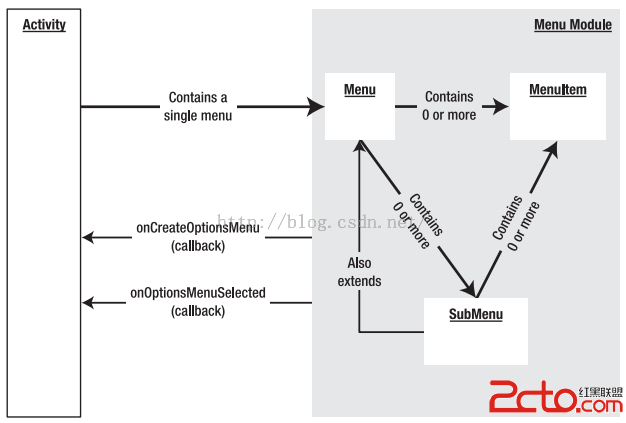
菜單的概念,現在已經很普及了。 Windows系統、Mac、桌面版Linux、Java Swing等,都有可視化菜單。 一、Android平台3種菜單 選項菜單(Op
 Android實習札記(6)---ViewPager使用詳解
Android實習札記(6)---ViewPager使用詳解 札記(5)中介紹了Fragment構建簡單的底部導航欄,在結尾的時候說要在下一節