編輯:關於Android編程
開發過程中,為了數據交互安全,決定對數據進行des加密,然後進行前後交互;但是,如果密鑰放置在android代碼裡面,就算是混淆,反編譯也很容易讓人拿到密鑰,數據加密的安全度不高,因此考慮通過jni來返回一個密鑰對數據進行加解密。從而達到數據的安全性。
下載NDK
通過android studio去下載NDK插件;打開File–>Project Structure–>SDK Location–>Android NDK Location,如下圖:
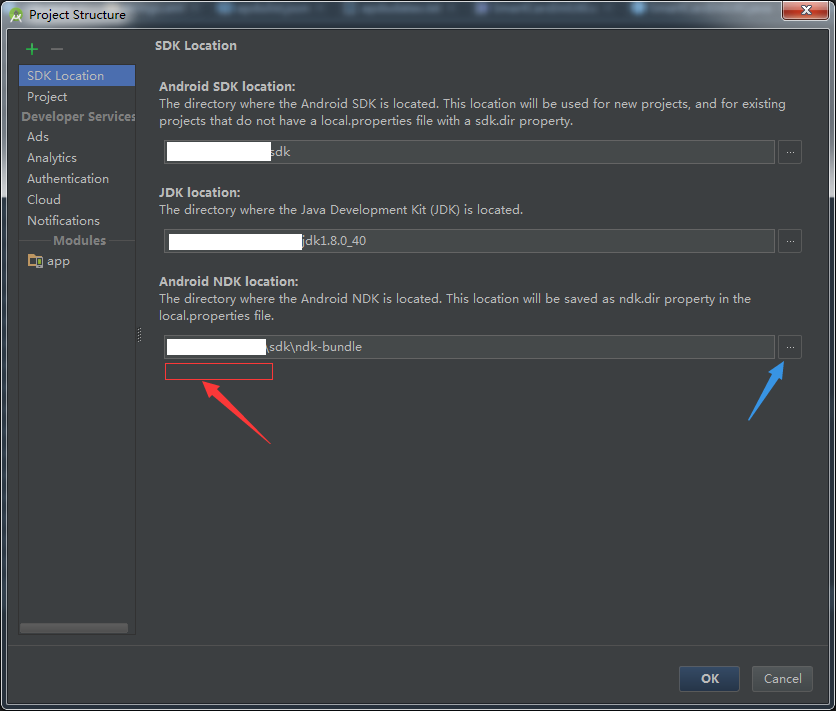
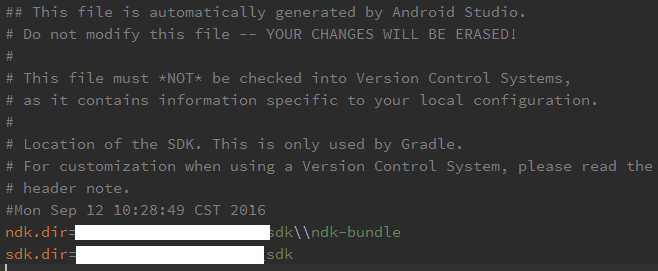
如果是第一次,沒有下載NDK插件,在紅色箭頭的地方有個按鈕用於下載安裝,點擊等待下載即可,使用AS下載的NDK會默認反正你的sdk的目錄路徑下;亦或者選中藍色剪頭的按鈕選擇已經下載好的NDK;點擊“OK”,配置成功之後,會在local.properties文件下看見相應的路徑指向,如下圖:
配置NDK環境變量
創建NDK_HOME
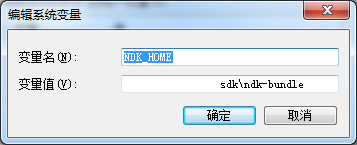
右鍵我的電腦–>屬性–>高級系統設置–>環境變量–>系統變量–>新建–>創建一個“NDK_HOME”,NDK的路徑就是上一步中配置的路徑,如下圖:
添加path
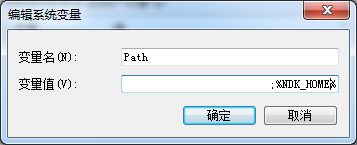
在系統變量中找到Path–>編輯,將;%NDK_HOME%添加至path中,如下圖:
驗證配置是否成功
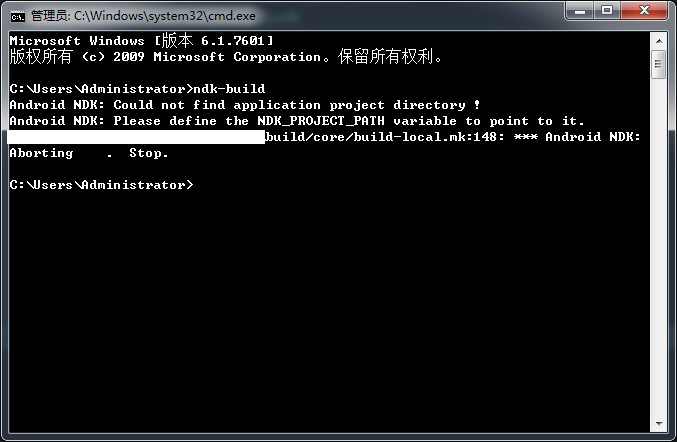
在cmd下輸入“ndk-build”指令,如果出現下圖結果,即配置成功:
在java目錄下創建一個帶有native方法的java文件
/**
 * native
 */
public class SmartCardJniUtil {
    /**
     * 加載so庫
     */
    static {
        System.loadLibrary("SCJniUtil");
    }

    /**
     * 獲取密鑰
     * @return 密鑰
     */
    public native String getKey();
}
通過Build–>Make Project項目
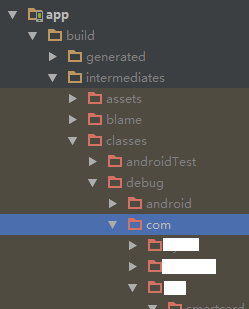
成功之後,在app–>intermediates–>classes–>debug–>個人項目路徑下找到上面新建的native類的class文件,如下圖:

生成頭文件
在File—settings—plugins下勾選Termainal
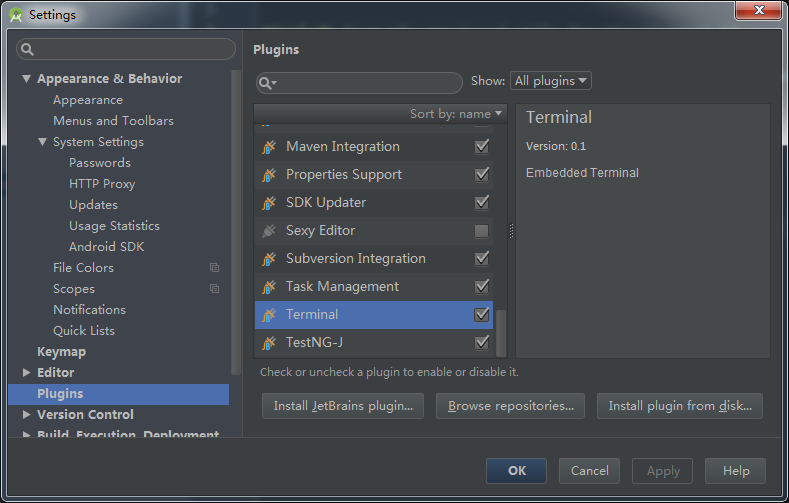
指令生成頭文件
javah -d jni -classpath ;….\build\intermediates\classes\debug 類的包名。
按著以上說明,首先通過cd app\src\main跳轉到main目錄下,然後輸入如下指令:
javah -d jni -classpath E:**\sdk\platforms\android-20\android.jar;….\build\intermediates\classes\debug com.a.b.c.SmartCardJniUtil
如下圖:

成功之後會在main目錄下多一個jni文件,並包含了一個.h的頭文件,如下圖:
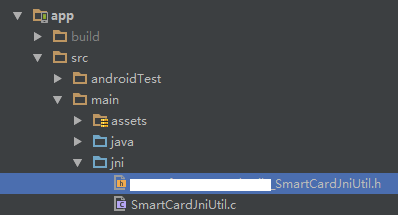
創建.c文件
在jni目錄下右鍵–>New–>C/C++ Source File創建一個SmartCardJniUtil.c文件,然後引入頭文件,返回密鑰,如下代碼:
#include "com_a_b_c_SmartCardJniUtil.h"


JNIEXPORT jstring JNICALL Java_com_a_b_c_SmartCardJniUtil_getKey
    (JNIEnv *env, jobject jobject1) {
return (*env)->NewStringUTF(env, "1122334455667788");
};
在build.gradle文件下添加配置,代碼如下:
buildTypes {
        release {
            minifyEnabled true
            proguardFiles getDefaultProguardFile('proguard-android.txt'), 'proguard-rules.pro'
            ndk {
                moduleName "SCJniUtil"             //生成的so名字
                abiFilters "armeabi", "armeabi-v7a", "x86"  //輸出指定三種abi體系結構下的so庫。
            }
        }
        debug {
            ndk {
                moduleName "SCJniUtil"             //生成的so名字
                abiFilters "armeabi", "armeabi-v7a", "x86"  //輸出指定三種abi體系結構下的so庫。
            }
        }
    }

    sourceSets {
        main {
            jniLibs.srcDirs = ['libs']
        }
    }
清理並重新make項目,生成so庫,如下圖:
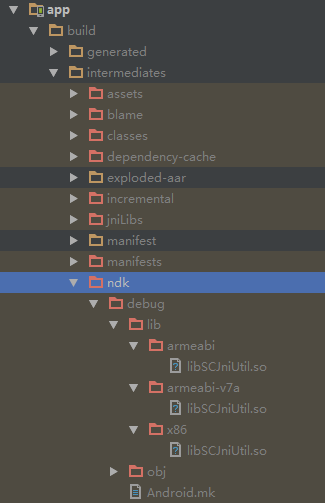
關於Android.mk文件說明
通過eclipse開發jni的時候,需要進行一個Android.mk文件的配置,但是Android Studio中並沒有做,沒有做不代表沒有,AS自動幫我們生成了,不需要我們自己去創建並配置,如下圖:
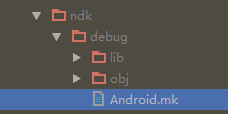
混淆文件中添加不混淆native的配置
-keepclasseswithmembernames class * {
native ;
}
通過jni獲取密鑰
當以上步驟完成之後,實例化native對象,調用相應的方法即可獲取到相應的結果,代碼如下:
//實例化對象
SmartCardJniUtil jniUtil = new SmartCardJniUtil();
//獲取密鑰
jniUtil.getKey()
des加解密工具
public class DesUtil {

    /**
     * 數據加密,算法(DES)
     *
     * @param data 要進行加密的數據
     * @return 加密後的數據
     */
    public static String encryptBasedDes(String data, String keyStr) {
        keyStr = StringUtilsSimple.leftPad(keyStr, 16, "0");
        byte[] DES_KEY = ByteUtil.hexStr2Byte(keyStr);
        String encryptedData = null;
        try {
            // DES算法要求有一個可信任的隨機數源
            SecureRandom sr = new SecureRandom();
            DESKeySpec deskey = new DESKeySpec(DES_KEY);
            // 創建一個密匙工廠,然後用它把DESKeySpec轉換成一個SecretKey對象
            SecretKeyFactory keyFactory = SecretKeyFactory.getInstance("DES");
            SecretKey key = keyFactory.generateSecret(deskey);
            // 加密對象
            Cipher cipher = Cipher.getInstance("DES");
            cipher.init(Cipher.ENCRYPT_MODE, key, sr);
            // 加密,並把字節數組編碼成字符串
            encryptedData = ByteUtil.hexToStr(cipher.doFinal(data.getBytes()));
        } catch (Exception e) {
//            log.error("加密錯誤,錯誤信息:", e);
            throw new RuntimeException("加密錯誤,錯誤信息:", e);
        }
        return encryptedData;
    }

    /**
     * 數據解密,算法(DES)
     *
     * @param cryptData 加密數據
     * @return 解密後的數據
     */
    public static String decryptBasedDes(String cryptData, String keyStr) {
        keyStr = StringUtilsSimple.leftPad(keyStr, 16, "0");
        byte[] DES_KEY = ByteUtil.hexStr2Byte(keyStr);
        String decryptedData = null;
        try {
            // DES算法要求有一個可信任的隨機數源
            SecureRandom sr = new SecureRandom();
            DESKeySpec deskey = new DESKeySpec(DES_KEY);
            // 創建一個密匙工廠,然後用它把DESKeySpec轉換成一個SecretKey對象
            SecretKeyFactory keyFactory = SecretKeyFactory.getInstance("DES");
            SecretKey key = keyFactory.generateSecret(deskey);
            // 解密對象
            Cipher cipher = Cipher.getInstance("DES");
            cipher.init(Cipher.DECRYPT_MODE, key, sr);
            // 把字符串解碼為字節數組,並解密
            decryptedData = new String(cipher.doFinal(ByteUtil.hexStr2Byte(cryptData)));
        } catch (Exception e) {
//            log.error("解密錯誤,錯誤信息:", e);
            throw new RuntimeException("解密錯誤,錯誤信息:", e);
        }
        return decryptedData;
    }

    public static void main(String[] args) {
        // TODO Auto-generated method stub

        String str = "123456789";

        // DES數據加密
        long time = System.currentTimeMillis();
        String s1 = encryptBasedDes(str, "1122334411223344");
        System.out.println("time1:" + (System.currentTimeMillis() - time));

        System.out.println(s1);

        // DES數據解密
        long time2 = System.currentTimeMillis();
        String s2 = decryptBasedDes(s1, "1122334411223344");
        System.out.println("time2:" + (System.currentTimeMillis() - time2));

        System.err.println(s2);
    }

}
文本左右補位的工具
public class StringUtilsSimple
{
    /**
     * A String for a space character.
     *
     * @since 3.2
     */
    public static final String SPACE = " ";

     /**
     *
The maximum size to which the padding constant(s) can expand.

*/ private static final int PAD_LIMIT = 8192; // Empty checks // ----------------------------------------------------------------------- /** *
* Checks if a CharSequence is empty ("") or null. *

* *
     * StringUtils.isEmpty(null)      = true
     * StringUtils.isEmpty("")        = true
     * StringUtils.isEmpty(" ")       = false
     * StringUtils.isEmpty("bob")     = false
     * StringUtils.isEmpty("  bob  ") = false
     *
* *
* NOTE: This method changed in Lang version 2.0. It no longer trims the * CharSequence. That functionality is available in isBlank(). *

* * @param cs * the CharSequence to check, may be null * @return {@code true} if the CharSequence is empty or null * @since 3.0 Changed signature from isEmpty(String) to * isEmpty(CharSequence) */ public static boolean isEmpty(final CharSequence cs) { return cs == null || cs.length() == 0; } /** *
* Left pad a String with a specified String. *

* *
* Pad to a size of {@code size}. *

* *
     * StringUtils.leftPad(null, *, *)      = null
     * StringUtils.leftPad("", 3, "z")      = "zzz"
     * StringUtils.leftPad("bat", 3, "yz")  = "bat"
     * StringUtils.leftPad("bat", 5, "yz")  = "yzbat"
     * StringUtils.leftPad("bat", 8, "yz")  = "yzyzybat"
     * StringUtils.leftPad("bat", 1, "yz")  = "bat"
     * StringUtils.leftPad("bat", -1, "yz") = "bat"
     * StringUtils.leftPad("bat", 5, null)  = "  bat"
     * StringUtils.leftPad("bat", 5, "")    = "  bat"
     *
* * @param str * the String to pad out, may be null * @param size * the size to pad to * @param padStr * the String to pad with, null or empty treated as single space * @return left padded String or original String if no padding is necessary, * {@code null} if null String input */ public static String leftPad(final String str, final int size, String padStr) { if (str == null) { return null; } if (isEmpty(padStr)) { padStr = SPACE; } final int padLen = padStr.length(); final int strLen = str.length(); final int pads = size - strLen; if (pads <= 0) { return str; // returns original String when possible } if (padLen == 1 && pads <= PAD_LIMIT) { return leftPad(str, size, padStr.charAt(0)); } if (pads == padLen) { return padStr.concat(str); } else if (pads < padLen) { return padStr.substring(0, pads).concat(str); } else { final char[] padding = new char[pads]; final char[] padChars = padStr.toCharArray(); for (int i = 0; i < pads; i++) { padding[i] = padChars[i % padLen]; } return new String(padding).concat(str); } } /** *
Left pad a String with a specified character.

* *
Pad to a size of {@code size}.

* *
     * StringUtils.leftPad(null, *, *)     = null
     * StringUtils.leftPad("", 3, 'z')     = "zzz"
     * StringUtils.leftPad("bat", 3, 'z')  = "bat"
     * StringUtils.leftPad("bat", 5, 'z')  = "zzbat"
     * StringUtils.leftPad("bat", 1, 'z')  = "bat"
     * StringUtils.leftPad("bat", -1, 'z') = "bat"
     *
* * @param str the String to pad out, may be null * @param size the size to pad to * @param padChar the character to pad with * @return left padded String or original String if no padding is necessary, * {@code null} if null String input * @since 2.0 */ public static String leftPad(final String str, final int size, final char padChar) { if (str == null) { return null; } final int pads = size - str.length(); if (pads <= 0) { return str; // returns original String when possible } if (pads > PAD_LIMIT) { return leftPad(str, size, String.valueOf(padChar)); } return repeat(padChar, pads).concat(str); } /** *
Returns padding using the specified delimiter repeated * to a given length.

* *
     * StringUtils.repeat('e', 0)  = ""
     * StringUtils.repeat('e', 3)  = "eee"
     * StringUtils.repeat('e', -2) = ""
     *
* *
Note: this method doesn't not support padding with * Unicode Supplementary Characters * as they require a pair of {@code char}s to be represented. * If you are needing to support full I18N of your applications * consider using {@link #repeat(String, int)} instead. *

* * @param ch character to repeat * @param repeat number of times to repeat char, negative treated as zero * @return String with repeated character * @see #repeat(String, int) */ public static String repeat(final char ch, final int repeat) { final char[] buf = new char[repeat]; for (int i = repeat - 1; i >= 0; i--) { buf[i] = ch; } return new String(buf); } /** *
Right pad a String with a specified String.

* *
The String is padded to the size of {@code size}.

* *
     * StringUtils.rightPad(null, *, *)      = null
     * StringUtils.rightPad("", 3, "z")      = "zzz"
     * StringUtils.rightPad("bat", 3, "yz")  = "bat"
     * StringUtils.rightPad("bat", 5, "yz")  = "batyz"
     * StringUtils.rightPad("bat", 8, "yz")  = "batyzyzy"
     * StringUtils.rightPad("bat", 1, "yz")  = "bat"
     * StringUtils.rightPad("bat", -1, "yz") = "bat"
     * StringUtils.rightPad("bat", 5, null)  = "bat  "
     * StringUtils.rightPad("bat", 5, "")    = "bat  "
     *
* * @param str the String to pad out, may be null * @param size the size to pad to * @param padStr the String to pad with, null or empty treated as single space * @return right padded String or original String if no padding is necessary, * {@code null} if null String input */ public static String rightPad(final String str, final int size, String padStr) { if (str == null) { return null; } if (isEmpty(padStr)) { padStr = SPACE; } final int padLen = padStr.length(); final int strLen = str.length(); final int pads = size - strLen; if (pads <= 0) { return str; // returns original String when possible } if (padLen == 1 && pads <= PAD_LIMIT) { return rightPad(str, size, padStr.charAt(0)); } if (pads == padLen) { return str.concat(padStr); } else if (pads < padLen) { return str.concat(padStr.substring(0, pads)); } else { final char[] padding = new char[pads]; final char[] padChars = padStr.toCharArray(); for (int i = 0; i < pads; i++) { padding[i] = padChars[i % padLen]; } return str.concat(new String(padding)); } } /** *
Right pad a String with a specified character.

* *
The String is padded to the size of {@code size}.

* *
     * StringUtils.rightPad(null, *, *)     = null
     * StringUtils.rightPad("", 3, 'z')     = "zzz"
     * StringUtils.rightPad("bat", 3, 'z')  = "bat"
     * StringUtils.rightPad("bat", 5, 'z')  = "batzz"
     * StringUtils.rightPad("bat", 1, 'z')  = "bat"
     * StringUtils.rightPad("bat", -1, 'z') = "bat"
     *
* * @param str the String to pad out, may be null * @param size the size to pad to * @param padChar the character to pad with * @return right padded String or original String if no padding is necessary, * {@code null} if null String input * @since 2.0 */ public static String rightPad(final String str, final int size, final char padChar) { if (str == null) { return null; } final int pads = size - str.length(); if (pads <= 0) { return str; // returns original String when possible } if (pads > PAD_LIMIT) { return rightPad(str, size, String.valueOf(padChar)); } return str.concat(repeat(padChar, pads)); } }
 管理Android通信錄
Android提供了Contacts應用程序來管理聯系人,而且Android系統還為聯系人管理提供了ContentProvider,這就允許其它應用
 android開發步步為營之64:PopupWindow實現自定義彈出菜單
打開PopupWindow的源碼,你會發現它其實也是通過WindowManager來添加view的。 private void invoke
 Android控件系列之CheckBox使用介紹
學習目的: 1、掌握在Android中如何建立CheckBox 2、掌握CheckBox的常用屬性 3、掌握CheckBox選中狀態變換的事件(監聽器) CheckBox
 OpenCV學習筆記(七)—— OpenCV for Android實時圖像處理
在上篇中我們已經實現了相機打開和實時圖像信息的獲取,那麼接下來我們可以嘗試在獲取的圖像信息進行一些處理,然後實時顯示出來,在這裡我們要完成的的幾種處理:灰化、Canny邊