編輯:關於Android編程
安卓消息處理類:
Looper、Handler、MessageQueue、Message、ThreadLocal、ThreadLocal.Values、HandlerThread。
class LooperThread extends Thread {
      public Handler mHandler;

      public void run() {
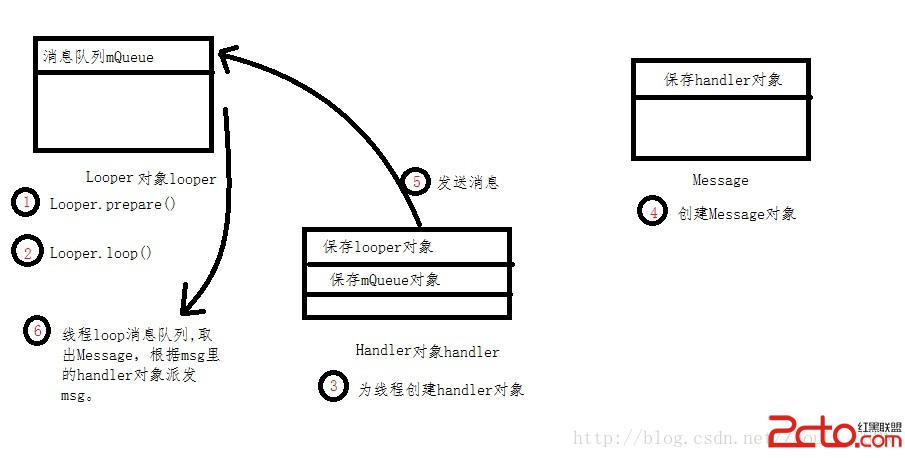
          Looper.prepare();

          mHandler = new Handler() {
              public void handleMessage(Message msg) {
                  // process incoming messages here
              }
          };

          Looper.loop();
      }
  }
那麼到這裡你肯定會想安卓的主線程並沒有prepare和loop也可以創建Handler,處理消息循環。這是因為安卓在創建主線程的時候已經為我們添加了消息循環。
public final class Looper {
    // sThreadLocal.get() will return null unless you've called prepare().
    static final ThreadLocal sThreadLocal = new ThreadLocal();
    private static Looper sMainLooper;  // guarded by Looper.class

    final MessageQueue mQueue;
    final Thread mThread;

    private Printer mLogging;

    public static void prepare() {
        prepare(true);
    }

    private static void prepare(boolean quitAllowed) {
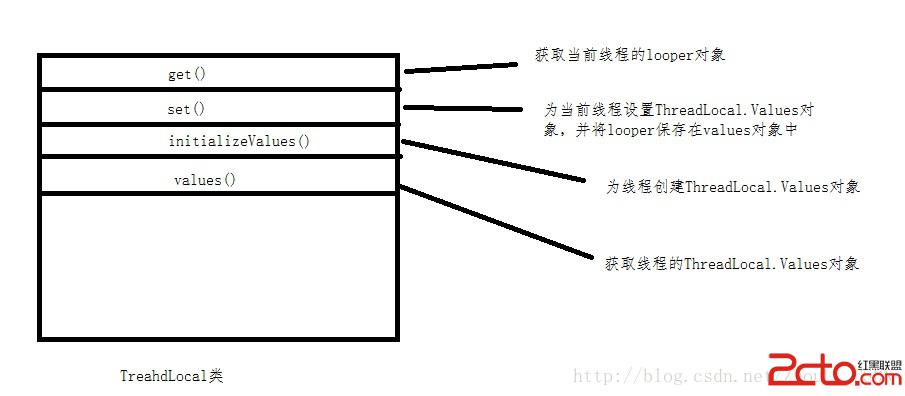
        if (sThreadLocal.get() != null) {
            throw new RuntimeException("Only one Looper may be created per thread");
        }
        sThreadLocal.set(new Looper(quitAllowed));
    }

    public static void prepareMainLooper() {
        prepare(false);
        synchronized (Looper.class) {
            if (sMainLooper != null) {
                throw new IllegalStateException("The main Looper has already been prepared.");
            }
            sMainLooper = myLooper();
        }
    }

    public static Looper getMainLooper() {
        synchronized (Looper.class) {
            return sMainLooper;
        }
    }

    public static void loop() {
        final Looper me = myLooper();
        if (me == null) {
            throw new RuntimeException("No Looper; Looper.prepare() wasn't called on this thread.");
        }
        final MessageQueue queue = me.mQueue;

        Binder.clearCallingIdentity();
        final long ident = Binder.clearCallingIdentity();

        for (;;) {
            Message msg = queue.next(); // might block
            if (msg == null) {
                // No message indicates that the message queue is quitting.
                return;
            }

            // This must be in a local variable, in case a UI event sets the logger
            Printer logging = me.mLogging;
            if (logging != null) {
                logging.println(">>>>> Dispatching to " + msg.target + " " +
                        msg.callback + ": " + msg.what);
            }

            msg.target.dispatchMessage(msg);

            if (logging != null) {
                logging.println("<<<<< Finished to " + msg.target + " " + msg.callback);
            }

            final long newIdent = Binder.clearCallingIdentity();
            if (ident != newIdent) {
                Log.wtf(TAG, "Thread identity changed from 0x"
                        + Long.toHexString(ident) + " to 0x"
                        + Long.toHexString(newIdent) + " while dispatching to "
                        + msg.target.getClass().getName() + " "
                        + msg.callback + " what=" + msg.what);
            }

            msg.recycle();
        }
    }

    public static Looper myLooper() {
        return sThreadLocal.get();
    }
下面通過圖解講解上面的過程:(prepare調用threadLocal的get的set方法) 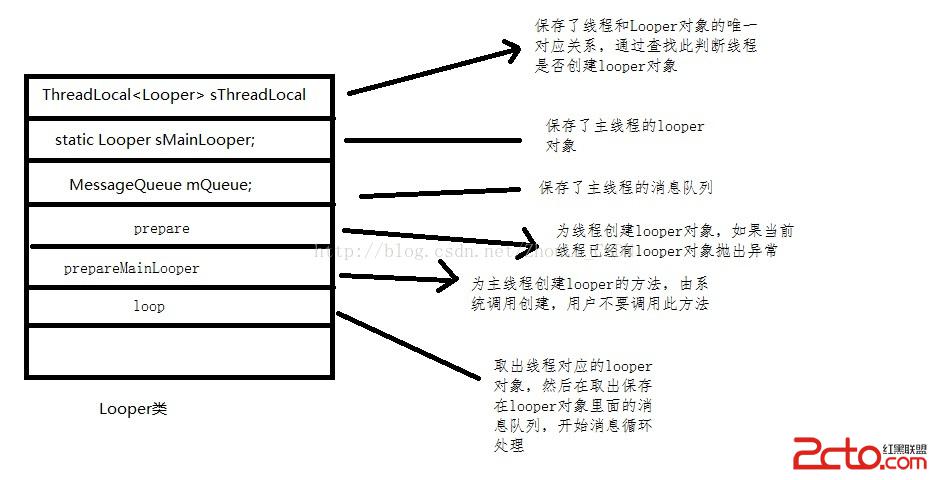
 android開發之listView組件用法實例簡析
本文實例講述了android開發之listView組件用法。分享給大家供大家參考,具體如下:關於Android ListView組件中android:drawSelect
 android增量更新
今天學習了一下增量更新,這個技術已經出現很長時間了,但是現實中,估計只有大廠才利用了這一技術在做產品!國內有些第三方服務平台,像友盟提供自動更新的服務,也是用的增量方式!
 Android動態加載框架DL的架構與基本原理解析
轉載請注明出處,本文來自【 Mr.Simple的博客 】。 我正在參加博客之星,點擊這裡投我一票吧,謝謝~ 前言 最近這一兩年,Android App使用插件化技術
 Android自定義控件實現icon+文字的多種效果
今天給大家帶來一個很簡單但是很常用的控件ButtonExtendM,在開發中我們經常會用到圖片加文字的組合控件,像這樣:以上圖片都是從微信上截取的。(暫時沒有找到icon