編輯:關於Android編程
雖然只是模仿,但我覺得這是學習自定義view的必經之路,所以還是把我所學到的東西拿出來與大家一起分享。
先貼出一張progressBar的gif圖,其中有水平的進度條,和圓形的進度條:
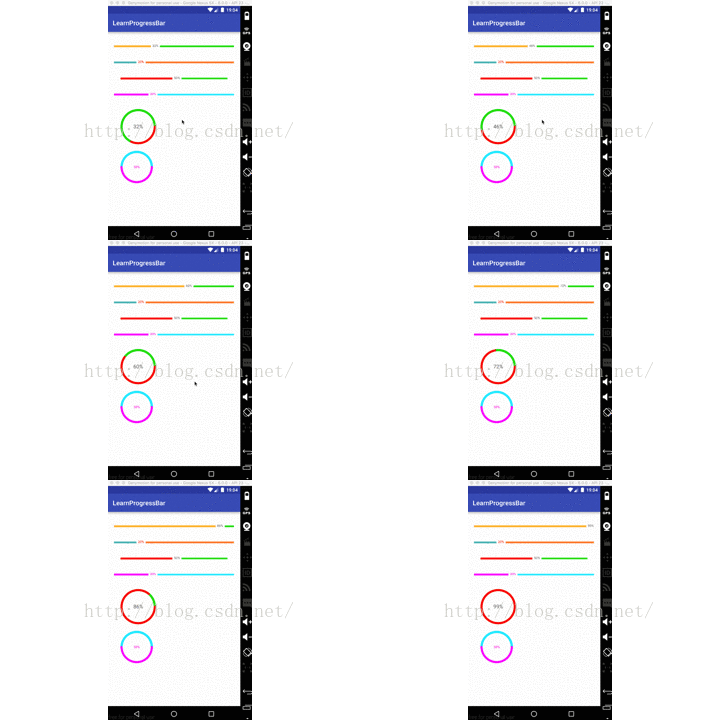
這裡我們的實現的思路是繼承的progressBar,然後重新去測量和繪制相關代碼,我們直接貼出源碼:
package com.example.asiatravel.learnprogressbar.view;

import android.content.Context;
import android.content.res.TypedArray;
import android.graphics.Canvas;
import android.graphics.Paint;
import android.util.AttributeSet;
import android.util.TypedValue;
import android.widget.ProgressBar;

import com.example.asiatravel.learnprogressbar.R;

/**
 * Created by kuangxiaoguo on 16/9/8.
 *
 * 水平進度條
 */
public class HorizontalProgressbarWithProgress extends ProgressBar {

    private static final int DEFAULT_TEXT_SIZE = 10;
    private static final int DEFAULT_TEXT_COLOR = 0xFFFC00D1;
    private static final int DEFAULT_COLOR_UNREACH = 0XFFD3D6DA;
    private static final int DEFAULT_HEIGHT_UNREACH = 2;
    private static final int DEFAULT_COLOR_REACH = DEFAULT_TEXT_COLOR;
    private static final int DEFAULT_HEIGHT_REACH = 2;
    private static final int DEFAULT_TEXT_OFFSET = 10;

    protected int mTextSize = sp2px(DEFAULT_TEXT_SIZE);
    protected int mTextColor = DEFAULT_TEXT_COLOR;
    protected int mUnReachColor = DEFAULT_COLOR_UNREACH;
    protected int mUNReachHeight = dp2px(DEFAULT_HEIGHT_UNREACH);
    protected int mReachColor = DEFAULT_COLOR_REACH;
    protected int mReachHeight = dp2px(DEFAULT_HEIGHT_REACH);
    protected int mTextOffSet = dp2px(DEFAULT_TEXT_OFFSET);

    protected Paint mPaint = new Paint();
    protected int mRealWidth;

    public HorizontalProgressbarWithProgress(Context context) {
        this(context, null);
    }

    public HorizontalProgressbarWithProgress(Context context, AttributeSet attrs) {
        this(context, attrs, 0);
    }

    public HorizontalProgressbarWithProgress(Context context, AttributeSet attrs, int defStyleAttr) {
        super(context, attrs, defStyleAttr);
        obtainStyleAttrs(attrs);
    }

    /**
     * 獲取自定義屬性
     */
    private void obtainStyleAttrs(AttributeSet attrs) {
        TypedArray ta = getContext().obtainStyledAttributes(attrs, R.styleable.HorizontalProgressbarWithProgress);
        mTextSize = (int) ta.getDimension(R.styleable.HorizontalProgressbarWithProgress_progress_text_size, mTextSize);
        mTextColor = ta.getColor(R.styleable.HorizontalProgressbarWithProgress_progress_text_color, mTextColor);
        mUnReachColor = ta.getColor(R.styleable.HorizontalProgressbarWithProgress_progress_unreach_color, mUnReachColor);
        mUNReachHeight = (int) ta.getDimension(R.styleable.HorizontalProgressbarWithProgress_progress_unreach_height, mUNReachHeight);
        mReachColor = ta.getColor(R.styleable.HorizontalProgressbarWithProgress_progress_reach_color, mReachColor);
        mReachHeight = (int) ta.getDimension(R.styleable.HorizontalProgressbarWithProgress_progress_reach_height, mReachHeight);
        mTextOffSet = (int) ta.getDimension(R.styleable.HorizontalProgressbarWithProgress_progress_text_offset, mTextOffSet);
        ta.recycle();

        mPaint.setTextSize(mTextSize);
    }

    @Override
    protected synchronized void onDraw(Canvas canvas) {

        /**
         * save:用來保存Canvas的狀態。save之後,可以調用Canvas的平移、放縮、旋轉、錯切、裁剪等操作。
         */
        canvas.save();
        canvas.translate(getPaddingLeft(), getHeight() / 2);

        /**
         * 判斷是否需要繪制右邊的部分
         */
        boolean noNeedUnReach = false;
        /**
         * getProgress() 獲取當前進度
         * getMax()獲取progressBar的最大進度
         */
        float radio = getProgress() * 1.0f / getMax();
        String text = getProgress() + "%";
        int textWidth = (int) mPaint.measureText(text);
        float progressX = radio * mRealWidth;
        if (progressX + textWidth > mRealWidth) {
            progressX = mRealWidth - textWidth;
            noNeedUnReach = true;
        }
        float endX = progressX - mTextOffSet / 2;
        if (endX > 0) {
            mPaint.setColor(mReachColor);
            mPaint.setStrokeWidth(mReachHeight);
            canvas.drawLine(0, 0, endX, 0, mPaint);
        }

        //draw text
        mPaint.setColor(mTextColor);
        /**
         * descent()是文字的底部y坐標, ascent()是文字頂部y坐標
         */
        int y = (int) -(mPaint.descent() + mPaint.ascent() / 2);
        canvas.drawText(text, progressX, y, mPaint);

        //draw unReach bar
        if (!noNeedUnReach) {
            float start = progressX + mTextOffSet / 2 + textWidth;
            mPaint.setColor(mUnReachColor);
            mPaint.setStrokeWidth(mUNReachHeight);
            canvas.drawLine(start, 0, mRealWidth, 0, mPaint);
        }
        /**
         * restore:用來恢復Canvas之前保存的狀態。防止save後對Canvas執行的操作對後續的繪制有影響。
         * 另外,save和restore要配對使用(restore可以比save少,但不能多),如果restore調用次數比save多,會引發Error.
         */
        canvas.restore();
    }

    @Override
    protected synchronized void onMeasure(int widthMeasureSpec, int heightMeasureSpec) {
        super.onMeasure(widthMeasureSpec, heightMeasureSpec);
        int width = MeasureSpec.getSize(widthMeasureSpec);
        int height = measureHeight(heightMeasureSpec);
        setMeasuredDimension(width, height);
        /**
         * 上面已經通過setMeasuredDimension()確定了view的寬度和高度
         * 所以可以直接通過getMeasuredWidth()獲取view的寬度
         */
        mRealWidth = getMeasuredWidth() - getPaddingLeft() - getPaddingRight();
    }

    private int measureHeight(int heightMeasureSpec) {
        int result;
        int mode = MeasureSpec.getMode(heightMeasureSpec);
        int size = MeasureSpec.getSize(heightMeasureSpec);

        if (mode == MeasureSpec.EXACTLY) {
            result = size;
        } else {
            /**
             * descent()是文字的底部y坐標, ascent()是文字頂部y坐標
             * 所以兩者之差即為文字高度
             */
            int textHeight = (int) (mPaint.descent() - mPaint.ascent());
            /**
             * 三者之中的最大值即為我們所繪制的view的高度.
             */
            result = getPaddingTop() + getPaddingBottom() + Math.max(Math.max(mReachHeight, mUNReachHeight), Math.abs(textHeight));
            /**
             * 如果為wrap_content的話,則result取計算result和size的最小值
             */
            if (mode == MeasureSpec.AT_MOST) {
                result = Math.min(result, size);
            }
        }
        return result;
    }

    protected int dp2px(int dp) {
        return (int) TypedValue.applyDimension(TypedValue.COMPLEX_UNIT_DIP, dp, getResources().getDisplayMetrics());
    }

    protected int sp2px(int sp) {
        return (int) TypedValue.applyDimension(TypedValue.COMPLEX_UNIT_SP, sp, getResources().getDisplayMetrics());
    }
}
package com.example.asiatravel.learnprogressbar.view;

import android.content.Context;
import android.content.res.TypedArray;
import android.graphics.Canvas;
import android.graphics.Paint;
import android.graphics.RectF;
import android.util.AttributeSet;

import com.example.asiatravel.learnprogressbar.R;

/**
 * Created by kuangxiaoguo on 16/9/8.
 *
 * 圓形進度條
 */
public class RoundProgressbarWithProgress extends HorizontalProgressbarWithProgress {

    private int mRadius = dp2px(30);
    private int mMaxPaintWidth;

    public RoundProgressbarWithProgress(Context context) {
        this(context, null);
    }

    public RoundProgressbarWithProgress(Context context, AttributeSet attrs) {
        this(context, attrs, 0);
    }

    public RoundProgressbarWithProgress(Context context, AttributeSet attrs, int defStyleAttr) {
        super(context, attrs, defStyleAttr);
        TypedArray ta = context.obtainStyledAttributes(attrs, R.styleable.RoundProgressbarWithProgress);
        mRadius = (int) ta.getDimension(R.styleable.RoundProgressbarWithProgress_radius, mRadius);
        ta.recycle();
        mPaint.setStyle(Paint.Style.STROKE);
        mPaint.setAntiAlias(true);
        mPaint.setDither(true);
        mPaint.setStrokeCap(Paint.Cap.ROUND);
    }

    @Override
    protected synchronized void onMeasure(int widthMeasureSpec, int heightMeasureSpec) {
        super.onMeasure(widthMeasureSpec, heightMeasureSpec);
        /**
         * 獲取最大的繪制寬度
         */
        mMaxPaintWidth = Math.max(mReachHeight, mUNReachHeight);
        //默認四個padding一致
        int expect = mRadius * 2 + mMaxPaintWidth + getPaddingLeft() + getPaddingRight();

        /**
         * resolveSize()方法就類似於我們自己根據MeasureSpec自己計算view的寬和高
         */
        int width = resolveSize(expect, widthMeasureSpec);
        int height = resolveSize(expect, heightMeasureSpec);

        int realWidth = Math.min(width, height);
        mRadius = (realWidth - getPaddingLeft() - getPaddingRight() - mMaxPaintWidth) / 2;
        setMeasuredDimension(realWidth, height);
    }

    @Override
    protected synchronized void onDraw(Canvas canvas) {
        String text = getProgress() + "%";
        float textWidth = mPaint.measureText(text);
        /**
         * descent()是文字的底部y坐標, ascent()是文字頂部y坐標
         */
        float textHeight = (mPaint.descent() + mPaint.ascent()) / 2;

        canvas.save();
        canvas.translate(getPaddingLeft() + mMaxPaintWidth / 2, getPaddingTop() + mMaxPaintWidth / 2);
        //draw unreach bar
        mPaint.setStyle(Paint.Style.STROKE);
        mPaint.setColor(mUnReachColor);
        canvas.drawCircle(mRadius, mRadius, mRadius, mPaint);

        //draw reach bar
        mPaint.setColor(mReachColor);
        mPaint.setStrokeWidth(mReachHeight);
        float sweepAngle = getProgress() * 1.0f / getMax() * 360;
        canvas.drawArc(new RectF(0, 0, mRadius * 2, mRadius * 2), 0, sweepAngle, false, mPaint);

        //draw text
        mPaint.setColor(mTextColor);
        mPaint.setTextSize(mTextSize);
        mPaint.setStyle(Paint.Style.FILL);
        canvas.drawText(text, mRadius - textWidth / 2, mRadius - textHeight, mPaint);
        canvas.restore();
    }
}
package com.example.asiatravel.learnprogressbar;

import android.os.Bundle;
import android.os.Handler;
import android.os.Message;
import android.support.v7.app.AppCompatActivity;

import com.example.asiatravel.learnprogressbar.view.HorizontalProgressbarWithProgress;
import com.example.asiatravel.learnprogressbar.view.RoundProgressbarWithProgress;

public class MainActivity extends AppCompatActivity {

    private static final int HORIZONTAL_WHAT = 0;
    private HorizontalProgressbarWithProgress progressBar;
    private RoundProgressbarWithProgress roundProgressBar;
    private Handler mHandler = new Handler() {
        @Override
        public void handleMessage(Message msg) {
            super.handleMessage(msg);
            int progress = progressBar.getProgress();
            int nextProgress = ++progress;
            progressBar.setProgress(nextProgress);
            roundProgressBar.setProgress(nextProgress);
            mHandler.sendEmptyMessageDelayed(HORIZONTAL_WHAT, 100);
            if (progress >= 100) {
                mHandler.removeMessages(HORIZONTAL_WHAT);
            }
        }
    };

    @Override
    protected void onCreate(Bundle savedInstanceState) {
        super.onCreate(savedInstanceState);
        setContentView(R.layout.activity_main);
        progressBar = (HorizontalProgressbarWithProgress) findViewById(R.id.progressBar);
        roundProgressBar = (RoundProgressbarWithProgress) findViewById(R.id.round_progressBar);
        mHandler.sendEmptyMessage(HORIZONTAL_WHAT);
    }
}
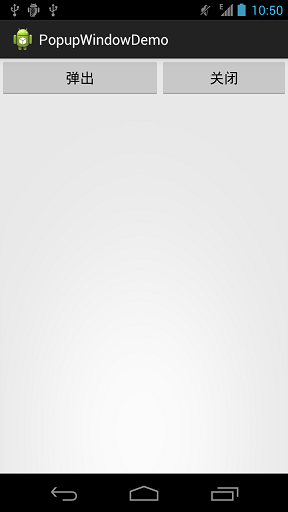 Android PopupWindow使用實例
示例效果如下: MainActivity.xmlpackage sn.qdj.popupwindowdemo;import android.support.v7
 DrySister看妹子應用(第一版)——3.圖片加載優化(寫個圖片緩存小框架)
1.一些BB上節我們把妹子圖片的數據來源從本地改成了解析Gank提供的接口數據,我們本節想對這個圖片加載類進行優化,比如加上顯示本地圖片的,另外還有一點就是緩存,我們現在
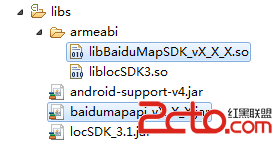 百度地圖 Android SDK - Hello Baidu Map
如下內容主要向廣大開發者介紹如何利用百度地圖Android SDK來構建一個最基本的地圖應用! 第一步,創建Android工程,將百度地圖Android SDK的開發包導
 Android 4.4 Kitkat Phone工作流程淺析(八)__Phone狀態分析
前置文章: 《Android 4.4 Kitkat Phone工作流程淺析(一)__概要和學習計劃》 《Android 4.4 Kitkat Phone工作