編輯:關於Android編程
本文主要討論有向圖的十字鏈表表示,包括建圖,添加弧,刪除弧,以鄰接表的格式打印圖(其中包括兩種形式:1,同尾的弧構成條鏈 2,同頭的弧構成條鏈)c ++ 描述。
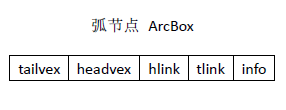
類 ArcBox 包含弧的信息:分別對應如下
弧的尾節點序號,弧的頭結點序號,指針域(指向與這條弧具有相同頭結點的下一條弧),指針域(指向與這條弧具有相同尾結點的下一條弧),弧的信息(權重)
類VexNode 包含每個頂點的信息
頂點的名稱(v1,v2,,,),指針域(指向以該頂點為弧頭的第一條弧),指針域(指向以該頂點為弧尾的第一條弧)

class ArcBox
{
public:
    ArcBox();
    ArcBox(int from, int to, int inf);
    ~ArcBox(){};
    friend class OLGraph;
    int getTailvex() { return tailvex; }
    int getHeadvex() { return headvex; }
    ArcBox *getHlink() { return hlink; }
    ArcBox *getTlink() { return tlink; }
    int getInfo() { return info; }
    void setInfo(int in) { info = in; }
    void setTailvex(int tv) { tailvex = tv; }
    void setHeadvex(int hv) { headvex = hv; }
    void setHlink(ArcBox *hl) { hlink = hl; }
    void setTlink(ArcBox *tl) { tlink = tl; }

private:
    int tailvex;
    int headvex;
    ArcBox *hlink;
    ArcBox *tlink;
    int info  ; // 權重,距離。。。
};
ArcBox::ArcBox()
{
    tailvex = -1;
    headvex = -1;
    hlink = NULL;
    tlink = NULL;
    info = -1;
}
ArcBox::ArcBox(int tail,int head,int inf)
{
    tailvex = tail;
    headvex = head;
    info = inf;
    hlink = NULL;
    tlink = NULL;
}

class Vexnode
{
public:
    Vexnode();
    ~Vexnode() {};
    friend class OLGraph;
    void setNodeNum(int noden) { nodeNum = noden; }
    void setFirstin(ArcBox *firsti) { firstin = firsti; }
    void setFirstout(ArcBox *firsto) { firstout = firsto; }
    int getNideNum() { return nodeNum; }
    ArcBox *getFirstin() { return firstin; }
    ArcBox *getFirstout() { return firstout; }
private:
    int nodeNum;
    ArcBox *firstin;
    ArcBox *firstout;
};
Vexnode::Vexnode()
{
    nodeNum = 0;
    firstin = NULL;
    firstout = NULL;
}


class OLGraph
{
public:
    OLGraph();
    ~OLGraph();

    int getVexnum() { return vexnum; }
    int getArcnum() { return vexnum; }
    Vexnode getVList(int vexIndex) { return xList[vexIndex]; }
    int addArc(int tail, int head, int inf); // 參數 tail 和 head 表示弧的尾節點和頭結點的數據,而不是節點編號
    int deleteArc(int tail, int head); // 參數 tail 和 head 表示弧的尾節點和頭結點的數據,而不是節點編號
    int createOLGraph();

    int vexLoc(int vexNum);
    int ftPrint();
    int tfPrint();
private:
    Vexnode xList[ MAX ];
    int vexnum;
    int arcnum;
};

OLGraph::OLGraph()
{
    vexnum = 0;
    arcnum = 0;
}

OLGraph::~OLGraph()
{
}
int OLGraph::vexLoc(int vexNum)
{
    for (int i = 0; i < this->vexnum; i++)
    {
        if (xList[i].nodeNum == vexNum)
        {
            return i;
        }
    }
    return -1;
}

int OLGraph::ftPrint()
{
    ArcBox *tempArc = new ArcBox();
    for (int index = 0; index < this->vexnum; index++)
    {
        cout << index << " : ";
        tempArc = xList[index].firstout;
        while (tempArc)
        {
            cout << "--> [ " << tempArc->headvex << "," << tempArc->info << " ]";
            tempArc = tempArc->tlink;

        }
        cout << "--> ^" << endl;
    }
    cout << "-------------------" << endl;
    return 0;
}
int OLGraph::tfPrint()
{
    ArcBox *tempArc = new ArcBox();
    for (int index = 0; index < this->vexnum; index++)
    {
        cout << index << " : ";
        tempArc = xList[index].firstin;
        while (tempArc)
        {
            cout << "--> [ " << tempArc->tailvex << "," << tempArc->info << " ]";
            tempArc = tempArc->hlink;
        }
        cout << "--> ^" << endl;
    }
    cout << "-------------------" << endl;
    return 0;
}
int OLGraph::addArc(int tail, int head, int inf)
{
    int tailIndex, headIndex;
    tailIndex = vexLoc(tail); // 弧尾節點在表頭鏈表中的位置
    headIndex = vexLoc(head); // 弧頭節點在表頭鏈表中的位置
    ArcBox *ftArc = new ArcBox(tailIndex, headIndex, inf);
    ftArc->hlink = xList[headIndex].firstin; // 弧頭節點相同
    xList[headIndex].firstin = ftArc;
    ftArc->tlink = xList[tailIndex].firstout; // 弧尾節點相同
    xList[tailIndex].firstout = ftArc;
    return 0;

}

int OLGraph::deleteArc(int tail, int head)
{
    int tailIndex, headIndex;
    tailIndex = vexLoc(tail); // 弧尾節點在表頭鏈表中的位置
    headIndex = vexLoc(head); // 弧頭節點在表頭鏈表中的位置
    ArcBox *ftArc = new ArcBox(),*preArc = new ArcBox();
    // 先刪同 tail 的鏈接
    ftArc = xList[tailIndex].firstout;
    if (ftArc && ftArc->headvex == headIndex) //特殊情況:判斷第一個出節點是否為要找的
    {
        xList[tailIndex].firstout = ftArc->tlink;
        //delete ftArc;  // 易錯點,只有把四條指向全部刪掉之後才可以刪除此 ArcBox對象,因為下文在刪除另一個方向的兩條指向時要用到這個 ArcBox對象
    }
    else
    {
        preArc = ftArc;
        ftArc = preArc->tlink;
        while (ftArc)
        {
            if (ftArc->headvex == headIndex)
            {
                preArc->tlink = ftArc->tlink;
                //delete ftArc;  // 易錯點,只有把四條指向全部刪掉之後才可以刪除此 ArcBox對象,因為下文在刪除另一個方向的兩條指向時要用到這個 ArcBox對象
                break;

            }
            else
            {
                preArc = ftArc;
                ftArc = preArc->tlink;
            }
        }
    }


    // 再刪同 head 的鏈接
    ftArc = xList[headIndex].firstin;
    if (ftArc && ftArc->tailvex == tailIndex) //特殊情況:判斷第一個出節點是否為要找的
    {
        xList[headIndex].firstin = ftArc->hlink;
        delete ftArc;
    }
    else
    {
        preArc = ftArc;
        ftArc = preArc->hlink;
        while (ftArc)
        {
            if (ftArc->tailvex == tailIndex)
            {
                preArc->hlink = ftArc->hlink;
                delete ftArc;
                break;

            }
            else
            {
                preArc = ftArc;
                ftArc = preArc->hlink;
            }
        }
    }
    ////////
    return 0;
}
int OLGraph::createOLGraph()
{
    cout << "請輸入節點數目:" << endl;
    cin >> this->vexnum;
    cout << "請輸入弧的數目:" << endl;
    cin >> this->arcnum;
    cout << "請輸入頂點信息:" << endl;
    for (int i = 0; i < this->vexnum; i++)
    {
        cin >> this->xList[i].nodeNum ;
    }
    cout << "請輸入弧的信息" << endl;
    int tail,head,info;
    for (int i = 0; i < this->arcnum ; i++)
    {
        cin >> tail >> head >> info;
        addArc(tail, head, info);
    }
    return 0;
}

int main()
{
    OLGraph *olGraph = new OLGraph();
    olGraph->createOLGraph();
    olGraph->ftPrint();
    olGraph->tfPrint();
    cout << "添加邊(2,1,0)" << endl;
    olGraph->addArc(2, 1, 0);
    olGraph->ftPrint();
    olGraph->tfPrint();
    cout << "刪除邊(1,2)" << endl;
    olGraph->deleteArc(1, 2);
    olGraph->ftPrint();
    olGraph->tfPrint();
}
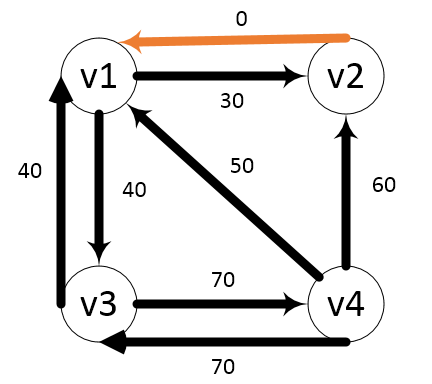
舉例子:
原圖:
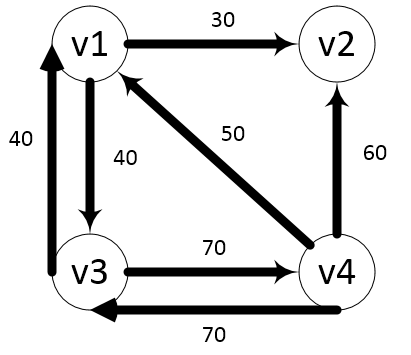
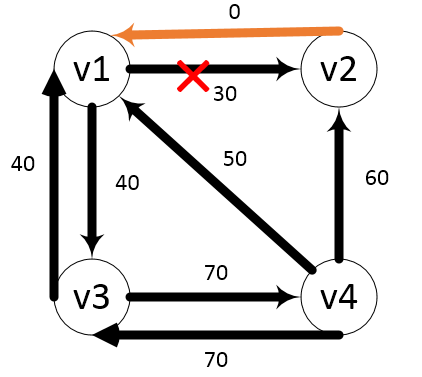
添加邊(2,1,0)
刪除邊(1,2)
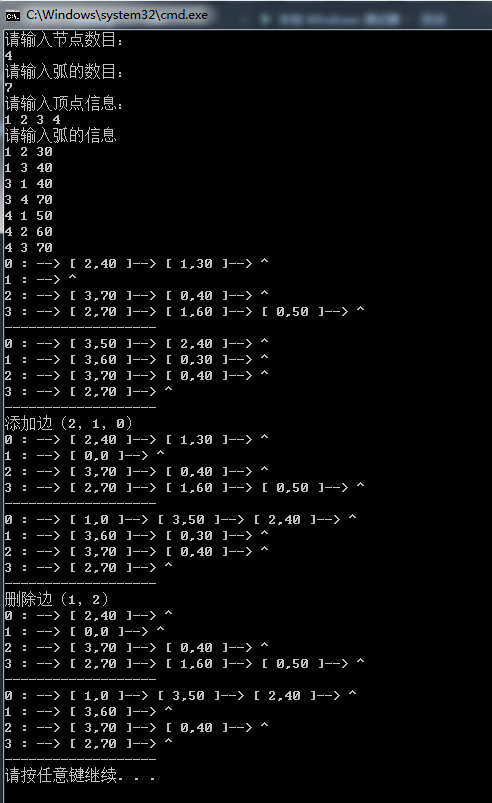
結果:
 ObjectAnimator詳解(測試用,承接Android動畫操作中的測試)
廢話不多說直接看代碼需要注意的是ObjectAnimator.ofFloat(xiaoming, “age”, 0f,100f)傳入的是float
 AppWidget源碼分析---接口類
最近項目中接觸到AppWidget,相對來說這部分比較簡單,所以趁著空余時間詳細閱讀了AppWidget的源碼。這篇文章主要是從源碼上分析AppWidget中API類的相
 Android--數據庫操作輔助類:SQLiteOpenHelper
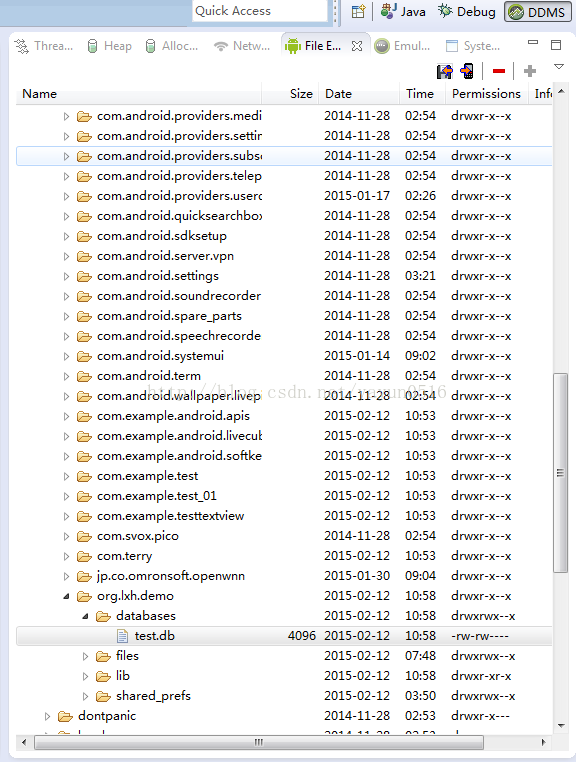
1.MyDatabaseHelper.java代碼如下: package org.lxh.demo; import android.content.Context; i
 android動畫——屬性動畫(Property Animation)
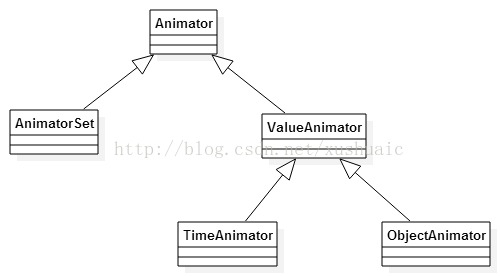
相對與視圖動畫 ,屬性動畫(android3.0提出的) 使用條件:完全彌補了View anim System的缺陷,你可以為一個對象的任何屬性添加動畫,(View或者非