編輯:關於Android編程
概述:
之前有個需求是寫一個公告,需要無限輪詢效果,第一時間想到的是用viewpager實現。網上一看,幾乎都是用viewpager實現的。於是我也手動實現了一下,發現其實效果也沒那麼好。實現無限輪詢,網上一般有兩種做法,1.給予viewpager的頁數一個很大的值,比如Integer.MAX_VALUE。這樣做的話不知道為什麼總是不大流暢,有時還出現空白頁,再者切換到下一頁是可以的,但是切換回上一頁有可能回到第一頁再也不能切換了,解決的方法是一開始跳到中間去。 2.是緩存幾頁,等切換到最後一頁時,下一頁是緩存的第一頁,切換到下一頁後馬上跳到第一頁,實現一個循環。由於很快,看不出變化,這樣的做法是去掉了切換頁的效果。 總之也是蠻多問題,勉強實現了效果,在我看來不是一個比較好的解決的辦法。在我思考了好一陣,決定寫這個控件,也當作練習自定義控件吧。
基本需求:
1.實現自動無限輪詢切換。
2.支持滑動切換。
3.支持滑動改變切換方向。
4.為了方便拓展,支持存放任何view。
5.支持點擊事件監聽,以便知道點擊了那個控件。
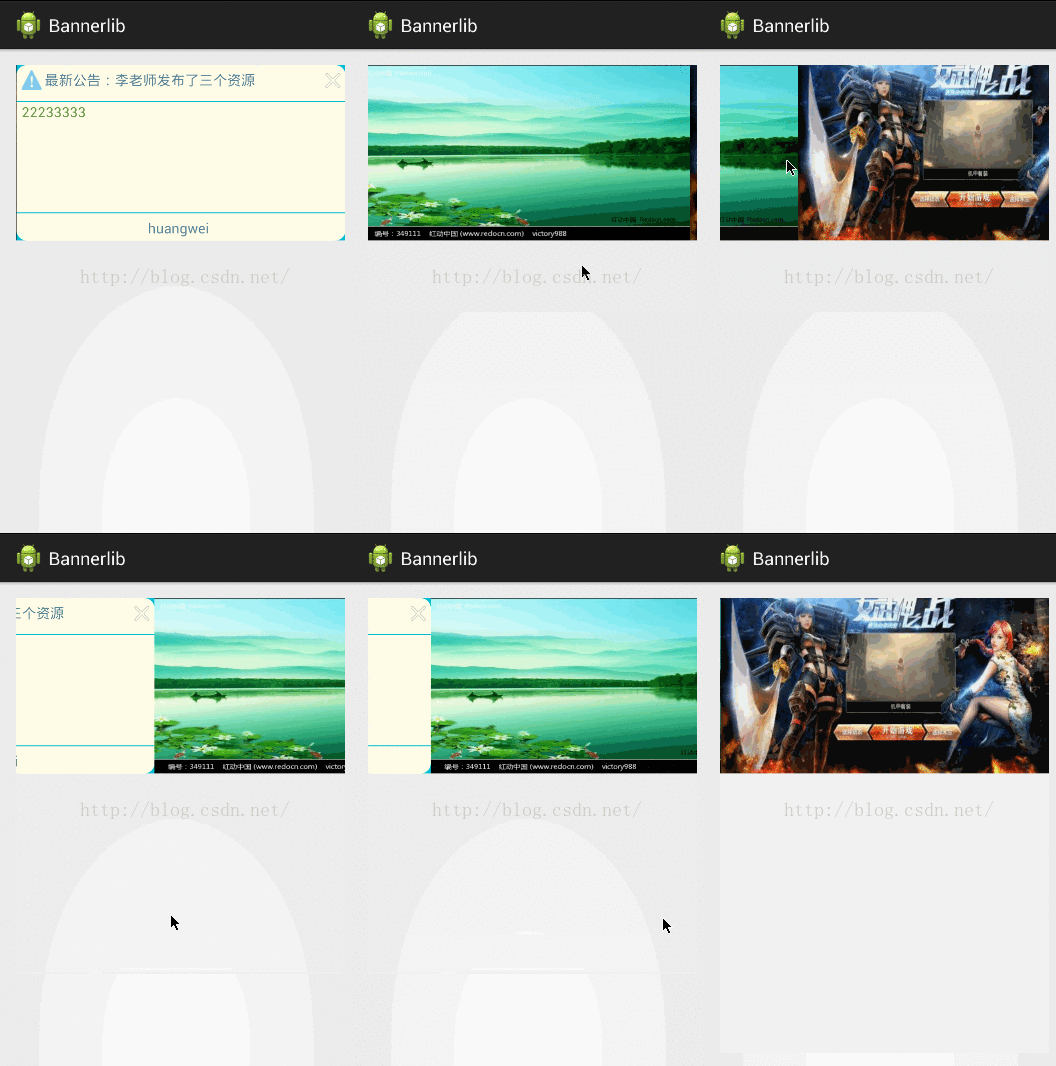
最終效果:
實現原理:
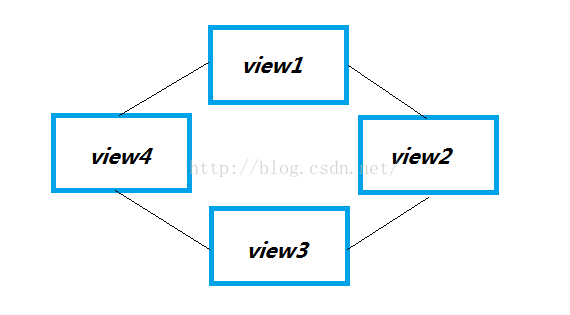
為了實現能向上或者向下輪詢,可以采用咬尾蛇的方式,就是view之間聯系起來,最開始與最後的view也關聯起來,形成一個真正的循環的圈子。如下圖顯示:
為了好處理,將其封裝在一個結構體裡面,如我寫的這樣:
public class BannerViewdata {

	private int index;
	private BannerViewdata previewdata;
	private BannerViewdata nextviewdata;
	private View view;
	private Boolean isfirst = false;
	private Boolean islast = false;}
當在滑動的時候,由於只會看到兩個view,通過判斷到底是執行滑動上一頁還是執行滑動下一頁,然後在這個咬尾蛇圈裡面獲取對應的三個view就可以了。由於它是一個循環圈,所以真正實現了只需要緩存幾個view就能無限循環下去了。
代碼實現邏輯:
1.封裝BannerViewdata,為了將各個要輪詢顯示的view關聯起來。
2.自定義BannerViewGroup,繼承viewgroup,基本邏輯是:
2.1將所有BannerViewdata的view添加進去。
2.2 顯示的話總共有三個view,前一個,中間一個,下一個,通過leftdividerxposition 與rightdividerxposition位 置分隔開。
2.3根據滑動的leftdividerxposition與位置rightdividerxposition,調用onlayout方法刷新顯示的三個view的位置。
2.4完成了前一頁或者下一頁移動後,中間頁數據也相應的向後或者向前移動,這樣完成一次切換。
代碼:
BannerViewdata:
/**
 * @author huangwei
 * 2016年9月1日下午5:09:16
 *
 */
public class BannerViewdata {

	private int index;
	private BannerViewdata previewdata;
	private BannerViewdata nextviewdata;
	private View view;
	private Boolean isfirst = false;
	private Boolean islast = false;


	/**
	 * @param context
	 * @param index 下標
	 * @param previewdata 前一個數據
	 * @param nextviewdata 後一個數據
	 * @param view view,不運行為空
	 * @param isfirst 用於標識是否是第一個view
	 * @param islast 用於標識是否是最後一個view
	 */
	public BannerViewdata(Context context, int index, BannerViewdata previewdata, BannerViewdata nextviewdata,
			View view, Boolean isfirst, Boolean islast) {
		this.index = index;
		this.previewdata = previewdata;
		this.nextviewdata = nextviewdata;
		this.isfirst = isfirst;
		this.islast = islast;

		setView(view, context);

		if (view == null) {
			throw new NullPointerException();
		}
	}

	public int getIndex() {
		return index;
	}

	public void setIndex(int index) {
		this.index = index;
	}

	public BannerViewdata getPreviewdata() {
		return previewdata;
	}

	public void setPreviewdata(BannerViewdata previewdata) {
		this.previewdata = previewdata;
	}

	public BannerViewdata getNextviewdata() {
		return nextviewdata;
	}

	public void setNextviewdata(BannerViewdata nextviewdata) {
		this.nextviewdata = nextviewdata;
	}

	public View getView() {
		return view;
	}

	public void setView(View view, Context context) {
		RelativeLayout relativeLayout = new RelativeLayout(context);
		relativeLayout.setLayoutParams(new LayoutParams(LayoutParams.MATCH_PARENT, LayoutParams.MATCH_PARENT));
		relativeLayout.addView(view);
		this.view = relativeLayout;
	}

	public Boolean istheFirst() {
		return isfirst;
	}

	public Boolean istheLast() {
		return islast;
	}

	public int getLength() {

		BannerViewdata first = findtheFirstViewdata();

		if (first == null)
			return 0;

		BannerViewdata next = first.getNextviewdata();

		if (next == null) {
			return 1;
		}

		if (next.islast) {
			return 2;
		}

		int length = 1;

		while (next != null) {
			length++;
			next = next.getNextviewdata();
			if (next.islast) {
				return ++length;
			}

		}

		return length;
	}

	/**
	 * @return 返回最開始的 BannerViewdata,也就是下標為0的,如果沒有那麼就返回null
	 */
	public BannerViewdata findtheFirstViewdata() {

		if (istheFirst()) {// 當前為0,那麼就是最開始的值了
			return this;
		}

		BannerViewdata bannerViewdata = previewdata;

		while (bannerViewdata != null && !bannerViewdata.istheFirst()) {
			bannerViewdata = bannerViewdata.getPreviewdata();
		}

		return bannerViewdata;
	}

}
/**
 * @author huangwei 2016年8月31日下午5:24:02
 *
 */
public class BannerViewGroup extends ViewGroup {

	private static final int PAGE_UP = 0X04, PAGE_DOWN = 0X05;
	private int movestate = PAGE_DOWN;
	private int automsiwtchtime = 3000;// 自動切換時間
	private int leftdividerxposition, rightdividerxposition;
	private int x0, actiondownx0;

	private BannerViewdata mBannerViewdata;
	private BannerViewdata prepagedata;
	private BannerViewdata nextpagedata;
	private Boolean onAimation = false;
	private Boolean startupautomswitch = true;// 啟動自動切換
	private Handler handler;
	private BannerClickListenr bannerClickListenr;
	private long downtime;// action down時的時間,用於判斷是不是點擊事件

	public BannerViewGroup(Context context) {
		super(context);

	}

	public BannerViewGroup(Context context, AttributeSet attrs) {
		super(context, attrs, 0);
		init();

	}

	public BannerViewGroup(Context context, AttributeSet attrs, int defStyleAttr) {
		super(context, attrs, defStyleAttr);
		init();
	}

	@SuppressLint("NewApi")
	public BannerViewGroup(Context context, AttributeSet attrs, int defStyleAttr, int defStyleRes) {
		super(context, attrs, defStyleAttr, defStyleRes);
		init();
	}

	private TimerTask timetask = new TimerTask() {

		@Override
		public void run() {
			if (movestate == PAGE_DOWN) {
				handler.sendEmptyMessage(PAGE_DOWN);
			} else {
				handler.sendEmptyMessage(PAGE_UP);
			}

		}
	};

	private void init() {

		handler = new Handler() {
			@Override
			public void handleMessage(Message msg) {
				switch (msg.what) {
				case PAGE_DOWN:
					if (!onAimation) {

						doPagedownAnimation();
					}
					break;
				case PAGE_UP:
					if (!onAimation) {

						doPageUpAnimation();
					}
					break;
				default:
					break;
				}

			}
		};
	}

	public void startupautomswitch() {
		startupautomswitch = true;
		Timer timer = new Timer();
		if (mBannerViewdata.getLength() > 1) {
			timer.schedule(timetask, 1000, automsiwtchtime);
		}
	}

	@Override
	protected void onLayout(boolean changed, int l, int t, int r, int b) {
		int cWidth = 0;
		int cHeight = 0;

		cWidth = getMeasuredWidth();
		cHeight = getMeasuredHeight();

		int childcount = getChildCount();
		// 隱藏所有可見view,這是為了清除可能出現重疊的情況
		for (int i = 0; i < childcount; i++) {
			View childview = getChildAt(i);
			childview.layout(-cWidth, 0, 0, 0);
		}

		if (prepagedata != null) {

			View childView1 = prepagedata.getView();

			if (childView1 != null) {
				int cl1 = 0, ct1 = 0, cr1 = 0, cb1 = 0;
				cl1 = leftdividerxposition - cWidth;
				cr1 = leftdividerxposition;
				cb1 = cHeight + ct1;
				childView1.layout(cl1, ct1, cr1, cb1);
			}
		}

		if (mBannerViewdata != null) {

			View childView2 = mBannerViewdata.getView();

			if (childView2 != null) {
				int cl1 = 0, ct1 = 0, cr1 = 0, cb1 = 0;
				cl1 = leftdividerxposition;
				cr1 = rightdividerxposition;
				cb1 = cHeight + ct1;
				childView2.layout(cl1, ct1, cr1, cb1);
			}
		}

		if (nextpagedata != null) {
			View childView3 = nextpagedata.getView();

			if (childView3 != null) {
				int cl2 = rightdividerxposition, ct2 = 0, cr2 = rightdividerxposition, cb2 = 0;
				cr2 = cl2 + cWidth;
				cb2 = cHeight + ct2;
				childView3.layout(cl2, ct2, cr2, cb2);
			}
		}

	}

	@Override
	protected void onMeasure(int widthMeasureSpec, int heightMeasureSpec) {
		super.onMeasure(widthMeasureSpec, heightMeasureSpec);

		/**
		 * 獲得此ViewGroup上級容器為其推薦的寬和高,以及計算模式
		 */

		int sizeWidth = MeasureSpec.getSize(widthMeasureSpec);
		int sizeHeight = MeasureSpec.getSize(heightMeasureSpec);

		// 計算出所有的childView的寬和高
		measureChildren(MeasureSpec.makeMeasureSpec(sizeWidth, MeasureSpec.AT_MOST),
				MeasureSpec.makeMeasureSpec(sizeHeight, MeasureSpec.AT_MOST));

		leftdividerxposition = 0;
		rightdividerxposition = sizeWidth + leftdividerxposition;

		/**
		 * 直接設置為父容器計算的值
		 */
		setMeasuredDimension(sizeWidth, sizeHeight);

	}

	/**
	 * 添加數據
	 *
	 * @param bannerViewdata
	 */
	public void setBannerViewData(BannerViewdata bannerViewdata) {
		if (!checkBannersecurity(bannerViewdata)) {
			return;
		}

		mBannerViewdata = bannerViewdata;
		mBannerViewdata = mBannerViewdata.findtheFirstViewdata();

		if (!checkBannersecurity(bannerViewdata)) {
			return;
		}

		prepagedata = mBannerViewdata.getPreviewdata();
		nextpagedata = mBannerViewdata.getNextviewdata();

		addview();

		if (startupautomswitch) {
			startupautomswitch();
		}
	}

	private void addview() {
		BannerViewdata viewdata = mBannerViewdata;

		while (checkBannersecurity(viewdata)) {
			addView(viewdata.getView());
			viewdata = viewdata.getNextviewdata();
			if (checkBannersecurity(viewdata) && viewdata.istheLast()) {
				addView(viewdata.getView());
				return;
			}

		}

	}

	@Override
	public boolean onInterceptTouchEvent(MotionEvent ev) {
		// 將事件攔截掉
		return true;
	}

	@SuppressLint("ClickableViewAccessibility")
	@Override
	public boolean onTouchEvent(MotionEvent event) {

		int x = (int) event.getX();

		if (onAimation) {
			return true;
		}

		switch (event.getAction()) {

		case MotionEvent.ACTION_DOWN:
			downtime = System.currentTimeMillis();
			x0 = x;
			actiondownx0 = x0;

			break;
		case MotionEvent.ACTION_MOVE:
			int offsetx = x - x0;

			x0 = x;
			leftdividerxposition = leftdividerxposition + offsetx;
			rightdividerxposition = leftdividerxposition + getWidth();
			if (x < actiondownx0) {
				movestate = PAGE_DOWN;

			} else {
				movestate = PAGE_UP;

			}

			onLayout(true, getLeft() + offsetx, getTop(), getRight() + offsetx, getBottom());

			break;

		case MotionEvent.ACTION_UP:
			doclickListener(x);
			Boolean hasmoved = Math.abs(x - actiondownx0) > 5;
			if (hasmoved) {
				if (x < actiondownx0) {
					movestate = PAGE_DOWN;
					doPagedownAnimation();
				} else {
					movestate = PAGE_UP;
					doPageUpAnimation();

				}
			} else {

				if (x > getWidth() / 2) {
					movestate = PAGE_DOWN;
					doPagedownAnimation();
				} else {
					movestate = PAGE_UP;
					doPageUpAnimation();
				}
			}

			break;

		default:
			break;
		}

		return true;
	}

	/**
	 * 點擊事件監聽
	 *
	 * @param x
	 */
	private void doclickListener(int x) {
		if (isckickeven()) {
			if (bannerClickListenr == null)
				return;
			if (x < leftdividerxposition) {
				if (prepagedata != null) {
					bannerClickListenr.onckick(prepagedata.getIndex(), prepagedata);
				}
			} else {

				if (nextpagedata != null) {
					bannerClickListenr.onckick(nextpagedata.getIndex(), nextpagedata);
				}

			}
		}
	}

	/**
	 * 用於判斷是否是執行了點擊事件
	 *
	 * @return
	 */
	private Boolean isckickeven() {
		long timeoffset = System.currentTimeMillis() - downtime;
		downtime = 0;
		return timeoffset > 30 && timeoffset < 100;
	}

	/**
	 * 執行上翻動畫
	 */
	private void doPageUpAnimation() {
		final ValueAnimator valueAnimator = getValueAnimator();
		valueAnimator.setDuration(1000);
		final int startposition = leftdividerxposition;
		final int distance = getWidth() - startposition;

		valueAnimator.addUpdateListener(new AnimatorUpdateListener() {

			@Override
			public void onAnimationUpdate(ValueAnimator animation) {
				float value = (Float) animation.getAnimatedValue();
				leftdividerxposition = (int) (startposition + distance * value);
				rightdividerxposition = leftdividerxposition + getWidth();

				if (leftdividerxposition >= getWidth()) {
					valueAnimator.cancel();
					mBannerViewdata = mBannerViewdata.getPreviewdata();
					committchange();
					onAimation = false;
					return;
				}
				onLayout(true, 0, 0, 0, 0);
			}

		});
		valueAnimator.start();

	}

	private void committchange() {
		if (mBannerViewdata != null) {
			prepagedata = mBannerViewdata.getPreviewdata();
			nextpagedata = mBannerViewdata.getNextviewdata();
			leftdividerxposition = 0;
			rightdividerxposition = leftdividerxposition + getWidth();
		}
	}

	/**
	 * 執行下翻動畫
	 */
	private void doPagedownAnimation() {
		final ValueAnimator valueAnimator = getValueAnimator();

		valueAnimator.addUpdateListener(new AnimatorUpdateListener() {

			@Override
			public void onAnimationUpdate(ValueAnimator animation) {
				float value = (Float) animation.getAnimatedValue();
				rightdividerxposition = (int) (rightdividerxposition * (1 - value));
				leftdividerxposition = rightdividerxposition - getWidth();
				if (rightdividerxposition <= 0) {
					valueAnimator.cancel();
					mBannerViewdata = mBannerViewdata.getNextviewdata();
					committchange();
					onAimation = false;
					return;
				}
				onLayout(true, 0, 0, 0, 0);
			}

		});
		valueAnimator.start();

	}

	private ValueAnimator getValueAnimator() {
		final ValueAnimator valueAnimator = ValueAnimator.ofFloat(0, 1);
		valueAnimator.setDuration(3000);

		valueAnimator.addListener(new AnimatorListener() {

			@Override
			public void onAnimationStart(Animator animation) {
			}

			@Override
			public void onAnimationRepeat(Animator animation) {
			}

			@Override
			public void onAnimationEnd(Animator animation) {

			}

			@Override
			public void onAnimationCancel(Animator animation) {
			}
		});

		onAimation = true;
		return valueAnimator;
	}

	private Boolean checkBannersecurity(BannerViewdata bannerViewdata) {
		return bannerViewdata != null;
	}

	@Override
	public void addView(View child) {
		super.addView(child);
	}

	@Override
	protected void onDetachedFromWindow() {

		super.onDetachedFromWindow();
		timetask.cancel();
		handler = null;

	}

	/**
	 * 設置點擊事件監聽
	 *
	 * @param bannerClickListenr
	 */
	public void setOnBannerClickListenr(BannerClickListenr bannerClickListenr) {
		this.bannerClickListenr = bannerClickListenr;
	}

	public interface BannerClickListenr {
		/**
		 * @param index
		 *            這個其實是點擊的bannerViewdata的index
		 * @param bannerViewdata
		 *            這個其實是點擊的bannerViewdata
		 */
		public void onckick(int index, BannerViewdata bannerViewdata);
	}
}
代碼下載地址:github
 Android開發筆記之:用Enum(枚舉類型)取代整數集的應用詳解
在Android的API中可以發現有很多用整數集來作為參數的地方,先來看一下實例。LinearLayout是大家所熟知的一個UI基本元素,它裡面有一個方向的屬性,可以通過
 Android控件Gallery3D效果實例代碼
貼上代碼: 1.擴展Gallery: 復制代碼 代碼如下: public class GalleryFlow extends Gallery { private Came
 Android事件分發淺談
前言:可能Android的事件分發對於剛學Android的童鞋來說接觸得不多,這樣不奇怪。因為剛學的時候,一般人很難注意到或是會選擇主動去了解。那麼究竟什麼是Androi
 安卓弧形ListView 開發手記解析
目前正在做的一個小項目中遇到了需要制作弧形listview的需求,要求是listview向右變為弧形,在空白部分顯示一定的內容。具體顯示如下: 以屏幕左上角或者