編輯:關於Android編程
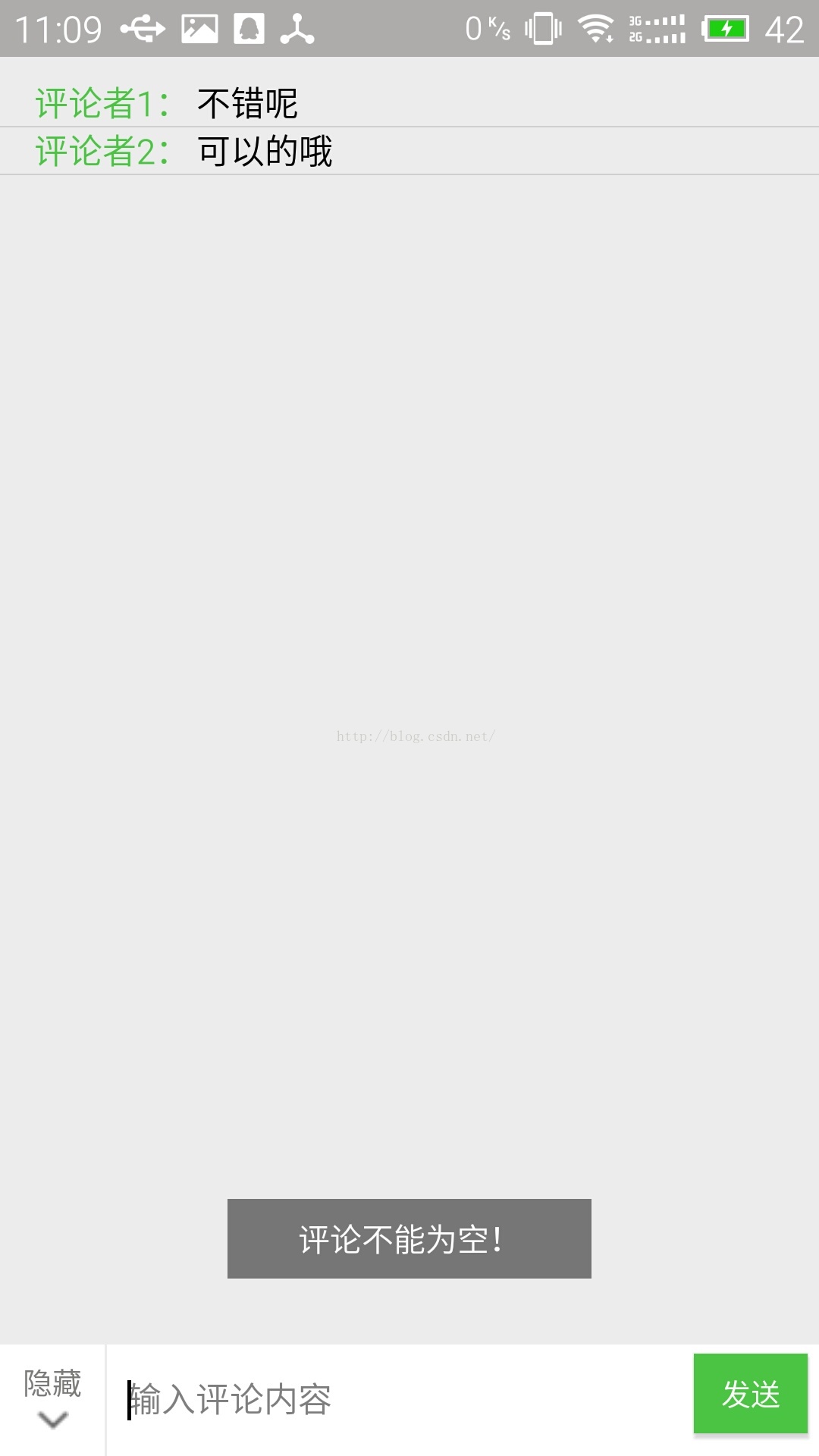
目前,各種App的社區或者用戶曬照片、發說說的地方,都提供了評論功能,為了更好地學習,自己把這個功能實現了一下,做了個小的Demo。
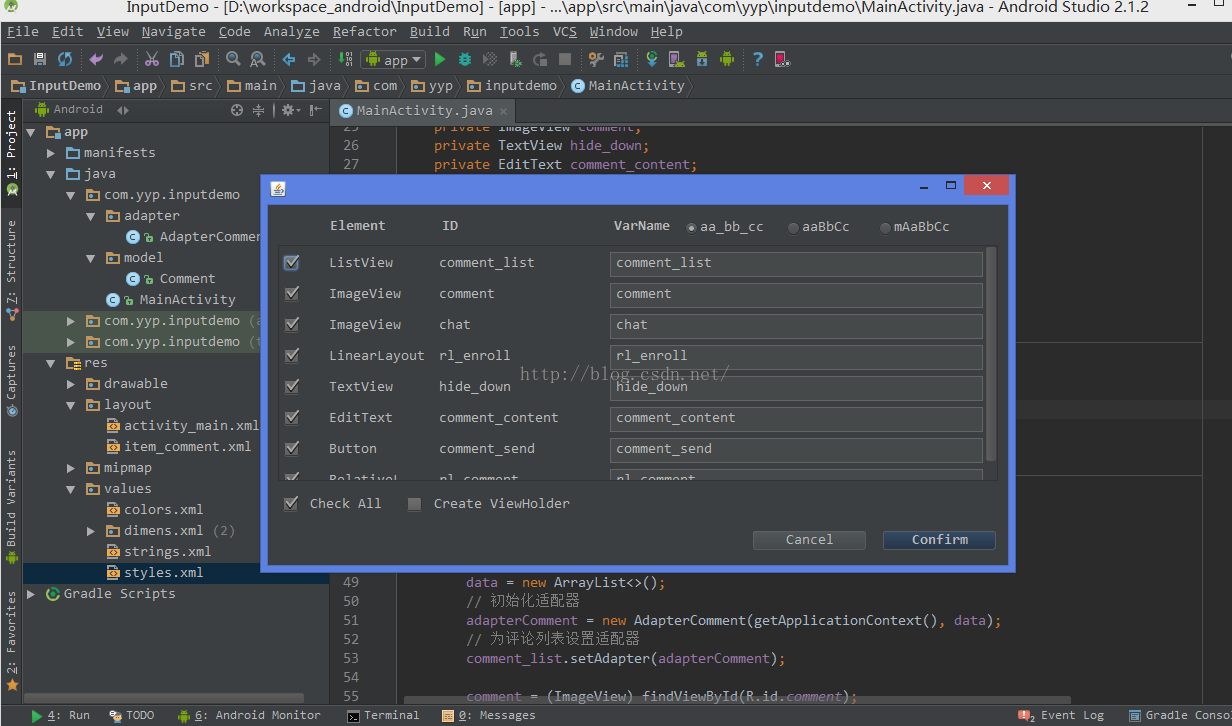
首先推薦一款實用的插件LayoutCreater,可以幫助開發者自動生成布局代碼,具體用法可以去GiHub上看看:
GitHub地址:https://github.com/boredream/BorePlugin
附上這個Demo的源碼:https://github.com/yeaper/android_sample/tree/master/InputDemo
public class Comment {

    String name; //評論者
    String content; //評論內容

    public Comment(){

    }

    public Comment(String name, String content){
        this.name = name;
        this.content = content;
    }

    public String getName() {
        return name;
    }

    public void setName(String name) {
        this.name = name;
    }

    public String getContent() {
        return content;
    }

    public void setContent(String content) {
        this.content = content;
    }
}
public class AdapterComment extends BaseAdapter {

    Context context;
    List data;

    public AdapterComment(Context c, List data){
        this.context = c;
        this.data = data;
    }

    @Override
    public int getCount() {
        return data.size();
    }

    @Override
    public Object getItem(int i) {
        return data.get(i);
    }

    @Override
    public long getItemId(int i) {
        return i;
    }

    @Override
    public View getView(int i, View convertView, ViewGroup viewGroup) {
        ViewHolder holder;
        // 重用convertView
        if(convertView == null){
            holder = new ViewHolder();
            convertView = LayoutInflater.from(context).inflate(R.layout.item_comment, null);
            holder.comment_name = (TextView) convertView.findViewById(R.id.comment_name);
            holder.comment_content = (TextView) convertView.findViewById(R.id.comment_content);

            convertView.setTag(holder);
        }else{
            holder = (ViewHolder) convertView.getTag();
        }
        // 適配數據
        holder.comment_name.setText(data.get(i).getName());
        holder.comment_content.setText(data.get(i).getContent());

        return convertView;
    }

    /**
     * 添加一條評論,刷新列表
     * @param comment
     */
    public void addComment(Comment comment){
        data.add(comment);
        notifyDataSetChanged();
    }

    /**
     * 靜態類,便於GC回收
     */
    public static class ViewHolder{
        TextView comment_name;
        TextView comment_content;
    }
}
public class MainActivity extends Activity implements View.OnClickListener {

    private ImageView comment;
    private TextView hide_down;
    private EditText comment_content;
    private Button comment_send;

    private LinearLayout rl_enroll;
    private RelativeLayout rl_comment;

    private ListView comment_list;
    private AdapterComment adapterComment;
    private List data;

    @Override
    protected void onCreate(Bundle savedInstanceState) {
        super.onCreate(savedInstanceState);
        setContentView(R.layout.activity_main);
        initView();
    }

    private void initView() {

        // 初始化評論列表
        comment_list = (ListView) findViewById(R.id.comment_list);
        // 初始化數據
        data = new ArrayList<>();
        // 初始化適配器
        adapterComment = new AdapterComment(getApplicationContext(), data);
        // 為評論列表設置適配器
        comment_list.setAdapter(adapterComment);

        comment = (ImageView) findViewById(R.id.comment);
        hide_down = (TextView) findViewById(R.id.hide_down);
        comment_content = (EditText) findViewById(R.id.comment_content);
        comment_send = (Button) findViewById(R.id.comment_send);

        rl_enroll = (LinearLayout) findViewById(R.id.rl_enroll);
        rl_comment = (RelativeLayout) findViewById(R.id.rl_comment);

        setListener();
    }

    /**
     * 設置監聽
     */
    public void setListener(){
        comment.setOnClickListener(this);

        hide_down.setOnClickListener(this);
        comment_send.setOnClickListener(this);
    }

    @Override
    public void onClick(View v) {
        switch (v.getId()) {
            case R.id.comment:
                // 彈出輸入法
                InputMethodManager imm = (InputMethodManager) getApplicationContext().getSystemService(Context.INPUT_METHOD_SERVICE);
                imm.toggleSoftInput(0, InputMethodManager.HIDE_NOT_ALWAYS);
                // 顯示評論框
                rl_enroll.setVisibility(View.GONE);
                rl_comment.setVisibility(View.VISIBLE);
                break;
            case R.id.hide_down:
                // 隱藏評論框
                rl_enroll.setVisibility(View.VISIBLE);
                rl_comment.setVisibility(View.GONE);
                // 隱藏輸入法,然後暫存當前輸入框的內容,方便下次使用
                InputMethodManager im = (InputMethodManager)getApplicationContext().getSystemService(Context.INPUT_METHOD_SERVICE);
                im.hideSoftInputFromWindow(comment_content.getWindowToken(), 0);
                break;
            case R.id.comment_send:
                sendComment();
                break;
            default:
                break;
        }
    }

    /**
     * 發送評論
     */
    public void sendComment(){
        if(comment_content.getText().toString().equals("")){
            Toast.makeText(getApplicationContext(), "評論不能為空!", Toast.LENGTH_SHORT).show();
        }else{
            // 生成評論數據
            Comment comment = new Comment();
            comment.setName("評論者"+(data.size()+1)+":");
            comment.setContent(comment_content.getText().toString());
            adapterComment.addComment(comment);
            // 發送完,清空輸入框
            comment_content.setText("");

            Toast.makeText(getApplicationContext(), "評論成功!", Toast.LENGTH_SHORT).show();
        }
    }
}
注意:
因為Android 手機類型比較雜,所以有的手機中會出現底部輸入框和輸入法重疊,如下圖,畫紅圈的這部分是沒有的:
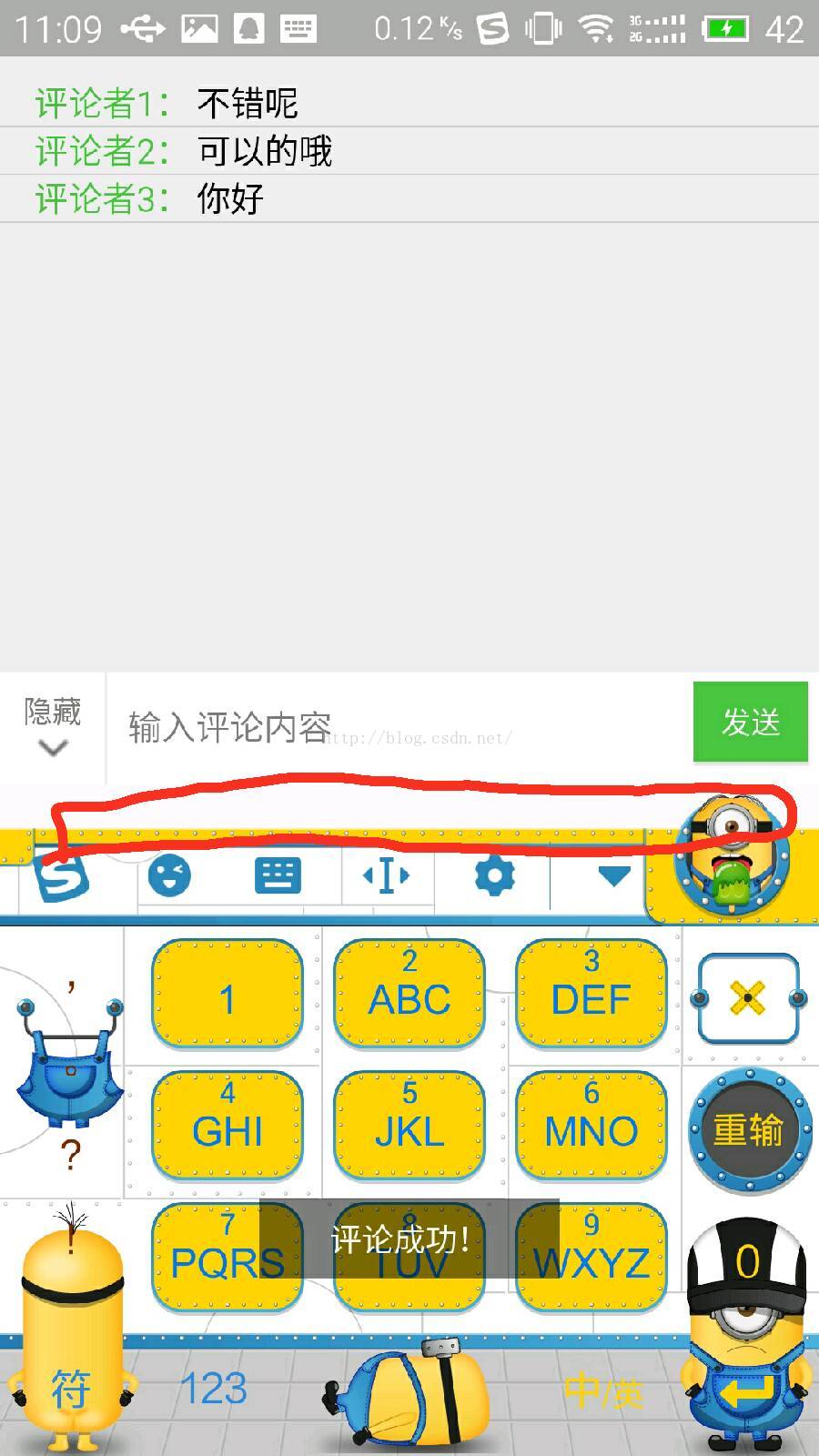
當出現這個問題時,可以在Manifest.xml文件中,給對應的Activity添加一條屬性
android:windowSoftInputMode="stateHidden|adjustResize"

 Android實現一鍵獲取課程成績dome
兩周廢寢忘食的創作終於成功了,現在拿出來分享一下。先不說別的看一下程序運行效果圖,我沒怎麼設計ui所以界面不是很好看但是能說明問題~~~現在我們來看看實現這個功能需要些什
 布局優化之RelativeLayout和LinearLayout及FrameLayout性能分析
工作一段時間後,經常會被領導說,你這個進入速度太慢了,競品的進入速度很快,你搞下優化吧?每當這時,你會怎麼辦?功能實現都有啊,進入時要加載那麼多view,這也沒辦法啊,等
 listview Button始終放在底部示例
android實現底部布局往往使用RelativeLayout的布局方式,並且設置android:layout_alignParentBottom=”true”,這樣很容
 android產品研發(九)--)App網絡傳輸協議
上一篇文章中我們講解了App的數據統計,其主要分為兩種:使用第三方服務統計和自身實現數據統計。一般而言我們使用第三方統計服務已經可以很好的滿足我們的也無需求了,只是部分數