編輯:關於Android編程
https://www.baidu.com/s?wd=%E6%94%AF%E4%BB%98%E5%AE%9D%E5%BC%80%E5%8F%91%E8%80%85%E5%B9%B3%E5%8F%B0&rsv_spt=1&rsv_iqid=0xfe0a29290002df6b&issp=1&f=3&rsv_bp=0&rsv_idx=2&ie=utf-8&tn=monline_3_dg&rsv_enter=1&rsv_sug3=14&rsv_sug1=10&rsv_sug7=100&rsv_sug2=0&prefixsug=%E6%94%AF%E4%BB%98%E5%AE%9D%E9%9B%86%E6%88%90&rsp=4&inputT=9885&rsv_sug4=10467
https://doc.open.alipay.com/


    long activityId = _activitiy.ActivityId;
        NSString *stringActivityId = [@(activityId) stringValue];         //活動ID
        NSString *userId = [AppConfig shareInstance].UserID;
        //用戶ID
        [self.paramDic setObject:stringActivityId forKey:@"activityId"];
        [self.paramDic setObject:userId forKey:@"userId"];
    NSString *bodyStr = _activitiy.title;
    NSString *subjectStr = _activitiy.title;
    NSInteger total_amount = _activitiy.totalFee;
    NSDateFormatter* formatter = [NSDateFormatter new];
    [formatter setDateFormat:@"yyyy-MM-dd HH:mm:ss"];
    NSDictionary *lastDic = @{
                              @"body":bodyStr,
                              @"subject":subjectStr,
                              @"total_amount":[NSString stringWithFormat:@"%.2ld",(long)total_amount],
                              @"spbillCreateip":[self deviceIPAdress]
                              };
    NSMutableDictionary *bigDic = [lastDic mutableCopy];
    [bigDic addEntriesFromDictionary:dic];
[[[SpeedService alloc]init]FetchUserPayProduct:nil paramDic:bigDic completionBlock:^(id response, NSError *error) {
        NSLog(@"++++%@",response);
        //服務器返回的訂單信息

        NSDictionary *samllDic = [response objectForKey:@"result"];

        //服務器返回的簽名
        NSString *sign = [samllDic objectForKey:@"sign"];
        //簽名Encode編碼
        NSString *locationSignEncode = [self encodeValue:sign];
        //創建訂單模型對象並且賦值
        Order *order = [Order new];

        order.biz_content = [BizContent new];

        order.app_id             = [samllDic objectForKey:@"app_id"];
        order.biz_content        = [samllDic objectForKey:@"biz_content"];

        order.charset            = [samllDic objectForKey:@"charset"];
        order.method             = [samllDic objectForKey:@"method"];
        order.notify_url         = [samllDic objectForKey:@"notify_url"];
        order.sign_type          = [samllDic objectForKey:@"sign_type"];
        order.timestamp          = [samllDic objectForKey:@"timestamp"];
        order.version            = [samllDic objectForKey:@"version"];

        //訂單信息Encode編碼
        NSString *messageEncode = [order orderInfoEncoded:YES];

        //最終訂單信息字符串Encode編碼
        NSString *orderOneString = [NSString stringWithFormat:@"%@&sign=%@",
                                    messageEncode, locationSignEncode];

        [[AlipaySDK defaultService] payOrder:orderOneString fromScheme:Scheme callback:^(NSDictionary *resultDic) {
            NSLog(@"服務器返回的結果:%@",resultDic);
        }];
    }];
- (NSString*)encodeValue:(NSString*)value
{
    NSString* encodedValue = value;
    if (value.length > 0) {
        encodedValue = (__bridge_transfer  NSString*)CFURLCreateStringByAddingPercentEscapes(kCFAllocatorDefault, (__bridge CFStringRef)value, NULL, (__bridge CFStringRef)@"!*'();:@&=+$,/?%#[]", kCFStringEncodingUTF8 );
    }
    return encodedValue;
}
[微信支付]APP支付開發者文檔
https://www.baidu.com/s?wd=%E5%BE%AE%E4%BF%A1%E6%94%AF%E4%BB%98%E5%B9%B3%E5%8F%B0&rsv_spt=1&rsv_iqid=0x970a0db100003d17&issp=1&f=3&rsv_bp=0&rsv_idx=2&ie=utf-8&tn=monline_3_dg&rsv_enter=1&rsv_sug3=12&rsv_sug1=9&rsv_sug7=100&rsv_sug2=0&prefixsug=%E5%BE%AE%E4%BF%A1%E6%94%AF%E4%BB%98&rsp=8&inputT=7099&rsv_sug4=7846
https://pay.weixin.qq.com/wiki/doc/api/app/app.php?chapter=11_1


- (BOOL)application:(UIApplication *)application didFinishLaunchingWithOptions:(NSDictionary *)launchOptions {
    [WXApi registerApp:WXapp_id withDescription:@"測試demo"];
}
#pragma mark - 微信支付
- (void)setUpWxPay
{
    long activityId = _activitiy.ActivityId;
    NSString *stringActivityId = [@(activityId) stringValue];
    NSString *userId = [AppConfig shareInstance].UserID;
    NSString *userTel = [self.paramDic objectForKey:@"mobile"];
    if (userTel.length == 0 || userTel.length > 11) {
        [SVProgressHUD showErrorWithStatus:@"請輸入正確的聯系電話"];
        return;
    }
    NSString *userName = [self.paramDic objectForKey:@"name"];
    if (userName.length == 0) {
        [SVProgressHUD showErrorWithStatus:@"請輸入姓名"];
        return;
    }
    NSString *userIdentity = [self.paramDic objectForKey:@"identity"];
    BOOL identity = [self isCorrect:userIdentity];
    NSString *userEmail = [self.paramDic objectForKey:@"email"];
    if (userEmail.length == 0) {
        [SVProgressHUD showErrorWithStatus:@"請輸入郵箱號"];
        return;
    }
    NSInteger totalFee = _activitiy.totalFee;
    NSString *body = _activitiy.title;
    NSString *subject = _activitiy.title;
    NSString *spbillCreateip = [self deviceIPAdress];
    SpeedService *speedService = [[SpeedService alloc] init];
    NSDictionary *dict = @{
                           @"body":body,
                           @"subject":subject,
                           @"userId":userId,
                           @"activityId":stringActivityId,
                           @"name":userName,
                           @"email":userEmail,
                           @"mobile":userTel,
                           @"identity":userIdentity,
                           @"total_amount":[NSString stringWithFormat:@"%d",totalFee],
                           @"spbillCreateip":spbillCreateip
                           };
    NSLog(@"字典是 : %@",dict);
    if (identity == YES) {
        //判斷是否安裝了微信
        if ([WXApi isWXAppInstalled]){
            [speedService FetchUserWxPayProduct:dict completionBlock:^(id response, NSError *error) {
                if (!error) {
                    NSLog(@"返回的結果是 : %@",response);
                    NSString * str = [response objectForKey:@"code"];
                     if ([str isEqualToString:@"0000"]) {
                        NSDictionary *dic = [NSDictionary dictionaryWithDictionary:[response objectForKey:@"result"]];
                        [self configRequest:dic stringStr:nil];
                     }

                }else{

                    NSLog(@"網絡超時,返回的錯誤信息是 : %@",error);
                }
            }];

        }else{

            [SVProgressHUD showErrorWithStatus:@"請安裝微信"];
        }

    }else{
        [SVProgressHUD showErrorWithStatus:@"請輸入正確的身份證號碼"];
        return;
    }
}
#pragma mark - 調用微信支付的接口
- (void)configRequest:(NSDictionary *)dic stringStr:(NSString *)stringStr{

    //需要創建這個支付對象
    PayReq *req = [[PayReq alloc] init];

    //由用戶微信號和AppID組成的唯一標識,用於校驗微信用戶
    req.openID = [dic objectForKey:@"appid"];

    // 商家id,在注冊的時候給的
    req.partnerId = [dic objectForKey:@"partnerid"];

    // 預支付訂單這個是後台跟微信服務器交互後,微信服務器傳給你們服務器的,你們服務器再傳給你
    req.prepayId  = [dic objectForKey:@"prepayid"];

    // 隨機編碼,為了防止重復的,在後台生成
    req.nonceStr  = [dic objectForKey:@"noncestr"];

    // 這個是時間戳,也是在後台生成的,為了驗證支付的
    NSMutableString *stamp = [dic objectForKey:@"timestamp"];
    req.timeStamp = stamp.intValue;

    // 根據財付通文檔填寫的數據和簽名
    //這個比較特殊,是固定的,只能是即req.package = Sign=WXPay
    req.package = [dic objectForKey:@"package"];

    // 這個簽名也是後台做的
    req.sign = [dic objectForKey:@"sign"];

    //發送請求到微信,等待微信返回onResp
    [WXApi sendReq:req];
}

 Android自定義View實現水面上漲效果
實現效果如下:實現思路:1、如何實現圓中水面上漲效果:利用Paint的setXfermode屬性為PorterDuff.Mode.SRC_IN畫出進度所在的矩形與圓的交集
 Content Type working with Document Word
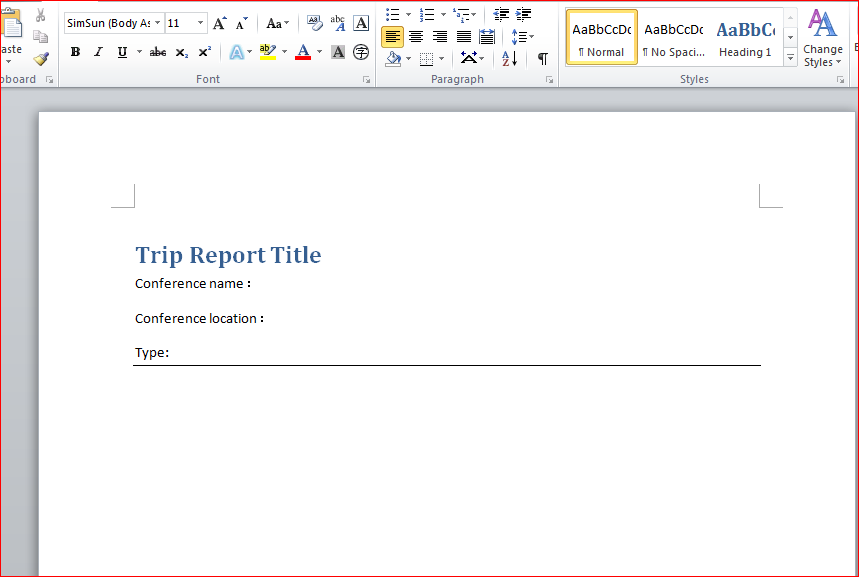
SharePoint Content Types working with Word這個文檔是按照SharePoint 2010 Development with Vis
 Android Contact provider基礎
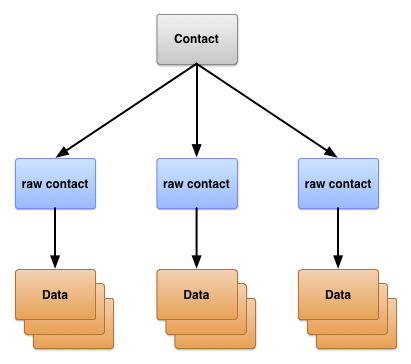
Contact providerContact provider是一個強大而又靈活的 Android 組件,用於管理設備上有關聯系人數據的中央存儲庫。 Contact p
 學習Android之第八個小程序文件保存(Notification、AndroidTestCase)
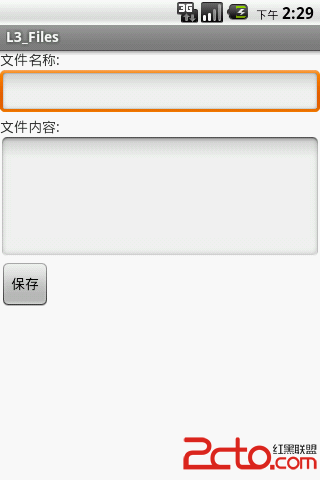
效果圖: .java文件有MainActivity.java、FileService.java、FileServiceTest.java, .xml文