編輯:關於Android編程
錄制視頻博客第一篇寫了視頻錄制控件的相關內容,這一篇裡講一下控件的具體使用。其實自己看一下控件的代碼,很容易使用的,可以根據自己的要求定制一下參數什麼的,這裡的代碼就各位就當個參考看看吧。

錄制預覽的尺寸需要設置的,控件的大小長寬比率需要配合預覽尺寸,不然預覽會變形的。還有就是我們公司項目是要自拍的,所以直接默認調用了前置攝像頭,需要調用後置的可以在代碼裡更改。切換攝像頭的需求沒有,也就沒做,有需求可以自己做一下。還有權限問題,錄制前會有權限檢測。注釋還算比較詳細的,具體可以參考注釋。
import android.Manifest;
import android.app.Activity;
import android.content.Intent;
import android.content.pm.PackageManager;
import android.os.Bundle;
import android.os.Handler;
import android.os.Message;
import android.support.annotation.Nullable;
import android.support.v4.app.ActivityCompat;
import android.util.DisplayMetrics;
import android.util.Log;
import android.view.MotionEvent;
import android.view.View;
import android.widget.Button;
import android.widget.FrameLayout;
import android.widget.ProgressBar;
import android.widget.RelativeLayout;
import android.widget.TextView;
import android.widget.Toast;

import java.io.File;
import java.io.IOException;

/**
 * 視頻拍攝頁面
 * Created by Wood on 2016/4/6.
 */
public class RecordVideoActivity extends Activity implements View.OnClickListener {
    private static final String LOG_TAG = "RecordVideoActivity";
    private static final int REQ_CODE = 110;
    private static final int RES_CODE = 111;
    /**
     * 錄制進度
     */
    private static final int RECORD_PROGRESS = 100;
    /**
     * 錄制結束
     */
    private static final int RECORD_FINISH = 101;

    private MovieRecorderView movieRecorderView;
    private Button buttonShoot;
    private RelativeLayout rlBottomRoot;
    private ProgressBar progressVideo;
    private TextView textViewCountDown;
    private TextView textViewUpToCancel;//上移取消
    private TextView textViewReleaseToCancel;//釋放取消
    /**
     * 是否結束錄制
     */
    private boolean isFinish = true;
    /**
     * 是否觸摸在松開取消的狀態
     */
    private boolean isTouchOnUpToCancel = false;
    /**
     * 當前進度
     */
    private int currentTime = 0;
    private Handler handler = new Handler() {
        @Override
        public void handleMessage(Message msg) {
            switch (msg.what) {
                case RECORD_PROGRESS:
                    progressVideo.setProgress(currentTime);
                    if (currentTime < 10) {
                        textViewCountDown.setText("00:0" + currentTime);
                    } else {
                        textViewCountDown.setText("00:" + currentTime);
                    }
                    break;
                case RECORD_FINISH:
                    if (isTouchOnUpToCancel) {//錄制結束,還在上移刪除狀態沒有松手,就復位錄制
                        resetData();
                    } else {//錄制結束,在正常位置,錄制完成跳轉頁面
                        isFinish = true;
                        buttonShoot.setEnabled(false);
                        finishActivity();
                    }
                    break;
            }
        }
    };
    /**
     * 按下的位置
     */
    private float startY;

    @Override
    protected void onCreate(@Nullable Bundle savedInstanceState) {
        super.onCreate(savedInstanceState);
        setContentView(R.layout.activity_record_video);
        initView();
    }

    public void initView() {
        ((TextView) findViewById(R.id.title)).setText("錄制視頻");
        findViewById(R.id.title_left).setOnClickListener(this);

        movieRecorderView = (MovieRecorderView) findViewById(R.id.movieRecorderView);
        buttonShoot = (Button) findViewById(R.id.button_shoot);
        rlBottomRoot = (RelativeLayout) findViewById(R.id.rl_bottom_root);
        //progressVideo = (DonutProgress) findViewById(R.id.progress_video);
        progressVideo = (ProgressBar) findViewById(R.id.progressBar_loading);
        textViewCountDown = (TextView) findViewById(R.id.textView_count_down);
        textViewCountDown.setText("00:00");
        textViewUpToCancel = (TextView) findViewById(R.id.textView_up_to_cancel);
        textViewReleaseToCancel = (TextView) findViewById(R.id.textView_release_to_cancel);

        DisplayMetrics dm = getApplicationContext().getResources().getDisplayMetrics();
        int width = dm.widthPixels;
        FrameLayout.LayoutParams layoutParams = (FrameLayout.LayoutParams) movieRecorderView.getLayoutParams();
        layoutParams.height = width * 4 / 3;//根據屏幕寬度設置預覽控件的尺寸,為了解決預覽拉伸問題
        //LogUtil.e(LOG_TAG, "mSurfaceViewWidth:" + width + "...mSurfaceViewHeight:" + layoutParams.height);
        movieRecorderView.setLayoutParams(layoutParams);

        FrameLayout.LayoutParams rlBottomRootLayoutParams = (FrameLayout.LayoutParams) rlBottomRoot.getLayoutParams();
        rlBottomRootLayoutParams.height = width / 3 * 2;
        rlBottomRoot.setLayoutParams(rlBottomRootLayoutParams);

        //處理觸摸事件
        buttonShoot.setOnTouchListener(new View.OnTouchListener() {
            @Override
            public boolean onTouch(View v, MotionEvent event) {
                if (event.getAction() == MotionEvent.ACTION_DOWN) {
                    textViewUpToCancel.setVisibility(View.VISIBLE);//提示上移取消

                    isFinish = false;//開始錄制
                    startY = event.getY();//記錄按下的坐標
                    movieRecorderView.record(new MovieRecorderView.OnRecordFinishListener() {
                        @Override
                        public void onRecordFinish() {
                            handler.sendEmptyMessage(RECORD_FINISH);
                        }
                    });
                } else if (event.getAction() == MotionEvent.ACTION_UP) {
                    textViewUpToCancel.setVisibility(View.GONE);
                    textViewReleaseToCancel.setVisibility(View.GONE);

                    if (startY - event.getY() > 100) {//上移超過一定距離取消錄制,刪除文件
                        if (!isFinish) {
                            resetData();
                        }
                    } else {
                        if (movieRecorderView.getTimeCount() > 3) {//錄制時間超過三秒,錄制完成
                            handler.sendEmptyMessage(RECORD_FINISH);
                        } else {//時間不足取消錄制,刪除文件
                            Toast.makeText(RecordVideoActivity.this, "視頻錄制時間太短", Toast.LENGTH_SHORT).show();
                            resetData();
                        }
                    }
                } else if (event.getAction() == MotionEvent.ACTION_MOVE) {
                    //根據觸摸上移狀態切換提示
                    if (startY - event.getY() > 100) {
                        isTouchOnUpToCancel = true;//觸摸在松開就取消的位置
                        if (textViewUpToCancel.getVisibility() == View.VISIBLE) {
                            textViewUpToCancel.setVisibility(View.GONE);
                            textViewReleaseToCancel.setVisibility(View.VISIBLE);
                        }
                    } else {
                        isTouchOnUpToCancel = false;//觸摸在正常錄制的位置
                        if (textViewUpToCancel.getVisibility() == View.GONE) {
                            textViewUpToCancel.setVisibility(View.VISIBLE);
                            textViewReleaseToCancel.setVisibility(View.GONE);
                        }
                    }
                } else if (event.getAction() == MotionEvent.ACTION_CANCEL) {
                    resetData();
                }
                return true;
            }
        });

        progressVideo.setMax(10);
        movieRecorderView.setOnRecordProgressListener(new MovieRecorderView.OnRecordProgressListener() {
            @Override
            public void onProgressChanged(int maxTime, int currentTime) {
                RecordVideoActivity.this.currentTime = currentTime;
                handler.sendEmptyMessage(RECORD_PROGRESS);
            }
        });
    }

    @Override
    public void onResume() {
        super.onResume();
        checkCameraPermission();
    }

    /**
     * 檢測攝像頭和錄音權限
     */
    private void checkCameraPermission() {
        if (ActivityCompat.checkSelfPermission(this, Manifest.permission.CAMERA) != PackageManager.PERMISSION_GRANTED
                || ActivityCompat.checkSelfPermission(this, Manifest.permission.RECORD_AUDIO) != PackageManager.PERMISSION_GRANTED) {
            // Camera permission has not been granted.
            Toast.makeText(this, "視頻錄制和錄音沒有授權", Toast.LENGTH_LONG);
            this.finish();
        } else {
            resetData();
        }
    }

    /**
     * 重置狀態
     */
    private void resetData() {
        if (movieRecorderView.getRecordFile() != null)
            movieRecorderView.getRecordFile().delete();
        movieRecorderView.stop();
        isFinish = true;
        currentTime = 0;
        progressVideo.setProgress(0);
        textViewCountDown.setText("00:00");
        buttonShoot.setEnabled(true);
        textViewUpToCancel.setVisibility(View.GONE);
        textViewReleaseToCancel.setVisibility(View.GONE);
        try {
            movieRecorderView.initCamera();
        } catch (IOException e) {
            e.printStackTrace();
        }
    }

    @Override
    public void onSaveInstanceState(Bundle outState) {
        super.onSaveInstanceState(outState);
        isFinish = true;
        movieRecorderView.stop();
    }

    /**
     * 遞歸刪除目錄下的所有文件及子目錄下所有文件
     *
     * @param dir 將要刪除的文件目錄
     * @return
     */
    private boolean deleteDir(File dir) {
        if (dir.isDirectory()) {
            String[] children = dir.list();
            //遞歸刪除目錄中的子目錄下
            for (int i = 0; i < children.length; i++) {
                if (!deleteDir(new File(dir, children[i]))) {
                    return false;
                }
            }
        }
        return dir.delete();
    }

    @Override
    public void onDestroy() {
        //TODO 退出界面刪除文件,如果要刪除文件夾,需要提供文件夾路徑
        if (movieRecorderView.getRecordFile() != null) {
            File file = new File(movieRecorderView.getRecordFile().getAbsolutePath());
            if (file != null && file.exists()) {
                Log.e(LOG_TAG, "file.exists():" + file.exists());
                file.delete();
            }
        }
        super.onDestroy();
    }

    /**
     * TODO 錄制完成需要做的事情
     */
    private void finishActivity() {
        if (isFinish) {
            movieRecorderView.stop();
            Intent intent = new Intent(this, VideoPreviewActivity.class);
            intent.putExtra("path", movieRecorderView.getRecordFile().getAbsolutePath());
            startActivityForResult(intent, REQ_CODE);
        }
    }

    @Override
    public void onClick(View v) {
        switch (v.getId()) {
            case R.id.title_left:
                finish();
                break;
        }
    }

    @Override
    protected void onActivityResult(int requestCode, int resultCode, Intent data) {
        super.onActivityResult(requestCode, resultCode, data);
        if (requestCode == REQ_CODE && resultCode == RES_CODE) {
            setResult(RES_CODE);
            finish();
        }
    }
}
    <framelayout android:layout_height="0dp" android:layout_weight="1" android:layout_width="match_parent">


    </framelayout>

    <framelayout android:background="#f0f0f0" android:layout_height="wrap_content" android:layout_width="match_parent">


            </framelayout>
 Android FM模塊學習之二 FM搜索頻率流程
上一篇大概分析了一下FM啟動流程,若不了解Fm啟動流程的,可以去打開前面的鏈接先了解FM啟動流程,接下來我們簡單分析一下FM的搜索頻率流程。 在了解源碼之前,我們先看一下
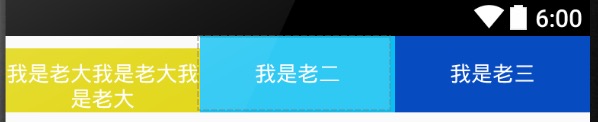 layout_weight屬性圖解
layout_height的作用:首先按照聲明的尺寸分配,剩余的空間再按照layout_weight進行分配一平均分配:代碼:<code class="h
 android自定義View之(四)------一鍵清除動畫
1.前言: 自己也是參考別人的一些自定義view例子,學習了一些基本的自定義view的方法。今天,我參考了一些資料,再結合自已的一些理解,做了一個一鍵清除的動畫。當年,我
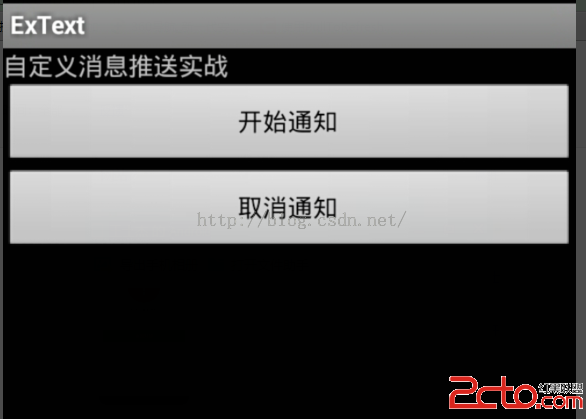 Android自定義消息推送
啥也不說看圖: 點擊後效果: 代碼:主方法: package com.text.ac; import java.util.Calend