編輯:關於Android編程
由於項目裡用到了百度地圖,路線規劃的標題(比如“M235/362”)在百度地圖API裡面沒有給出來,網上各種搜索都找不到別人發出來的方案,然後就只能自己組織標題了,相信很多人也遇到和我一樣的問題,所以這裡我把我的方案拿出來分享一下。先看一下效果圖。
 地圖的UI參考了美團的。
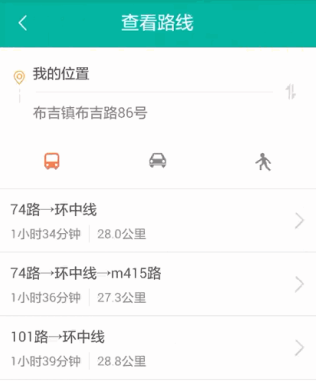 如上圖,每個路線的數據存放在RouteLine的子類裡面,而RouteLine的title值都是空值,所以每條路線的名字在RouteLine裡面是找不到的。公交、駕車、步行路線的數據是存放在RouteLine子類裡面,比如公交的數據存放在TransitRouteLine裡,TransitRouteLine給出了每條路線的詳細行駛步驟。
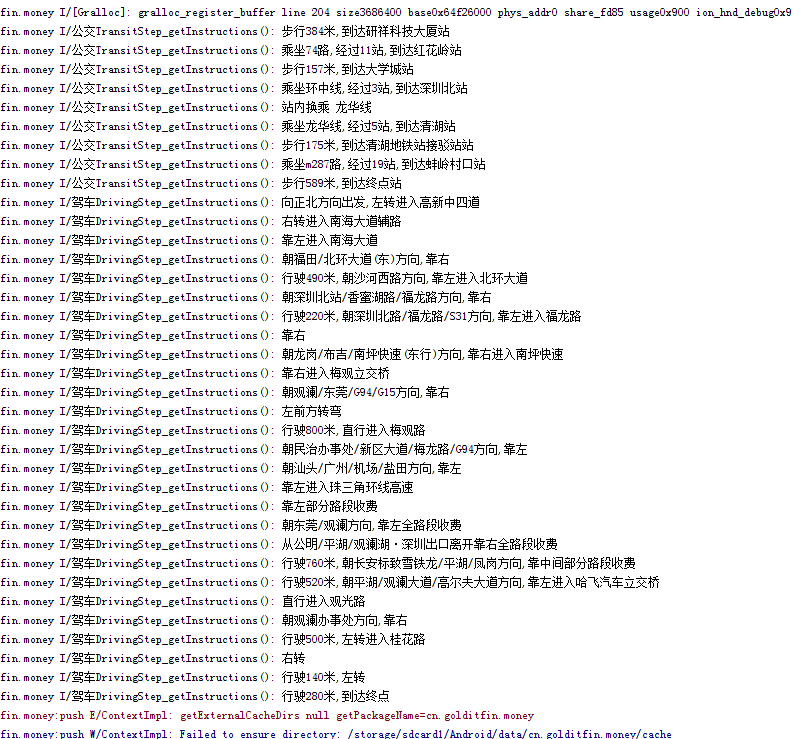 上圖打印了公交和駕車的每個步驟,有沒有發現一些規律,我們可以從這些規律中組織標題,當然百度地圖API開發人員如果改了那些步驟的語言組織方法的話,我們也得重新組織標題了。
公交的規律:每量公交前面都有“乘坐”兩個字,所以可以判斷字符串裡有乘坐兩字的就有公交換乘,公交名字後面都有一個逗號,然後是不是可以從乘坐後面截取字符串到逗號為止呢。如果有多輛車可以換乘的話API是這樣返回公交的“m324(或m435,362)”,公交名字之間也有逗號,所以以逗號結束不可以,但可以以",經過"公交名字為結束符。
上圖打印了公交和駕車的每個步驟,有沒有發現一些規律,我們可以從這些規律中組織標題,當然百度地圖API開發人員如果改了那些步驟的語言組織方法的話,我們也得重新組織標題了。
公交的規律:每量公交前面都有“乘坐”兩個字,所以可以判斷字符串裡有乘坐兩字的就有公交換乘,公交名字後面都有一個逗號,然後是不是可以從乘坐後面截取字符串到逗號為止呢。如果有多輛車可以換乘的話API是這樣返回公交的“m324(或m435,362)”,公交名字之間也有逗號,所以以逗號結束不可以,但可以以",經過"公交名字為結束符。
    private List addBusLinesTitle(List busLines){
        for(int i=0 ; i steps = busLine.getAllStep();
            String title = "";
            for(int j=0 ; j 0){
                        title += ("→"+instructions.substring(2,instructions.indexOf(",經過")));
                        //下面被屏蔽的一行也可以使用
//                        title += ( "→"+instructions.split(",經過")[0].substring(2) );
                    }else {
//                        title = instructions.split(",經過")[0].substring(2);
                        title = instructions.substring(2,instructions.indexOf(",經過"));
                    }
                }
            }
            busLine.setTitle(title);
        }
        return busLines;
    }
上面的代碼就是獲取公交路線名字的方法,每個步驟的字符串用getInstructions()方法來獲取。如果有很多個字符串有“乘坐”兩字,代表要換乘多輛公交,然後把公交用連接符"→"連起來。
instructions.substring(2,instructions.indexOf(",經過"))這個方法時從2的下標截取到第一個",經過"的下標。
instructions.split(",經過")[0].substring(2)這個方法將字符串用",經過"分割成字符串數組,然後取第一個字符串,再從2的個下標截取到末尾。
標題組織好了後再放回RouteLine的title參數裡面。
駕車和步行路線我只取了第一條顯示出來,下面給出的是駕車、步行、自行車的標題組織方法。
    /**
     * 組織路線的名字,(格式:途徑xxx和xxx),xxx取最近的兩條路
     * @param steps
     * @param
     * @return
     */
    private String getRouteTitle(List steps){
        if(steps == null || steps.size()==0)
            return "";
        String title = "";
        Method method = null;
        try {
            method = steps.get(0).getClass().getDeclaredMethod("getInstructions");
        } catch (NoSuchMethodException e) {
            e.printStackTrace();
        }
        for(T step:steps){
            try {
                String ss = (String) method.invoke(step);
                if(ss.contains("進入")){
                    if(title.contains("途徑")){
                        title += (" 和 " + ss.substring(ss.indexOf("進入")+2).split(",")[0]);
                        break;
                    }else {
                        title += ("途徑 " + ss.substring(ss.indexOf("進入")+2).split(",")[0]);
                    }
                }
            } catch (InvocationTargetException e) {
                e.printStackTrace();
            } catch (IllegalAccessException e) {
                e.printStackTrace();
            }

        }
        return title;
    }
上面的用法是反射加泛型的方法。因為每個步驟的名字只能在RouteStep的子類才能獲取,而且都是從每個子類的getInstructions()方法來獲取步驟名字,所以不用反射的話只能駕車步行騎行都單獨去寫一個。路線名字只取了最近經過的兩條路顯示。
下面是一些需要用到的參數:
routeLine.getDistance() :起點終點的距離,單位(米)
routeLine.getDuration() :起點到終點的時間,單位(秒)
/**
 * 定位、顯示多個商家地址
 * Created by HuangYuGuang on 2016/7/11.
 */
public abstract class MapBaseFragment extends ABaseFragment {
    //地圖相關
    private MapView mMapView = null;
    protected BaiduMap mBaiduMap;

    //定位相關
    private BitmapDescriptor mIconMaker;
    private LocationService locService;
    protected BDLocation myLocation = MapApplication.bdLocation;

    @Override
    protected int inflateContentView() {
        return R.layout.comm_lay_base_map;
    }

    @Override
    protected void layoutInit(LayoutInflater inflater, Bundle savedInstanceSate) {
        super.layoutInit(inflater, savedInstanceSate);
        mMapView = (MapView) findViewById(R.id.bmapView);
        //隱藏縮放按鍵
        mMapView.showZoomControls(false);
        mBaiduMap = mMapView.getMap();
        mIconMaker = BitmapDescriptorFactory.fromResource(R.drawable.btu_gps_map);
        //地圖顯示的比例范圍
        mBaiduMap.setMapStatus(MapStatusUpdateFactory.zoomTo(15.0f));
        mBaiduMap.setOnMapLoadedCallback(new BaiduMap.OnMapLoadedCallback() {
            @Override
            public void onMapLoaded() {
                onMapLoadFinish();
            }
        });
        if(canShowInfoWindow()){
            initMarkerClickEvent();
            initMapClickEvent();
        }
        if(canShowMyLocation()){
            initMyLocation();
            findViewById(R.id.view_my_location).setOnClickListener(new View.OnClickListener() {
                @Override
                public void onClick(View v) {
                    showMyLocation();
                }
            });
        }
    }

    private void initMapClickEvent()
    {
        mBaiduMap.setOnMapClickListener(new BaiduMap.OnMapClickListener() {

            @Override
            public boolean onMapPoiClick(MapPoi arg0) {
                return false;
            }

            @Override
            public void onMapClick(LatLng arg0) {
                mBaiduMap.hideInfoWindow();
            }
        });
    }

    private void initMarkerClickEvent()
    {
        // 對Marker的點擊
        mBaiduMap.setOnMarkerClickListener(new BaiduMap.OnMarkerClickListener() {
            @Override
            public boolean onMarkerClick(final Marker marker) {
                // 獲得marker中的數據
                final AddrInfo info = (AddrInfo) marker.getExtraInfo().get("markerInfo");

                InfoWindow mInfoWindow;
                // 將marker所在的經緯度的信息轉化成屏幕上的坐標
                final LatLng ll = marker.getPosition();
                Point p = mBaiduMap.getProjection().toScreenLocation(ll);
                p.y -= 47;
                LatLng llInfo = mBaiduMap.getProjection().fromScreenLocation(p);
                mInfoWindow = new InfoWindow(InfoWindowView(info), llInfo,-15);
                mBaiduMap.showInfoWindow(mInfoWindow);
                return true;
            }
        });
    }

    public void addInfoOverlay(AddrInfo info){
        addInfosOverlay(Arrays.asList(info));
    }

    /**
     * 在百度地圖圖層添加熱點覆蓋物
     */
    public void addInfosOverlay(List infos)
    {
        mBaiduMap.clear();
        LatLng latLng = null;
        OverlayOptions overlayOptions = null;
        Marker marker = null;
        for (AddrInfo info : infos)
        {
            // 位置
            latLng = new LatLng(info.getLatitude(), info.getLongitude());
            // 圖標
            overlayOptions = new MarkerOptions().position(latLng)
                    .icon(mIconMaker).zIndex(5);
            marker = (Marker) (mBaiduMap.addOverlay(overlayOptions));
            Bundle bundle = new Bundle();
            bundle.putSerializable("markerInfo", info);
            marker.setExtraInfo(bundle);
        }
        // 將地圖移到到最後一個經緯度位置
        MapStatusUpdate u = MapStatusUpdateFactory.newLatLng(latLng);
        mBaiduMap.setMapStatus(u);
    }

    private void initMyLocation(){
        locService = new LocationService(getActivity());
        LocationClientOption mOption = locService.getDefaultLocationClientOption();
        mOption.setLocationMode(LocationClientOption.LocationMode.Battery_Saving);
        mOption.setCoorType("bd09ll");
        locService.setLocationOption(mOption);
        locService.registerListener(listener);
        locService.start();
    }

    /***
     * 定位結果回調,在此方法中處理定位結果
     */
    BDLocationListener listener = new BDLocationListener() {
        @Override
        public void onReceiveLocation(BDLocation location) {
            // map view 銷毀後不在處理新接收的位置
            if (location == null || location.getLatitude() == 4.9E-324 || mMapView == null) {
                return;
            }
            myLocation = location;
            MapApplication.bdLocation = location;
            MyLocationData locData = new MyLocationData.Builder()
                    //去掉光圈
//                    .accuracy(location.getRadius())
                    .accuracy(0)
                    // 此處設置開發者獲取到的方向信息,順時針0-360
                    .direction(100).latitude(location.getLatitude())
                    .longitude(location.getLongitude()).build();
            mBaiduMap.setMyLocationData(locData);
        }
    };

    private void showMyLocation(){
        LatLng ll = new LatLng(myLocation.getLatitude(), myLocation.getLongitude());
        MapStatusUpdate u = MapStatusUpdateFactory.newLatLng(ll);
        mBaiduMap.setMapStatus(MapStatusUpdateFactory.zoomTo(15.0f));
        mBaiduMap.animateMapStatus(u);
    }

    public void useOtherMap(AddrInfo addrInfo){
        useOtherMap(addrInfo.getLatitude(), addrInfo.getLongitude(), addrInfo.getName());
    }

    /**
     * 傳入的坐標為百度坐標
     * @param latitude
     * @param longitude
     * @param name
     */
    public void useOtherMap(double latitude,double longitude,String name){
        Gps gps = PositionUtil.bd09_To_Gps84(latitude, longitude);
        Uri mUri = Uri.parse(String.format("geo:%s,%s?q=%s",gps.getWgLat(),gps.getWgLon(),name));
        Intent mIntent = new Intent(Intent.ACTION_VIEW,mUri);
        try {
            startActivity(mIntent);
        }catch (Exception e){
            ToastUtil.showMsg("找不到手機地圖軟件。");
        }
    }

    /**
     * 需要重寫InfoWindow的就重寫該方法
     * @param addrInfo
     * @return
     */
    protected View InfoWindowView(final AddrInfo addrInfo){
        if(addrInfo == null) return null;
        // 生成一個TextView用戶在地圖中顯示InfoWindow
        TextView textView = new TextView(getActivity());
        textView.setBackgroundResource(R.drawable.location_tips);
        textView.setPadding(30, 20, 30, 50);
        textView.setText(addrInfo.getName());
        textView.setTextColor(0xFFFFFFFF);
        textView.setOnClickListener(new View.OnClickListener() {
            @Override
            public void onClick(View v) {
                onInfoWindowClick(addrInfo);
            }
        });
        return textView;
    }

    /**
     * 是否顯示我當前的位置
     * @return
     */
    protected boolean canShowMyLocation(){
        return true;
    }

    /**
     * 點擊出現標InfoWindow
     * @return
     */
    protected boolean canShowInfoWindow(){
        return false;
    }

    /**
     * 可以重寫該方法重寫InfoWindow的點擊事件
     * @param addrInfo
     */
    protected void onInfoWindowClick(AddrInfo addrInfo){
        useOtherMap(addrInfo.getLatitude(),addrInfo.getLongitude(),addrInfo.getName());
    }

    /**
     * 有些操作必須放在map加載完成後
     */
    protected void onMapLoadFinish(){}

    @Override
    public void onStart()
    {
        mBaiduMap.setMyLocationEnabled(true);
        super.onStart();
    }

    @Override
    public void onStop()
    {
        mBaiduMap.setMyLocationEnabled(false);
        super.onStop();
    }

    @Override
    public void onDestroy()
    {
        super.onDestroy();
        if(locService != null){
            locService.unregisterListener(listener);
            locService.stop();
        }
        mMapView.onDestroy();
        mIconMaker.recycle();
        mMapView = null;
    }

    @Override
    public void onResume()
    {
        super.onResume();
        mMapView.onResume();
    }

    @Override
    public void onPause()
    {
        super.onPause();
        mMapView.onPause();
    }
}
獲取路線規劃列表
/**
 * 路線列表
 * Created by HuangYuGuang on 2016/7/12.
 */
@SuppressLint("ValidFragment")
public class RouteLinesFragment extends Fragment {
    private RoutePlanSearch mSearch = null;
    private AddrInfo mAddrInfo;
    private BDLocation myLocation = MapApplication.bdLocation;
    private PlanNode stNode;
    private PlanNode enNode;

    private ListView listView;
    private ViewGroup rootView;
    public enum RoutePlanType{
        bus,        //公交路線查詢
        driving,    //駕車路線查詢
        walking     //步行路線查詢
    }

    public RouteLinesFragment(AddrInfo addrInfo, RoutePlanType type) {
        Bundle bundle = new Bundle();
        bundle.putSerializable("whereToGo", addrInfo);
        bundle.putSerializable("routeType",type);
        setArguments(bundle);
    }

    @Override
    public void onCreate(@Nullable Bundle savedInstanceState) {
        super.onCreate(savedInstanceState);
        rootView = (ViewGroup) View.inflate(getActivity(), R.layout.hyg_ui_route_lines,null);
        listView = (ListView) rootView.findViewById(R.id.listView);
        mAddrInfo = (AddrInfo) getArguments().getSerializable("whereToGo");
        initPlan();
        searchRoutePlan();
        listView.setOnItemClickListener(new AdapterView.OnItemClickListener() {
            @Override
            public void onItemClick(AdapterView parent, View view, int position, long id) {
                RoutePlanAdapter adapter = (RoutePlanAdapter) listView.getAdapter();
                MapRoutePlanFreament.routeLine = adapter.getItem(position);
                MapRoutePlanFreament.lunch(getActivity(),null);
            }
        });
    }

    @Override
    public View onCreateView(LayoutInflater inflater, ViewGroup container, Bundle savedInstanceState) {
        return rootView;
    }

    /**
     * 初始化線路規劃
     */
    private void initPlan() {
        // 初始化搜索模塊,注冊事件監聽
        mSearch = RoutePlanSearch.newInstance();
        mSearch.setOnGetRoutePlanResultListener(new OnGetRoutePlanResultListener() {
            @Override
            public void onGetWalkingRouteResult(WalkingRouteResult walkingRouteResult) {
                if (walkingRouteResult == null || walkingRouteResult.error != SearchResult.ERRORNO.NO_ERROR) {
                    loadFailAction();
                }

                if (walkingRouteResult.error == SearchResult.ERRORNO.NO_ERROR) {
                    loadSuccessAction();
                    WalkingRouteLine route = walkingRouteResult.getRouteLines().get(0);
                    String title = getRouteTitle(route.getAllStep());
                    route.setTitle(title.length()>0?title:"步行");
                    listView.setAdapter(new RoutePlanAdapter(getActivity(), Arrays.asList(route)));
                }else {
                    loadFailAction();
                }
            }

            @Override
            public void onGetTransitRouteResult(TransitRouteResult transitRouteResult) {
                if (transitRouteResult == null || transitRouteResult.error != SearchResult.ERRORNO.NO_ERROR) {
                    loadFailAction();
                }
                //FIXME
                if (transitRouteResult.error == SearchResult.ERRORNO.NO_ERROR) {
                    loadSuccessAction();
                    List routeLines = transitRouteResult.getRouteLines();
                    listView.setAdapter(new RoutePlanAdapter(getActivity(),addBusLinesTitle(routeLines)));
                }else {
                    loadFailAction();
                }
            }

            @Override
            public void onGetDrivingRouteResult(DrivingRouteResult drivingRouteResult) {
                if (drivingRouteResult == null || drivingRouteResult.error != SearchResult.ERRORNO.NO_ERROR) {
                    loadFailAction();
                }

                if (drivingRouteResult.error == SearchResult.ERRORNO.NO_ERROR) {
                    loadSuccessAction();
                    DrivingRouteLine route = drivingRouteResult.getRouteLines().get(0);
                    String title = getRouteTitle(route.getAllStep());
                    route.setTitle(title.length()>0?title:"駕車");
                    listView.setAdapter(new RoutePlanAdapter(getActivity(), Arrays.asList(route)));
                }else {
                    loadFailAction();
                }
            }

            @Override
            public void onGetBikingRouteResult(BikingRouteResult bikingRouteResult) {

            }
        });
    }

    /**
     * 組織路線的名字,(格式:途徑xxx和xxx),xxx取最近的兩條路
     * @param steps
     * @param
     * @return
     */
    private String getRouteTitle(List steps){
        if(steps == null || steps.size()==0)
            return "";
        String title = "";
        Method method = null;
        try {
            method = steps.get(0).getClass().getDeclaredMethod("getInstructions");
        } catch (NoSuchMethodException e) {
            e.printStackTrace();
        }
        for(T step:steps){
            try {
                String ss = (String) method.invoke(step);
                if(ss.contains("進入")){
                    if(title.contains("途徑")){
                        title += (" 和 " + ss.substring(ss.indexOf("進入")+2).split(",")[0]);
                        break;
                    }else {
                        title += ("途徑 " + ss.substring(ss.indexOf("進入")+2).split(",")[0]);
                    }
                }
            } catch (InvocationTargetException e) {
                e.printStackTrace();
            } catch (IllegalAccessException e) {
                e.printStackTrace();
            }

        }
        return title;
    }

    /**
     * 給公交路線添加名字
     */
    private List addBusLinesTitle(List busLines){
        for(int i=0 ; i steps = busLine.getAllStep();
            String title = "";
            for(int j=0 ; j 0){
                        title += ("→"+instructions.substring(2,instructions.indexOf(",經過")));
                        //下面被屏蔽的一行也可以使用
//                        title += ( "→"+instructions.split(",經過")[0].substring(2) );
                    }else {
//                        title = instructions.split(",經過")[0].substring(2);
                        title = instructions.substring(2,instructions.indexOf(",經過"));
                    }
                }
            }
            busLine.setTitle(title);
        }
        return busLines;
    }

    private void searchRoutePlan(){
        if(myLocation == null){
            loadFailAction("獲取不到當前位置!");
            return;
        }
        if(mAddrInfo == null){
            loadFailAction("找不到您要去的地址!");
            return;
        }
        stNode = PlanNode.withLocation(new LatLng(myLocation.getLatitude(), myLocation.getLongitude()));
        enNode = PlanNode.withLocation(new LatLng(mAddrInfo.getLatitude(), mAddrInfo.getLongitude()));
        doingSearch();
    }

    private void doingSearch(){
        loadingAction();
        RoutePlanType type = (RoutePlanType) getArguments().getSerializable("routeType");
        if(type == RoutePlanType.bus)
            mSearch.transitSearch(new TransitRoutePlanOption().city(myLocation.getCity()).from(stNode).to(enNode));
        else if(type == RoutePlanType.driving)
            mSearch.drivingSearch(new DrivingRoutePlanOption().from(stNode).to(enNode));
        else if(type == RoutePlanType.walking)
            mSearch.walkingSearch(new WalkingRoutePlanOption().from(stNode).to(enNode));
    }

    /**
     * 交換地點查詢
     */
    public void exchangeSearch(){
        if(stNode == null || enNode == null)
            return;
        PlanNode node = stNode;
        stNode = enNode;
        enNode = node;
        doingSearch();
    }

    private void loadingAction(){
        listView.setVisibility(View.GONE);
        rootView.findViewById(R.id.layoutLoading).setVisibility(View.VISIBLE);
        rootView.findViewById(R.id.layoutLoadFailed).setVisibility(View.GONE);
    }

    private void loadFailAction(){
        loadFailAction(null);
    }

    private void loadFailAction(String msg){
        listView.setVisibility(View.GONE);
        if(msg != null && msg.length()>0)
            ((TextView)rootView.findViewById(R.id.tv_fail_msg)).setText(msg);
        rootView.findViewById(R.id.layoutLoading).setVisibility(View.GONE);
        rootView.findViewById(R.id.layoutLoadFailed).setVisibility(View.VISIBLE);
    }

    private void loadSuccessAction(){
        listView.setVisibility(View.VISIBLE);
        rootView.findViewById(R.id.layoutLoading).setVisibility(View.GONE);
        rootView.findViewById(R.id.layoutLoadFailed).setVisibility(View.GONE);
    }

    @Override
    public void onDestroy() {
        mSearch.destroy();
        super.onDestroy();
    }
}
顯示路線以及路線的詳細步驟
/**
 * 路線規劃
 * Created by HuangYuGuang on 2016/7/11.
 */
public class MapRoutePlanFreament extends MapBaseFragment {
    public static RouteLine routeLine;
//    private OverlayManager routeOverlay = null;

    private ListView listView;
    private ImageView ivUpDown;
    protected List routeSteps;

    public static void lunch(Activity from, T route){
        Bundle bundle = new Bundle();
        bundle.putParcelable("whereToGo",route);
        FragmentContainerActivity.getInstance(false).launch(from,MapRoutePlanFreament.class,bundle);
    }

    @Override
    protected int inflateContentView() {
        return R.layout.hyg_ui_storemap1;
    }

    @Override
    protected void layoutInit(LayoutInflater inflater, Bundle savedInstanceSate) {
        super.layoutInit(inflater, savedInstanceSate);
        // 清除路線
//        if (routeOverlay != null) {
//            routeOverlay.removeFromMap();
//        }
    }

    @Override
    protected void onMapLoadFinish() {
//        Object o = getArguments().getParcelable("whereToGo");
        /**
         *RouteLine通過intent傳過來會出現異常閃退,可能是RouteLine使用Parcelable序列化的原因(據說比Serializable性能高,內存開銷小)。
         *把RouteLine設為靜態變量保存在內存就能用,但手機內存回收時會有問題。
         */
        if(routeLine == null) return;

        RouteLine o = routeLine;
        if(o instanceof TransitRouteLine){
            TransitRouteLine routeLine = (TransitRouteLine) o;
            addTransitOverLay(routeLine);
            routeSteps = getRouteSteps(routeLine.getAllStep());
        }else if(o instanceof DrivingRouteLine){
            DrivingRouteLine routeLine = (DrivingRouteLine) o;
            addDrivingOverLay(routeLine);
            routeSteps = getRouteSteps(routeLine.getAllStep());
        }
        else if(o instanceof WalkingRouteLine){
            WalkingRouteLine routeLine = (WalkingRouteLine) o;
            addWalkingOverLay(routeLine);
            routeSteps = getRouteSteps(routeLine.getAllStep());
        }

        setTextView(R.id.tv_name,routeLine.getTitle());
        setTextView(R.id.tv_time, RoutePlanAdapter.getRouteTimeStr(routeLine.getDuration()));
        setTextView(R.id.tv_distance,RoutePlanAdapter.getDistanceStr(routeLine.getDistance()));
        setOnClickListener(R.id.iv_back);
        setOnClickListener(R.id.linearLayout);
        ivUpDown = (ImageView) findViewById(R.id.iv_up_down);
        listView = (ListView) findViewById(R.id.listView);
        if(routeSteps != null && routeSteps.size()>0)
            listView.setAdapter(new RouteStepAdapter());
    }

    private void addWalkingOverLay(WalkingRouteLine route){
        WalkingRouteOverlay overlay = new WalkingRouteOverlay(mBaiduMap);
        overlay.setData(route);
        overlay.addToMap();
        overlay.zoomToSpan();
    }

    private void addTransitOverLay(TransitRouteLine route){
        TransitRouteOverlay overlay = new TransitRouteOverlay(mBaiduMap);
        overlay.setData(route);
        overlay.addToMap();
        overlay.zoomToSpan();
    }

    private void addDrivingOverLay(DrivingRouteLine route){
        DrivingRouteOverlay overlay = new DrivingRouteOverlay(mBaiduMap);
        overlay.setData(route);
        overlay.addToMap();
        overlay.zoomToSpan();
    }

    /**
     * 獲取路線的詳細步驟
     * @param steps
     * @param
     * @return
     */
    private List getRouteSteps(List steps){
        if(steps == null || steps.size()==0)
            return null;
        Method method = null;
        try {
            method = steps.get(0).getClass().getDeclaredMethod("getInstructions");
        } catch (NoSuchMethodException e) {
            e.printStackTrace();
        }
        List stepStrs = new ArrayList<>();
        for(T step:steps){
            try {
                stepStrs.add((String) method.invoke(step));
            } catch (InvocationTargetException e) {
                e.printStackTrace();
            } catch (IllegalAccessException e) {
                e.printStackTrace();
            }

        }
        return stepStrs;
    }

    @Override
    public void onViewClicked(View view) {
        super.onViewClicked(view);
        int i = view.getId();
        if (i == R.id.iv_back) {
            getActivity().finish();
        }else if(i == R.id.linearLayout){
            if(listView.getVisibility() == View.VISIBLE){
                listView.setVisibility(View.GONE);
                ivUpDown.setImageResource(R.drawable.icon_map_up);
            }else {
                listView.setVisibility(View.VISIBLE);
                ivUpDown.setImageResource(R.drawable.icon_map_dnow);
            }
        }
    }

    class RouteStepAdapter extends BaseAdapter{

        @Override
        public int getCount() {
            return routeSteps.size();
        }

        @Override
        public Object getItem(int position) {
            return routeSteps.get(position);
        }

        @Override
        public long getItemId(int position) {
            return position;
        }

        @Override
        public View getView(int position, View convertView, ViewGroup parent) {
            ViewHolder viewHolder;
            if(convertView == null){
                convertView = View.inflate(getActivity(),R.layout.hyg_item_route_step,null);

                viewHolder = new ViewHolder();
                viewHolder.imageView = (ImageView) convertView.findViewById(R.id.imageView);
                viewHolder.tvStep = (TextView) convertView.findViewById(R.id.tv_step);
                convertView.setTag(viewHolder);
            }else {
                viewHolder = (ViewHolder) convertView.getTag();
            }
            String step = routeSteps.get(position);
            viewHolder.tvStep.setText(step);
            if(routeLine instanceof TransitRouteLine){
                if(step.contains("步行") )
                    viewHolder.imageView.setImageResource(R.drawable.btu_pep2);
                else
                    viewHolder.imageView.setImageResource(R.drawable.btu_bus2);
            }else if(routeLine instanceof DrivingRouteLine){
                viewHolder.imageView.setImageResource(R.drawable.btu_car2);
            }else if(routeLine instanceof WalkingRouteLine){
                viewHolder.imageView.setImageResource(R.drawable.btu_pep2);
            }
            return convertView;
        }
    }

    class ViewHolder{
        public ImageView imageView;
        public TextView tvStep;
    }
}
 Android NDK學習筆記15-配置AndroidStudio
現在大家越來越多的使用AndroidStudio進行Android開發,那麼今天就和大家一起交流一下AndroidStudio開發NDK的配置方法。AndroidStud
 retrofit2+Executors+DiskLruCache 2秒加載100張圖片從此告別OOM的困擾
人生的旅途,前途很遠,也很暗。然而不要怕,不怕的人的面前才有路。——魯迅自從上一篇博客發布後,已經有很長時間沒有更新博客了,一直忙著支付通的事情,
 Android之帶group指示器的ExpandableListView(自寫)
我們都知道Android缺省的ExpandableListView的group header無法固定在界面上,當向下滾動後,不能對當前顯示的那些child 指示出它們歸屬
 Android自定義View實現水面上漲效果
實現效果如下:實現思路:1、如何實現圓中水面上漲效果:利用Paint的setXfermode屬性為PorterDuff.Mode.SRC_IN畫出進度所在的矩形與圓的交集