編輯:關於Android編程
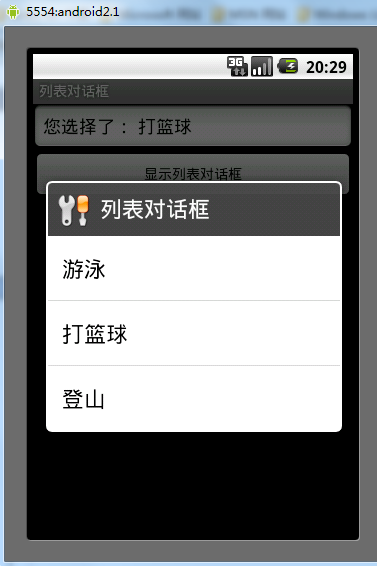
本文實例講述了Android列表對話框用法。分享給大家供大家參考。具體如下:
main.xml布局文件:
<?xml version="1.0" encoding="utf-8"?>
<LinearLayout xmlns:android="http://schemas.android.com/apk/res/android"
 android:orientation="vertical" android:layout_width="fill_parent"
 android:layout_height="fill_parent">
 <EditText android:text=""
  android:id="@+id/editText"
  android:layout_width="fill_parent"
  android:layout_height="wrap_content"
  android:editable="false"
  android:cursorVisible="false" />
 <Button android:text="顯示列表對話框"
  android:id="@+id/button"
  android:layout_width="fill_parent"
  android:layout_height="wrap_content" />
</LinearLayout>
array.xml數組:
<?xml version="1.0" encoding="utf-8"?>
<resources>
 <string-array name="hobby">
  <item>游泳</item>
  <item>打籃球</item>
  <item>登山</item>
 </string-array>
</resources>
AlertDialog類:
package com.ljq.dialog;
import android.app.Activity;
import android.app.Dialog;
import android.app.AlertDialog.Builder;
import android.content.DialogInterface;
import android.content.DialogInterface.OnClickListener;
import android.os.Bundle;
import android.view.View;
import android.widget.Button;
import android.widget.EditText;
public class AlertDialog extends Activity {
 private EditText editText;
 private final static int DIALOG=1;
 @Override
 public void onCreate(Bundle savedInstanceState) {
  super.onCreate(savedInstanceState);
  setContentView(R.layout.main);
  editText=(EditText)findViewById(R.id.editText);
  Button button = (Button) findViewById(R.id.button);
  button.setOnClickListener(new View.OnClickListener() {
   public void onClick(View v) {
    // 顯示對話框
    showDialog(DIALOG);
   }
  });
 }
 /**
  * 創建列表對話框
  */
 @Override
 protected Dialog onCreateDialog(int id) {
  Dialog dialog=null;
  switch (id) {
  case DIALOG:
   Builder builder=new android.app.AlertDialog.Builder(this);
   //設置對話框的圖標
   builder.setIcon(R.drawable.header);
   //設置對話框的標題
   builder.setTitle("列表對話框");
   //添加按鈕,android.content.DialogInterface.OnClickListener.OnClickListener
   builder.setItems(R.array.hobby, new OnClickListener(){
    public void onClick(DialogInterface dialog, int which) {
     String hoddy=getResources().getStringArray(R.array.hobby)[which];
     editText.setText("您選擇了: "+hoddy);
    }
   });
   //創建一個列表對話框
   dialog=builder.create();
   break;
  }
  return dialog;
 }
}
運行結果:
希望本文所述對大家的Android程序設計有所幫助。
 Android 創建Library Project(庫項目)與引用操作
由於在開發過程,為了實現未曾了解的某種效果與特定功能,而求助於網上優秀的開源項目,在使用過程中發現引用開源的Library Project(庫項目),的確可以解決很多問題
 android開發之shape詳解
很多時候,使用shape能夠實現的效果,你用一張圖片也能夠實現,但問題是一張圖片無論你怎麼壓縮,它都不可能比一個xml文件小,因此,為了獲得一個高性能的手機App,我們在
 Android使用SwipeListView實現類似QQ的滑動刪除效果
QQ的滑動刪除效果很不錯,要實現這種效果,可以使用SwipeListView。1. 下載com.fortysevendeg.swipelistview這個項目(以前Git
 一步步教你寫Slack的Loading動畫
項目地址:https://github.com/JeasonWong/SlackLoadingView老規矩,先上效果。圖好大。。說下第一眼看到這個動畫後的思路:+兩根平