編輯:關於Android編程
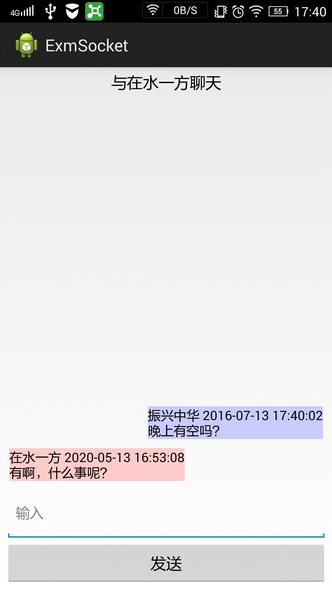
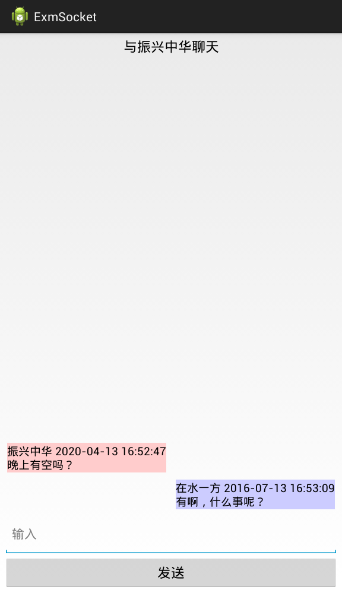
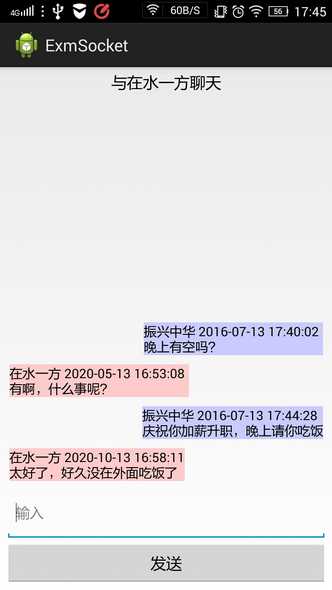
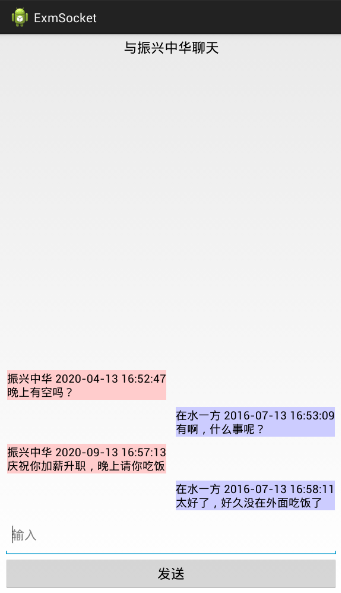
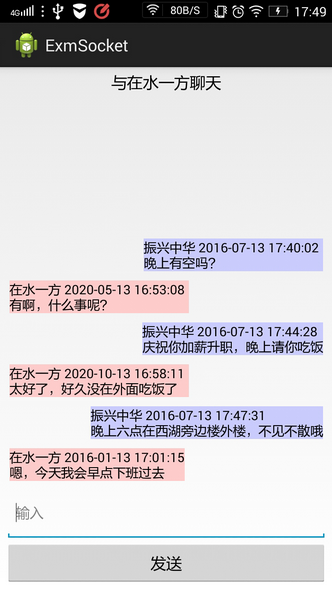
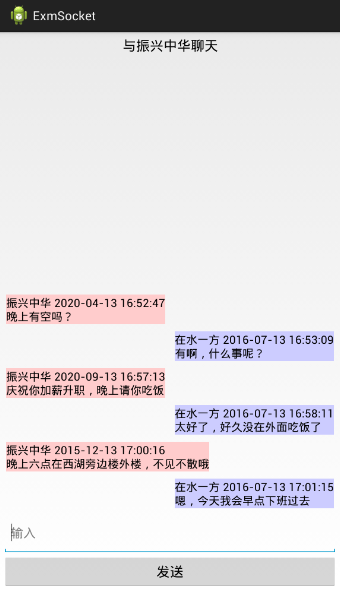
import com.example.exmsocket.thread.ClientThread;
import com.example.exmsocket.util.DateUtil;

import android.app.Application;
import android.os.Build;
import android.os.Message;
import android.util.Log;

public class MainApplication extends Application {
	private static final String TAG = "MainApplication";

	private static MainApplication mApp;
	private String mNickName;
	private ClientThread mClientThread;

	public static MainApplication getInstance() {
		return mApp;
	}

	@Override
	public void onCreate() {
		super.onCreate();
		mApp = this;
		mClientThread = new ClientThread(mApp);
		new Thread(mClientThread).start();
	}

	public void sendAction(String action, String otherId, String msgText) {
		String content = String.format("%s,%s,%s,%s,%s%s%s\r\n",
				action, Build.SERIAL, getNickName(), DateUtil.getNowTime(),
				otherId, ClientThread.SPLIT_LINE, msgText);
		Log.d(TAG, "sendAction : " + content);
		Message msg = Message.obtain();
		msg.obj = content;
		if (mClientThread==null || mClientThread.mRecvHandler==null) {
			Log.d(TAG, "mClientThread or its mRecvHandler is null");
		} else {
			mClientThread.mRecvHandler.sendMessage(msg);
		}
	}

	public void setNickName(String nickName) {
		mApp.mNickName = nickName;
	}

	public String getNickName() {
		return mApp.mNickName;
	}

}
import com.example.exmsocket.thread.ClientThread;

import android.app.Activity;
import android.content.Intent;
import android.os.Bundle;
import android.view.View;
import android.view.View.OnClickListener;
import android.widget.Button;
import android.widget.EditText;
import android.widget.Toast;

public class MainActivity extends Activity implements OnClickListener {
	private static final String TAG = "MainActivity";

    private EditText et_name;
    private Button btn_ok;

	@Override
	protected void onCreate(Bundle savedInstanceState) {
		super.onCreate(savedInstanceState);
		setContentView(R.layout.activity_main);
		et_name = (EditText) findViewById(R.id.et_name);
        btn_ok = (Button) findViewById(R.id.btn_ok);
        btn_ok.setOnClickListener(this);
	}

	@Override
	public void onClick(View v) {
		if (v.getId() == R.id.btn_ok) {
			String nickName = et_name.getText().toString().trim();
			if (nickName.length() <= 0) {
				Toast.makeText(this, "請輸入您的昵稱", Toast.LENGTH_SHORT).show();
			} else {
				MainApplication.getInstance().setNickName(nickName);
				MainApplication.getInstance().sendAction(ClientThread.LOGIN, "", "");
				Intent intent = new Intent(this, FriendListActivity.class);
				startActivity(intent);
				finish();
			}
		}
	}
}
import java.util.ArrayList;

import com.example.exmsocket.adapter.Friend;
import com.example.exmsocket.adapter.FriendListAdapter;
import com.example.exmsocket.thread.ClientThread;

import android.app.Activity;
import android.content.BroadcastReceiver;
import android.content.Context;
import android.content.Intent;
import android.os.Bundle;
import android.os.Handler;
import android.util.Log;
import android.view.View;
import android.view.View.OnClickListener;
import android.widget.Button;
import android.widget.ListView;
import android.widget.Toast;

public class FriendListActivity extends Activity implements OnClickListener {
	private static final String TAG = "FriendListActivity";

    private static Context mContext;
    private static ListView lv_friend;
    private Button btn_refresh;

    @Override
    protected void onCreate(Bundle savedInstanceState) {
        super.onCreate(savedInstanceState);
        setContentView(R.layout.activity_list);
        mContext = getApplicationContext();
        lv_friend = (ListView) findViewById(R.id.lv_friend);
        btn_refresh = (Button) findViewById(R.id.btn_refresh);
        btn_refresh.setOnClickListener(this);
    }

    @Override
    protected void onResume() {
		mHandler.postDelayed(mRefresh, 500);
    	super.onResume();
    }

    @Override
    protected void onDestroy() {
    	MainApplication.getInstance().sendAction(ClientThread.LOGOUT, "", "");
    	super.onDestroy();
    }

    private Handler mHandler = new Handler();
    private Runnable mRefresh = new Runnable() {
		@Override
		public void run() {
	        MainApplication.getInstance().sendAction(ClientThread.GETLIST, "", "");
		}
    };

	@Override
	public void onClick(View v) {
		if (v.getId() == R.id.btn_refresh) {
			mHandler.post(mRefresh);
		}
	}

	public static class GetListReceiver extends BroadcastReceiver {

		@Override
		public void onReceive(Context context, Intent intent) {
			if (intent != null) {
				Log.d(TAG, "onReceive");
				String content = intent.getStringExtra(ClientThread.CONTENT);
				if (mContext != null && content != null && content.length() > 0) {
					int pos = content.indexOf(ClientThread.SPLIT_LINE);
					String head = content.substring(0, pos);
					String body = content.substring(pos + 1);
					String[] splitArray = head.split(ClientThread.SPLIT_ITEM);
					if (splitArray[0].equals(ClientThread.GETLIST)) {
						String[] bodyArray = body.split("\\|");
						ArrayList friendList = new ArrayList();
						for (int i = 0; i < bodyArray.length; i++) {
							String[] itemArray = bodyArray[i].split(ClientThread.SPLIT_ITEM);
							if (bodyArray[i].length() > 0 && itemArray != null && itemArray.length >= 3) {
								friendList.add(new Friend(itemArray[0], itemArray[1], itemArray[2]));
							}
						}
						if (friendList.size() > 0) {
							FriendListAdapter adapter = new FriendListAdapter(mContext, friendList);
							lv_friend.setAdapter(adapter);
							lv_friend.setOnItemClickListener(adapter);
						}
					} else {
						String hint = String.format("%s\n%s", splitArray[0], body);
						Toast.makeText(mContext, hint, Toast.LENGTH_SHORT).show();
					}
				}
			}
		}
	}

}
import com.example.exmsocket.thread.ClientThread;
import com.example.exmsocket.util.DateUtil;
import com.example.exmsocket.util.MetricsUtil;

import android.app.Activity;
import android.content.BroadcastReceiver;
import android.content.Context;
import android.content.Intent;
import android.graphics.Color;
import android.os.Build;
import android.os.Bundle;
import android.util.Log;
import android.view.Gravity;
import android.view.View;
import android.view.View.OnClickListener;
import android.view.ViewGroup.LayoutParams;
import android.widget.Button;
import android.widget.EditText;
import android.widget.LinearLayout;
import android.widget.TextView;
import android.widget.Toast;

public class ChatActivity extends Activity implements OnClickListener {
	private static final String TAG = "ChatActivity";

    private static Context mContext;
    private TextView tv_other;
    private EditText et_input;
    private static TextView tv_show;
    private static LinearLayout ll_show;
    private Button btn_send;
    private String mOtherId;
    private static int dip_margin;

    @Override
    protected void onCreate(Bundle savedInstanceState) {
        super.onCreate(savedInstanceState);
        setContentView(R.layout.activity_chat);
        mContext = getApplicationContext();
        tv_other = (TextView) findViewById(R.id.tv_other);
        et_input = (EditText) findViewById(R.id.et_input);
        tv_show = (TextView) findViewById(R.id.tv_show);
        ll_show = (LinearLayout) findViewById(R.id.ll_show);
        btn_send = (Button) findViewById(R.id.btn_send);
        btn_send.setOnClickListener(this);

        dip_margin = MetricsUtil.dip2px(mContext, 5);
        Bundle bundle = getIntent().getExtras();
        mOtherId = bundle.getString("otherId", "");
        String desc = String.format("與%s聊天", bundle.getString("otherName", ""));
        tv_other.setText(desc);
    }

	@Override
	public void onClick(View v) {
		if (v.getId() == R.id.btn_send) {
			String body = et_input.getText().toString();
			String append = String.format("%s %s\n%s",
					MainApplication.getInstance().getNickName(),
					DateUtil.formatTime(DateUtil.getNowTime()), body);
			appendMsg(Build.SERIAL, append);
            MainApplication.getInstance().sendAction(ClientThread.SENDMSG, mOtherId, body);
            et_input.setText("");
		}
	}

	private static void appendMsg(String deviceId, String append) {
		//tv_show.setText(tv_show.getText().toString() + append);
		int gravity = deviceId.equals(Build.SERIAL) ? Gravity.RIGHT : Gravity.LEFT;
		int bg_color = deviceId.equals(Build.SERIAL) ? 0xffccccff : 0xffffcccc;
		LinearLayout ll_append = new LinearLayout(mContext);
		LinearLayout.LayoutParams ll_params = new LinearLayout.LayoutParams(
				LayoutParams.MATCH_PARENT, LayoutParams.WRAP_CONTENT);
		ll_params.setMargins(dip_margin, dip_margin, dip_margin, dip_margin);
		ll_append.setLayoutParams(ll_params);
		ll_append.setGravity(gravity);

		TextView tv_append = new TextView(mContext);
		tv_append.setText(tv_show.getText().toString() + append);
		tv_append.setTextColor(Color.BLACK);
		LinearLayout.LayoutParams tv_params = new LinearLayout.LayoutParams(
				LayoutParams.WRAP_CONTENT, LayoutParams.WRAP_CONTENT);
		tv_append.setLayoutParams(tv_params);
		tv_append.setBackgroundColor(bg_color);
		ll_append.addView(tv_append);

		ll_show.addView(ll_append);
	}

	public static class RecvMsgReceiver extends BroadcastReceiver {

		@Override
		public void onReceive(Context context, Intent intent) {
			if (intent != null) {
				Log.d(TAG, "onReceive");
				String content = intent.getStringExtra(ClientThread.CONTENT);
				if (mContext != null && content != null && content.length() > 0) {
					int pos = content.indexOf(ClientThread.SPLIT_LINE);
					String head = content.substring(0, pos);
					String body = content.substring(pos + 1);
					String[] splitArray = head.split(ClientThread.SPLIT_ITEM);
					if (splitArray[0].equals(ClientThread.RECVMSG)) {
						String append = String.format("%s %s\n%s",
								splitArray[2], DateUtil.formatTime(splitArray[3]), body);
						appendMsg(splitArray[1], append);
					} else {
						String hint = String.format("%s\n%s", splitArray[0], body);
						Toast.makeText(mContext, hint, Toast.LENGTH_SHORT).show();
					}
				}
			}
		}
	}

}
import java.io.BufferedReader;
import java.io.InputStreamReader;
import java.io.OutputStream;
import java.net.InetSocketAddress;
import java.net.Socket;

import android.content.Context;
import android.content.Intent;
import android.os.Handler;
import android.os.Looper;
import android.os.Message;
import android.util.Log;

public class ClientThread implements Runnable {
	private static final String TAG = "ClientThread";
	private static final String SOCKET_IP = "192.168.0.212";  // 模擬器使用
	//private static final String SOCKET_IP = "192.168.253.1";  // 真機使用
	private static final int SOCKET_PORT = 52000;
	public static String ACTION_RECV_MSG = "com.example.exmsocket.RECV_MSG";
	public static String ACTION_GET_LIST = "com.example.exmsocket.GET_LIST";
	public static String CONTENT = "CONTENT";
	public static String SPLIT_LINE = "|";
	public static String SPLIT_ITEM = ",";

	public static String LOGIN = "LOGIN";
	public static String LOGOUT = "LOGOUT";
	public static String SENDMSG = "SENDMSG";
	public static String RECVMSG = "RECVMSG";
	public static String GETLIST = "GETLIST";

    private Context mContext;
    private Socket mSocket;
    // 定義接收UI線程的Handler對象
    public Handler mRecvHandler;
    private BufferedReader mReader = null;
    private OutputStream mWriter = null;

    public ClientThread(Context context) {
    	mContext = context;
    }

    @Override
    public void run() {
    	mSocket = new Socket();
        try {
        	mSocket.connect(new InetSocketAddress(SOCKET_IP, SOCKET_PORT), 3000);
            mReader = new BufferedReader(new InputStreamReader(mSocket.getInputStream()));
            mWriter = mSocket.getOutputStream();
            // 啟動一條子線程來讀取服務器相應的數據
            new Thread() {
                @Override
                public void run() {
                    String content = null;
                    try {
                        while ((content = mReader.readLine()) != null) {
                            // 讀取到來自服務器的數據之後,發送消息通知
                        	ClientThread.this.notify(0, content);
                        }
                    } catch (Exception e) {
                        e.printStackTrace();
                        ClientThread.this.notify(97, e.getMessage());
                    }
                }
            }.start();
            Looper.prepare();
            mRecvHandler = new Handler() {
                @Override
                public void handleMessage(Message msg) {
					// 接收到UI線程的中用戶輸入的數據
					try {
						mWriter.write(msg.obj.toString().getBytes("utf8"));
					} catch (Exception e) {
						e.printStackTrace();
						ClientThread.this.notify(98, e.getMessage());
					}
                }
            };
            Looper.loop();
        } catch (Exception e) {
        	e.printStackTrace();
        	notify(99, e.getMessage());
        }
    }

    private void notify(int type, String message) {
    	if (type == 99) {
    		String content = String.format("%s%s%s%s", "ERROR", SPLIT_ITEM, SPLIT_LINE, message);
			Intent intent1 = new Intent(ACTION_RECV_MSG);
			intent1.putExtra(CONTENT, content);
			mContext.sendBroadcast(intent1);
			Intent intent2 = new Intent(ACTION_GET_LIST);
			intent2.putExtra(CONTENT, content);
			mContext.sendBroadcast(intent2);
    	} else {
			int pos = message.indexOf(SPLIT_LINE);
			String head = message.substring(0, pos-1);
			String[] splitArray = head.split(SPLIT_ITEM);
			String action = "";
			if (splitArray[0].equals(RECVMSG)) {
				action = ACTION_RECV_MSG;
			} else if (splitArray[0].equals(GETLIST)) {
				action = ACTION_GET_LIST;
			}
	    	Log.d(TAG, "action="+action+", message="+message);
			Intent intent = new Intent(action);
			intent.putExtra(CONTENT, message);
			mContext.sendBroadcast(intent);
    	}
    }

}
import java.net.ServerSocket;
import java.util.ArrayList;

public class ChatServer {
	private static final int SOCKET_PORT = 52000;
	public static ArrayList mSocketList = new ArrayList();

	private void initServer() {
		try {
			// 創建一個ServerSocket,用於監聽客戶端Socket的連接請求
			ServerSocket server = new ServerSocket(SOCKET_PORT);
			while (true) {
				// 每當接收到客戶端的Socket請求,服務器端也相應的創建一個Socket
				SocketBean socket = new SocketBean(DateUtil.getTimeId(), server.accept());
				mSocketList.add(socket);
				// 每連接一個客戶端,啟動一個ServerThread線程為該客戶端服務
				new Thread(new ServerThread(socket)).start();
			}
		} catch (Exception e) {
			e.printStackTrace();
		}
	}

	public static void main(String[] args) {
		ChatServer server = new ChatServer();
		server.initServer();
	}
}
import java.io.BufferedReader;
import java.io.IOException;
import java.io.InputStreamReader;
import java.io.PrintStream;

public class ServerThread implements Runnable {

	private SocketBean mSocket = null;
	private BufferedReader mReader = null;

	public ServerThread(SocketBean mSocket) throws IOException {
		this.mSocket = mSocket;
		mReader = new BufferedReader(new InputStreamReader(
				mSocket.socket.getInputStream()));
	}

	@Override
	public void run() {
		try {
			String content = null;
			// 循環不斷地從Socket中讀取客戶端發送過來的數據
			while ((content = mReader.readLine()) != null) {
				System.out.println("content="+content);
				int pos = content.indexOf("|");
				// 包頭格式為:動作名稱|設備編號|昵稱|時間|對方設備編號
				String head = content.substring(0, pos);
				String body = content.substring(pos+1);
				String[] splitArray = head.split(",");
				String action = splitArray[0];
				System.out.println("action="+action);
				if (action.equals("LOGIN")) {
					login(splitArray[1], splitArray[2], splitArray[3]);
				} else if (action.equals("LOGOUT")) {
					logout(splitArray[1]);
					break;
				} else if (action.equals("SENDMSG")) {
					sendmsg(splitArray[2], splitArray[4], splitArray[1], body);
				} else if (action.equals("GETLIST")) {
					getlist(splitArray[1]);
				}
			}
		} catch (Exception e) {
			e.printStackTrace();
		}
	}

	private void login(String deviceId, String nickName, String loginTime) throws IOException {
		for (int i=0; i<ChatServer.mSocketList.size(); i++) {
			SocketBean item = ChatServer.mSocketList.get(i);
			if (item.id.equals(mSocket.id)) {
				item.deviceId = deviceId;
				item.nickName = nickName;
				item.loginTime = loginTime;
				ChatServer.mSocketList.set(i, item);
				break;
			}
		}
	}

	private String getFriend() {
		String friends = "GETLIST,";
		for (SocketBean item : ChatServer.mSocketList) {
			if (item.deviceId!=null && item.deviceId.length()>0) {
				String friend = String.format("|%s,%s,%s", item.deviceId, item.nickName, item.loginTime);
				friends += friend;
			}
		}
		return friends;
	}

	private void getlist(String deviceId) throws IOException {
		for (int i=0; i<ChatServer.mSocketList.size(); i++) {
			SocketBean item = ChatServer.mSocketList.get(i);
			if (item.id.equals(mSocket.id) && item.deviceId.equals(deviceId)) {
				PrintStream printStream = new PrintStream(item.socket.getOutputStream());
				printStream.println(getFriend());
				break;
			}
		}
	}

	private void logout(String deviceId) throws IOException {
		for (int i=0; i<ChatServer.mSocketList.size(); i++) {
			SocketBean item = ChatServer.mSocketList.get(i);
			if (item.id.equals(mSocket.id) && item.deviceId.equals(deviceId)) {
				PrintStream printStream = new PrintStream(item.socket.getOutputStream());
				printStream.println("LOGOUT,|");
				item.socket.close();
				ChatServer.mSocketList.remove(i);
				break;
			}
		}
	}

	private void sendmsg(String otherName, String otherId, String selfId, String message) throws IOException {
		for (int i=0; i<ChatServer.mSocketList.size(); i++) {
			SocketBean item = ChatServer.mSocketList.get(i);
			if (item.deviceId.equals(otherId)) {
				String content = String.format("%s,%s,%s,%s|%s",
						"RECVMSG", selfId, otherName, DateUtil.getNowTime(), message);
				PrintStream printStream = new PrintStream(item.socket.getOutputStream());
				printStream.println(content);
				break;
			}
		}
	}

}
 Android官方文檔之Animation
Android提供了三種動畫機制:屬性動畫(property animation)、補間動畫(tween animation / view animation)、幀動畫(
 android 12306余票查詢
android軟件 可以查詢動車余票 [1].[圖片] 1.jpg 跳至 [1] [2] [3] [4] [5] [2].[圖片] 2.jpg 跳至 [1
 android 音樂播放器總結
學習從模仿開始一個星期完成的音樂播放器基本功能,具有下一首,上一首,暫停和隨機、順序和單曲等播放,以及保存上一次播放的狀態,缺少了歌詞顯示功能。使用了andbase框架的
 Android數據庫高手秘籍(二)——創建表和LitePal的基本用法
我們學習了一些Android數據庫相關的基礎知識,和幾個頗為有用的SQLite命令,都是直接在命令行操作的。但是我們都知道,數據庫是要和程序結合在一起使用的,