編輯:關於Android編程
自定義線性布局經常用到:
第一種是在擴展的LinearLayout構造函數中使用Inflater加載一個布局,並從中提取出相關的UI組件進行封裝,形成一個獨立的控件。在使用該控件時,由於它所有的子元素都是在運行時通過代碼動態創建的,所以該控件只能以一個獨立控件的形式在Layout文件中聲明,例如:
public class CustomLayout extends LinearLayout{

       public  CustomLayout(Context context){
                 LayoutInflater mInflater = LayoutInflater.from(context);
                View myView = mInflater.inflate(R.layout.receive, null);
                addView(myView);

       }
}
< LinearLayout xmlns:android="http://schemas.android.com/apk/res/android" android:layout_width="wrap_content" android:layout_height="wrap_content" androidundefinedrientation="vertical" >
imagebtn.xml
MyLinearLayout1.java
package com.hust.customlinearlayout;

import android.content.Context;
import android.util.AttributeSet;
import android.view.LayoutInflater;
import android.view.View;
import android.widget.ImageView;
import android.widget.LinearLayout;
import android.widget.TextView;

public class MyLinearLayout1 extends LinearLayout {
	private ImageView imageView;
	private TextView  textView;
	public MyLinearLayout1(Context context){
		super(context);
	}
	public MyLinearLayout1(Context context, AttributeSet attrs) {
		super(context, attrs);
		LayoutInflater inflater=(LayoutInflater) context.getSystemService(Context.LAYOUT_INFLATER_SERVICE);
		inflater.inflate(R.layout.imagebtn, this);
		imageView=(ImageView) findViewById(R.id.imageView1);
		textView=(TextView)findViewById(R.id.textView1);


	}

	public void setImageResource(int resId){
		imageView.setImageResource(resId);
	}
	public void setTextViewText(String text){
		textView.setText(text);
	}
}
package com.hust.customlinearlayout;

import android.support.v7.app.ActionBarActivity;
import android.os.Bundle;
import android.view.Menu;
import android.view.MenuItem;
import android.view.View;
import android.widget.Toast;

public class MainActivity extends ActionBarActivity {
    private MyLinearLayout1 myLinearLayout1;
    private MyLinearLayout1 myLinearLayout2;
	@Override
	protected void onCreate(Bundle savedInstanceState) {
		super.onCreate(savedInstanceState);
		setContentView(R.layout.activity_main);

		myLinearLayout1=(MyLinearLayout1) findViewById(R.id.btn_right);
		myLinearLayout2=(MyLinearLayout1) findViewById(R.id.btn_error);

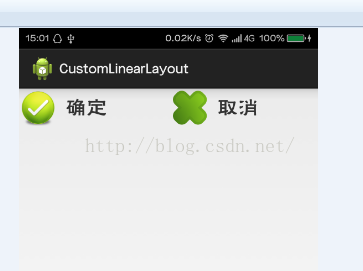
		myLinearLayout1.setTextViewText("確定");
		myLinearLayout2.setTextViewText("取消");
		myLinearLayout1.setImageResource(R.drawable.confirm);
		myLinearLayout2.setImageResource(R.drawable.cancle);
		myLinearLayout1.setOnClickListener(new View.OnClickListener() {

			public void onClick(View v) {
				// TODO Auto-generated method stub
				Toast.makeText(getApplicationContext(), "點擊的正確按鈕", 1).show();
			}
		});

		myLinearLayout2.setOnClickListener(new View.OnClickListener() {

			public void onClick(View v) {
				// TODO Auto-generated method stub
				Toast.makeText(getApplicationContext(), "點擊的錯誤按鈕", 1).show();
			}
		});

	}


}
private class SpeechView extends LinearLayout {

        private TextView mTitle;
        private TextView mDialogue;

        public SpeechView(Context context, String title, String words) {
            super(context);
            this.setOrientation(VERTICAL);
             // Here we build the child views in code. They could also have

            // been specified in an XML file.
            mTitle = new TextView(context);
            mTitle.setText(title);
            addView(mTitle, new LinearLayout.LayoutParams(

                   LayoutParams.FILL_PARENT, LayoutParams.WRAP_CONTENT));

             mDialogue = new TextView(context);
            mDialogue.setText(words);
            addView(mDialogue, new LinearLayout.LayoutParams(
                    LayoutParams.FILL_PARENT, LayoutParams.WRAP_CONTENT));

        }

       /**
        * Convenience method to set the title of a SpeechView
         */

       public void setTitle(String title) {
                      mTitle.setText(title);

       }

         /**
         * Convenience method to set the dialogue of a SpeechView

        */

       public void setDialogue(String words) {
                mDialogue.setText(words);
        }

      }
 Android Tinyalsa
tinyalsa位於Android源碼的external/tinyalsa位置。關於tinyalsa,tinyalsa是Google在Android 4.0之後推的基於a
 AsyncTask陷阱之:Handler,Looper與MessageQueue的詳解
AsyncTask的隱蔽陷阱先來看一個實例這個例子很簡單,展示了AsyncTask的一種極端用法,挺怪的。復制代碼 代碼如下:public class AsyncTask
 設計模式-裝飾者模式(Decorator)理解和在Android中的應用
介紹最近寫代碼沒有手感,就看看書找點寫代碼的靈感。看點高大上的設計模式談談自己的理解。我讀的是《研磨設計模式》看完之後真正的醍醐灌頂。借用一句話 一本值得反復研讀的書讀了
 Android在程序中浏覽網頁
本文是自己學習所做筆記,歡迎轉載,但請注明出處:http://blog.csdn.net/jesson20121020 有時需要在程序中浏覽一些網頁,
 Android framework回顧(3)binder利用及IBinder BpRefbase IInterface INTERFACE 之間關系
status_t AudioSystem::setStreamVolum