編輯:關於Android編程
AXML即Android Binary XML,是Android應用程序APK包中保存xml文件數據的一種方式,可以減小xml文件的大小。resources.arsc文件是apk的資源索引文件,而xml文件是apk的資源文件,resources.arsc保存了xml中需要用到的資源的索引,它們之間有非常強的依賴關系,apk在執行的時候缺一不可。另外大家在用AXMLPrinter去解碼AXML文件時會看見輸出中有很多屬性的值都是一串數字,很難明白是什麼意思,實際上這串數字就是資源的索引id值,需要用這個id去resources.arsc中查找才能得到具體的字符串,知道這個屬性的值是@string/XXXX或者@drawable/XXXX等等。
在上面的文章中我介紹了Resources.arsc文件的解析方式,本文我來介紹怎樣來解析AXML文件。
AXML文件的格式與resources.arsc的文件格式有點類似,如果你清楚resources.arsc文件格式的話,那學習AXML文件格式就更方便了。AXML文件格式所需要的數據結構和resources.arsc的數據結構在同一個文件中定義,都在系統源碼的/frameworks/base/include/androidfw/ResourceType.h中,也用到了chunk的概念,文件是以chunk為單位劃分的,每個chunk都有chunk header和chunk body。chunk的類型在ResourceType.h文件中有定義:
struct ResChunk_header
 {
     enum
     {
         RES_NULL_TYPE               = 0x0000,
         RES_STRING_POOL_TYPE        = 0x0001,
         RES_TABLE_TYPE              = 0x0002,

         // Chunk types in RES_XML_TYPE
         RES_XML_TYPE                = 0x0003,
         RES_XML_FIRST_CHUNK_TYPE    = 0x0100,
         RES_XML_START_NAMESPACE_TYPE= 0x0100,
         RES_XML_END_NAMESPACE_TYPE  = 0x0101,
         RES_XML_START_ELEMENT_TYPE  = 0x0102,
         RES_XML_END_ELEMENT_TYPE    = 0x0103,
         RES_XML_CDATA_TYPE          = 0x0104,
         RES_XML_LAST_CHUNK_TYPE     = 0x017f,

         // This contains a uint32_t array mapping strings in the string
         // pool back to resource identifiers.  It is optional.
         RES_XML_RESOURCE_MAP_TYPE   = 0x0180,

         // Chunk types in RES_TABLE_TYPE
         RES_TABLE_PACKAGE_TYPE      = 0x0200,
         RES_TABLE_TYPE_TYPE         = 0x0201,
         RES_TABLE_TYPE_SPEC_TYPE    = 0x0202
     };
     //當前這個chunk的類型
     uint16_t type;
     //當前這個chunk的頭部大小
     uint16_t headerSize;
     //當前這個chunk的大小
     uint32_t size;
 };
代碼段1
具體格式如下圖:
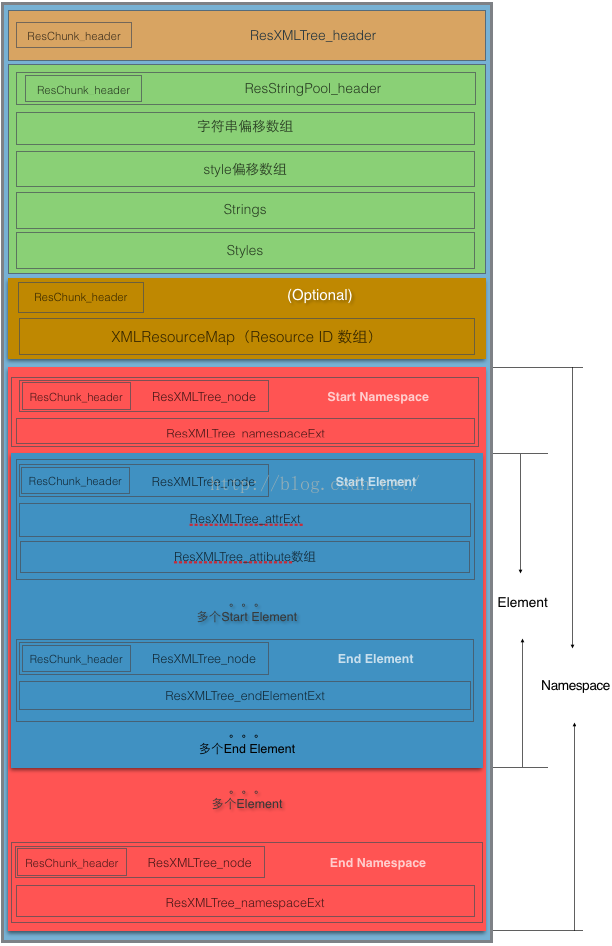
圖1
可以看到和resources.arsc一樣,在文件的頭部後面緊接著是一個string pool,存放著文件中需要用到的字符串。後面是一個XMLResourceMap,它的作用是:This contains a uint32_t array mapping strings in the stringpool back to resource identifiers. It is optional.由於我對應用中使用資源文件不太熟悉,所以沒看明白,以後明白了再更新,但這個chunk是optional的。
再往後是一個Namespace,個人理解和C裡面的namespace一個意思吧,類型是RES_XML_START_NAMESPACE_TYPE,Namespace裡面是一個個的Element,類型是RES_XML_START_ELEMENT_TYPE,實際上對應著xml中的一個個tag,每個Element裡面還有attribute,每個Element裡面還可以有子Element,和xml文件中的標簽結構是對應的,後面還有結束標簽End Element和End Namespace,後面會舉例具體說明。每個tag被描述為一個ResXMLTree_node結構體,定義如下:
struct ResXMLTree_node
{
    struct ResChunk_header header;

    // Line number in original source file at which this element appeared.
    uint32_t lineNumber;

    // Optional XML comment that was associated with this element; -1 if none.
    struct ResStringPool_ref comment;
};
代碼段2
舉例就和手把手教你解析Resources.arsc用同一個工程的例子吧,以工程中的AndroidManifest.xml的二進制文件作為分析目標,其原始的內容如下:
代碼段3
下面把手把手教你解析Resources.arsc文章中用到的/res/values/strings.xml和R.java對應部分也貼出來:
/res/values/strings.xml內容:
    Cert
    Hello world!
    Settings
代碼段4 R.java內容:
public final class R {
              ...
    public static final class string {
                     ...
        /**  Description of the choose target button in a ShareActionProvider (share UI). [CHAR LIMIT=NONE]
         */
        public static final int abc_shareactionprovider_share_with=0x7f0a000c;
        /**  Description of a share target (both in the list of such or the default share button) in a ShareActionProvider (share UI). [CHAR LIMIT=NONE]
         */
        public static final int abc_shareactionprovider_share_with_application=0x7f0a000b;
        public static final int action_settings=0x7f0a000f;
        public static final int app_name=0x7f0a000d;
        public static final int hello_world=0x7f0a000e;
    }
                     ...
}
代碼段5
AXML文件的頭部格式如下:
struct ResXMLTree_header
{
    struct ResChunk_header header;
};
代碼段6 很簡單,AXML文件二進制內容如下:

圖2
字符串池與resources.arsc的字符串池的結構什麼的是完全一樣的,現實一個ResStringPool_header結構體,然後跟著n個字符串偏移數組,然後是字符串,這裡就不多說了。
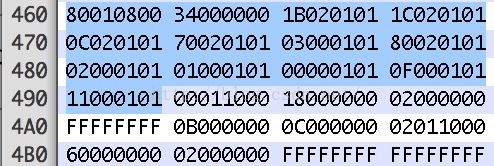
圖3
可以看到類型是RES_XML_RESOURCE_MAP_TYPE(0x180),ResChunk_header後面跟著11個四字節的id值,這些id值對應Android源碼中/frameworks/base/core/res/res/values/public.xml文件中的值,看代碼段3的例子中所有tag下用到的屬性名在public.xml對應的id都會出現在這個數組裡面,比如versionCode、versionName、name、label、icon、theme這些,這裡可能表明需要用到系統資源文件,這些id是系統資源的id值,但是具體為什麼我還不太清楚。
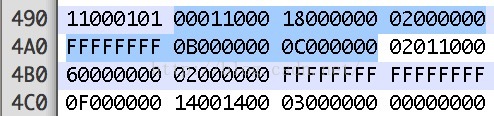
圖4
可以看到chunk的類型是RES_XML_START_NAMESPACE_TYPE(0x0100),在原始AndroidManifest.xml文件中的line number是0x2,ResXMLTree_namespaceExt結構體定義如下:
struct ResXMLTree_namespaceExt
{
    // The prefix of the namespace.
    struct ResStringPool_ref prefix;

    // The URI of the namespace.
    struct ResStringPool_ref uri;
};
代碼段7 結合上面數據可以看到prefix在string pool的字符串偏移數組的下標是0xB,uri的下標是0xC,到string pool中去查找得到分別對應字符串“android”和“http://schemas.android.com/apk/res/android”,可以看到與代碼段2 AndroidManifest.xml原始內容是相對照的,第二行原始內容:http://schemas.android.com/apk/res/android" ,xmlns就表示這個xml的namespace了,這個namespace是android官方標准定義的,uri和prefix是固定的。整個xml文件是屬於android=http://schemas.android.com/apk/res/android這個namespace范圍內。
XML文件中的每個tag在這裡被描述為Element,同樣有起始tag和結束tag,這裡對應Start Element和End Element,Start Element這個chunk的header是ResXMLTree_node來描述,chunk的body是一個ResXMLTree_attrExt,後面跟若干個ResXMLTree_attribute,定義如下:
struct ResXMLTree_attrExt
{
    // String of the full namespace of this element.
    struct ResStringPool_ref ns;


    // String name of this node if it is an ELEMENT; the raw
    // character data if this is a CDATA node.
    struct ResStringPool_ref name;

    // Byte offset from the start of this structure where the attributes start.
    uint16_t attributeStart;

    // Size of the ResXMLTree_attribute structures that follow.
    uint16_t attributeSize;


    // Number of attributes associated with an ELEMENT.  These are
    // available as an array of ResXMLTree_attribute structures
    // immediately following this node.
    uint16_t attributeCount;


    // Index (1-based) of the "id" attribute. 0 if none.
    uint16_t idIndex;

    // Index (1-based) of the "class" attribute. 0 if none.
    uint16_t classIndex;

    // Index (1-based) of the "style" attribute. 0 if none.
    uint16_t styleIndex;
};


struct ResXMLTree_attribute
{
    // Namespace of this attribute.
    struct ResStringPool_ref ns;

    // Name of this attribute.
    struct ResStringPool_ref name;


    // The original raw string value of this attribute.
    struct ResStringPool_ref rawValue;

    // Processesd typed value of this attribute.
    struct Res_value typedValue;
};
代碼段8 ResXMLTree_attrExt描述了這個Element的名字、所屬的namespace以及這個Element中包含了幾個attribute等相關信息。ResXMLTree_attribute描述了attribute的具體信息。
這裡看二進制內容:
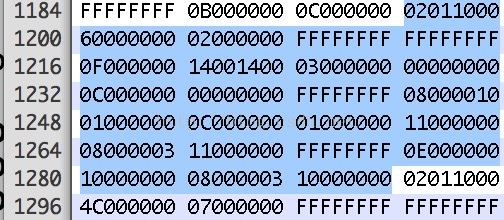
圖5
chunk的類型是RES_XML_START_ELEMENT_TYPE(0x0102),attribute的個數是3,offset是0x14,0xFFFFFFFF表示null。後面跟著三個ResXMLTree_attribute結構體,第一個name是0x0,從string pool中查找是versionCode,Res_value的類型是TYPE_FIRST_INT,值是0x01,與代碼段3中原始內容的android:versionCode="1"是對應的。第二和第三個ResXMLTree_attribute就不分析了。
下面找一個與resources.arsc有關的Element分析一下,二進制內容如下:
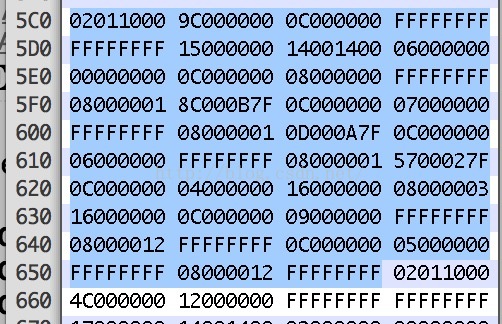
圖6
這個Element的line number是0x0C,name是0x15對應string pool中“application”,與代碼段3中我們的例子對應。後面有6個ResXMLTree_attribute,我們看第二個,內容是:0C000000 07000000 FFFFFFFF 08000001 0D000A7F,name是0x07,對應string pool中”label“,Res_value的類型是TYPE_FIRST_INT,值是0x7F0A000D,看過手把手教你解析Resources.arsc這篇文章的人會發現很眼熟,這不就是R.java中為每個資源分配的id值嗎?對了,系統會根據這個id值去resources.arsc文件中去找具體的資源內容,方法這裡就不說了,可以到我的那篇文章中去看。我們直接到代碼段5的R.java中去找這個id,對應的是app_name,再看代碼段3中原始的內容是
也就是說在APK中某個AXML文件如果引用到其它AXML文件的資源時,都是通過id來引用的,在解析的時候都需要通過resources.arsc去索引。
每個tag都有Start Element和End Element來標識這個tag的范圍,End Element Chunk的header是由一個ResXMLTree_node來描述,它的body是由一個ResXMLTree_endElementExt來描述,定義如下:
struct ResXMLTree_endElementExt
{
    // String of the full namespace of this element.
    struct ResStringPool_ref ns;

    // String name of this node if it is an ELEMENT; the raw
    // character data if this is a CDATA node.
    struct ResStringPool_ref name;
};
代碼段9 其中namespace和name都是和Start Element對應的,這裡就不多說了。
 Android實現記事本功能(26)
本文實例為大家分享了Android實現記事本功能的具體代碼,供大家參考,具體內容如下MainActivity.java代碼:package siso.smartnotef
 AndroidStudio上github使用
AndroidStudio上github使用要想在AndroidStudio上面使用github,首先要下載git工具然後在AndroidStudio上面設置git工具的
 Android開發中Dialog半透明背景消失
近日,遇到一個Dialog半透明背景消失的問題,背景需求是自定義Dialog實現警告提示框:// 初始化警告彈出框 alertDialog = new EmpAlertV
 Android:仿手機QQ好友動態的ListView
1.介紹:本博客使用XListView模仿Android版QQ好友動態的ListView效果。效果截圖如下:效果圖1效果圖2這裡面主要涉及的是ListView的布局問題,