編輯:關於Android編程
先上幾張自定義所實現的效果圖吧,有興趣的可以繼續往下看
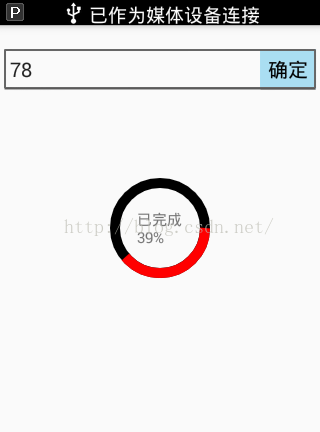
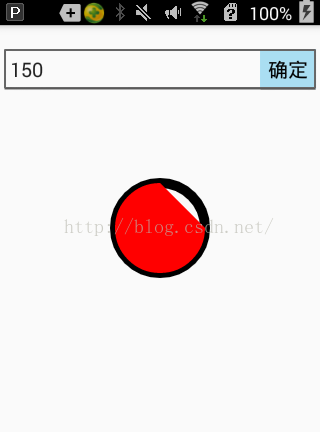
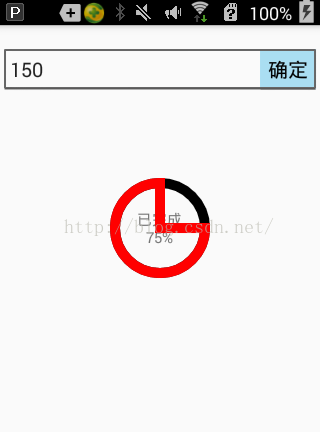
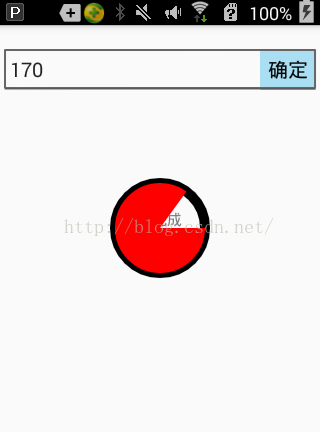
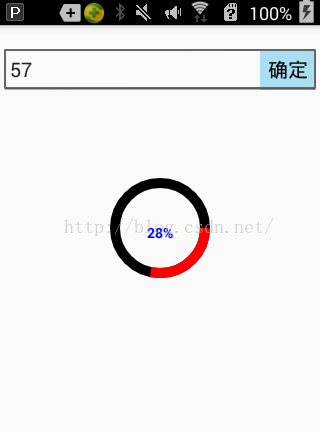
實現思路,前四張圖呢在自定義progressbar時沒有加入text文本,文本是在xml布局時加上去的,最後一張是與progressbar定義在一起的。可以看到有以下幾種情況
1,圖1自定義中未集成文本的圓環顯示,這樣的話需要自己添加文本,做法也很簡單
利用相對布局,將文本與progressbar進行嵌套,如下:這是整個頁面的布局文件,所自定的view為RoundProgressBar
 mProgress.setCurrentProgress(Integer.valueOf(mEdit.getText().toString()));
                mTv.setText("已完成" + "\n" + mProgress.getPercent() + "%");
2,像圖2這種有填充有圓環的自己感覺用戶體驗不是太好,不如圖4
這種做法忽略掉圓心,做法也很簡單,那就是在畫圓時useCenter傳入一個false,
/** *@param oval The bounds of oval used to define the shape and size * of the arc * @param startAngle Starting angle (in degrees) where the arc begins * @param sweepAngle Sweep angle (in degrees) measured clockwise,,你要畫的百分比的弧度, *如果傳入為true,則畫圓時就會包括圓心,其實就相當於用的圓規,如果設置為true,則畫百分比時圓規一腳固定在圓心 *另一腳沿著圓弧按百分比進行畫弧 * @param useCenter If true, include the center of the oval in the arc, and close it if it is being stroked. This will draw a wedge * @param paint The paint used to draw the arc */
3,有了圖2的分析就可以知道,圖3和圖4傳入的useCenter參數為true。
除了包不包含圓心之分,還有一個區分那就是圖1和圖3是空心無填充,圖2和圖4是實心有填充,這個是怎麼設計的呢?
可以看到在畫圓時傳入了一個畫筆的對象paint,可以對畫筆對象進行一些設置,比如
paint.setStyle(Paint.Style.STROKE);//設置為空心
paint.setStyle(Paint.Style.FILL);//設置為實心,在畫時有填充
好了,大致分析了一下幾種情況的不同,接下來看如何自定義View
要想實現這種自定義的view先分析都需要什麼,(直接將圖5考慮進來,如果不需要顯示可以直接注掉)
首先是畫整個圓環(圓環顏色,畫筆對象,圓環寬度)按百分比進行畫弧(圓弧顏色,最大值,當前值)考慮是空心還是實心(style)畫出文本(文本顏色,文本大小,文本是否顯示)畫時考慮坐標仔細想想,這個View所要畫的也就這些東西了,
自定義view分以下幾步
繼承View(不要怪我啰嗦,說不定真有人會忘....)
public class RoundProgressBar extends View
既然我們已經知道需要哪些量,那就先進行構造
 private Paint paint;//畫筆對象
    private int ringColor;//圓環color
    private int ringProgressColor;//進度弧度color
    private int textColor;//百分比字體color
    private float textSize;//百分比字體size
    private float ringWidth;//圓環寬度
    private int maxProgress;//進度最大值
    private int currentProgress;//當前進度
    private boolean textIsDisplay;//是否顯示中間進度百分比
    private int styleRes;//進度風格
然後創建字段的setter和getter方法
構造方法
public RoundProgressBar(Context context) {
        this(context,null);
    }

    public RoundProgressBar(Context context, AttributeSet attrs) {
        this(context, attrs,0);
    }

    public RoundProgressBar(Context context, AttributeSet attrs, int defStyleAttr) {
        super(context, attrs, defStyleAttr);


        paint = new Paint();
        TypedArray typedArray = context.obtainStyledAttributes(attrs, R.styleable.RoundProgressBar);
        //獲取自定義屬性和默認值
        ringColor = typedArray.getColor(R.styleable.RoundProgressBar_ringColor, Color.BLACK);
        ringProgressColor = typedArray.getColor(R.styleable.RoundProgressBar_ringProgressColor,Color.RED);
        textColor = typedArray.getColor(R.styleable.RoundProgressBar_textColor,Color.BLUE);
        textSize = typedArray.getDimension(R.styleable.RoundProgressBar_textSize,14);
        textIsDisplay = typedArray.getBoolean(R.styleable.RoundProgressBar_textIsDisplay,true);
        styleRes = typedArray.getInt(R.styleable.RoundProgressBar_style,1);
        typedArray.recycle();
    }
在這裡用到了一個自定義的風格RoundProgressBar的style
在values文件夾下創建一個資源文件,在該文件中定義了所需字段的默認值
覆寫view的onDraw方法
  @Override
    protected void onDraw(Canvas canvas) {
        super.onDraw(canvas);
首先要畫圓環
        int center = getWidth()/2; //獲取到自定義控件的寬度,當然這是你在xml文件中定義的
        int radius = (int)(center - ringWidth/2);//內圓半徑
        paint.setColor(ringColor);//設置圓環顏色
        paint.setStyle(Paint.Style.STROKE);設置是否填充
        paint.setStrokeWidth(ringWidth);//設置圓環寬度
        paint.setAntiAlias(true);//設置是否平滑
        canvas.drawCircle(center,center,radius,paint);畫圓
附上一張說明圖幫助大家理解
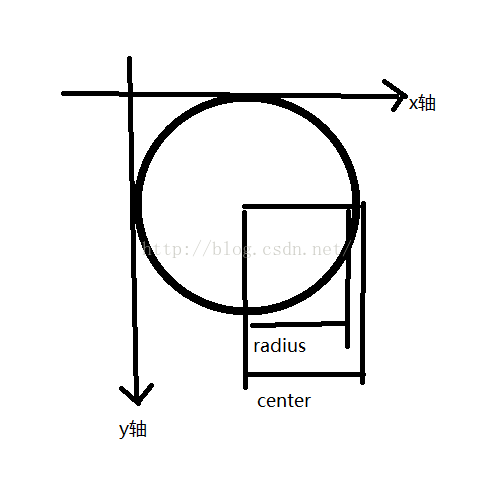
當然像這種畫圓方法,你在xml文件中使用該自定義的控件時用padding屬性是沒用的,因為在畫圓時,原點坐標是view的左上角,圓心坐標是(x軸到圓點的距離,y軸到圓點的距離),要想對控件設置padding屬性起作用,必須在畫圓時對半徑進行修改,
 int padding =  Math.min(getPaddingLeft(),getPaddingTop());
        int radius = (int)(center - ringWidth/2 - padding);
圓環畫好後可以開始畫圓弧了
        paint.setStrokeWidth(ringWidth);//圓弧寬度
        paint.setColor(ringProgressColor);//圓弧顏色
    //坐標,left,top,right,bottom,參考說明圖,很好理解
     RectF rectF = new RectF(center - radius,center - radius,center + radius,center + radius);
        switch (styleRes){
//這兩種情況一個是空心一個是實心
 case STROKE:
                paint.setStyle(Paint.Style.STROKE);
               //計算出圓弧的長度 = 360 * 當前進度/最大值,至於所傳參數是false還是true的介紹上文已經說明
                canvas.drawArc(rectF,0,360*currentProgress/maxProgress,true,paint);
//                canvas.drawArc(rectF,0,360*currentProgress/maxProgress,false,paint);

                break;
            case FILL:
                paint.setStyle(Paint.Style.FILL);
                if (currentProgress != 0){
                    //canvas.drawArc(rectF,0,360*currentProgress/maxProgress,false,paint);
canvas.drawArc(rectF,0,360*currentProgress/maxProgress,false,paint);} break; }
圓弧畫好後可以開始寫文本了,文本的話應該簡單的多了
       paint.setStrokeWidth(0);
        paint.setColor(textColor);//文本顏色
        paint.setTextSize(textSize);//文本字體大小
        paint.setTypeface(Typeface.DEFAULT_BOLD);//typeface
        percent = (int)(((float)currentProgress/(float) maxProgress)*100);//計算 百分比
        float textWidth = paint.measureText( percent + "%");//測量文本的寬度
        Paint.FontMetrics textHeigh = paint.getFontMetrics();//為了使文本居中,我們要根據文本的寬高來獲取坐標
        float height = (float)Math.ceil(textHeigh.descent - textHeigh.top);//獲取到文本的高度
        if (textIsDisplay && percent != 0 && styleRes == STROKE){//如果是空心圓且百分比不為0,且設置的為顯示,則顯示
//橫坐標為center-textWidth/2 :外圓環的半徑減去文本的寬度,
//縱坐標為center+height/2:外圓環的半徑 加上文本的高度
            canvas.drawText(percent + "%",center - textWidth/2 ,center + height/2  ,paint);
        }
至此,一個帶進度百分比的progress已經自定義完成 詳解Android的內存優化--LruCache
概念:LruCache什麼是LruCache?LruCache實現原理是什麼?這兩個問題其實可以作為一個問題來回答,知道了什麼是 LruCache,就只然而然的知道 Lr
 Android Canvas API使用
這裡記錄一下Canvas 相關API的使用,權當自己作筆記,以後需要好參考前面有一文Android應用程序窗口View的draw過程講到View的繪制過程,其中說到,Vi
 Android-廣播機制的注冊及作用
Android的廣播接收器注冊方式分為兩種: 1.動態注冊:(即代碼注冊,該注冊經常伴隨著組件的生命周期或者對象的生命周期同生共死),如下: /** * @autho
 Android存儲五大方式
Android存儲五大方式:1 使用SharedPreferences存儲數據2 文件存儲數據3 SQLite數據庫存儲數據4 使用ContentProvider存儲數據