編輯:關於Android編程
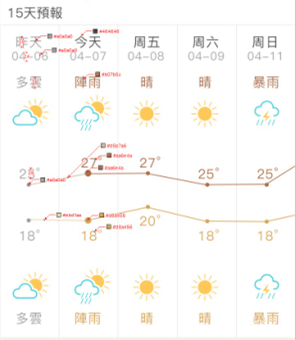
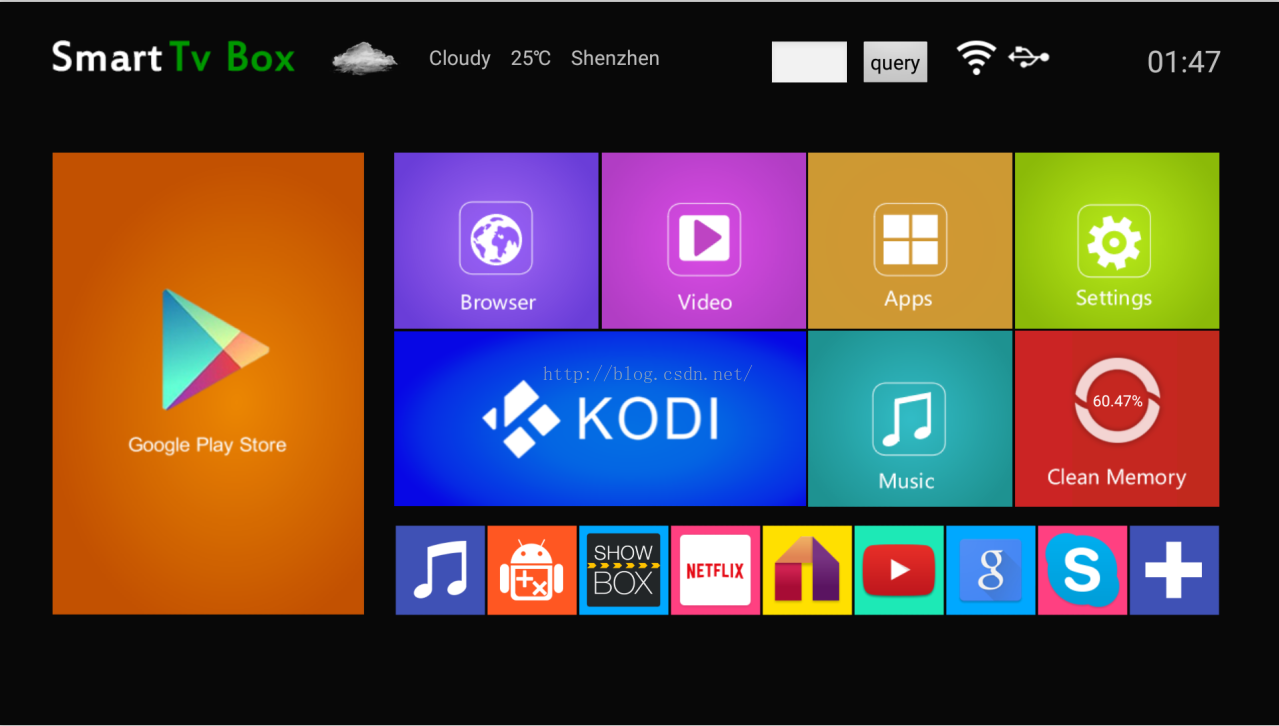 1、接到任務後,我首先想的是,先把天氣獲取到(比如獲取深圳本地的),然後再做定位的功能
有了大致的思路後,就著手開始做了,因為公司是做國外的生意,所以用的是雅虎的api,說起來雅虎,年前自己搞個天氣玩了下,用的就是雅虎的,是解析woeid的,當時是可以用的,不清楚從什麼時候用不了
就變成了如下這樣
1、接到任務後,我首先想的是,先把天氣獲取到(比如獲取深圳本地的),然後再做定位的功能
有了大致的思路後,就著手開始做了,因為公司是做國外的生意,所以用的是雅虎的api,說起來雅虎,年前自己搞個天氣玩了下,用的就是雅虎的,是解析woeid的,當時是可以用的,不清楚從什麼時候用不了
就變成了如下這樣
 然後就到雅虎的官網上找別的方法https://developer.yahoo.com/weather/,因為之前參考網上的例子,原作者是用sax解析xml,我也就依葫蘆畫瓢想用sax解析,xml是這樣的
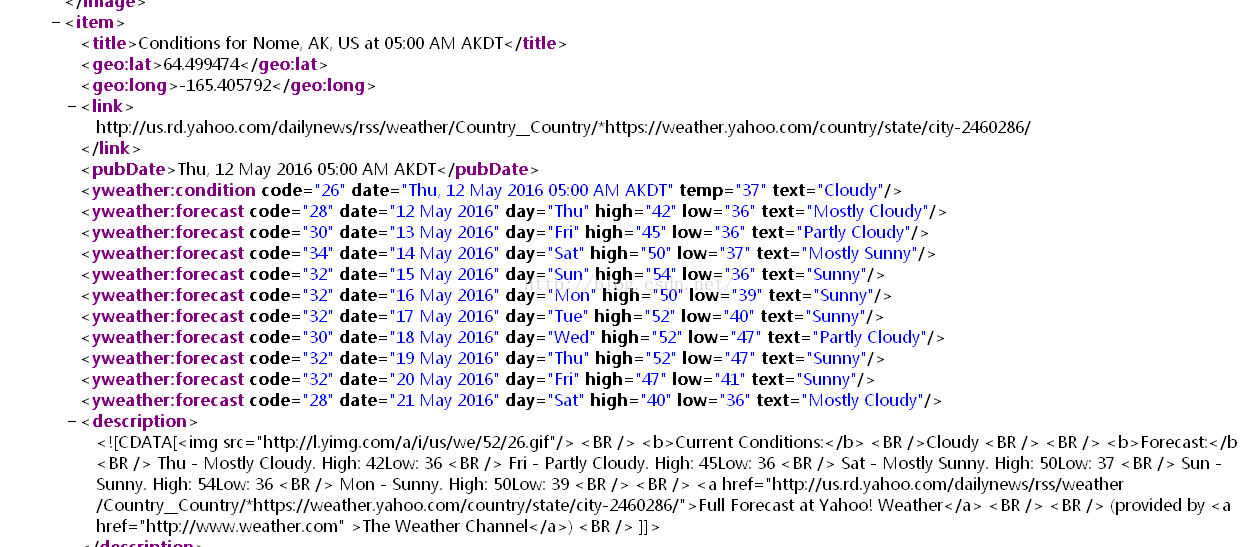 ok,但是後來發現,遇到了困難,用的方法不對。想了下,還是用json的解析,比較熟悉些。然後訪問雅虎返回的json數據是這樣的
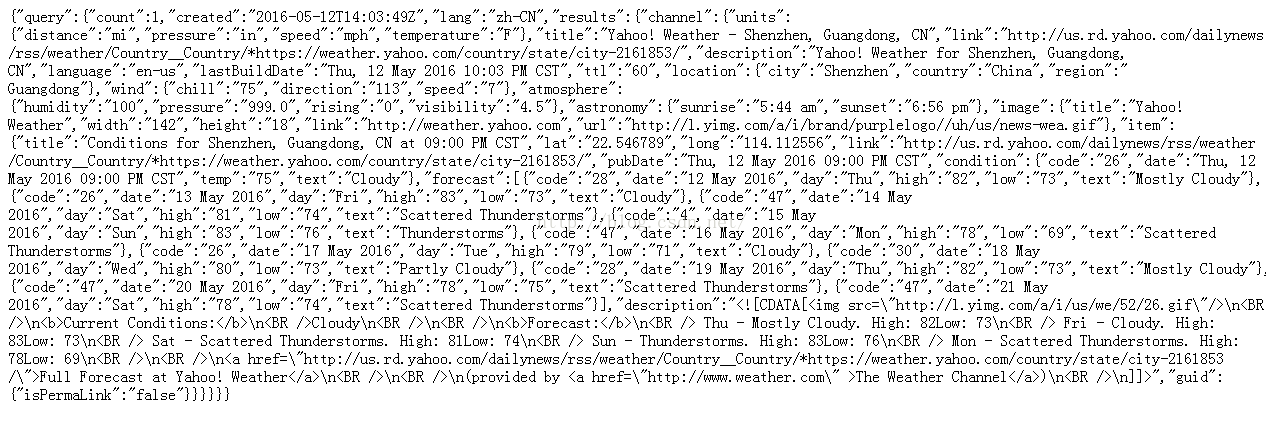 是不是看著頭都大了,本菜菜當時一看頓時嚇尿,這裡推薦一個在線轉換json格式(http://json.cn/)
效果圖是這樣的
是不是看著頭都大了,本菜菜當時一看頓時嚇尿,這裡推薦一個在線轉換json格式(http://json.cn/)
效果圖是這樣的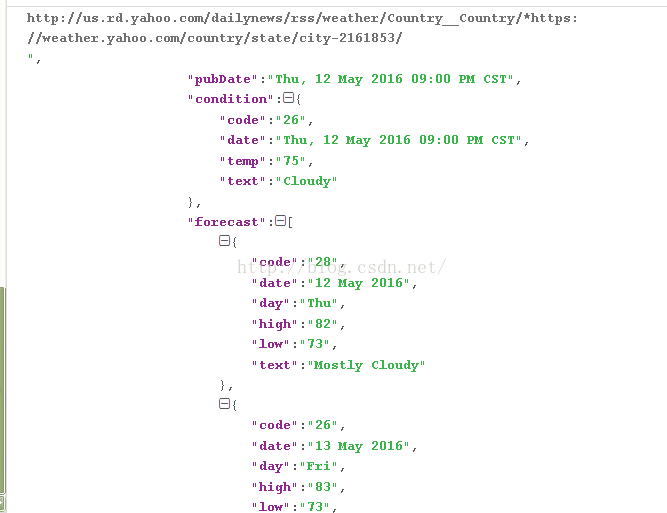 是不是感覺清晰了很多?
這裡返回的數據,需要層層遞取的,下面貼代碼,
這裡我用了voelly框架,封裝好的方法,用起來就是爽,話說還沒用過的請自行百度,真的很好用(哈哈,這裡感謝基友浩的鼎力幫助)
privateRequestQueuemQueue;
mQueue=Volley.newRequestQueue(this);
需要導包的
privatevoidgetData(Stringurl){//解析的方法
JsonObjectRequestjsonObjectRequest=newJsonObjectRequest(url,null,newListener
是不是感覺清晰了很多?
這裡返回的數據,需要層層遞取的,下面貼代碼,
這裡我用了voelly框架,封裝好的方法,用起來就是爽,話說還沒用過的請自行百度,真的很好用(哈哈,這裡感謝基友浩的鼎力幫助)
privateRequestQueuemQueue;
mQueue=Volley.newRequestQueue(this);
需要導包的
privatevoidgetData(Stringurl){//解析的方法
JsonObjectRequestjsonObjectRequest=newJsonObjectRequest(url,null,newListener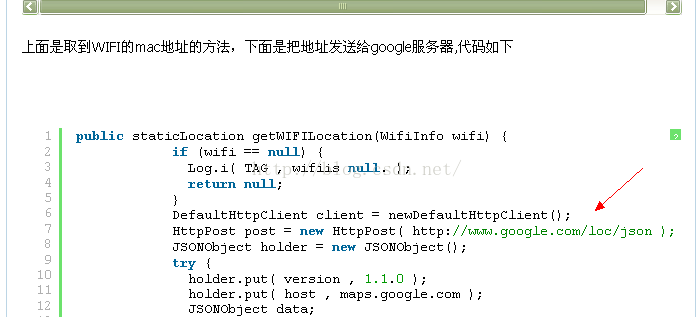 這裡訪問google,一是需要翻牆,這個對我們公司倒是沒有壓力。把現成的方法copy進去,就發現了問題
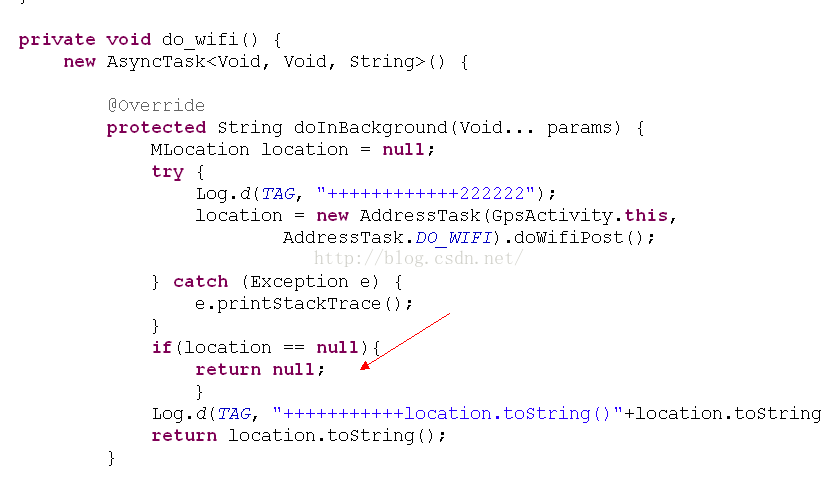 這裡一直得到的是null值,跟了代碼,不是很明白,一直走不到下一步,在網上查了下,說是這個google的服務器停了(欲哭無淚),有點懷疑,因為打印,取到的是亂碼,我也無從考察,因為時間很緊,果斷換了方法了。
然後說下能全球定位的其他兩個方法,google和百度,如果單從我們公司出發,肯定google定位是首先,為此我還申請了key。但goolge定位的,需要些services,還有些其他的原因,搞了一天沒搞出來,果斷換了。
去看了百度這地圖的官方文檔,上面也有現成的demo可以參考,下載下來過後,運行,定位ok。把需要的code放到源碼環境下編譯,需要倒入jar包和.so文件。Android.mk配置
這裡一直得到的是null值,跟了代碼,不是很明白,一直走不到下一步,在網上查了下,說是這個google的服務器停了(欲哭無淚),有點懷疑,因為打印,取到的是亂碼,我也無從考察,因為時間很緊,果斷換了方法了。
然後說下能全球定位的其他兩個方法,google和百度,如果單從我們公司出發,肯定google定位是首先,為此我還申請了key。但goolge定位的,需要些services,還有些其他的原因,搞了一天沒搞出來,果斷換了。
去看了百度這地圖的官方文檔,上面也有現成的demo可以參考,下載下來過後,運行,定位ok。把需要的code放到源碼環境下編譯,需要倒入jar包和.so文件。Android.mk配置
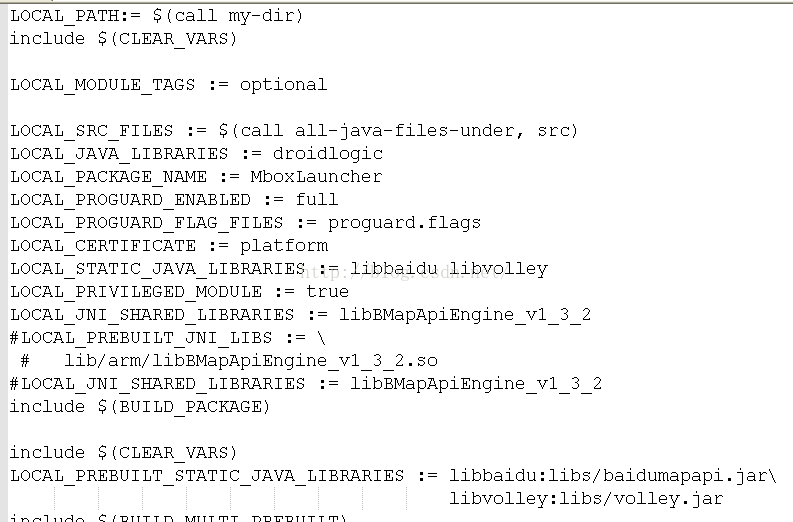 mm 該工程,編譯通過,out目錄該工程目錄下成功生成了lib文件.so自然在其中了,需要手動把你的.so放到system/lib下,在盒子上測試,你需要把.so放到system/lib下,修改權限,把out目錄下生成該工程的apk,push到盒子裡,替換,當聯網的時候,盒子一直閃屏,查看logcat打印的報錯信息,如下:
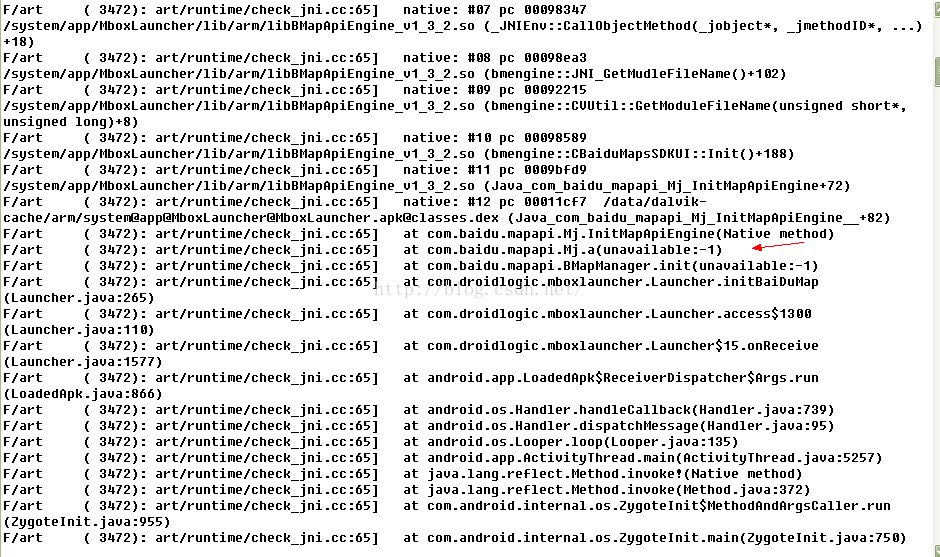 不可用?!因為之前參考的demo不是最新的.so和jar包,更換了百度最新的.so和jar包,重復上面的過程,還是報同樣的錯誤,在網上搜了一下,說是可能不兼容的處理器,問了下硬件,我們是64位的處理器,但是軟件是32的,什麼鬼?ok,用笨方法,一個試總可以吧
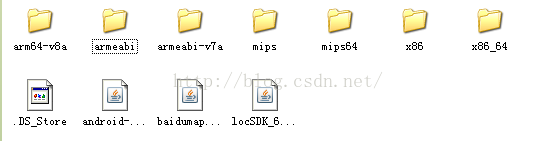 試完以上的所有.so還是閃屏不斷,崩潰了快,這樣編譯百度.so,jar到系統中,反復測試,耽誤了不少時間。一時陷入僵局(這個問題是兼容的問題,還是so文件配置出了問題,到現在也沒頭緒,如果有大神讀到小弟的這篇文章,還請不吝賜教,感謝感謝)。和基友浩交流,決定用強大的SP(SharedPreference)把獲得的定位城市數據傳遞到 launcher APK,可以將apk的數據傳遞到apk2
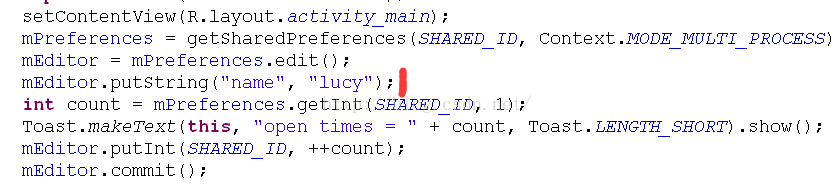
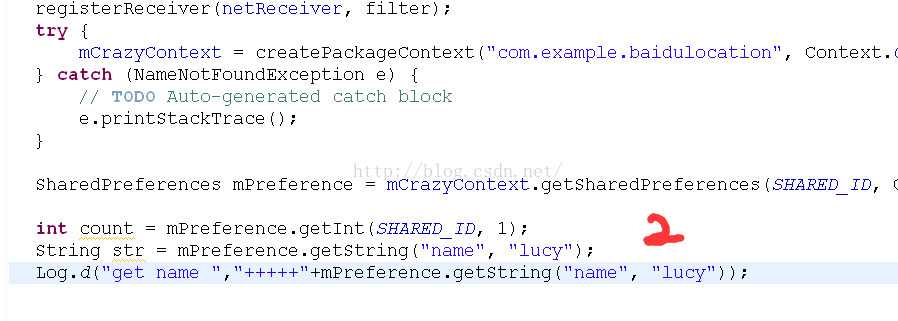 打印,得到的"lucy",可是後來遇到個問題,需要傳遞的是city=res.addressComponents.city;百度定位獲得的city,卻傳不過去了。想了下,用廣播的方式傳值,有個方法
Intenti=newIntent();
i.setAction("com.example.perference.shared_id");
i.putExtra("city",city);
sendBroadcast(i);
3、城市定位apk與launcher APK的數據傳送
連上wifi發送此廣播
if((action.equals(WifiManager.NETWORK_STATE_CHANGED_ACTION))||action.equals(WifiManager.WIFI_STATE_CHANGED_ACTION)||
action.equals(ConnectivityManager.CONNECTIVITY_ACTION)){
Intentsend=newIntent();
send.setAction("com.weather.broadcast");
send.putExtra("launcher","weather");
Launcher.this.sendBroadcast(send);
Log.d(TAG,"sendBroadcastReceiver++++++++=");
}
定位apk監聽此廣播
publicclassMyBroadcastextendsBroadcastReceiver{
privatestaticfinalStringTAG="MyBroadcast";
publicfinalStringweather_broadcat="com.weather.broadcast";//接收到此廣播
@Override
publicvoidonReceive(Contextcontent,Intentintent)
{
if(intent.getAction().equals(weather_broadcat)){
Stringstr=intent.getExtras().getString("launcher");
//Log.d(TAG,"+++++"+str);
intent=newIntent(content,MyService.class);
content.startService(intent); //啟動後台service服務
//Log.d(TAG,"intent++++++++over");
}
}
}
啟動service,開啟定位,獲取當地城市
publicclassMyServiceextendsService{
privatestaticfinalStringTAG="MyService";
privateBMapManagermBMapMan=null;
privateLocationListenermLocationListener=null;
privateMKSearchmSearch=null;
privatefinalStringweather_receive_action="com.example.perference.shared_id";
staticStringcity;
privateHandlerhandler=newHandler();
@Override
publicIBinderonBind(Intentintent)/*noted*/
{
returnnull;
}
@Override
publicvoidonCreate(){
//Log.d(TAG,"onCreate()+++++++");
initBaiDuMap();
mBMapMan.getLocationManager().requestLocationUpdates(mLocationListener);
mBMapMan.getLocationManager().enableProvider(MKLocationManager.MK_GPS_PROVIDER);
mBMapMan.start();
}
@Override
publicintonStartCommand(Intentintent,intflags,intstartId){
//Log.d(TAG,"onStartCommand++++++++");
initBaiDuMap();
mBMapMan.getLocationManager().requestLocationUpdates(mLocationListener);
mBMapMan.getLocationManager().enableProvider(MKLocationManager.MK_GPS_PROVIDER);
mBMapMan.start();
returnsuper.onStartCommand(intent,flags,startId);
}
publicvoidinitBaiDuMap(){
mBMapMan=newBMapManager(getApplication());
mBMapMan.init("14A97FC2DDF678193F61C19C0A20EA29C49DEF5C",null);
mBMapMan.start();
initMyLocation();
//Log.d(TAG,"initMyLocation()+++++++");
}
privatevoidinitMyLocation(){
mLocationListener=newLocationListener(){
@Override
publicvoidonLocationChanged(Locationlocation){
if(location!=null){
GeoPointmyPt=newGeoPoint((int)(location.getLatitude()*1e6),
(int)(location.getLongitude()*1e6));
initMapSerach();
mSearch.reverseGeocode(myPt);
}else{
}
}
};
}
privatevoidinitMapSerach(){
//Log.d(TAG,"thefirst1+++++");
mSearch=newMKSearch();
mSearch.init(mBMapMan,newMKSearchListener(){
publicvoidonGetPoiResult(MKPoiResultres,inttype,interror){
}
publicvoidonGetDrivingRouteResult(MKDrivingRouteResultres,
interror){
}
publicvoidonGetTransitRouteResult(MKTransitRouteResultres,
interror){
}
publicvoidonGetWalkingRouteResult(MKWalkingRouteResultres,
interror){
}
publicvoidonGetAddrResult(MKAddrInfores,interror){
if(error!=0||res==null){
//Log.d(TAG,"isnoterror");
}else{
//獲取到城市和省份
city=res.addressComponents.city;
Stringpro=res.addressComponents.province;
newThread(){
publicvoidrun(){
Intenti=newIntent();
i.setAction("com.example.perference.shared_id");
i.putExtra("city",city);
//Log.d(TAG,"city====="+city);
sendBroadcast(i);
handler.postDelayed(this,600000); //隔十分鐘更新一次
}
}.start();
}
}
@Override
publicvoidonGetBusDetailResult(MKBusLineResultarg0,intarg1){
}
});
}
}
launcher APK 接收到廣播,調用解析方法,JSONObject解析,在主界面更新顯示
privateBroadcastReceivernetReceiver=newBroadcastReceiver(){
@Override
publicvoidonReceive(Contextcontext,Intentintent){
Stringaction=intent.getAction();
if(action==null)
return;
Log.d(TAG,"netReceiveraction="+action);
if(action.equals(outputmode_change_action)){
setHeight();
}
if(action.equals(Intent.ACTION_TIME_TICK)){
displayDate();
time_count++;
if(time_count>=time_freq){
sendWeatherBroadcast();
time_count=0;
}
}if((action.equals(WifiManager.NETWORK_STATE_CHANGED_ACTION))||action.equals(WifiManager.WIFI_STATE_CHANGED_ACTION)||
action.equals(ConnectivityManager.CONNECTIVITY_ACTION)){
Intentsend=newIntent();
send.setAction("com.weather.broadcast");
send.putExtra("launcher","weather");
Launcher.this.sendBroadcast(send);
Log.d(TAG,"sendBroadcastReceiver++++++++=");
}
if(action.equals(net_change_action)){
}
elseif(action.equals(weather_receive_action)){ //接收service發送的廣播,然後調用方法解析
StringweatherInfo=intent.getExtras().getString("weather_today");
setWeatherView(weatherInfo);
StringweatherCity=intent.getExtras().getString("city"); //得到定位到的城市
urlcity="https://query.yahooapis.com/v1/public/yql?q=select%20*%20from%20weather.forecast%20where%20woeid%20in%20(select%20woeid%20from%20geo.places(1)%20where%20text%3D'"+weatherCity+"')&format=json&env=store%3A%2F%2Fdatatables.org%2Falltableswithkeys"; //雅虎json查詢天氣語句
getData(urlcity); //調用解析方法
}elseif(Intent.ACTION_EXTERNAL_APPLICATIONS_AVAILABLE.equals(action)
||Intent.ACTION_EXTERNAL_APPLICATIONS_UNAVAILABLE.equals(action)){
updateAppList(intent);
}else{
updateWifiLevel();
displayStatus();
updateStatus();
}
}
};
最後說一下,因為定位只在移動網絡上有效,query 這個button按鈕是為了客戶連接以太網,手動輸入城市,獲取天氣兒准備的
query_button.setOnClickListener(newOnClickListener(){
@Override
publicvoidonClick(Viewv){
/**因為開機EditText會自動獲取焦點,從而調系統的軟鍵盤,所以在xml設置成了android:visibility="gone"
這裡,點擊EditText才會顯示軟鍵盤*/
etCity.setVisibility(View.VISIBLE);
finalStringmCityStr=etCity.getText().toString();
StringCityCodeUrl="";
if(!mCityStr.isEmpty()){
tx_city.setVisibility(View.GONE);
CityCodeUrl="https://query.yahooapis.com/v1/public/yql?q=select%20*%20from%20weather.forecast%20where%20woeid%20in%20(select%20woeid%20from%20geo.places(1)%20where%20text%3D'"+mCityStr+"')&format=json&env=store%3A%2F%2Fdatatables.org%2Falltableswithkeys";
getData(CityCodeUrl);
//Log.d(TAG,"queryonclick+++");
}else{
Toast.makeText(Launcher.this,"Pleaseenteracityname",Toast.LENGTH_SHORT).show();
}
}
});
}
希望可以幫到大家,如有有錯誤,請幫忙指正。謝謝!
打印,得到的"lucy",可是後來遇到個問題,需要傳遞的是city=res.addressComponents.city;百度定位獲得的city,卻傳不過去了。想了下,用廣播的方式傳值,有個方法
Intenti=newIntent();
i.setAction("com.example.perference.shared_id");
i.putExtra("city",city);
sendBroadcast(i);
3、城市定位apk與launcher APK的數據傳送
連上wifi發送此廣播
if((action.equals(WifiManager.NETWORK_STATE_CHANGED_ACTION))||action.equals(WifiManager.WIFI_STATE_CHANGED_ACTION)||
action.equals(ConnectivityManager.CONNECTIVITY_ACTION)){
Intentsend=newIntent();
send.setAction("com.weather.broadcast");
send.putExtra("launcher","weather");
Launcher.this.sendBroadcast(send);
Log.d(TAG,"sendBroadcastReceiver++++++++=");
}
定位apk監聽此廣播
publicclassMyBroadcastextendsBroadcastReceiver{
privatestaticfinalStringTAG="MyBroadcast";
publicfinalStringweather_broadcat="com.weather.broadcast";//接收到此廣播
@Override
publicvoidonReceive(Contextcontent,Intentintent)
{
if(intent.getAction().equals(weather_broadcat)){
Stringstr=intent.getExtras().getString("launcher");
//Log.d(TAG,"+++++"+str);
intent=newIntent(content,MyService.class);
content.startService(intent); //啟動後台service服務
//Log.d(TAG,"intent++++++++over");
}
}
}
啟動service,開啟定位,獲取當地城市
publicclassMyServiceextendsService{
privatestaticfinalStringTAG="MyService";
privateBMapManagermBMapMan=null;
privateLocationListenermLocationListener=null;
privateMKSearchmSearch=null;
privatefinalStringweather_receive_action="com.example.perference.shared_id";
staticStringcity;
privateHandlerhandler=newHandler();
@Override
publicIBinderonBind(Intentintent)/*noted*/
{
returnnull;
}
@Override
publicvoidonCreate(){
//Log.d(TAG,"onCreate()+++++++");
initBaiDuMap();
mBMapMan.getLocationManager().requestLocationUpdates(mLocationListener);
mBMapMan.getLocationManager().enableProvider(MKLocationManager.MK_GPS_PROVIDER);
mBMapMan.start();
}
@Override
publicintonStartCommand(Intentintent,intflags,intstartId){
//Log.d(TAG,"onStartCommand++++++++");
initBaiDuMap();
mBMapMan.getLocationManager().requestLocationUpdates(mLocationListener);
mBMapMan.getLocationManager().enableProvider(MKLocationManager.MK_GPS_PROVIDER);
mBMapMan.start();
returnsuper.onStartCommand(intent,flags,startId);
}
publicvoidinitBaiDuMap(){
mBMapMan=newBMapManager(getApplication());
mBMapMan.init("14A97FC2DDF678193F61C19C0A20EA29C49DEF5C",null);
mBMapMan.start();
initMyLocation();
//Log.d(TAG,"initMyLocation()+++++++");
}
privatevoidinitMyLocation(){
mLocationListener=newLocationListener(){
@Override
publicvoidonLocationChanged(Locationlocation){
if(location!=null){
GeoPointmyPt=newGeoPoint((int)(location.getLatitude()*1e6),
(int)(location.getLongitude()*1e6));
initMapSerach();
mSearch.reverseGeocode(myPt);
}else{
}
}
};
}
privatevoidinitMapSerach(){
//Log.d(TAG,"thefirst1+++++");
mSearch=newMKSearch();
mSearch.init(mBMapMan,newMKSearchListener(){
publicvoidonGetPoiResult(MKPoiResultres,inttype,interror){
}
publicvoidonGetDrivingRouteResult(MKDrivingRouteResultres,
interror){
}
publicvoidonGetTransitRouteResult(MKTransitRouteResultres,
interror){
}
publicvoidonGetWalkingRouteResult(MKWalkingRouteResultres,
interror){
}
publicvoidonGetAddrResult(MKAddrInfores,interror){
if(error!=0||res==null){
//Log.d(TAG,"isnoterror");
}else{
//獲取到城市和省份
city=res.addressComponents.city;
Stringpro=res.addressComponents.province;
newThread(){
publicvoidrun(){
Intenti=newIntent();
i.setAction("com.example.perference.shared_id");
i.putExtra("city",city);
//Log.d(TAG,"city====="+city);
sendBroadcast(i);
handler.postDelayed(this,600000); //隔十分鐘更新一次
}
}.start();
}
}
@Override
publicvoidonGetBusDetailResult(MKBusLineResultarg0,intarg1){
}
});
}
}
launcher APK 接收到廣播,調用解析方法,JSONObject解析,在主界面更新顯示
privateBroadcastReceivernetReceiver=newBroadcastReceiver(){
@Override
publicvoidonReceive(Contextcontext,Intentintent){
Stringaction=intent.getAction();
if(action==null)
return;
Log.d(TAG,"netReceiveraction="+action);
if(action.equals(outputmode_change_action)){
setHeight();
}
if(action.equals(Intent.ACTION_TIME_TICK)){
displayDate();
time_count++;
if(time_count>=time_freq){
sendWeatherBroadcast();
time_count=0;
}
}if((action.equals(WifiManager.NETWORK_STATE_CHANGED_ACTION))||action.equals(WifiManager.WIFI_STATE_CHANGED_ACTION)||
action.equals(ConnectivityManager.CONNECTIVITY_ACTION)){
Intentsend=newIntent();
send.setAction("com.weather.broadcast");
send.putExtra("launcher","weather");
Launcher.this.sendBroadcast(send);
Log.d(TAG,"sendBroadcastReceiver++++++++=");
}
if(action.equals(net_change_action)){
}
elseif(action.equals(weather_receive_action)){ //接收service發送的廣播,然後調用方法解析
StringweatherInfo=intent.getExtras().getString("weather_today");
setWeatherView(weatherInfo);
StringweatherCity=intent.getExtras().getString("city"); //得到定位到的城市
urlcity="https://query.yahooapis.com/v1/public/yql?q=select%20*%20from%20weather.forecast%20where%20woeid%20in%20(select%20woeid%20from%20geo.places(1)%20where%20text%3D'"+weatherCity+"')&format=json&env=store%3A%2F%2Fdatatables.org%2Falltableswithkeys"; //雅虎json查詢天氣語句
getData(urlcity); //調用解析方法
}elseif(Intent.ACTION_EXTERNAL_APPLICATIONS_AVAILABLE.equals(action)
||Intent.ACTION_EXTERNAL_APPLICATIONS_UNAVAILABLE.equals(action)){
updateAppList(intent);
}else{
updateWifiLevel();
displayStatus();
updateStatus();
}
}
};
最後說一下,因為定位只在移動網絡上有效,query 這個button按鈕是為了客戶連接以太網,手動輸入城市,獲取天氣兒准備的
query_button.setOnClickListener(newOnClickListener(){
@Override
publicvoidonClick(Viewv){
/**因為開機EditText會自動獲取焦點,從而調系統的軟鍵盤,所以在xml設置成了android:visibility="gone"
這裡,點擊EditText才會顯示軟鍵盤*/
etCity.setVisibility(View.VISIBLE);
finalStringmCityStr=etCity.getText().toString();
StringCityCodeUrl="";
if(!mCityStr.isEmpty()){
tx_city.setVisibility(View.GONE);
CityCodeUrl="https://query.yahooapis.com/v1/public/yql?q=select%20*%20from%20weather.forecast%20where%20woeid%20in%20(select%20woeid%20from%20geo.places(1)%20where%20text%3D'"+mCityStr+"')&format=json&env=store%3A%2F%2Fdatatables.org%2Falltableswithkeys";
getData(CityCodeUrl);
//Log.d(TAG,"queryonclick+++");
}else{
Toast.makeText(Launcher.this,"Pleaseenteracityname",Toast.LENGTH_SHORT).show();
}
}
});
}
希望可以幫到大家,如有有錯誤,請幫忙指正。謝謝!
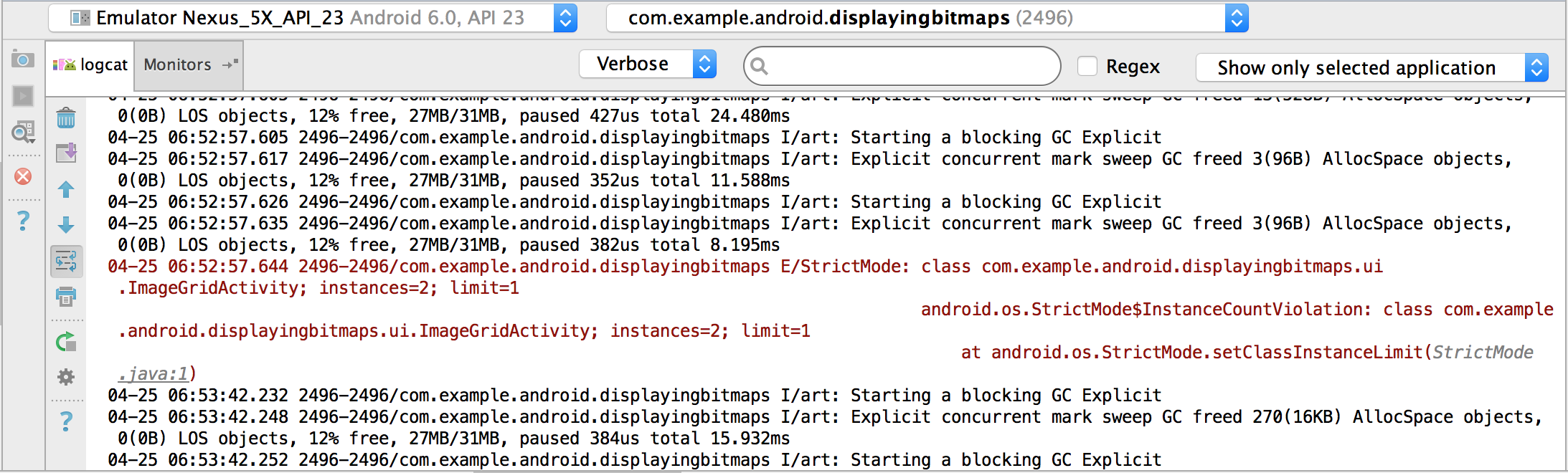 5.1、Android Studio用Logcat編寫和查看日志
Android Studio在Android Monitor中包含了一個logcat的tab,可以打印系統事件,比如垃圾回收發生時,實時打印應用消息。為了顯示需要的信息,
 Android開發---Fragment學習總結(一)
下面正式開始Fragment使用講解:一.准備工作1.引入類庫(導包)步驟:復制jar包--->project視圖下--->工程--->app---&g
 Android-自定義Dialog
Android-自定義Dialog2014年4月27日 星期天 天氣晴朗 心情平靜 本篇博文來分享一個也是開發中經常需要用到的功能-自定義對話框,這裡我用到了Androi
 Android(十四)解決AppBarLayout滑動不暢
最近在開發的App中需要實現Toolbar與頂部內容區域級聯滾動的效果,一開始就想到了Android 5.0 中新添加的AppBarLayout控件,其正好是實現這個效果