編輯:關於Android編程
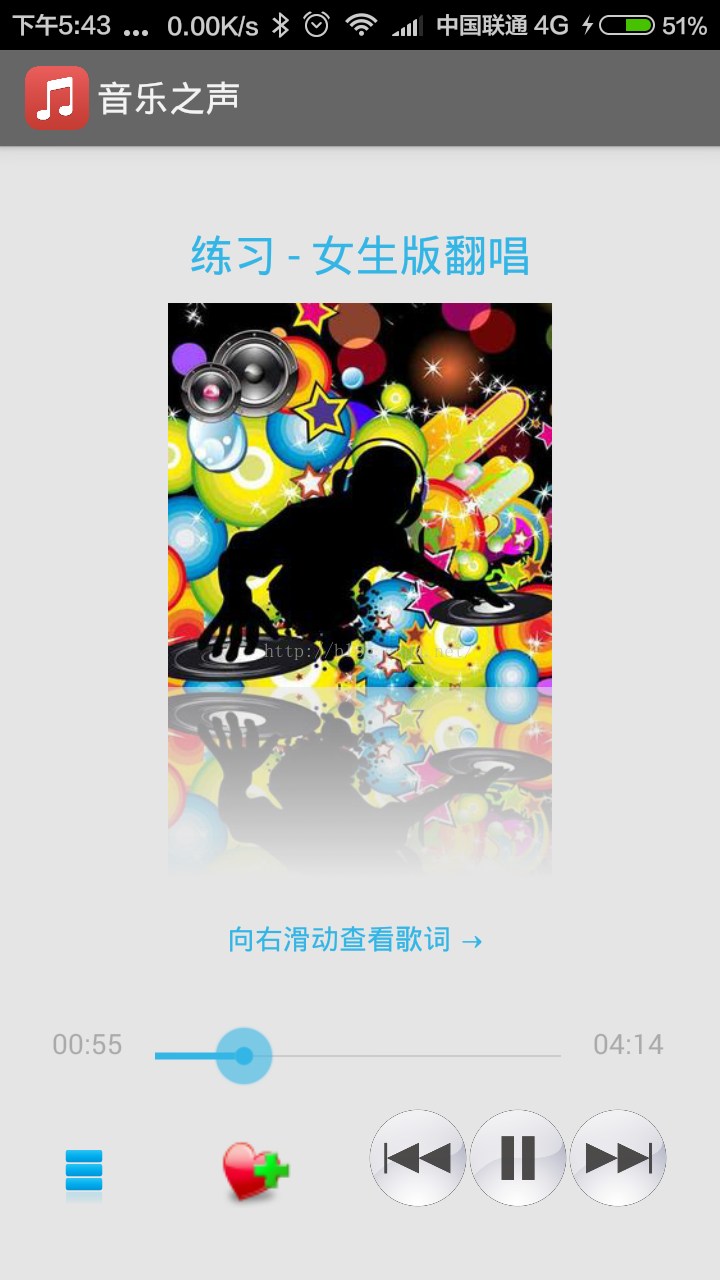
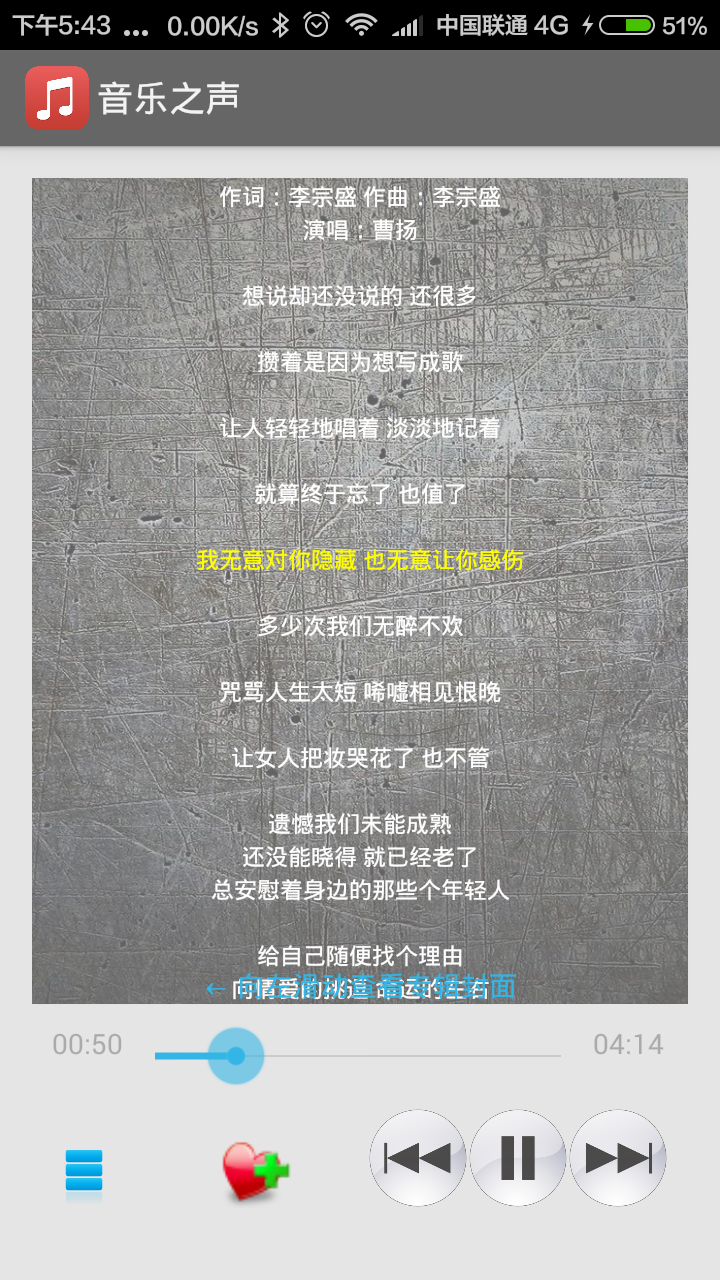
PlayActivity如下:
package com.iwanghang.drmplayer;
import android.graphics.Bitmap;
import android.media.MediaPlayer;
import android.os.Bundle;
import android.os.Environment;
import android.os.Handler;
import android.os.Message;
import android.support.v4.view.ViewPager;
import android.support.v4.view.ViewPager.OnPageChangeListener;
import android.view.LayoutInflater;
import android.view.View;
import android.view.View.OnClickListener;
import android.widget.ImageView;
import android.widget.SeekBar;
import android.widget.SeekBar.OnSeekBarChangeListener;
import android.widget.TextView;
import android.widget.Toast;
import com.douzi.android.view.DefaultLrcBuilder;
import com.douzi.android.view.ILrcBuilder;
import com.douzi.android.view.ILrcView;
import com.douzi.android.view.LrcRow;
import com.douzi.android.view.LrcView;
import com.iwanghang.drmplayer.adapter.ViewPagerAdapter;
import com.iwanghang.drmplayer.utils.Constant;
import com.iwanghang.drmplayer.utils.ImageUtils;
import com.iwanghang.drmplayer.utils.MediaUtils;
import com.iwanghang.drmplayer.vo.Mp3Info;
import com.lidroid.xutils.db.sqlite.Selector;
import com.lidroid.xutils.exception.DbException;
import java.io.BufferedReader;
import java.io.File;
import java.io.FileInputStream;
import java.io.FileNotFoundException;
import java.io.IOException;
import java.io.InputStreamReader;
import java.lang.ref.WeakReference;
import java.util.ArrayList;
import java.util.List;
import static com.iwanghang.drmplayer.PlayService.ORDER_PLAY;
import static com.iwanghang.drmplayer.PlayService.RANDOM_PLAY;
import static com.iwanghang.drmplayer.PlayService.SINGLE_PLAY;
/**
* PlayActivity 點擊MyMusicListFragment(本地音樂)底部UI中的專輯封面圖片打開的Activity
*/
public class PlayActivity extends BaseActivity implements OnClickListener, OnSeekBarChangeListener ,OnPageChangeListener {
private TextView textView2_title;//歌名
private ImageView imageView1_ablum;//專輯封面圖片
private SeekBar seekBar1;//進度條
private TextView textView1_start_time, textView1_end_time;//開始時間,結束時間
private ImageView imageView1_play_mode;//菜單
private ImageView imageView3_previous, imageView2_play_pause, imageView1_next;//上一首,播放暫停,下一首
private ImageView imageView1_ablum_reflection;//專輯封面圖片倒影
private ImageView imageView1_favorite;//收藏按鈕
//private ArrayList mp3Infos;
//private int position;//當前播放的位置
private boolean isPause = false;//當前播放的是否為暫停狀態
private static final int UPDATE_TIME = 0x10;//更新播放事件的標記
private DRMPlayerApp app;//取出全局對象 方便調用
//歌詞
private ViewPager viewPager;
private LrcView lrcView;// 自定義歌詞視圖
private ArrayList views = new ArrayList<>();
private static final int UPDATE_LRC = 0x20;//更新播放事件的標記
ILrcView mLrcView;
public final static String TAG = "PlayActivity";
private MediaPlayer mPlayer;
private ViewPagerAdapter adapter;
@Override
protected void onCreate(Bundle savedInstanceState) {
super.onCreate(savedInstanceState);
setContentView(R.layout.activity_music_play);
//取出全局對象 方便調用
app = (DRMPlayerApp) getApplication();
//初始化界面信息
//textView2_title = (TextView) findViewById(R.id.textView2_title);//歌名
//imageView1_ablum = (ImageView) findViewById(R.id.imageView1_ablum);//專輯封面圖片
seekBar1 = (SeekBar) findViewById(R.id.seekBar1);//進度條
textView1_start_time = (TextView) findViewById(R.id.textView1_start_time);//開始時間
textView1_end_time = (TextView) findViewById(R.id.textView1_end_time);//結束時間
imageView1_play_mode = (ImageView) findViewById(R.id.imageView1_play_mode);//菜單
imageView3_previous = (ImageView) findViewById(R.id.imageView3_previous);//上一首
imageView2_play_pause = (ImageView) findViewById(R.id.imageView2_play_pause);//播放暫停
imageView1_next = (ImageView) findViewById(R.id.imageView1_next);//下一首
imageView1_favorite = (ImageView) findViewById(R.id.imageView1_favorite);//收藏按鈕
lrcView = (LrcView) findViewById(R.id.lrcView);//自定義歌詞視圖
//注冊按鈕點擊監聽事件
imageView1_play_mode.setOnClickListener(this);
imageView2_play_pause.setOnClickListener(this);
imageView3_previous.setOnClickListener(this);
imageView1_next.setOnClickListener(this);
seekBar1.setOnSeekBarChangeListener(this);
imageView1_favorite.setOnClickListener(this);
//mp3Infos = MediaUtils.getMp3Infos(this);
//bindPlayService();//綁定服務,異步過程,綁定後需要取得相應的值,來更新界面
myHandler = new MyHandler(this);
//獨立音樂播放界面 和 歌詞界面
//viewPager = (ViewPager) findViewById(R.id.fgv_player_main);
viewPager = (ViewPager) findViewById(R.id.viewpager);
initViewPager();//初始化
//以下直接調用change()是不行的,因為異步問題,會發生NullPointerException空指針異常
//從MyMusicListFragment的專輯封面圖片點擊時間傳過來的position(當前播放的位置)
//position = getIntent().getIntExtra("position",0);
//change(position);
//通過在BaseActivity中綁定Service,添加如下代碼實現change()
//musicUpdatrListener.onChange(playService.getCurrentProgeress());
//從MyMusicListFragment的專輯封面圖片點擊時間傳過來的isPause(當前播放的是否為暫停狀態)
//isPause = getIntent().getBooleanExtra("isPause",false);
// mLrcView = new LrcView(this, null);
// setContentView((View) mLrcView);
//
// //在目標位置讀取lrc文件
// File LrcDirFile = new File(Environment.getExternalStorageDirectory() + Constant.DIR_LRC);
// System.out.println("LrcDirFile : " + LrcDirFile);
// if (!LrcDirFile.exists()) {
// LrcDirFile.mkdirs();
// }
// //把lrc轉成字符串
// String lrc = LrcDirFile + "/" + "山丘" + ".lrc";
// //Log.d的輸出顏色是藍色的,僅輸出debug調試的意思,但他會輸出上層的信息,過濾起來可以通過DDMS的Logcat標簽來選擇.
// Log.d(TAG, "lrc:" + lrc);
//
// //把lrc的字符串 轉成數組
// ILrcBuilder builder = new DefaultLrcBuilder();
// List rows = builder.getLrcRows(lrc);
//
// //把lrc數組 設置到mLrcView裡
// mLrcView.setLrc(rows);
// //beginLrcPlay();
//
// //設置監聽器,監聽歌詞滾動
// mLrcView.setListener(new ILrcView.LrcViewListener() {
// public void onLrcSeeked(int newPosition, LrcRow row) {
// if (mPlayer != null) {
// Log.d(TAG, "onLrcSeeked:" + row.time);
// mPlayer.seekTo((int)row.time);//用戶滑動歌詞界面,調整進度
// }
// }
// });
}
private void initViewPager() {//專輯封面圖片Pager與歌詞Pager
//View album_image_layout = getLayoutInflater().inflate(R.layout.album_image_layout, null);
//System.out.println("PlayActivity.initViewPager.album_image_layout:" + album_image_layout);
View album_image_layout = LayoutInflater.from(getApplicationContext()).inflate(R.layout.album_image_layout, null);
System.out.println("PlayActivity.initViewPager.album_image_layout:" + album_image_layout);
//初始化界面信息
//textView2_title = (TextView) findViewById(R.id.textView2_title);//歌名
//這裡要注意下,直接findViewById,返回的是textView2_title是null;像下面這樣,加上layout才可以,否則在change的時候會報空指針異常
textView2_title = (TextView) album_image_layout.findViewById(R.id.textView2_title);//歌名
//System.out.println("PlayActivity.initViewPager.textView2_title:" + textView2_title);
//System.out.println("PlayActivity.initViewPager.textView2_title.getText:" + textView2_title.getText());
imageView1_ablum = (ImageView) album_image_layout.findViewById(R.id.imageView1_ablum);//專輯封面圖片
imageView1_ablum_reflection = (ImageView) album_image_layout.findViewById(R.id.imageView1_ablum_reflection);//專輯封面圖片倒影
views.add(album_image_layout);//添加專輯封面圖片Pager
//View lrc_layout = getLayoutInflater().inflate(R.layout.lrc_layout, null);
View lrc_layout = LayoutInflater.from(getApplicationContext()).inflate(R.layout.lrc_layout, null);
System.out.println("PlayActivity.initViewPager.lrc_layout:" + lrc_layout);
lrcView = (LrcView) lrc_layout.findViewById(R.id.lrcView);
//設置滾動事件
lrcView.setListener(new ILrcView.LrcViewListener() {
@Override
public void onLrcSeeked(int newPosition, LrcRow row) {
if (playService.isPlaying()) {
playService.seekTo((int) row.time);
}
}
});
lrcView.setLoadingTipText("正在加載歌詞......");
lrcView.setBackgroundResource(R.mipmap.app_splash_bg);
lrcView.getBackground().setAlpha(150);//背景透明度0-255
views.add(lrc_layout);
System.out.println("PlayActivity.initViewPager.views:" + views);
//adapter = new ViewPagerAdapter(views);
adapter = new ViewPagerAdapter(views);
viewPager.setAdapter(adapter);
//viewPager.setAdapter(new ViewPagerAdapter(views));
System.out.println("PlayActivity.initViewPager.viewPager:" + viewPager);
viewPager.addOnPageChangeListener(this);
System.out.println("PlayActivity.initViewPager.viewPager:" + viewPager);
}
//把播放服務的綁定和解綁放在onResume,onPause裡,好處是,每次回到當前Activity就獲取一次播放狀態
@Override
protected void onResume() {
super.onResume();
bindPlayService();//綁定服務
}
@Override
protected void onPause() {
super.onPause();
unbindPlayService();//解綁服務
}
@Override
protected void onDestroy() {
super.onDestroy();
unbindPlayService();//解綁服務
}
//Handler用於更新已經播放時間
private static MyHandler myHandler;
//進度條改變 (fromUser 是否來自用戶的改變 , 而不是程序自身控制的改變)
@Override
public void onProgressChanged(SeekBar seekBar, int progress, boolean fromUser) {
if (fromUser) {
//playService.pause();//暫停
playService.seekTo(progress);//尋找指定的時間位置 (跳到某個時間點進行播放)
//playService.start();//播放
}
}
//進度條開始觸摸
@Override
public void onStartTrackingTouch(SeekBar seekBar) {
}
//進度條停止觸摸
@Override
public void onStopTrackingTouch(SeekBar seekBar) {
}
//頁面滾動
@Override
public void onPageScrolled(int position, float positionOffset, int positionOffsetPixels) {
}
//頁面選擇
@Override
public void onPageSelected(int position) {
}
//頁面滾動狀態改變
@Override
public void onPageScrollStateChanged(int state) {
}
static class MyHandler extends Handler {
private PlayActivity playActivity;
private WeakReference weak;//弱引用
public MyHandler(PlayActivity playActivity) {
//this.playActivity = playActivity;
weak = new WeakReference(playActivity);
}
@Override
public void handleMessage(Message msg) {
super.handleMessage(msg);
//System.out.println("PlayActivity.MyHandler.weak = " + weak);
playActivity = weak.get();
//System.out.println("PlayActivity.MyHandler.playActivity = " + playActivity);
if (playActivity != null) {
switch (msg.what) {
case UPDATE_TIME://更新時間(已經播放時間)
playActivity.textView1_start_time.setText(MediaUtils.formatTime((int) msg.obj));
break;
case UPDATE_LRC:
playActivity.lrcView.seekLrcToTime((int) msg.obj);
break;
default:
break;
}
}
}
}
@Override
public void publish(int progress) {
//以下是是直接調用線程,但是不能這樣做,會報錯,線程異常
//textView1_start_time.setText(MediaUtils.formatTime(progress));
//所以,我們需要使用Handler
//Message msg = myHandler.obtainMessage(UPDATE_TIME);//用於更新已經播放時間
//msg.arg1 = progress;//用於更新已經播放時間
//myHandler.sendMessage(msg);//用於更新已經播放時間
//seekBar1.setProgress(progress);
myHandler.obtainMessage(UPDATE_TIME, progress).sendToTarget();
seekBar1.setProgress(progress);
myHandler.obtainMessage(UPDATE_LRC, progress).sendToTarget();
//System.out.println("PlayActivity.publish.myHandler = " + myHandler);
//System.out.println("PlayActivity.publish.UPDATE_LRC = " + UPDATE_LRC);
//System.out.println("PlayActivity.publish.progress = " + progress);
}
@Override
public void change(int position) {//初始化,獨立播放界面的歌曲切換後的初始化界面上的歌曲信息
//if (this.playService.isPlaying()) {//獲取是否為播放狀態
//System.out.println("PlayActivity.change.position = " + position);
Mp3Info mp3Info = playService.mp3Infos.get(position);
//System.out.println("PlayActivity.change.getTitle = " + mp3Info.getTitle());
textView2_title.setText(mp3Info.getTitle());//設置歌名
//textView2_title.setTtileText(mp3Info.getTitle());//設置歌名
//System.out.println("PlayActivity.change.textView2_title = " + textView2_title);
//System.out.println("PlayActivity.change.getText : " + textView2_title.getText());
//System.out.println("PlayActivity.change.getText : " + textView2_title.getTtileText());
//下面這句話是提交更新UI的,但是這個功能在adapter裡面實現了,但是實現的方式,只適合UI需要更新的內容很少的時候
//而且,就算使用,也是設置了專輯圖片和倒影,以後使用,不是這裡.
//之所以放在這裡,是因為我開始調試的時候,無法setText,最後通過Debug找到了問題所在
//以後我會專門開個博文,介紹一下Debug
//adapter.notifyDataSetChanged();
//setText後,歌名沒有顯示,但是可以getText,嘗試隱藏/顯示,來刷新UI,結果歌名還是沒有顯示
//viewPager.setVisibility(View.GONE);
//getWindow().setFeatureInt(Window.FEATURE_CUSTOM_TITLE, R.layout.activity_music_play);
//viewPager.setVisibility(View.VISIBLE);
//setText後,歌名沒有顯示,但是可以getText,嘗試隱藏/顯示,來刷新UI,結果歌名還是沒有顯示
//viewPager.setVisibility(View.GONE);
//viewPager.setVisibility(View.VISIBLE);
//獲取專輯封面圖片
Bitmap albumBitmap = MediaUtils.getArtwork(this, mp3Info.getId(), mp3Info.getAlbumId(), true, false);
//改變播放界面專輯封面圖片
imageView1_ablum.setImageBitmap(albumBitmap);
textView1_end_time.setText(MediaUtils.formatTime(mp3Info.getDuration()));//設置結束時間
imageView2_play_pause.setImageResource(R.mipmap.app_music_pause);//設置暫停圖片
seekBar1.setProgress(0);//設置當前進度為0
seekBar1.setMax((int) mp3Info.getDuration());//設置進度條最大值為MP3總時間
if (playService.isPlaying()) {
imageView2_play_pause.setImageResource(R.mipmap.app_music_pause);
} else {
imageView2_play_pause.setImageResource(R.mipmap.app_music_play);
}
if (imageView1_ablum != null) {
imageView1_ablum_reflection.setImageBitmap(ImageUtils.createReflectionBitmapForSingle(albumBitmap));//顯示倒影
}
switch (playService.getPlay_mode()) {
case ORDER_PLAY://順序播放
imageView1_play_mode.setImageResource(R.mipmap.app_mode_order);
//imageView2_play_pause.setTag(ORDER_PLAY);
break;
case PlayService.RANDOM_PLAY://隨機播放
imageView1_play_mode.setImageResource(R.mipmap.app_mode_random);
//imageView2_play_pause.setTag(RANDOM_PLAY);
break;
case PlayService.SINGLE_PLAY://單曲循環
imageView1_play_mode.setImageResource(R.mipmap.app_mode_single);
//imageView2_play_pause.setTag(SINGLE_PLAY);
break;
default:
break;
}
long id = getId(mp3Info);
//初始化收藏狀態
try {
Mp3Info loveMp3Info = app.dbUtils.findFirst(Selector.from(Mp3Info.class).where("mp3InfoId", "=", mp3Info.getMp3InfoId()));//查出歌曲,SQL語句
System.out.println("初始化收藏狀態" + loveMp3Info);
// if (loveMp3Info != null) {
// imageView1_favorite.setImageResource(R.mipmap.app_love_selected);
// } else {
// imageView1_favorite.setImageResource(R.mipmap.app_love_unselected);
// }
if (loveMp3Info != null) {
System.out.println("loveMp3Info.getIsLove() = " + loveMp3Info.getIsLove());
if (loveMp3Info.getIsLove() == 0) {//返回值不為null,且,isLove為0時,也顯示為'未收藏'
imageView1_favorite.setImageResource(R.mipmap.app_love_unselected);
}else {//返回值為null,且,isLove為1時,一定顯示為'已收藏'
imageView1_favorite.setImageResource(R.mipmap.app_love_selected);
}
} else {//返回值為null,一定顯示為'未收藏'
imageView1_favorite.setImageResource(R.mipmap.app_love_unselected);
}
} catch (DbException e) {
e.printStackTrace();
}
//歌詞
String songName = mp3Info.getTitle();
//歌詞功能還不完善,後面會博文,會繼續完善,暫時使用我已經下載好的lrc測試效果.
songName = "山丘";//測試用的lrc的歌名
String lrcPath = Environment.getExternalStorageDirectory() + Constant.DIR_LRC + "/" + songName + ".lrc";
File lrcFile = new File(lrcPath);
if (!lrcFile.exists()){
//下載
System.out.println("請下載歌詞");
}else{
loadLRC(lrcFile);
}
}
//如果是本地音樂,id就是id;如果是收藏音樂,id則是mp3InfoId
//提供給 收藏按鈕 點擊事件時 調用.
private long getId(Mp3Info mp3Info){
//初始收藏狀態
long id = 0;
switch (playService.getChangePlayList()){
case PlayService.MY_MUSIC_LIST:
System.out.println("當前為本地列表");
id = mp3Info.getId();
System.out.println("id =" + id);
break;
case PlayService.LOVE_MUSIC_LIST:
System.out.println("當前為收藏列表");
id = mp3Info.getMp3InfoId();
System.out.println("id =" + id);
break;
default:
break;
}
return id;
}
//點擊事件
@Override
public void onClick(View v) {
switch (v.getId()) {
case R.id.imageView2_play_pause: {//播放暫停按鈕
if (playService.isPlaying()) {//如果是播放狀態
imageView2_play_pause.setImageResource(R.mipmap.app_music_play);//設置播放圖片
playService.pause();
} else {
if (playService.isPause()) {
imageView2_play_pause.setImageResource(R.mipmap.app_music_pause);//設置暫停圖片
playService.start();//播放事件
} else {
//只有打開APP沒有點擊任何歌曲,同時,直接點擊暫停播放按鈕時.才會調用
//playService.play(0);
//只有打開APP沒有點擊任何歌曲,同時,直接點擊暫停播放按鈕時.才會調用
//默認播放的是,在PlayService的onCreate中 恢復狀態值
playService.play(playService.getCurrentPosition());
}
}
break;
}
case R.id.imageView1_next: {//下一首按鈕
playService.next();//下一首
break;
}
case R.id.imageView3_previous: {//上一首按鈕
playService.prev();//上一首
break;
}
case R.id.imageView1_play_mode: {//循環模式按鈕
//int mode = (int) imageView1_play_mode.getTag();
/**
* 以下Tosat內容,在strings.xml裡,添加對應代碼
*順序播放
*隨機播放
*單曲循環
*/
switch (playService.getPlay_mode()) {
case ORDER_PLAY:
imageView1_play_mode.setImageResource(R.mipmap.app_mode_random);
//imageView1_play_mode.setTag(RANDOM_PLAY);
playService.setPlay_mode(RANDOM_PLAY);
//Toast.makeText(getApplicationContext(),"隨機播放",Toast.LENGTH_SHORT).show();//這句也可以
//Toast.makeText(PlayActivity.this, "隨機播放", Toast.LENGTH_SHORT).show();//這句也可以
Toast.makeText(PlayActivity.this, getString(R.string.random_play), Toast.LENGTH_SHORT).show();
break;
case RANDOM_PLAY:
imageView1_play_mode.setImageResource(R.mipmap.app_mode_single);
//imageView1_play_mode.setTag(SINGLE_PLAY);
playService.setPlay_mode(SINGLE_PLAY);
//Toast.makeText(getApplicationContext(),"單曲循環",Toast.LENGTH_SHORT).show();//這句也可以
//Toast.makeText(PlayActivity.this, "單曲循環", Toast.LENGTH_SHORT).show();//這句也可以
Toast.makeText(PlayActivity.this, getString(R.string.single_play), Toast.LENGTH_SHORT).show();
break;
case SINGLE_PLAY:
imageView1_play_mode.setImageResource(R.mipmap.app_mode_order);
//imageView1_play_mode.setTag(ORDER_PLAY);
playService.setPlay_mode(ORDER_PLAY);
//Toast.makeText(getApplicationContext(),"順序播放",Toast.LENGTH_SHORT).show();//這句也可以
//Toast.makeText(PlayActivity.this, "順序播放", Toast.LENGTH_SHORT).show();//這句也可以
Toast.makeText(PlayActivity.this, getString(R.string.order_play), Toast.LENGTH_SHORT).show();
break;
}
break;
}
case R.id.imageView1_favorite: {//收藏按鈕 //在vo.Mp3Info裡 private long mp3InfoId;//在收藏音樂時用於保存原始ID
Mp3Info mp3Info = playService.mp3Infos.get(playService.getCurrentPosition());//查出歌曲
System.out.println(mp3Info);
try {
Mp3Info loveMp3Info = app.dbUtils.findFirst(Selector.from(Mp3Info.class).where("mp3InfoId","=",getId(mp3Info)));//查出歌曲,SQL語句
System.out.println(loveMp3Info);
if (loveMp3Info==null){//返回值為null,則一定需要save
System.out.println("不在音樂收藏數據庫中 保存音樂數據 原始數據: " + mp3Info);
mp3Info.setMp3InfoId(mp3Info.getId());
mp3Info.setIsLove(1);
System.out.println(mp3Info);
app.dbUtils.save(mp3Info);//在音樂收藏數據庫 保存音樂
System.out.println("save");
imageView1_favorite.setImageResource(R.mipmap.app_love_selected);
//以下是:調試使用,保存以後再查一遍
loveMp3Info = app.dbUtils.findFirst(Selector.from(Mp3Info.class).where("mp3InfoId","=",getId(mp3Info)));//查出歌曲,SQL語句
System.out.println("調試使用,保存以後再查一遍 最新數據: " + loveMp3Info);
}else {//返回值不為null,則一定需要update
System.out.println("在音樂收藏數據庫中 更新音樂數據 原始數據: " + loveMp3Info);
int isLove = loveMp3Info.getIsLove();
if (isLove==1){//返回值不為null,且,isLove為1時;設置isLove為0,同時顯示為'未收藏'
loveMp3Info.setIsLove(0);
imageView1_favorite.setImageResource(R.mipmap.app_love_unselected);
}else {//返回值不為null,且,isLove為0時;設置isLove為1,同時顯示為'已收藏'
loveMp3Info.setIsLove(1);
imageView1_favorite.setImageResource(R.mipmap.app_love_selected);
}
System.out.println("update");
app.dbUtils.update(loveMp3Info,"isLove");//更新loveMp3Info數據
//以下是:調試使用,更新以後再查一遍
loveMp3Info = app.dbUtils.findFirst(Selector.from(Mp3Info.class).where("mp3InfoId", "=", getId(mp3Info)));//查出歌曲,SQL語句
System.out.println("調試使用,更新以後再查一遍 最新數據: " + loveMp3Info);
}
} catch (DbException e) {
e.printStackTrace();
}
break;
}
default:
break;
}
}
//加載歌詞
private void loadLRC(File lrcFile){
StringBuffer buf = new StringBuffer(1024 * 10);
char[] chars = new char[1024];
try {
BufferedReader in = new BufferedReader(new InputStreamReader(new FileInputStream(lrcFile)));
int len = -1;
while ((len = in.read(chars)) != -1){
buf.append(chars,0,len);
}
in.close();
} catch (FileNotFoundException e) {
e.printStackTrace();
}catch (IOException e) {
e.printStackTrace();
}
ILrcBuilder builder = new DefaultLrcBuilder();
List rows = builder.getLrcRows(buf.toString());
lrcView.setLrc(rows);
//加載專輯封面圖片為背景的方法(實際使用,發現效果不理想)
//long id = mp3Info.getMp3InfoId()==0?mp3Info.getId:mp3Info.getMp3InfoId();
//Bitmap bg = MediaUtils.getArtwork(this, id ,mp3Info.getAlbumId(),false,false);
//if(bg != null){
// lrcView.getBackground(new BitmapDrawable(getResources(),bg));
// lrcView.getBackground().setAlpha(120);
//}
}
}
activity_music_play如下:
<relativelayout xmlns:android="http://schemas.android.com/apk/res/android" android:layout_width="match_parent" android:layout_height="match_parent" android:padding="@dimen/activity_horizontal_margin">

    <android.support.v4.view.viewpager android:id="@+id/viewpager" android:layout_width="match_parent" android:layout_height="match_parent" android:layout_alignparentstart="true" android:layout_gravity="center" android:layout_above="@+id/linearLayout3">
    </android.support.v4.view.viewpager>


    <linearlayout android:id="@+id/linearLayout3" android:layout_width="match_parent" android:layout_height="wrap_content" android:padding="10dp" android:orientation="vertical" android:layout_alignparentbottom="true">

        <linearlayout android:id="@+id/linearLayout" android:layout_width="match_parent" android:layout_height="wrap_content" android:layout_marginbottom="10dp" android:orientation="horizontal">

            <textview android:id="@+id/textView1_start_time" android:layout_width="wrap_content" android:layout_height="wrap_content" android:text="00:00" android:textcolor="@android:color/darker_gray">

            <seekbar android:id="@+id/seekBar1" android:layout_width="235dp" android:layout_height="wrap_content" android:indeterminate="false">

            <textview android:id="@+id/textView1_end_time" android:layout_width="wrap_content" android:layout_height="wrap_content" android:text="00:00" android:textcolor="@android:color/darker_gray">

        </textview></seekbar></textview></linearlayout>

        <relativelayout android:id="@+id/linearLayout2" android:layout_width="match_parent" android:layout_height="50dp" android:layout_marginbottom="10dp" android:orientation="horizontal">

            <imageview android:id="@+id/imageView1_play_mode" android:layout_width="wrap_content" android:layout_height="wrap_content" android:src="@mipmap/app_music_order" android:layout_alignbottom="@+id/imageView3_previous" android:layout_alignparentstart="true">

            <imageview android:id="@+id/imageView1_favorite" android:layout_width="40dp" android:layout_height="40dp" android:src="@mipmap/app_love_unselected" android:layout_alignparenttop="true" android:layout_toendof="@+id/imageView1_play_mode" android:layout_margintop="15dp" android:layout_marginstart="50dp">

            <imageview android:id="@+id/imageView3_previous" android:layout_width="50dp" android:layout_height="50dp" android:layout_aligntop="@+id/imageView2_play_pause" android:layout_toleftof="@+id/imageView2_play_pause" android:src="@mipmap/app_music_previous">

            <imageview android:id="@+id/imageView2_play_pause" android:layout_width="50dp" android:layout_height="50dp" android:layout_aligntop="@+id/imageView1_next" android:layout_toleftof="@+id/imageView1_next" android:src="@mipmap/app_music_play">

            <imageview android:id="@+id/imageView1_next" android:layout_width="50dp" android:layout_height="50dp" android:layout_alignparentbottom="true" android:layout_alignparentright="true" android:src="@mipmap/app_music_next">

        </imageview></imageview></imageview></imageview></imageview></relativelayout>

    </linearlayout>

</relativelayout>
ViewPagerAdapter如下:
package com.iwanghang.drmplayer.adapter;

import android.content.Context;
import android.os.Parcelable;
import android.support.v4.view.PagerAdapter;
import android.support.v4.view.ViewPager;
import android.view.View;
import android.view.ViewGroup;
import android.widget.ImageView;
import android.widget.TextView;

import java.util.List;

/**
 * Created by iwanghang on 16/5/10.
 * ViewPagerAdapter
 */
public class ViewPagerAdapter extends PagerAdapter {
    private List list;
    private Context context;

    public ViewPagerAdapter(List list) {
        this.list = list;
    }

    public ViewPagerAdapter(List list,Context context) {
        this.list = list;
        this.context = context;
    }

    @Override
    public int getCount() {
        if (list != null && list.size() > 0) {
            return list.size();
        } else {
            return 0;
        }
    }

    @Override
    public boolean isViewFromObject(View arg0, Object arg1) {
        return arg0 == arg1;
    }

    @Override
    public void destroyItem(ViewGroup container, int position, Object object) {
        container.removeView((View) object);
    }

    @Override
    public Object instantiateItem(ViewGroup container, int position) {
        container.addView(list.get(position));
        return list.get(position);
    }

    @Override
    public int getItemPosition(Object object) {
        return POSITION_NONE;
    }

}
 Android游戲開發實踐之人物移動地圖的平滑滾動處理
如圖所示為程序效果動畫圖地圖滾動的原理在本人之前博客的文章中介紹過人物在屏幕中的移動方式,因為之前拼的游戲地圖是完全填充整個手機屏幕的,所以無需處理地圖的平滑滾動。這篇文
 Android二維碼開發學習教程
二維碼其實有很多種,但是我們常見的微信使用的是一種叫做QRCode的二維碼,像下面這樣的,可以放心的掃,這只是我的博客主頁鏈接啦: 關於QR碼編碼的二維碼,我們
 Android - 5分鐘發布Android Library項目到JCenter
android-library-publish-to-jcenter是一個幫助Android開發者將AAR庫發布到jcenter的項目,android-library-p
 如果寫一個android支持的html文件
Software License .box { overflow:hidden