編輯:關於Android編程
運行結果:
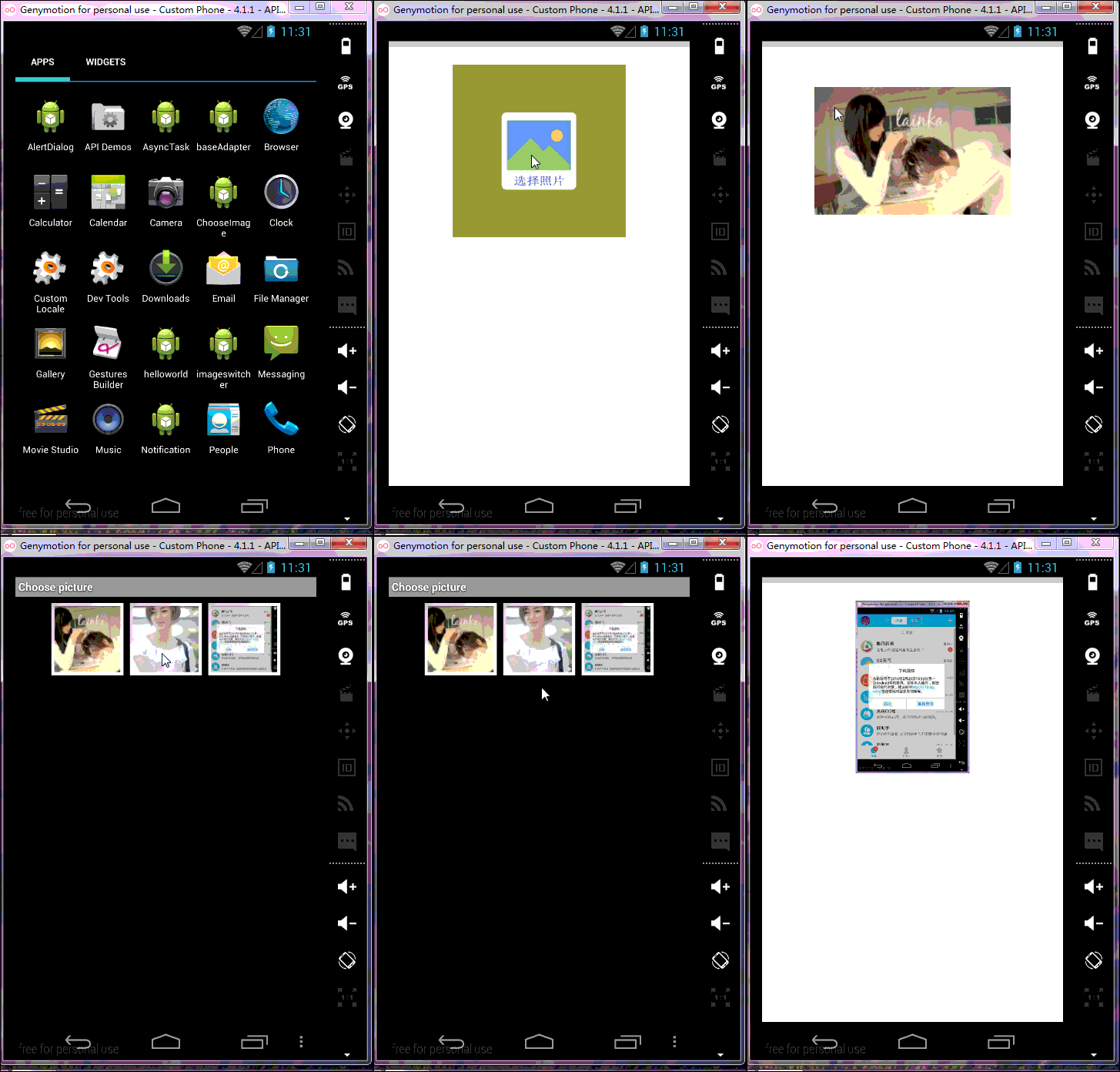
模擬器圖庫就三張 沒辦法~畫質挺感人~
一個隱式意圖
布局文件:
<relativelayout xmlns:android="http://schemas.android.com/apk/res/android" xmlns:tools="http://schemas.android.com/tools" android:layout_width="match_parent" android:layout_height="match_parent">

    <imageview android:id="@+id/image_choose" android:layout_width="250dp" android:layout_height="250dp" android:background="#CC0000" android:layout_centerhorizontal="true" android:layout_margintop="30dp" android:src="@drawable/default_bg" android:padding="5dp">

</imageview></relativelayout>
package com.example.chooseimage;

import android.os.Bundle;
import android.provider.MediaStore;
import android.app.Activity;
import android.content.Intent;
import android.view.View;
import android.view.View.OnClickListener;
import android.view.Window;
import android.widget.ImageView;

public class MainActivity extends Activity implements OnClickListener {

	private ImageView image_choose;

	@Override
	protected void onCreate(Bundle savedInstanceState) {
		super.onCreate(savedInstanceState);
		requestWindowFeature(Window.FEATURE_NO_TITLE);
		setContentView(R.layout.activity_main);
		image_choose = (ImageView) findViewById(R.id.image_choose);
		image_choose.setOnClickListener(this);
	}

	@Override
	public void onClick(View v) {
		// TODO Auto-generated method stub
		switch (v.getId()) {
		case R.id.image_choose: {
			Intent intent = new Intent(Intent.ACTION_PICK, null);
			intent.setDataAndType(MediaStore.Images.Media.EXTERNAL_CONTENT_URI,
					"image/*");
			startActivityForResult(intent, 0x1);
			break;
		}
		}
	}

	@Override
	protected void onActivityResult(int requestCode, int resultCode, Intent data) {
		// TODO Auto-generated method stub
		if (requestCode == 0x1 && resultCode == RESULT_OK) {
			if (data != null) {
				image_choose.setImageURI(data.getData());
			}
		}
		super.onActivityResult(requestCode, resultCode, data);
	}

}
 Java的進化? Kotlin初探與集成Android項目
介紹:Statically typed programming language for the JVM, Android and the browser. 100% i
 48.Android 標簽TextView的點擊技巧
48.Android 標簽TextView的點擊技巧Android 標簽TextView的點擊技巧 前言 ClickableSpan源碼 自定義ClickableSpan
 Android仿百度外賣自定義下拉刷新效果
現如今的APP各式各樣,同樣也帶來了各種需求,一個下拉刷新都能玩出花樣了,前兩天訂飯的時候不經意間看到了“百度外賣”的下拉刷新,今天的主題就是它–自定義下拉刷新動畫。看一
 Service要點全解析
1、Service概述Service的主要作用是,讓系統可以在後台干一些不與用戶交互的操作,這些操作可能會比較耗時,比如去下載一些網絡資源等;也可能是一項長期運行的工作,