編輯:關於Android編程
MSM8909+Android5.1.1之BSP開發---電池管理2---BatteryInfo.java
先來借用MTK對電池管理的框架圖
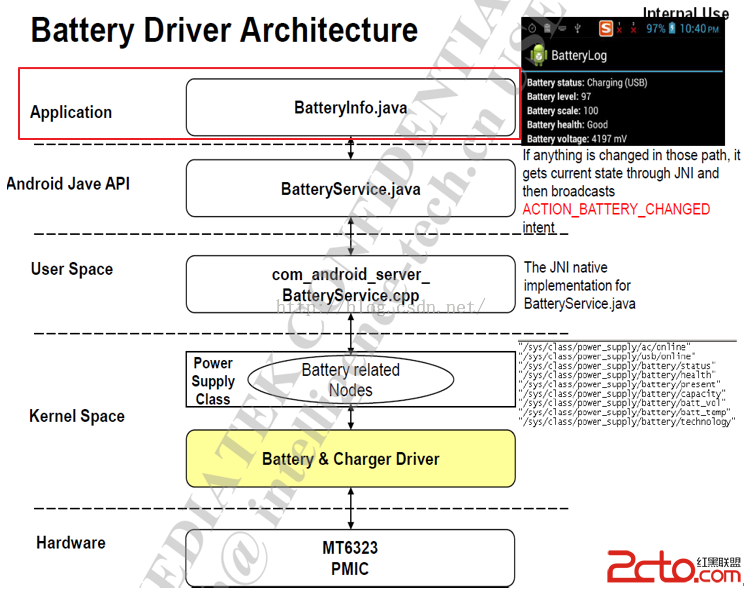
圖1
通過電話測試指令:*#*#4636#*#*可以彈出Testing界面
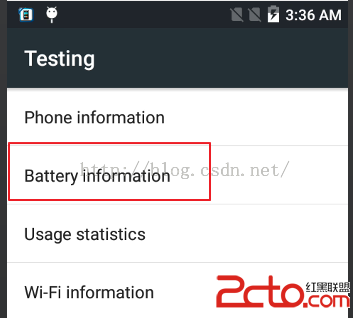
圖2
選擇Battery information,進入:
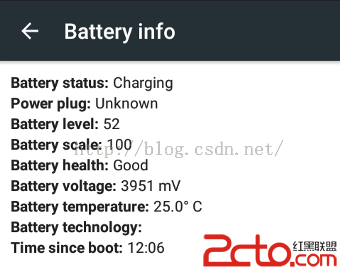
圖3
我們接入USB或是DC充電的時候,Power plug都顯示的時Unknown
說明底層就判斷為Unknown類型,此問題要查清楚
BatteryInfo對應的代碼為packages\apps\Settings\src\com\android\settings\BatteryInfo.java
1. \packages\apps\Settings\AndroidManifest.xml
(1) android:label
android:label="@string/battery_info_label",label表示標簽,@表示引用,表示從string這個文件中引用battery_info_label這個鍵值的值,
\packages\apps\Settings\res\values\ strings.xml中對應的值如下:
Battery info
(2) android:taskAffinity
android:taskAffinity="com.android.settings"表示BatteryInfo Activity希望進入com.android.settings這個task。
Activity的歸屬,也就是Activity應該在哪個Task中,Activity與Task的吸附關系。我們知道,一般情況下在同一個應用中,啟動的Activity都在同一個Task中,它們在該Task中度過自己的生命周期,這些Activity是從一而終的好榜樣。
那麼為什麼我們創建的Activity會進入這個Task中?它們會轉到其它的Task中嗎?如果轉到其它的Task中,它們會到什麼樣的Task中去?
解決這些問題的關鍵,在於每個Activity的taskAffinity屬性。
每個Activity都有taskAffinity屬性,這個屬性指出了它希望進入的Task。如果一個Activity沒有顯式的指明該Activity的taskAffinity,那麼它的這個屬性就等於Application指明的taskAffinity,如果Application也沒有指明,那麼該taskAffinity的值就等於包名。而Task也有自己的affinity屬性,它的值等於它的根Activity的taskAffinity的值。
2. BatteryInfo.java代碼分析
2.1 onCreate()
@Override
   public void onCreate(Bundle icicle) {
       super.onCreate(icicle);

       setContentView(R.layout.battery_info);

       // create the IntentFilter that will be used to listen
       // to battery status broadcasts
       mIntentFilter = new IntentFilter();
       mIntentFilter.addAction(Intent.ACTION_BATTERY_CHANGED);
    }
(1) R.layout.battery_info
其值在packages\apps\Settings\res\layout\battery_info.xml定義
(2) 創建一個IntentFilter類的對象mIntentFilter
用於監聽電池狀態廣播。
(3) mIntentFilter.addAction(Intent.ACTION_BATTERY_CHANGED);
為此IntentFilter增加一個ACTION_BATTERY_CHANGED的action,也就是說當其他Activity、或是Service等發送包含有ACTION_BATTERY_CHANGED的intent時,BatteryInfo就執行更新電池狀態的動作
2.2 onResume()
public void onResume() {
       super.onResume();

       mStatus = (TextView)findViewById(R.id.status);
       mPower = (TextView)findViewById(R.id.power);
       mLevel = (TextView)findViewById(R.id.level);
       mScale = (TextView)findViewById(R.id.scale);
       mHealth = (TextView)findViewById(R.id.health);
       mTechnology = (TextView)findViewById(R.id.technology);
       mVoltage = (TextView)findViewById(R.id.voltage);
       mTemperature = (TextView)findViewById(R.id.temperature);
       mUptime = (TextView) findViewById(R.id.uptime);

       // Get awake time plugged in and on battery
       mBatteryStats =IBatteryStats.Stub.asInterface(ServiceManager.getService(
                BatteryStats.SERVICE_NAME));
       mScreenStats = IPowerManager.Stub.asInterface(ServiceManager.getService(POWER_SERVICE));
       mHandler.sendEmptyMessageDelayed(EVENT_TICK, 3000);

       registerReceiver(mIntentReceiver, mIntentFilter);
    }
在onResume()方法中通過registerReceiver(mIntentReceiver,mIntentFilter);注冊一個Receiver,最終在onReceive()方法中收到值為ACTION_BATTERY_CHANGED的action時,BatteryInfo這個Activity要更新電池狀態信息。
(1) 創建一個Handler
mHandler.sendEmptyMessageDelayed(EVENT_TICK,3000);使用到Handler,其創建如下:
private Handler mHandler = new Handler() {
        @Override
       public void handleMessage(Message msg) {
           switch (msg.what) {
                case EVENT_TICK:
                    updateBatteryStats();
                   sendEmptyMessageDelayed(EVENT_TICK, 1000);

                    break;
           }
       }
};
重寫handleMessage()用於處理消息EVENT_TICK,在收到此消息後,調用updateBatteryStats()更新電池狀態,並1000ms後發送EVENT_TICK消息。
(2) 注冊一個監聽器
/**
   *Listens for intent broadcasts
   */
   private IntentFilter  mIntentFilter;

   private BroadcastReceiver mIntentReceiver = new BroadcastReceiver() {
       @Override
       public void onReceive(Context context, Intent intent) {
           String action = intent.getAction();
           if (action.equals(Intent.ACTION_BATTERY_CHANGED)) {
                int plugType =intent.getIntExtra("plugged", 0);

                mLevel.setText("" +intent.getIntExtra("level", 0));
                mScale.setText("" +intent.getIntExtra("scale", 0));
                mVoltage.setText("" +intent.getIntExtra("voltage", 0) + " "
                        +getString(R.string.battery_info_voltage_units));
               mTemperature.setText("" +tenthsToFixedString(intent.getIntExtra("temperature", 0))
                        +getString(R.string.battery_info_temperature_units));
               mTechnology.setText("" +intent.getStringExtra("technology"));

               mStatus.setText(Utils.getBatteryStatus(getResources(), intent));


                switch (plugType) {
                    case 0:                       mPower.setText(getString(R.string.battery_info_power_unplugged));
                        break;
                    case BatteryManager.BATTERY_PLUGGED_AC:                       mPower.setText(getString(R.string.battery_info_power_ac));
                        break;
                    case BatteryManager.BATTERY_PLUGGED_USB:                       mPower.setText(getString(R.string.battery_info_power_usb));
                        break;
                    caseBatteryManager.BATTERY_PLUGGED_WIRELESS:
                       mPower.setText(getString(R.string.battery_info_power_wireless));
                        break;
                    case(BatteryManager.BATTERY_PLUGGED_AC|BatteryManager.BATTERY_PLUGGED_USB):                       mPower.setText(getString(R.string.battery_info_power_ac_usb));
                        break;
                    default:                        mPower.setText(getString(R.string.battery_info_power_unknown));
                        break;
                }

                int health =intent.getIntExtra("health", BatteryManager.BATTERY_HEALTH_UNKNOWN);
                String healthString;
                if (health ==BatteryManager.BATTERY_HEALTH_GOOD) {
                    healthString =getString(R.string.battery_info_health_good);
                } else if (health ==BatteryManager.BATTERY_HEALTH_OVERHEAT) {
                   healthString =getString(R.string.battery_info_health_overheat);
                } else if (health ==BatteryManager.BATTERY_HEALTH_DEAD) {
                    healthString =getString(R.string.battery_info_health_dead);
                } else if (health ==BatteryManager.BATTERY_HEALTH_OVER_VOLTAGE) {
                    healthString =getString(R.string.battery_info_health_over_voltage);
                } else if (health ==BatteryManager.BATTERY_HEALTH_UNSPECIFIED_FAILURE) {
                    healthString =getString(R.string.battery_info_health_unspecified_failure);
                } else if (health ==BatteryManager.BATTERY_HEALTH_COLD) {
                    healthString =getString(R.string.battery_info_health_cold);
                } else {
                    healthString =getString(R.string.battery_info_health_unknown);
                }
                mHealth.setText(healthString);
           }
       }
   };
1) Battery status信息的更新
其中Battery status有些特別:
mStatus.setText(Utils.getBatteryStatus(getResources(),intent));
看packages\apps\Settings\src\com\android\settings\Utils.java\getBatteryStatus()的實現:
public static StringgetBatteryStatus(Resources res, Intent batteryChangedIntent) {
       final Intent intent = batteryChangedIntent;

       int plugType = intent.getIntExtra(BatteryManager.EXTRA_PLUGGED, 0);
       int status = intent.getIntExtra(BatteryManager.EXTRA_STATUS,
               BatteryManager.BATTERY_STATUS_UNKNOWN);
       String statusString;
       if (status == BatteryManager.BATTERY_STATUS_CHARGING) {
           int resId;
           if (plugType == BatteryManager.BATTERY_PLUGGED_AC) {
                resId =R.string.battery_info_status_charging_ac;
           } else if (plugType == BatteryManager.BATTERY_PLUGGED_USB) {
                resId =R.string.battery_info_status_charging_usb;
           } else if (plugType == BatteryManager.BATTERY_PLUGGED_WIRELESS) {
                resId =R.string.battery_info_status_charging_wireless;
           } else {
                resId =R.string.battery_info_status_charging;
           }
           statusString = res.getString(resId);
        } else if (status ==BatteryManager.BATTERY_STATUS_DISCHARGING) {
           statusString = res.getString(R.string.battery_info_status_discharging);
       } else if (status == BatteryManager.BATTERY_STATUS_NOT_CHARGING) {
           statusString = res.getString(R.string.battery_info_status_not_charging);
       } else if (status == BatteryManager.BATTERY_STATUS_FULL) {
           statusString = res.getString(R.string.battery_info_status_full);
       } else {
           statusString = res.getString(R.string.battery_info_status_unknown);
       }

       return statusString;
}
從上面可知,plugType是unknown,所以從\packages\apps\Settings\res\values\strings.xml的battery_info_status_charging獲取到充電狀態是Charing,如下:
Charging
2) 如何獲取電池的信息
public void onReceive(Context context,Intent intent) {
           String action = intent.getAction();
           if (action.equals(Intent.ACTION_BATTERY_CHANGED)) {
                int plugType =intent.getIntExtra("plugged", 0);
這是上面其中一段代碼,收到廣播,且其中intent的action的值為 ACTION_BATTERY_CHANGED時就從intent中讀取plugged的值,這個intent是由BatteryService廣播出來的。
2.3 onPause()
@Override
   public void onPause() {
       super.onPause();
       mHandler.removeMessages(EVENT_TICK);
       Slog.e(TAG, "BatteryInfo--->onPause()");
       // we are no longer on the screen stop the observers
       unregisterReceiver(mIntentReceiver);
}
比較簡單,就是刪除EVENT_TICK消息和注銷監聽器mIntentReceiver
 android百度地圖 添加覆蓋物Marker與InfoWindow的使用
如何添加覆蓋物,實現周邊搜索,以及對覆蓋物的點擊出現介紹等效果。效果圖:我們的需求是,當用戶點擊衣食住行,或者對對附近搜索是,從服務器返回數據(經緯度,商家信息,介紹等)
 [Android]_[初級]_[Android開發環境搭建入門(Windows)]
場景:1. 突然接到Android的開發任務時如何配置android開發環境?2. 現在的android studio是基於idea的,在我的電腦上運行奇慢和卡(雙核i5
 Android 生成正式簽名的APK文件
應用已經開發出來了,下一步我們需要思考推廣方面的工作。那麼如何才能讓更多的用戶知道並使用我們的應用程序呢?在手機領域,最常見的做法
 Android5.x新特性之 Toolbar和Theme的使用
Android5.0以後谷歌大力推崇Material Design設計,有意統一之前Android style風格亂象的情況。上一篇博客我們學習了Androi