編輯:關於Android編程
從今天開始我們正式開始Android的逆向之旅,關於逆向的相關知識,想必大家都不陌生了,逆向領域是一個充滿挑戰和神秘的領域。作為一名Android開發者,每個人都想去探索這個領域,因為一旦你破解了別人的內容,成就感肯定爆棚,不過相反的是,我們不僅要研究破解之道,也要研究加密之道,因為加密和破解是相生相克的。但是我們在破解的過程中可能最頭疼的是native層,也就是so文件的破解。所以我們先來詳細了解一下so文件的內容下面就來看看我們今天所要介紹的內容。今天我們先來介紹一下elf文件的格式,因為我們知道Android中的so文件就是elf文件,所以需要了解so文件,必須先來了解一下elf文件的格式,對於如何詳細了解一個elf文件,就是手動的寫一個工具類來解析一個elf文件。
我們需要了解elf文件的格式,關於elf文件格式詳解,網上已經有很多介紹資料了。這裡我也不做太多的解釋了。不過有兩個資料還是需要介紹一下的,因為網上的內容真的很多,很雜。這兩個資料是最全的,也是最好的。我就是看這兩個資料來操作的:
第一個資料是非蟲大哥的經典之作:
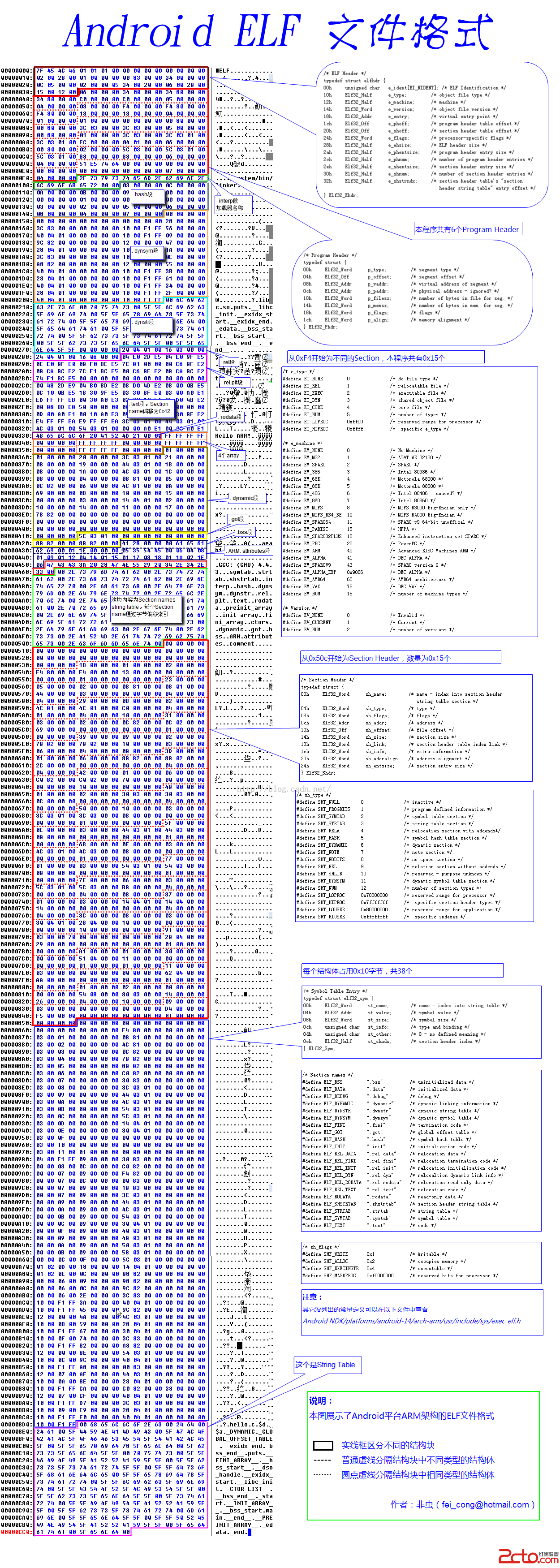
看吧,是不是超級詳細?後面我們用Java代碼來解析elf文件的時候,就是按照這張圖來的。但是這張圖有些數據結構解釋的還不是很清楚,所以第二個資料來了。
第二個資料:北京大學實驗室出的標准版
http://download.csdn.net/detail/jiangwei0910410003/9204051
這裡就不對這個文件做詳細解釋了,後面在做解析工作的時候,會截圖說明。
關於上面的這兩個資料,這裡還是多數兩句:一定要仔細認真的閱讀。這個是經典之作。也是後面工作的基礎。
當然這裡還需要介紹一個工具,因為這個工具在我們下面解析elf文件的時候,也非常有用,而且是檢查我們解析elf文件的模板。
就是很出名的:readelf命令
不過Window下這個命令不能用,因為這個命令是Linux的,所以我們還得做個工作就是安裝Cygwin。關於這個工具的安裝,大家可以看看這篇文章:
http://blog.csdn.net/jiangwei0910410003/article/details/17710243
不過在下載的過程中,我擔心小朋友們會遇到挫折,所以很貼心的,放到的雲盤裡面:
http://pan.baidu.com/s/1C1Zci
下載下來之後,需要改一個東西才能用:
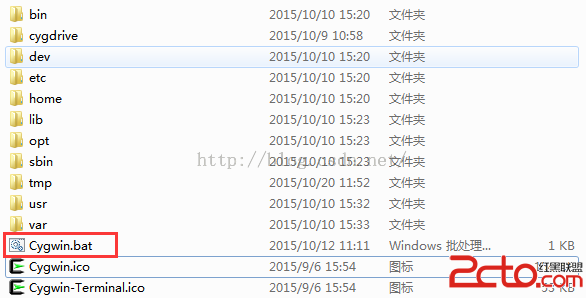
該一下這個文件:
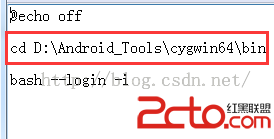
這個路徑要改成你本地cygwin64中的bin目錄的路徑,不然運行錯誤的。改好之後,直接運行Cygwin.bat就可以了。
關於readelf工具我們這裡不做太詳細的介紹,只介紹我們要用到的命令:
1、readelf -h xxx.so
查看so文件的頭部信息
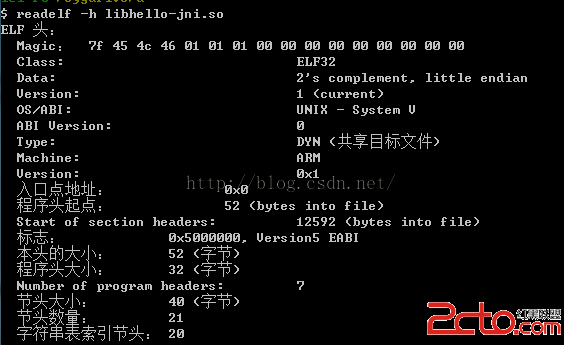
2、readelf -S xxx.so
查看so文件的段(Section)頭的信息
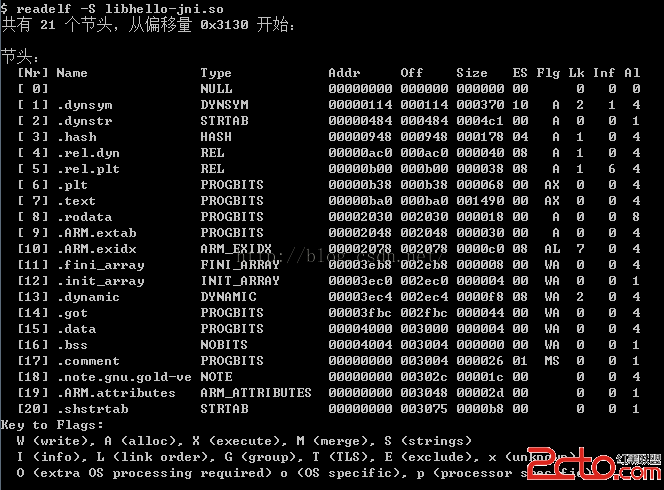
3、readelf -l xxx.so
查看so文件的程序段頭信息(Program)
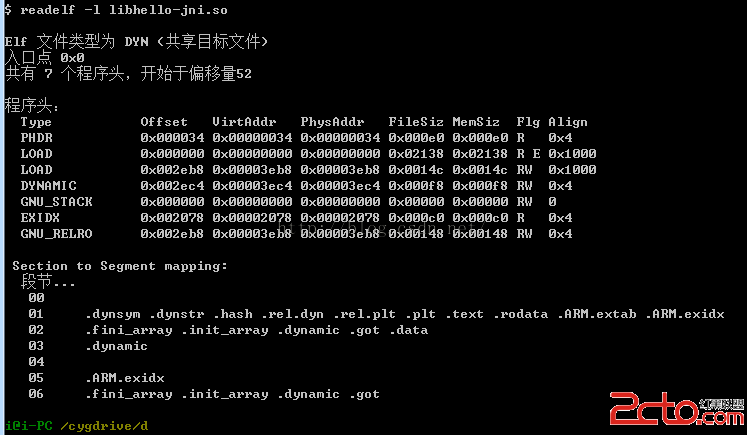
4、readelf -a xxx.so
查看so文件的全部內容
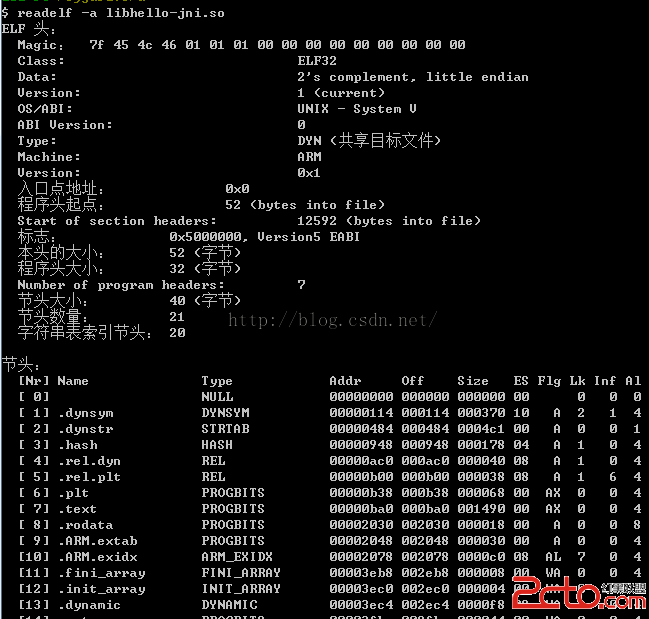
還有很多命令用法,這裡就不在細說了,網上有很多介紹的~~
上面我們介紹了elf文件格式資料,elf文件的工具,那麼下面我們就來實際操作一下,來用Java代碼手把手的解析一個libhello-jni.so文件。關於這個libhello-jni.so文件的下載地址:
http://download.csdn.net/detail/jiangwei0910410003/9204087
這個我們需要參考elf.h這個頭文件的格式了。這個文件網上也是有的,這裡還是給個下載鏈接吧:
http://download.csdn.net/detail/jiangwei0910410003/9204081
我們看看Java中定義的elf文件的數據結構類:
package com.demo.parseso;
import java.util.ArrayList;
public class ElfType32 {
public elf32_rel rel;
public elf32_rela rela;
public ArrayList symList = new ArrayList();
public elf32_hdr hdr;//elf頭部信息
public ArrayList phdrList = new ArrayList();//可能會有多個程序頭
public ArrayList shdrList = new ArrayList();//可能會有多個段頭
public ArrayList strtbList = new ArrayList();//可能會有多個字符串值
public ElfType32() {
rel = new elf32_rel();
rela = new elf32_rela();
hdr = new elf32_hdr();
}
/**
* typedef struct elf32_rel {
Elf32_Addr r_offset;
Elf32_Word r_info;
} Elf32_Rel;
*
*/
public class elf32_rel {
public byte[] r_offset = new byte[4];
public byte[] r_info = new byte[4];
@Override
public String toString(){
return r_offset:+Utils.bytes2HexString(r_offset)+;r_info:+Utils.bytes2HexString(r_info);
}
}
/**
* typedef struct elf32_rela{
Elf32_Addr r_offset;
Elf32_Word r_info;
Elf32_Sword r_addend;
} Elf32_Rela;
*/
public class elf32_rela{
public byte[] r_offset = new byte[4];
public byte[] r_info = new byte[4];
public byte[] r_addend = new byte[4];
@Override
public String toString(){
return r_offset:+Utils.bytes2HexString(r_offset)+;r_info:+Utils.bytes2HexString(r_info)+;r_addend:+Utils.bytes2HexString(r_info);
}
}
/**
* typedef struct elf32_sym{
Elf32_Word st_name;
Elf32_Addr st_value;
Elf32_Word st_size;
unsigned char st_info;
unsigned char st_other;
Elf32_Half st_shndx;
} Elf32_Sym;
*/
public static class Elf32_Sym{
public byte[] st_name = new byte[4];
public byte[] st_value = new byte[4];
public byte[] st_size = new byte[4];
public byte st_info;
public byte st_other;
public byte[] st_shndx = new byte[2];
@Override
public String toString(){
return st_name:+Utils.bytes2HexString(st_name)
+
st_value:+Utils.bytes2HexString(st_value)
+
st_size:+Utils.bytes2HexString(st_size)
+
st_info:+(st_info/16)
+
st_other:+(((short)st_other) & 0xF)
+
st_shndx:+Utils.bytes2HexString(st_shndx);
}
}
public void printSymList(){
for(int i=0;i> 4)
#define ELF_ST_TYPE(x) (((unsigned int) x) & 0xf)
*/
/**
* typedef struct elf32_hdr{
unsigned char e_ident[EI_NIDENT];
Elf32_Half e_type;
Elf32_Half e_machine;
Elf32_Word e_version;
Elf32_Addr e_entry; // Entry point
Elf32_Off e_phoff;
Elf32_Off e_shoff;
Elf32_Word e_flags;
Elf32_Half e_ehsize;
Elf32_Half e_phentsize;
Elf32_Half e_phnum;
Elf32_Half e_shentsize;
Elf32_Half e_shnum;
Elf32_Half e_shstrndx;
} Elf32_Ehdr;
*/
public class elf32_hdr{
public byte[] e_ident = new byte[16];
public byte[] e_type = new byte[2];
public byte[] e_machine = new byte[2];
public byte[] e_version = new byte[4];
public byte[] e_entry = new byte[4];
public byte[] e_phoff = new byte[4];
public byte[] e_shoff = new byte[4];
public byte[] e_flags = new byte[4];
public byte[] e_ehsize = new byte[2];
public byte[] e_phentsize = new byte[2];
public byte[] e_phnum = new byte[2];
public byte[] e_shentsize = new byte[2];
public byte[] e_shnum = new byte[2];
public byte[] e_shstrndx = new byte[2];
@Override
public String toString(){
return magic:+ Utils.bytes2HexString(e_ident)
+
e_type:+Utils.bytes2HexString(e_type)
+
e_machine:+Utils.bytes2HexString(e_machine)
+
e_version:+Utils.bytes2HexString(e_version)
+
e_entry:+Utils.bytes2HexString(e_entry)
+
e_phoff:+Utils.bytes2HexString(e_phoff)
+
e_shoff:+Utils.bytes2HexString(e_shoff)
+
e_flags:+Utils.bytes2HexString(e_flags)
+
e_ehsize:+Utils.bytes2HexString(e_ehsize)
+
e_phentsize:+Utils.bytes2HexString(e_phentsize)
+
e_phnum:+Utils.bytes2HexString(e_phnum)
+
e_shentsize:+Utils.bytes2HexString(e_shentsize)
+
e_shnum:+Utils.bytes2HexString(e_shnum)
+
e_shstrndx:+Utils.bytes2HexString(e_shstrndx);
}
}
/**
* typedef struct elf32_phdr{
Elf32_Word p_type;
Elf32_Off p_offset;
Elf32_Addr p_vaddr;
Elf32_Addr p_paddr;
Elf32_Word p_filesz;
Elf32_Word p_memsz;
Elf32_Word p_flags;
Elf32_Word p_align;
} Elf32_Phdr;
*/
public static class elf32_phdr{
public byte[] p_type = new byte[4];
public byte[] p_offset = new byte[4];
public byte[] p_vaddr = new byte[4];
public byte[] p_paddr = new byte[4];
public byte[] p_filesz = new byte[4];
public byte[] p_memsz = new byte[4];
public byte[] p_flags = new byte[4];
public byte[] p_align = new byte[4];
@Override
public String toString(){
return p_type:+ Utils.bytes2HexString(p_type)
+
p_offset:+Utils.bytes2HexString(p_offset)
+
p_vaddr:+Utils.bytes2HexString(p_vaddr)
+
p_paddr:+Utils.bytes2HexString(p_paddr)
+
p_filesz:+Utils.bytes2HexString(p_filesz)
+
p_memsz:+Utils.bytes2HexString(p_memsz)
+
p_flags:+Utils.bytes2HexString(p_flags)
+
p_align:+Utils.bytes2HexString(p_align);
}
}
public void printPhdrList(){
for(int i=0;i這個沒什麼問題,也沒難度,就是在看elf.h文件中定義的數據結構的時候,要記得每個字段的占用字節數就可以了。
有了結構定義,下面就來看看如何解析吧。
在解析之前我們需要將so文件讀取到byte[]中,定義一個數據結構類型
public static ElfType32 type_32 = new ElfType32();
byte[] fileByteArys = Utils.readFile(so/libhello-jni.so);
if(fileByteArys == null){
System.out.println(read file byte failed...);
return;
}
2、解析elf文件的頭部信息
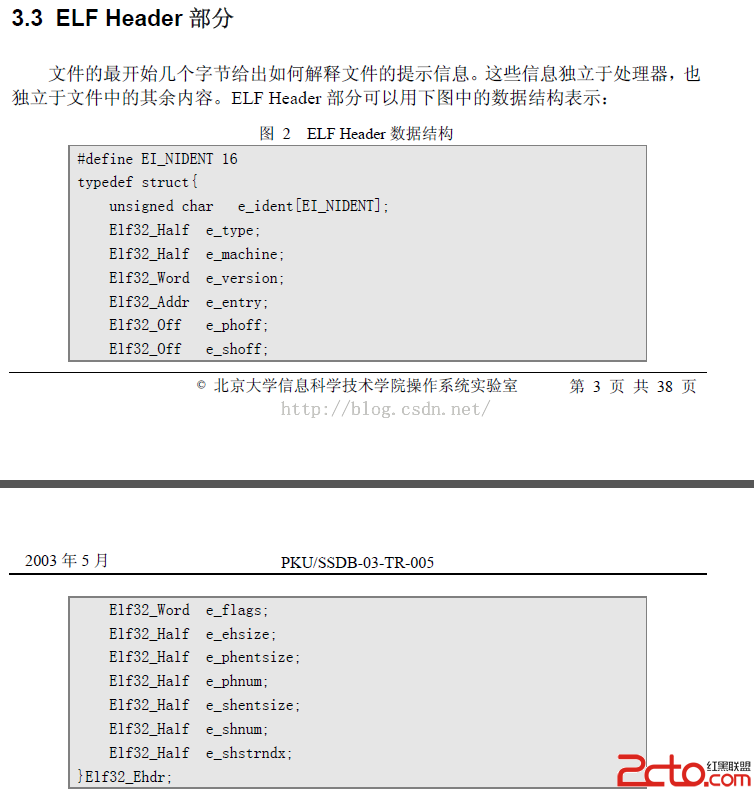
關於這些字段的解釋,要看上面提到的那個pdf文件中的描述
這裡我們介紹幾個重要的字段,也是我們後面修改so文件的時候也會用到:
1)、e_phoff
這個字段是程序頭(Program Header)內容在整個文件的偏移值,我們可以用這個偏移值來定位程序頭的開始位置,用於解析程序頭信息
2)、e_shoff
這個字段是段頭(Section Header)內容在這個文件的偏移值,我們可以用這個偏移值來定位段頭的開始位置,用於解析段頭信息
3)、e_phnum
這個字段是程序頭的個數,用於解析程序頭信息
4)、e_shnum
這個字段是段頭的個數,用於解析段頭信息
5)、e_shstrndx
這個字段是String段在整個段列表中的索引值,這個用於後面定位String段的位置
按照上面的圖我們就可以很容易的解析
/**
* 解析Elf的頭部信息
* @param header
*/
private static void parseHeader(byte[] header, int offset){
if(header == null){
System.out.println(header is null);
return;
}
/**
* public byte[] e_ident = new byte[16];
public short e_type;
public short e_machine;
public int e_version;
public int e_entry;
public int e_phoff;
public int e_shoff;
public int e_flags;
public short e_ehsize;
public short e_phentsize;
public short e_phnum;
public short e_shentsize;
public short e_shnum;
public short e_shstrndx;
*/
type_32.hdr.e_ident = Utils.copyBytes(header, 0, 16);//魔數
type_32.hdr.e_type = Utils.copyBytes(header, 16, 2);
type_32.hdr.e_machine = Utils.copyBytes(header, 18, 2);
type_32.hdr.e_version = Utils.copyBytes(header, 20, 4);
type_32.hdr.e_entry = Utils.copyBytes(header, 24, 4);
type_32.hdr.e_phoff = Utils.copyBytes(header, 28, 4);
type_32.hdr.e_shoff = Utils.copyBytes(header, 32, 4);
type_32.hdr.e_flags = Utils.copyBytes(header, 36, 4);
type_32.hdr.e_ehsize = Utils.copyBytes(header, 40, 2);
type_32.hdr.e_phentsize = Utils.copyBytes(header, 42, 2);
type_32.hdr.e_phnum = Utils.copyBytes(header, 44,2);
type_32.hdr.e_shentsize = Utils.copyBytes(header, 46,2);
type_32.hdr.e_shnum = Utils.copyBytes(header, 48, 2);
type_32.hdr.e_shstrndx = Utils.copyBytes(header, 50, 2);
}
按照對應的每個字段的字節個數,讀取byte就可以了。
3、解析段頭(Section Header)信息
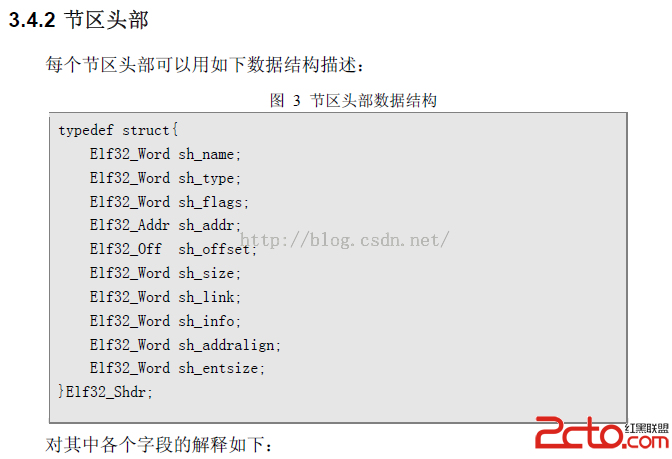
這個結構中字段見pdf中的描述吧,這裡就不做解釋了。後面我們會手動的構造這樣的一個數據結構,到時候在詳細說明每個字段含義。
按照這個結構。我們解析也簡單了:
/**
* 解析段頭信息內容
*/
public static void parseSectionHeaderList(byte[] header, int offset){
int header_size = 40;//40個字節
int header_count = Utils.byte2Short(type_32.hdr.e_shnum);//頭部的個數
byte[] des = new byte[header_size];
for(int i=0;i這裡需要注意的是,我們看到的Section Header一般都是多個的,這裡用一個List來保存
4、解析程序頭(Program Header)信息
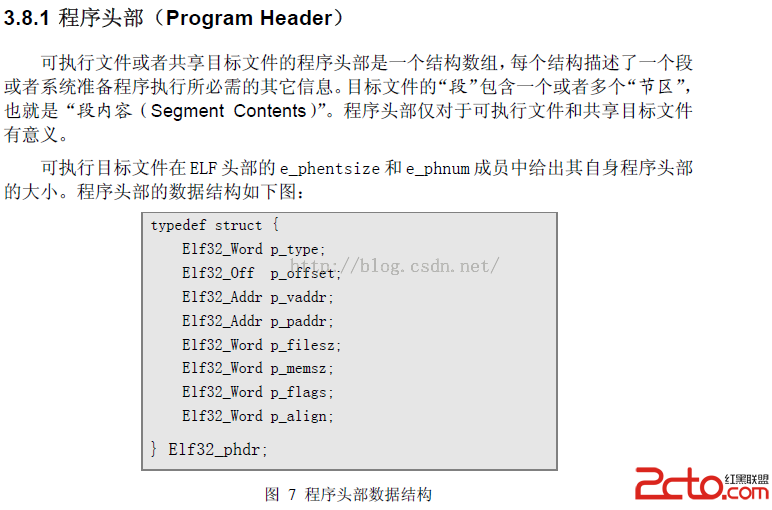 這裡的字段,這裡也不做解釋了,看pdf文檔。
我們按照這個結構來進行解析:
/**
* 解析程序頭信息
* @param header
*/
public static void parseProgramHeaderList(byte[] header, int offset){
int header_size = 32;//32個字節
int header_count = Utils.byte2Short(type_32.hdr.e_phnum);//頭部的個數
byte[] des = new byte[header_size];
for(int i=0;i
當然還有其他結構的解析工作,這裡就不在一一介紹了,因為這些結構我們在後面的介紹中不會用到,但是也是需要了解的,詳細參見pdf文檔。
5、驗證解析結果
那麼上面我們的解析工作做完了,為了驗證我們的解析工作是否正確,我們需要給每個結構定義個打印函數,也就是從寫toString方法即可。
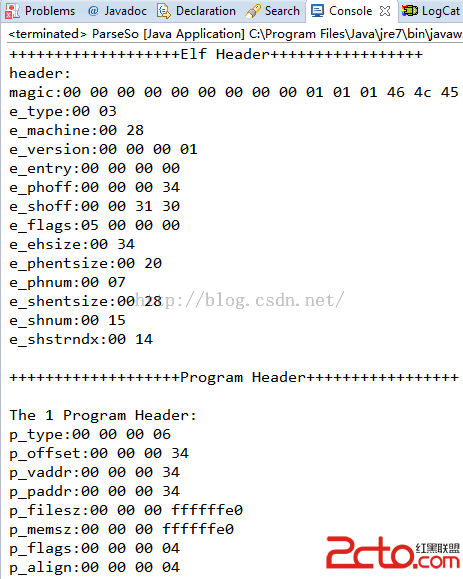
然後我們在使用readelf工具來查看so文件的各個結構內容,對比就可以知道解析的是否成功了。
解析代碼下載地址:http://download.csdn.net/detail/jiangwei0910410003/9204119
上面我們用的是Java代碼來進行解析的,為了照顧廣大程序猿,所以給出一個C++版本的解析類:
#include
#include
#include
#include elf.h
/**
非常重要的一個宏,功能很簡單:
P:需要對其的段地址
ALIGNBYTES:對其的字節數
功能:將P值補充到時ALIGNBYTES的整數倍
這個函數也叫:頁面對其函數
eg: 0x3e45/0x1000 == >0x4000
*/
#define ALIGN(P, ALIGNBYTES) ( ((unsigned long)P + ALIGNBYTES -1)&~(ALIGNBYTES-1) )
int addSectionFun(char*, char*, unsigned int);
int main()
{
addSectionFun(D:libhello-jni.so, .jiangwei, 0x1000);
return 0;
}
int addSectionFun(char *lpPath, char *szSecname, unsigned int nNewSecSize)
{
char name[50];
FILE *fdr, *fdw;
char *base = NULL;
Elf32_Ehdr *ehdr;
Elf32_Phdr *t_phdr, *load1, *load2, *dynamic;
Elf32_Shdr *s_hdr;
int flag = 0;
int i = 0;
unsigned mapSZ = 0;
unsigned nLoop = 0;
unsigned int nAddInitFun = 0;
unsigned int nNewSecAddr = 0;
unsigned int nModuleBase = 0;
memset(name, 0, sizeof(name));
if(nNewSecSize == 0)
{
return 0;
}
fdr = fopen(lpPath, rb);
strcpy(name, lpPath);
if(strchr(name, '.'))
{
strcpy(strchr(name, '.'), _new.so);
}
else
{
strcat(name, _new);
}
fdw = fopen(name, wb);
if(fdr == NULL || fdw == NULL)
{
printf(Open file failed);
return 1;
}
fseek(fdr, 0, SEEK_END);
mapSZ = ftell(fdr);//源文件的長度大小
printf(mapSZ:0x%x
, mapSZ);
base = (char*)malloc(mapSZ * 2 + nNewSecSize);//2*源文件大小+新加的Section size
printf(base 0x%x
, base);
memset(base, 0, mapSZ * 2 + nNewSecSize);
fseek(fdr, 0, SEEK_SET);
fread(base, 1, mapSZ, fdr);//拷貝源文件內容到base
if(base == (void*) -1)
{
printf(fread fd failed);
return 2;
}
//判斷Program Header
ehdr = (Elf32_Ehdr*) base;
t_phdr = (Elf32_Phdr*)(base + sizeof(Elf32_Ehdr));
for(i=0;ie_phnum;i++)
{
if(t_phdr->p_type == PT_LOAD)
{
//這裡的flag只是一個標志位,去除第一個LOAD的Segment的值
if(flag == 0)
{
load1 = t_phdr;
flag = 1;
nModuleBase = load1->p_vaddr;
printf(load1 = %p, offset = 0x%x
, load1, load1->p_offset);
}
else
{
load2 = t_phdr;
printf(load2 = %p, offset = 0x%x
, load2, load2->p_offset);
}
}
if(t_phdr->p_type == PT_DYNAMIC)
{
dynamic = t_phdr;
printf(dynamic = %p, offset = 0x%x
, dynamic, dynamic->p_offset);
}
t_phdr ++;
}
//section header
s_hdr = (Elf32_Shdr*)(base + ehdr->e_shoff);
//獲取到新加section的位置,這個是重點,需要進行頁面對其操作
printf(addr:0x%x
,load2->p_paddr);
nNewSecAddr = ALIGN(load2->p_paddr + load2->p_memsz - nModuleBase, load2->p_align);
printf(new section add:%x
, nNewSecAddr);
if(load1->p_filesz < ALIGN(load2->p_paddr + load2->p_memsz, load2->p_align) )
{
printf(offset:%x
,(ehdr->e_shoff + sizeof(Elf32_Shdr) * ehdr->e_shnum));
//注意這裡的代碼的執行條件,這裡其實就是判斷section header是不是在文件的末尾
if( (ehdr->e_shoff + sizeof(Elf32_Shdr) * ehdr->e_shnum) != mapSZ)
{
if(mapSZ + sizeof(Elf32_Shdr) * (ehdr->e_shnum + 1) > nNewSecAddr)
{
printf(無法添加節
);
return 3;
}
else
{
memcpy(base + mapSZ, base + ehdr->e_shoff, sizeof(Elf32_Shdr) * ehdr->e_shnum);//將Section Header拷貝到原來文件的末尾
ehdr->e_shoff = mapSZ;
mapSZ += sizeof(Elf32_Shdr) * ehdr->e_shnum;//加上Section Header的長度
s_hdr = (Elf32_Shdr*)(base + ehdr->e_shoff);
printf(ehdr_offset:%x,ehdr->e_shoff);
}
}
}
else
{
nNewSecAddr = load1->p_filesz;
}
printf(還可添加 %d 個節
, (nNewSecAddr - ehdr->e_shoff) / sizeof(Elf32_Shdr) - ehdr->e_shnum - 1);
int nWriteLen = nNewSecAddr + ALIGN(strlen(szSecname) + 1, 0x10) + nNewSecSize;//添加section之後的文件總長度:原來的長度 + section name + section size
printf(write len %x
,nWriteLen);
char *lpWriteBuf = (char *)malloc(nWriteLen);//nWriteLen :最後文件的總大小
memset(lpWriteBuf, 0, nWriteLen);
//ehdr->e_shstrndx是section name的string表在section表頭中的偏移值,修改string段的大小
s_hdr[ehdr->e_shstrndx].sh_size = nNewSecAddr - s_hdr[ehdr->e_shstrndx].sh_offset + strlen(szSecname) + 1;
strcpy(lpWriteBuf + nNewSecAddr, szSecname);//添加section name
//以下代碼是構建一個Section Header
Elf32_Shdr newSecShdr = {0};
newSecShdr.sh_name = nNewSecAddr - s_hdr[ehdr->e_shstrndx].sh_offset;
newSecShdr.sh_type = SHT_PROGBITS;
newSecShdr.sh_flags = SHF_WRITE | SHF_ALLOC | SHF_EXECINSTR;
nNewSecAddr += ALIGN(strlen(szSecname) + 1, 0x10);
newSecShdr.sh_size = nNewSecSize;
newSecShdr.sh_offset = nNewSecAddr;
newSecShdr.sh_addr = nNewSecAddr + nModuleBase;
newSecShdr.sh_addralign = 4;
//修改Program Header信息
load1->p_filesz = nWriteLen;
load1->p_memsz = nNewSecAddr + nNewSecSize;
load1->p_flags = 7; //可讀 可寫 可執行
//修改Elf header中的section的count值
ehdr->e_shnum++;
memcpy(lpWriteBuf, base, mapSZ);//從base中拷貝mapSZ長度的字節到lpWriteBuf
memcpy(lpWriteBuf + mapSZ, &newSecShdr, sizeof(Elf32_Shdr));//將新加的Section Header追加到lpWriteBuf末尾
//寫文件
fseek(fdw, 0, SEEK_SET);
fwrite(lpWriteBuf, 1, nWriteLen, fdw);
fclose(fdw);
fclose(fdr);
free(base);
free(lpWriteBuf);
return 0;
}
看了C++代碼解析之後,這裡不得不多說兩句了,看看C++中的代碼多麼簡單,原因很簡單:在做文件字節操作的時候,C++中的指針真的很牛逼的,這個也是Java望成莫及的。。
第五、總結
關於Elf文件的格式,就介紹到這裡,通過自己寫一個解析類的話,可以很深刻的了解elf文件的格式,所以我們在以後遇到一個文件格式的了解過程中,最好的方式就是手動的寫一個工具類就好了。那麼這篇文章是逆向之旅的第一篇,也是以後篇章的基礎,下面一篇文章我們會介紹如何來手動的在elf中添加一個段數據結構,盡情期待~~
 魅族遠程支持mSupport圖文使用教程
對於煤油來說,有了魅族mSupport遠程支持服務無論你在任何地方,只需要連接上 Wi-Fi ,即可享受魅族的技術支持顧問的遠程支援服務,無須動手即可由技術
 android SlidingTabLayout實現ViewPager頁卡滑動效果
先來張效果圖(可以滑動切換頁卡) 主頁面布局文件 remind_auction_new_list.xml : 主頁面代碼: public c
 Android 學習之 Fragment(一)
Android為什麼引入碎片Fragment?現在形形色色的Android設備,屏幕尺寸各有不同,同樣的布局,可能在不同的設備上有著不同的效果,比如在手機上顯示很完美,到
 Android N 的新特性
2016年5月19日,谷歌在美國加州的山景城舉辦了GoogleI/O開發者大會中發布。在系統界面上谷歌或許已經貧乏,這也是手機整體大環境所致,因此谷歌也只好轉向修補方面,