編輯:關於Android編程
在tomcat6.0的webappsROOT下放一個.exe的可執行文件(若放.mp3、.jpg等格式的文件可能下載過程出現損壞還是可以查看的,若是.exe可執行文件下載過程出現損壞就不可執行了),然後啟動tomcat,雙擊bin文件夾下的startup.bat,出現以下的界面
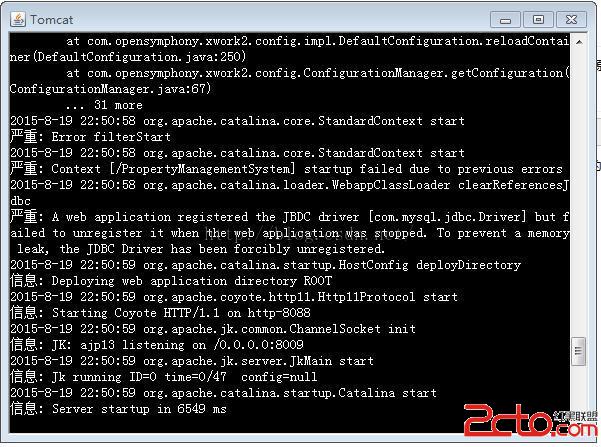
記得不要關閉這個窗體,若關閉了後面的文件下載會出錯的。
Android的布局文件代碼如下:
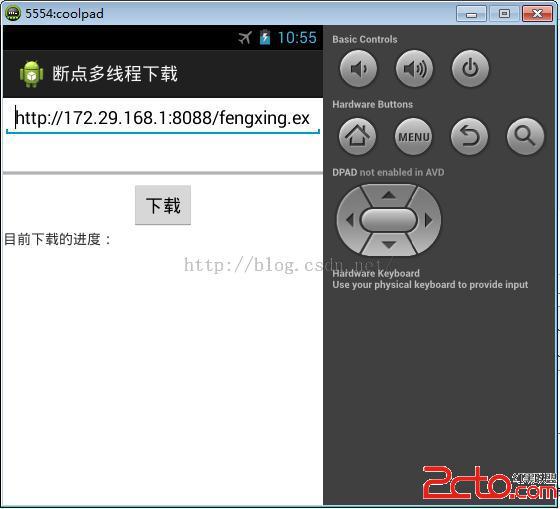
為了方便,在代碼中寫死了下載路徑。
MainActivity中的代碼如下:
package com.myself.download;

import java.io.File;
import java.io.FileInputStream;
import java.io.InputStream;
import java.io.RandomAccessFile;
import java.net.HttpURLConnection;
import java.net.URL;


import android.os.Bundle;
import android.os.Environment;
import android.os.Handler;
import android.os.Message;
import android.app.Activity;
import android.text.TextUtils;
import android.view.Menu;
import android.view.View;
import android.widget.Button;
import android.widget.EditText;
import android.widget.ProgressBar;
import android.widget.TextView;
import android.widget.Toast;

public class MainActivity extends Activity {
	protected static final int DOWN_LOAD_ERROR = 1;
	protected static final int SERVER_ERROR = 2;
	protected static final int SD_UNABLE = 3;
	public static final int DOWN_LOAD_FINISH = 4;
	public static final int UPDATE_TEXT = 5;
	public static int threadCount = 3;
    public static int runingThread =3;

    public int currentProcess=0;//當前的進度

	private EditText et_path;
	private ProgressBar pb;
	private TextView tv_show;

	private Handler handler=new Handler(){
         public void handleMessage(android.os.Message msg) {
        	 switch (msg.what) {
			case DOWN_LOAD_ERROR:
				Toast.makeText(MainActivity.this, 下載錯誤, 1).show();
				break;
			case SERVER_ERROR:
				Toast.makeText(MainActivity.this, 服務器連接錯誤, 1).show();
				break;
			case SD_UNABLE:
				Toast.makeText(MainActivity.this, SD卡不可用, 1).show();
				break;
			case DOWN_LOAD_FINISH:
				Toast.makeText(MainActivity.this, 資源下載完畢, 1).show();
				break;
			case UPDATE_TEXT:
				tv_show.setText(目前下載的進度:+pb.getProgress()*100/pb.getMax()+%);
				break;
			default:
				break;
			}
         };
	};

	@Override
	protected void onCreate(Bundle savedInstanceState) {
		super.onCreate(savedInstanceState);
		setContentView(R.layout.activity_main);
		et_path=(EditText) findViewById(R.id.et_path);
		pb=(ProgressBar) findViewById(R.id.pb);
		tv_show=(TextView) findViewById(R.id.tv_show);
	}

	public void download(View v){
		final String path=et_path.getText().toString().trim();
		if(TextUtils.isEmpty(path)){
			Toast.makeText(this, 下載路徑不能為空, 1).show();
			return ;
		}
		new Thread(){
			public void run() {
				// 1.連接服務器,獲取要下載的文件長度,並創建一個跟要下載資源大小一樣的臨時文件
				try {

					//String path = http://172.29.168.1:8088/fengxing.exe;
					URL url = new URL(path);
					HttpURLConnection conn = (HttpURLConnection) url.openConnection();
					conn.setConnectTimeout(5000);
					conn.setRequestMethod(GET);
					int code = conn.getResponseCode();
					System.out.println(code:   +code);
					if (code == 200) {
						// 服務器返回的數據的長度實際上就是文件的長度
						int length = conn.getContentLength();
						pb.setMax(length);
						//System.out.println(文件總長度: + length);
						//判斷sd卡是否可用
						if(Environment.getExternalStorageState().equals(Environment.MEDIA_MOUNTED)){
							//在客戶端創建一個與要下載的資源同樣大小的臨時文件
							RandomAccessFile raf=new RandomAccessFile(/sdcard/fengxing.exe, rwd);
							//設置文件的大小
							raf.setLength(length);
							raf.close();


							// 假設是3個線程去下載
							// 平均每一個線程下載的資源的大小
							int blockSize = length / threadCount;
							for (int threadId = 1; threadId <= threadCount; threadId++) {
								// 第一個線程開始下載的位置
								int startIndex = (threadId - 1) * blockSize;
								int endIndex = (threadId * blockSize) - 1;
								if (threadId == threadCount) {// 最後一個線程下載的資源就是剩下的資源
									endIndex = length;

								}
								System.out.println(線程+threadId+線程下載的位置: +startIndex+------->+endIndex);
								new DownlLoad(threadId, startIndex, endIndex, path).start();

							}
						}else{
							System.out.println(sd卡不可用...);
							Message msg=new Message();
							msg.what=SD_UNABLE;
							handler.sendMessage(msg);
						}

					} else {
						System.out.println(服務器連接錯誤...);
						Message msg=new Message();
						msg.what=SERVER_ERROR;
						handler.sendMessage(msg);
					}

				} catch (Exception e) {
					e.printStackTrace();
					Message msg=new Message();
					msg.what=DOWN_LOAD_ERROR;
					handler.sendMessage(msg);
				}

			};
		}.start();
	}

	/**
	 * 下載文件的子線程   每一個線程下載對應位置的文件
	 * @author Administrator
	 *
	 */
	public class DownlLoad extends Thread{
		private int threadId;
		private int startIndex;
		private int endIndex;
		private String path;

		/**
		 *
		 * @param threadId 線程Id
		 * @param startIndex  開始下載的位置
		 * @param endIndex  結束位置
		 * @param path 要下載的資源所在路徑
		 */
		public DownlLoad(int threadId, int startIndex, int endIndex, String path) {
			this.threadId = threadId;
			this.startIndex = startIndex;
			this.endIndex = endIndex;
			this.path = path;
		}

		@Override
		public void run() {
			try {
				//檢查是否存在記錄了已經下載長度的文件,若存在則讀取文件的內容
				File tempFile=new File(/sdcard/+threadId+.txt);
				if(tempFile.exists()&&tempFile.length()>0){
					FileInputStream fis=new FileInputStream(tempFile);

					byte[] temp=new byte[1024];
					int leng=fis.read(temp);
					String downloadLen=new String(temp,0,leng);
					int downloadInt=Integer.parseInt(downloadLen);

					int alreadyDownInt=downloadInt-startIndex;//已經下載的進度
					currentProcess+=alreadyDownInt;//若已經有下載的,重新設置進度

					startIndex=downloadInt;//修改下載真實的開始位置

				}


				URL url = new URL(path);
				HttpURLConnection conn = (HttpURLConnection) url.openConnection();
				conn.setConnectTimeout(5000);
				conn.setRequestMethod(GET);
				//重要:請求服務器下載部分的文件  指定下載的資源范圍
				conn.setRequestProperty(Range, bytes=+startIndex+-+endIndex);
				System.out.println(線程+threadId+線程重新開始下載的位置: +startIndex+------->+endIndex);
				int code = conn.getResponseCode();//200代表的是全部的資源     206代表的是部分資源

				//System.out.println(code:+code);
				if(code==206){
					InputStream is=conn.getInputStream();//已經設置了請求的位置  返回當前位置對應的文件的輸入流
					RandomAccessFile raf=new RandomAccessFile(/sdcard/fengxing.exe, rwd);
					raf.seek(startIndex);//定位開始位置

					int len=0;
					byte[] buff=new byte[1024];

					int total=0;//記錄已經下載的文件的長度

					while((len=is.read(buff))!=-1){
						//FileOutputStream fos=new FileOutputStream(file);
						RandomAccessFile file=new RandomAccessFile(/sdcard/+threadId+.txt,rwd);//記錄當前線程下載的長度
						raf.write(buff, 0, len);
						total+=len;
						//System.out.println(線程+threadId+   下載長度:+total);
						file.write((+(total+startIndex)).getBytes());
						file.close();
						//更新進度條
						synchronized (MainActivity.this) {
							currentProcess+=len;//獲取所有線程下載的總進度
							pb.setProgress(currentProcess);//更改進度條的進度

							Message msg=Message.obtain();//復用舊的消息
							msg.what=UPDATE_TEXT;
							handler.sendMessage(msg);
						}

					}
					is.close();
					raf.close();
					System.out.println(線程+threadId+下載完畢...);


				}else{
					System.out.println(線程+threadId+下載失敗...);
				}

				/*File deleteFile=new File(threadId+.txt);
				deleteFile.delete();*/

			} catch (Exception e) {
				e.printStackTrace();
			} finally{
				threadFinish();
			}
		}

		private synchronized void threadFinish() {
			//這部分的作用:防止某一個記錄文件在資源下載完後沒有被刪除
			runingThread--;
			if(runingThread==0){
				for(int i=1;i<=3;i++){
					File file=new File(/sdcard/+i+.txt);
					file.delete();
				}
				System.out.println(資源已經下載完畢,刪除所有的下載記錄...);
				Message msg=new Message();
				msg.what=DOWN_LOAD_FINISH;
				handler.sendMessage(msg);
			}
		}
	}

}
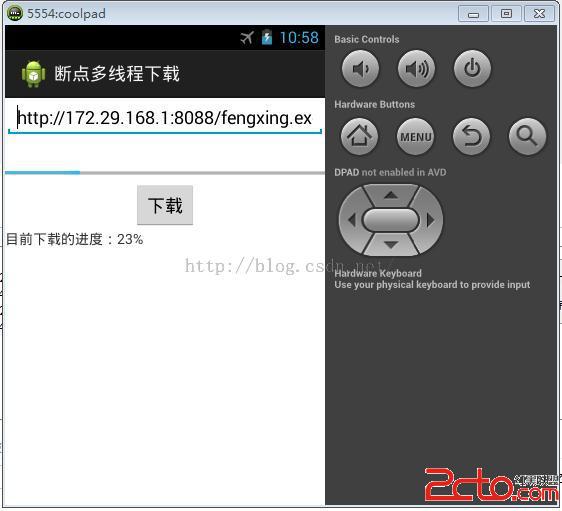
在下載的過程中,退出程序,然後在打開程序,程序會接著在原來的基礎上繼續下載。
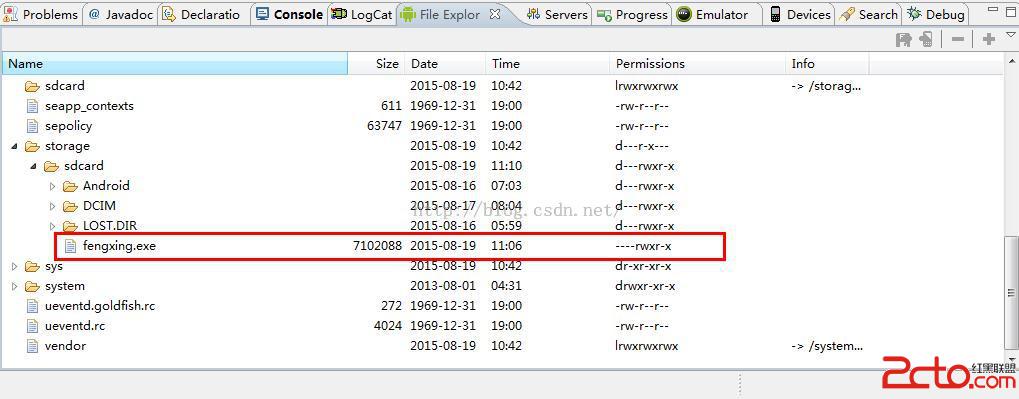
最後打開File Explor中的sdcard,就會發現下載的文件:
 Android開發UI特效
Android中UI特效 android經典開源代碼分享 本文原始網址 作者為23code,歡迎給作者投稿 其它UI相關的網址: https://github.co
 Android RecyclerView布局就這麼簡單
RecyclerView是什麼?筆者個人看法,RecyclerView只是一個對ListView的升級版,這個升級的主要目的是為了讓這個view的效率更高,並且使用更加方
 android notification完全解析
Notifications in Android 4.4 and Lower notification是很重要的部分,它與service,BroadcastReceive
 Android UI + Activity + Events
Statement:This archive is created by William Yi and it’s all the harvests which