編輯:關於Android編程
今天面試被問及了一個問題:Activity A、Activity B,Activity A 被B覆蓋的時候,Activity生命周期中哪幾個方法被調用了?Activity A、Dialog B對話框覆蓋了Activity A,Activity生命周期中哪些方法被調用了?答案等下揭曉:
我們經常使用Activity,也知道Activity的生命周期中有onCreate、onStart、onResume、onPause、onStop、onDestroy、onRestart這些方法,那麼這些方法什麼時候會被調用呢?
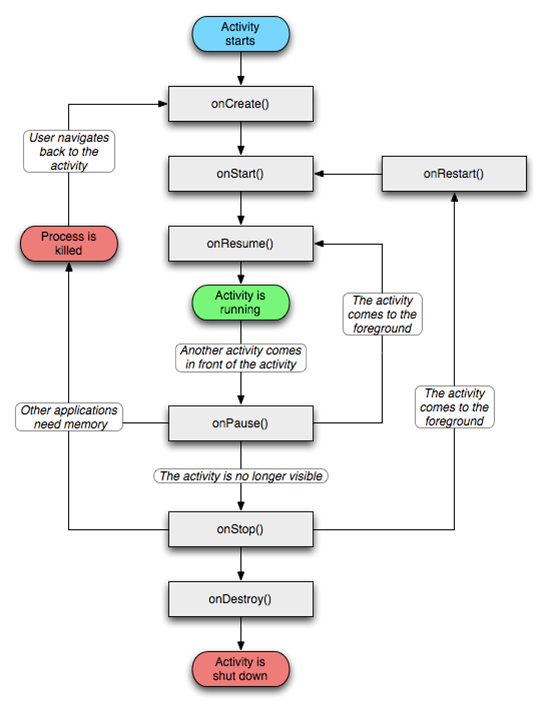
首先我們來看下面經典的生命周期圖流程圖:
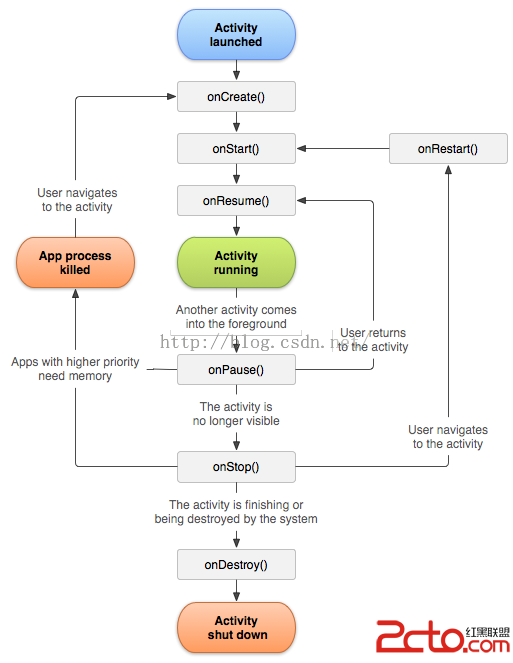
相信不少朋友看過這個流程圖,也基本了解了Activity的生命周期:
1,啟動一個Activity: 系統會調用 onCreate()--->onStart()--->onResume(),Activity進入運行狀態。
2,用戶退出當前Activity並關閉應用(如點擊返回按鈕):系統會調用 onPause()--->onStop()--->onDestroy(),
3,當前Activity被其他Activity覆蓋或點擊電源鍵:系統會調用 onPause()--->onStop();Activity進入停滯狀態
4,當前Activity跳轉到一個新的Activity界面或者點擊Home鍵:系統會調用 onPause()--->onStop();Activity進入停滯狀態
5,從上一個Activity返回到當前Activity:系統會調用 onRestart()--->onStart()--->onResume();當前Activity進入運行狀態。
6,橫豎屏切換:當前Activity 系統會調用 onPause()--->onStop()--->onDestroy(); 然後重新創建一個新的Activity:onCreate()--->onStart()--->onResume();
那麼今天面試中的問題:彈出對話框生命周期會是什麼情況呢?
7,彈出對話框(PopupWindow,Dialog):
此時系統並沒有將Activity從棧頂移除或是有另一個Activity覆蓋當前Activity的情況。所以系統並不會調用Activity中生命周期中的方法。
下面結合實例,來演示一下各個情況:
public class MainActivity extends Activity {

    private static final String TAG = MainActivity;
    private Button mBtnShowDialog;
    private Button mBtnShowPopWindow;

    @Override
    protected void onCreate(Bundle savedInstanceState) {
        super.onCreate(savedInstanceState);
        setContentView(R.layout.activity_main);

        mBtnShowDialog = (Button) findViewById(R.id.button);
        mBtnShowPopWindow = (Button) findViewById(R.id.btn_show_pop);
        mBtnShowDialog.setOnClickListener(listener);
        mBtnShowPopWindow.setOnClickListener(listener);
        Log.i(TAG, ==onCreate()==);
    }

    // 點擊事件
    View.OnClickListener listener = new View.OnClickListener() {
        @Override
        public void onClick(View v) {
            switch (v.getId()){
                case R.id.button:
                    doShowDialog();
                    break;
                case R.id.btn_show_pop:
                    doShowPopWindow(v);
                    break;
            }
        }
    };

    // 顯示對話框
    public void doShowDialog(){
        AlertDialog.Builder builder = new AlertDialog.Builder(this);
        builder.setTitle(對話框);
        builder.setMessage(對話框消息);
        builder.setPositiveButton(確定, new DialogInterface.OnClickListener() {
            @Override
            public void onClick(DialogInterface dialog, int which) {
                Intent intent = new Intent(MainActivity.this, CameraActivity.class);
                startActivity(intent);
            }
        });
        builder.show();
    }

    // 顯示彈窗
    public void doShowPopWindow(View v){
        PopupWindow window = new PopupWindow();
        View view = this.getLayoutInflater().inflate(R.layout.popup_window, null);
        window.setContentView(view);
        window.setWidth(100);
        window.setHeight(100);
        window.showAsDropDown(v);
    }

    @Override
    public void onWindowFocusChanged(boolean hasFocus) {
        super.onWindowFocusChanged(hasFocus);
        Log.i(TAG,==onWindowFocusChanged== + hasFocus);
    }

    @Override
    protected void onRestart() {
        super.onRestart();
        Log.i(TAG, ==onRestart==);
    }

    @Override
    protected void onStart() {
        super.onStart();
        Log.i(TAG, ==onStart()==);
    }

    @Override
    protected void onResume() {
        super.onResume();
        Log.i(TAG, ==onResume()==);
    }

    @Override
    protected void onPause() {
        super.onPause();
        Log.i(TAG, ==onPause()==);
    }

    @Override
    protected void onStop() {
        super.onStop();
        Log.i(TAG, ==onStop()==);
    }

    @Override
    protected void onDestroy() {
        super.onDestroy();
        Log.i(TAG, ==onDestroy()==);
    }

    // 此方法在被橫豎屏切換時會被調用,
    @Override
    protected void onRestoreInstanceState(Bundle savedInstanceState) {
        super.onRestoreInstanceState(savedInstanceState);
        Log.i(TAG,==onRestoreInstanceState==);
    }

    // 主要用來在Activity失去焦點,Activity不可顯示前保存一些狀態值,該方法在onStart方法之後在onStop方法之前被調用
    @Override
    protected void onSaveInstanceState(Bundle outState) {
        super.onSaveInstanceState(outState);
        Log.i(TAG, ==onSaveInstanceState==);
    }

    @Override
    public void onConfigurationChanged(Configuration newConfig) {
        super.onConfigurationChanged(newConfig);
        Log.i(TAG, ==onConfigurationChanged==);
    }
}
參考其他資料:我添加了onWindowFocusChanged、onSaveInstanceState、onRestoreInstanceState、onConfigurationChanged方法;
1,onWindowFocusChanged方法:Called when the current Window of the activity gains or loses focus.當窗口獲取或者失去焦點的時候會被調用。
(1)在Activity被首次被創建,窗口獲取到焦點

(2)點擊Home鍵或者點擊鍵鎖屏

(3)再次顯示應用

還有當用戶退出當前Activity,當前Activity被其他Activity覆蓋的時候同樣也會被調用。(建議屏蔽該方法,以方便後面的測試)
2,onSaveInstanceState方法:Called to retrieve per-instance state from an activity before being killed so that the state can be restored inonCreate(Bundle) or onRestoreInstanceState(Bundle) 在Activity被系統Kill前保存一些狀態值,以便在onCreate或者onRestoreInstanceState方法使用。
3,onRestoreInstanceState方法:This method is called after onStart() when the activity is being re-initialized from a previously saved state, given here in savedInstanceState.當前Activity重新被初始化的時候調用。
4,onConfigurationChanged方法:Called by the system when the device configuration changes while your component is running.當設備的配置發生改變時會被調用。
 java/android 設計模式學習筆記(14)---外觀模式
這篇博客來介紹外觀模式(Facade Pattern),外觀模式也稱為門面模式,它在開發過程中運用頻率非常高,尤其是第三方 SDK 基本很大概率都會使用外觀模式。通過一個
 Android開發系列二之窗口Activity的生命周期
在上篇文章給大家介紹了android開發系列一之用按鈕實現顯示時間,感興趣的朋友可以點擊閱讀詳情。在Activity從創建到銷毀的過程中需要在不同的階段調用7個生命周期的
 (Android 應用之路) MPAndroidChart~BarChart
簡介MPAndroidChart是PhilJay大神給Android開發者帶來的福利。MPAndroidChart是一個功能強大並且使用靈活的圖表開源庫,支持Androi
 最簡單的保留兩位小數的方法(android)
有的時候,android在展示數據的時候,需要保留兩位小數: 之前用的一個方法: 比如把米轉換為km,然後保留兩位小數顯示: float distan