編輯:關於Android編程
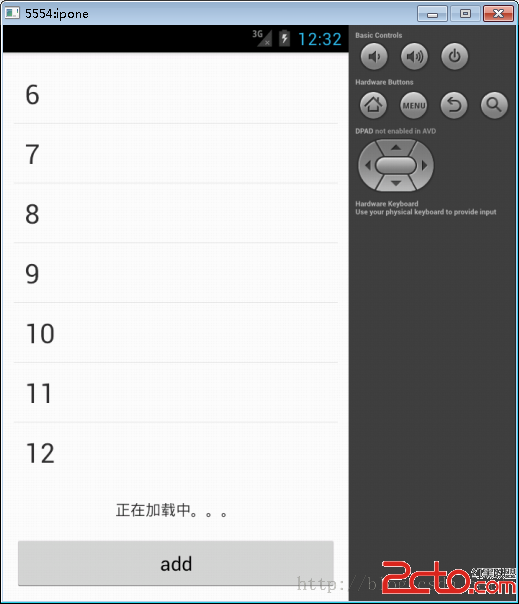
上拉刷新,即當ListView滾動到底部的時候,再繼續拉取的時候,將出現一個提示告訴你正在加載數據,稍後提示消失,新的數據出現。
在這裡,我提供一個想法:ListView自帶方法中具有添加尾部布局的方法,這樣的話,當我們監聽到拉到最後的時候,出現尾部布局並加載新的數據,等加載完後,更新ListView的中的數據,那些數據將自動把尾部布局壓在底下看不到。如此反復,便可以實現上拉加載更多的功能。
思路有了,開始思考需要怎麼一步步實現:
a)創建自定義ListView
b)為ListView添加底部布局
c)為ListView添加底部監聽
d)實現ListView滑到底部時所要執行的用戶操作
a)創建一個MyPullUpListView類,並且繼承ListView,再次同時實現其構造方法:
	public MyPullUpListView(Context context) {
		super(context);
	}

	public MyPullUpListView(Context context, AttributeSet attrs) {
		super(context, attrs);
	}
b)首先在其layout中創建一個尾部布局,例如:
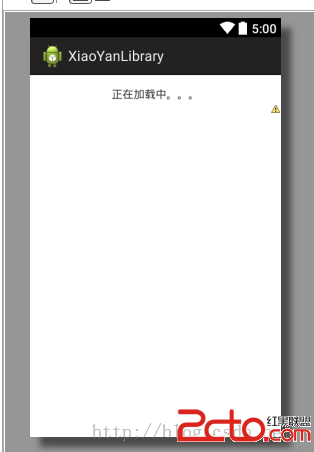
其中,在加入底部布局的代碼為:
	/**
	 * 初始化話底部頁面
	 */
	public void initBottomView() {

		if (footerView == null) {
			footerView = LayoutInflater.from(this.context).inflate(
					R.layout.listview_loadbar, null);
		}
		addFooterView(footerView);
	}
c)為ListView添加滑到監聽,便是實現OnScrollListener接口,並實現以下方法:
	public void onScrollStateChanged(AbsListView view, int scrollState) {

		//當滑動到底部時
		if (scrollState == OnScrollListener.SCROLL_STATE_IDLE
				&& firstVisibleItem != 0) {
		}
	}

	public void onScroll(AbsListView view, int firstVisibleItem,
			int visibleItemCount, int totalItemCount) {
		this.firstVisibleItem = firstVisibleItem;

		if (footerView != null) {
			//判斷可視Item是否能在當前頁面完全顯示
			if (visibleItemCount == totalItemCount) {
				// removeFooterView(footerView);
				footerView.setVisibility(View.GONE);//隱藏底部布局
			} else {
				// addFooterView(footerView);
				footerView.setVisibility(View.VISIBLE);//顯示底部布局
			}
		}

	}
d)要實現ListView滑到底部時所要執行的用戶操作,此時,則需要一個回調接口:
	/**
	 * 上拉刷新的ListView的回調監聽
	 *
	 * @author xiejinxiong
	 *
	 */
	public interface MyPullUpListViewCallBack {

		void scrollBottomState();
	}
	public void onScrollStateChanged(AbsListView view, int scrollState) {

		//當滑動到底部時
		if (scrollState == OnScrollListener.SCROLL_STATE_IDLE
				&& firstVisibleItem != 0) {
			myPullUpListViewCallBack.scrollBottomState();
		}
	}
		myListView = (MyPullUpListView) this.findViewById(R.id.mylist);
		myListView.initBottomView();
		myListView.setAdapter(listViewAdapter);
		myListView.setMyPullUpListViewCallBack(new MyPullUpListViewCallBack() {

			public void scrollBottomState() {
				// TODO Auto-generated method stub
				····
			}
		});
為方便學習者參考,以下附上完整自定義ListView代碼:
package com.xiaoyan.xiaoyanlibrary.common.widget.listview;

import android.content.Context;
import android.util.AttributeSet;
import android.view.LayoutInflater;
import android.view.View;
import android.widget.AbsListView;
import android.widget.AbsListView.OnScrollListener;
import android.widget.ListView;

import com.xiaoyan.xiaoyanlibrary.R;

/**
 * 上拉刷新ListView
 *
 * @author xiejinxiong
 *
 */
public class MyPullUpListView extends ListView implements OnScrollListener {

	/** 底部顯示正在加載的頁面 */
	private View footerView = null;
	/** 存儲上下文 */
	private Context context;
	/** 上拉刷新的ListView的回調監聽 */
	private MyPullUpListViewCallBack myPullUpListViewCallBack;
	/** 記錄第一行Item的數值 */
	private int firstVisibleItem;

	public MyPullUpListView(Context context) {
		super(context);
		this.context = context;
		initListView();
	}

	public MyPullUpListView(Context context, AttributeSet attrs) {
		super(context, attrs);
		this.context = context;
		initListView();
	}

	/**
	 * 初始化ListView
	 */
	private void initListView() {

		// 為ListView設置滑動監聽
		setOnScrollListener(this);
		// 去掉底部分割線
		setFooterDividersEnabled(false);
	}

	/**
	 * 初始化話底部頁面
	 */
	public void initBottomView() {

		if (footerView == null) {
			footerView = LayoutInflater.from(this.context).inflate(
					R.layout.listview_loadbar, null);
		}
		addFooterView(footerView);
	}

	public void onScrollStateChanged(AbsListView view, int scrollState) {

		//當滑動到底部時
		if (scrollState == OnScrollListener.SCROLL_STATE_IDLE
				&& firstVisibleItem != 0) {
			myPullUpListViewCallBack.scrollBottomState();
		}
	}

	public void onScroll(AbsListView view, int firstVisibleItem,
			int visibleItemCount, int totalItemCount) {
		this.firstVisibleItem = firstVisibleItem;

		if (footerView != null) {
			//判斷可視Item是否能在當前頁面完全顯示
			if (visibleItemCount == totalItemCount) {
				// removeFooterView(footerView);
				footerView.setVisibility(View.GONE);//隱藏底部布局
			} else {
				// addFooterView(footerView);
				footerView.setVisibility(View.VISIBLE);//顯示底部布局
			}
		}

	}

	public void setMyPullUpListViewCallBack(
			MyPullUpListViewCallBack myPullUpListViewCallBack) {
		this.myPullUpListViewCallBack = myPullUpListViewCallBack;
	}

	/**
	 * 上拉刷新的ListView的回調監聽
	 *
	 * @author xiejinxiong
	 *
	 */
	public interface MyPullUpListViewCallBack {

		void scrollBottomState();
	}
}
 Android View 事件分發機制源碼詳解(View篇)
前言在Android View 事件分發機制源碼詳解(ViewGroup篇)一文中,主要對ViewGroup#dispatchTouchEvent的源碼做了相應的解析,其
 Android開發自學路線圖
Android平台是建立在Linux基礎上,以Java語言為主的一個操作系統平台。它的開發涉及到很多方面,但其實並不復雜,上面的路線圖看似需要學習的內容很多,但其實每個小
 微信授權登陸接入第三方App(步驟總結)Android
這幾天開發要用到微信授權的功能,所以就研究了一下。可是微信開放平台接入指南裡有幾個地方寫的不清不楚。在此總結一下,以便需要的人。很多微信公眾平台的應用如果移植到app上的
 Android開發中WebView的簡單使用小結
前言WebView(網絡視圖)在Andorid中就是用來顯示網頁的,下面我們來一起看看它是如何使用的。一、基本使用1.聲明權限,WebView不可避免地要用到網絡,我們要