編輯:關於Android編程
在項目開發中,帶刪除按鈕輸入框也是人們常常用到的,該文章便介紹一下如何創建一個帶刪除輸入框。其中,需要解決的問題如下:
a)創建自定義editText類
b)在自定義editText中顯示刪除圖片
c)根據輸入框的輸入情況顯示或隱藏圖片
d)點擊刪除圖片文字消失,圖片隱藏
e)根據輸入框焦點失去和獲得狀態顯示或隱藏圖片
好了,問題明確了,開始實現功能:
a)創建一個名為MyClearEditText的class文件,並集成EditText,實現其構造方法:
	public MyClearEditText(Context context) {
		this(context, null);
		// TODO Auto-generated constructor stub
	}

	public MyClearEditText(Context context, AttributeSet attrs) {
		this(context, attrs, android.R.attr.editTextStyle);
		// TODO Auto-generated constructor stub
	}

	public MyClearEditText(Context context, AttributeSet attrs, int defStyle) {
		super(context, attrs, defStyle);
	}
ok,第一個問題解決了,進入第二步。
b)在editText中,我們若想顯示上下左右方向的圖片,有著setCompoundDrawables或setCompoundDrawablesWithIntrinsicBounds方法,具體的話,可以去百度一下其區別,在這裡,我使用的是setCompoundDrawablesWithIntrinsicBounds方法。代碼如下:
	/**
	 * 初始化清除的圖片
	 */
	private void initClearDrawable() {
		draw = getCompoundDrawables()[2];

		// 判斷清除的圖片是否為空
		if (draw == null) {
			draw = getResources().getDrawable(R.drawable.editdelete);
		}

		// 為輸入框設置圖片
		this.setCompoundDrawablesWithIntrinsicBounds(null, null, draw, null);
	}
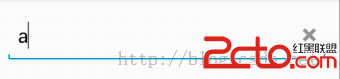
思路為:先找到editText中右邊的圖片,若為null,則為其設置默認圖片,然後再為輸入框顯示圖片,便獲得下圖效果:
c)需要獲得輸入框的情況,便要實現TextWatcher接口。
監聽:
this.addTextChangedListener(this);
	public void onTextChanged(CharSequence text, int start, int lengthBefore,
			int lengthAfter) {
		// 判斷輸入框中是否有內容
		if (text.length() > 0) {
			this.setCompoundDrawablesWithIntrinsicBounds(null, null, draw, null);
		} else {
			this.setCompoundDrawablesWithIntrinsicBounds(null, null, null, null);
		}
	}

	public void beforeTextChanged(CharSequence s, int start, int count,
			int after) {
		// TODO Auto-generated method stub

	}

	public void afterTextChanged(Editable s) {
		// TODO Auto-generated method stub

	}
	@Override
	public boolean onTouchEvent(MotionEvent event) {
		// 判斷觸碰是否結束
		if (event.getAction() == MotionEvent.ACTION_UP) {
			// 判斷所觸碰的位置是否為清除的按鈕
			if (event.getX() > (getWidth() - getTotalPaddingRight())
					&& event.getX() < (getWidth() - getPaddingRight())) {
				// 將editText裡面的內容清除
				setText();
			}
		}
		return super.onTouchEvent(event);
	}
e)既然是根據焦點的得失來判斷,當然是實現焦點監聽的方法:
	@Override
	protected void onFocusChanged(boolean focused, int direction,
			Rect previouslyFocusedRect) {
		// TODO Auto-generated method stub
		super.onFocusChanged(focused, direction, previouslyFocusedRect);
		// 判斷焦點失去和得到時的操作
		if (focused && !this.getText().toString().equals()) {
			this.setCompoundDrawablesWithIntrinsicBounds(null, null, draw, null);
		} else {
			this.setCompoundDrawablesWithIntrinsicBounds(null, null, null, null);
		}
	}
package com.xiaoyan.xiaoyanlibrary.common.widget.edittext;

import com.xiaoyan.xiaoyanlibrary.R;

import android.content.Context;
import android.graphics.Rect;
import android.graphics.drawable.Drawable;
import android.text.Editable;
import android.text.TextWatcher;
import android.util.AttributeSet;
import android.view.MotionEvent;
import android.widget.EditText;

/**
 * 自定義一個具有清除功能的editText
 *
 * @author xiejinxiong
 *
 */
public class MyClearEditText extends EditText implements TextWatcher {
	/** 儲存清除的圖片 */
	private Drawable draw;

	public MyClearEditText(Context context) {
		this(context, null);
		// TODO Auto-generated constructor stub
	}

	public MyClearEditText(Context context, AttributeSet attrs) {
		this(context, attrs, android.R.attr.editTextStyle);
		// TODO Auto-generated constructor stub
	}

	public MyClearEditText(Context context, AttributeSet attrs, int defStyle) {
		super(context, attrs, defStyle);

		initClearDrawable();
		this.addTextChangedListener(this);
	}

	@Override
	protected void onFocusChanged(boolean focused, int direction,
			Rect previouslyFocusedRect) {
		// TODO Auto-generated method stub
		super.onFocusChanged(focused, direction, previouslyFocusedRect);
		// 判斷焦點失去和得到時的操作
		if (focused && !this.getText().toString().equals()) {
			this.setCompoundDrawablesWithIntrinsicBounds(null, null, draw, null);
		} else {
			this.setCompoundDrawablesWithIntrinsicBounds(null, null, null, null);
		}
	}

	/**
	 * 初始化清除的圖片
	 */
	private void initClearDrawable() {
		draw = getCompoundDrawables()[2];

		// 判斷清除的圖片是否為空
		if (draw == null) {
			draw = getResources().getDrawable(R.drawable.editdelete);
		}

		// 將輸入框默認設置為沒有清除的按鈕
		this.setCompoundDrawablesWithIntrinsicBounds(null, null, null, null);
	}

	public void onTextChanged(CharSequence text, int start, int lengthBefore,
			int lengthAfter) {
		// 判斷輸入框中是否有內容
		if (text.length() > 0) {
			this.setCompoundDrawablesWithIntrinsicBounds(null, null, draw, null);
		} else {
			this.setCompoundDrawablesWithIntrinsicBounds(null, null, null, null);
		}
	}

	public void beforeTextChanged(CharSequence s, int start, int count,
			int after) {
		// TODO Auto-generated method stub

	}

	public void afterTextChanged(Editable s) {
		// TODO Auto-generated method stub

	}

	@Override
	public boolean onTouchEvent(MotionEvent event) {
		// 判斷觸碰是否結束
		if (event.getAction() == MotionEvent.ACTION_UP) {
			// 判斷所觸碰的位置是否為清除的按鈕
			if (event.getX() > (getWidth() - getTotalPaddingRight())
					&& event.getX() < (getWidth() - getPaddingRight())) {
				// 將editText裡面的內容清除
				setText();
			}
		}
		return super.onTouchEvent(event);
	}

}
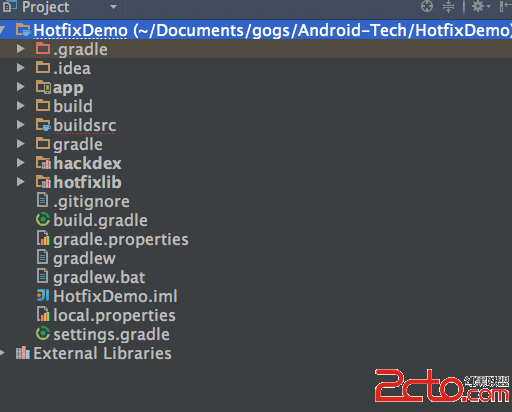 Android熱補丁動態修復實踐
前言好幾個月之前關於Android App熱補丁修復火了一把,源於QQ空間團隊的一篇文章安卓App熱補丁動態修復技術介紹,然後各大廠的開源項目都出來了,本文的實踐基於Ho
 Android入門教程之ListView的應用示例
本文實例講述了Android ListView的簡單應用。分享給大家供大家參考,具體如下:我們今天要講的內容是Android中ListView中的實現.一共分為四個步驟,
 Android側滑菜單DrawerLayout的使用
現在側滑菜單使用很多,大都是通過SlidingMenu實現。現在也可以通過DrawerLayout創建抽屜布局 activity_main.xml
 如何將Android數據庫操作通用化(一)
概述 小小說明 一別之後二地相懸 都說是三四月誰又知五六年 七弦琴無心彈八行書不可傳 九連環從中折斷十裡長亭望眼欲穿 披荊斬棘 概述 在開始考慮Android的數據庫操作