編輯:關於Android編程
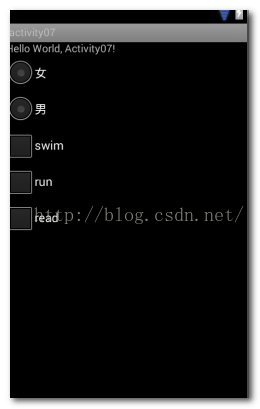
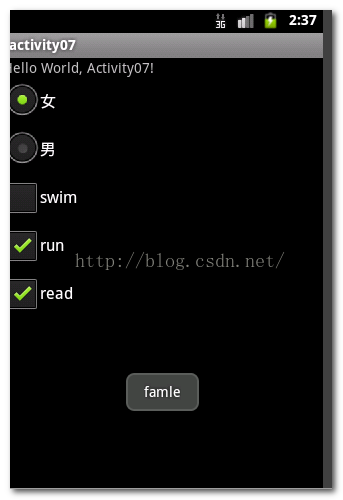
Android裡面的單選框和html中的其實是一樣的效果。這裡用到兩個控件:CheckBox和RadioGroup。直接上代碼:
radio.xml布局文件:
String.xml代碼:
RadioTest:Hello World, Activity07! activity07 男 女 swim run read
package mars.activity07;

import android.app.Activity;
import android.os.Bundle;
import android.widget.CheckBox;
import android.widget.CompoundButton;
import android.widget.RadioButton;
import android.widget.RadioGroup;
import android.widget.Toast;

public class RadioTest extends Activity {
    /** Called when the activity is first created. */
	//對控件對象進行聲明
	private RadioGroup genderGroup = null;
	private RadioButton femaleButton = null;
	private RadioButton maleButton = null;
	private CheckBox swimBox = null;
	private CheckBox runBox = null;
	private CheckBox readBox = null;
    @Override
    public void onCreate(Bundle savedInstanceState) {
        super.onCreate(savedInstanceState);
        setContentView(R.layout.radio);
        //通過控件的ID來得到代表控件的對象
        genderGroup = (RadioGroup)findViewById(R.id.genderGroup);
        femaleButton = (RadioButton)findViewById(R.id.femaleButton);
        maleButton = (RadioButton)findViewById(R.id.maleButton);
        swimBox = (CheckBox)findViewById(R.id.swim);
        runBox = (CheckBox)findViewById(R.id.run);
        readBox = (CheckBox)findViewById(R.id.read);
        //為RadioGroup設置監聽器,需要注意的是,這裡的監聽器和Button控件的監聽器有所不同
        genderGroup.setOnCheckedChangeListener(new RadioGroup.OnCheckedChangeListener() {

			@Override
			public void onCheckedChanged(RadioGroup group, int checkedId) {
				// TODO Auto-generated method stub
				if(femaleButton.getId() == checkedId){
					System.out.println("famale");
					Toast.makeText(RadioTest.this, "famle", Toast.LENGTH_SHORT).show();
				}
				else if(maleButton.getId() == checkedId)
				{
					System.out.println("male");
					Toast.makeText(RadioTest.this, "male", Toast.LENGTH_SHORT).show();
				}
			}
		});

        //為多選按鈕添加監聽器
        swimBox.setOnCheckedChangeListener(new CompoundButton.OnCheckedChangeListener() {

			@Override
			public void onCheckedChanged(CompoundButton buttonView, boolean isChecked) {
				// TODO Auto-generated method stub
				if(isChecked)//未選中到選中狀態是執行這裡:
				{
					System.out.println("swim is checked");
				}
				else//由選中狀態到未選中狀態時候執行這裡:
				{
					System.out.println("swim is unchecked");
				}
			}
		});
        runBox.setOnCheckedChangeListener(new CompoundButton.OnCheckedChangeListener() {

			@Override
			public void onCheckedChanged(CompoundButton buttonView, boolean isChecked) {
				// TODO Auto-generated method stub
				if(isChecked)
				{
					System.out.println("run is checked");
				}
				else
				{
					System.out.println("run is unchecked");
				}
			}
		});
        readBox.setOnCheckedChangeListener(new CompoundButton.OnCheckedChangeListener() {

			@Override
			public void onCheckedChanged(CompoundButton buttonView, boolean isChecked) {
				// TODO Auto-generated method stub
				if(isChecked)
				{
					System.out.println("read is checked");
				}
				else
				{
					System.out.println("read is unchecked");
				}
			}
		});
    }

}
注冊文件進行注冊:
 Android之開源類庫Pinyin4j的使用----搜索聯系人
Pinyin4j只能算是Java開源類庫,但是在Android的應用開發中也經常被用到。大家都用過手機的通訊錄,通訊錄的搜索聯系人的功能,用pinyin4j就可以實現。下
 Android 最火快速開發框架androidannotation簡介
1.目標 androidannotation框架要促進Android應用程序的編寫和維護。相信簡單的代碼有明確的意圖是實現這些目
 Android實現有視差效果的ListView
視差效果是什麼?所謂的視差效果在Web設計和移動應用中都非常常見,我們在一些主要的平台都可以發現它的身影,從Windows Phone到iOS乃至Android。按照維基
 兩行代碼搞定Android視圖擴散切換效果
兩行代碼,用最簡單的方式來實現Android視圖擴散切換效果。一、概述這兩天時間動手撸了個視圖擴散切換效果的控制器,API兼容至Android4.0,更方便我們在視圖切