編輯:關於Android編程
下面以我拍攝的圖片為例,看下三者的大小區別(所用軟件為自己臨時開發的小工具);
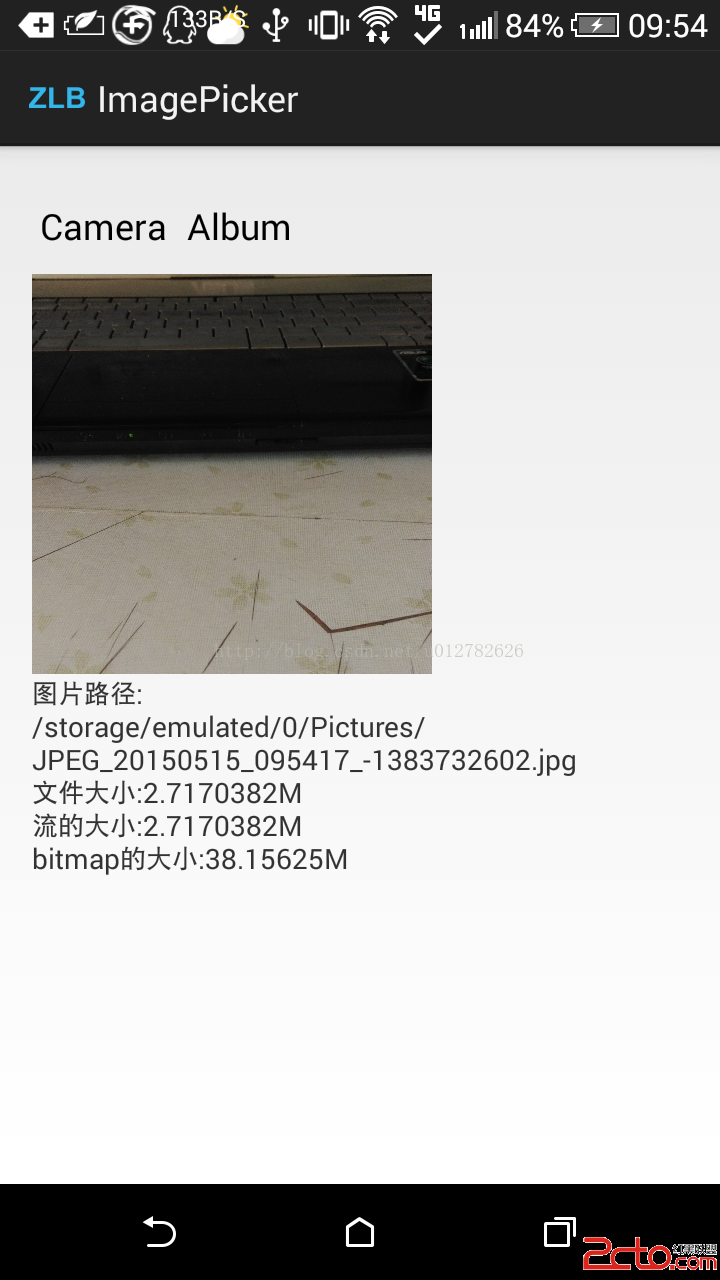
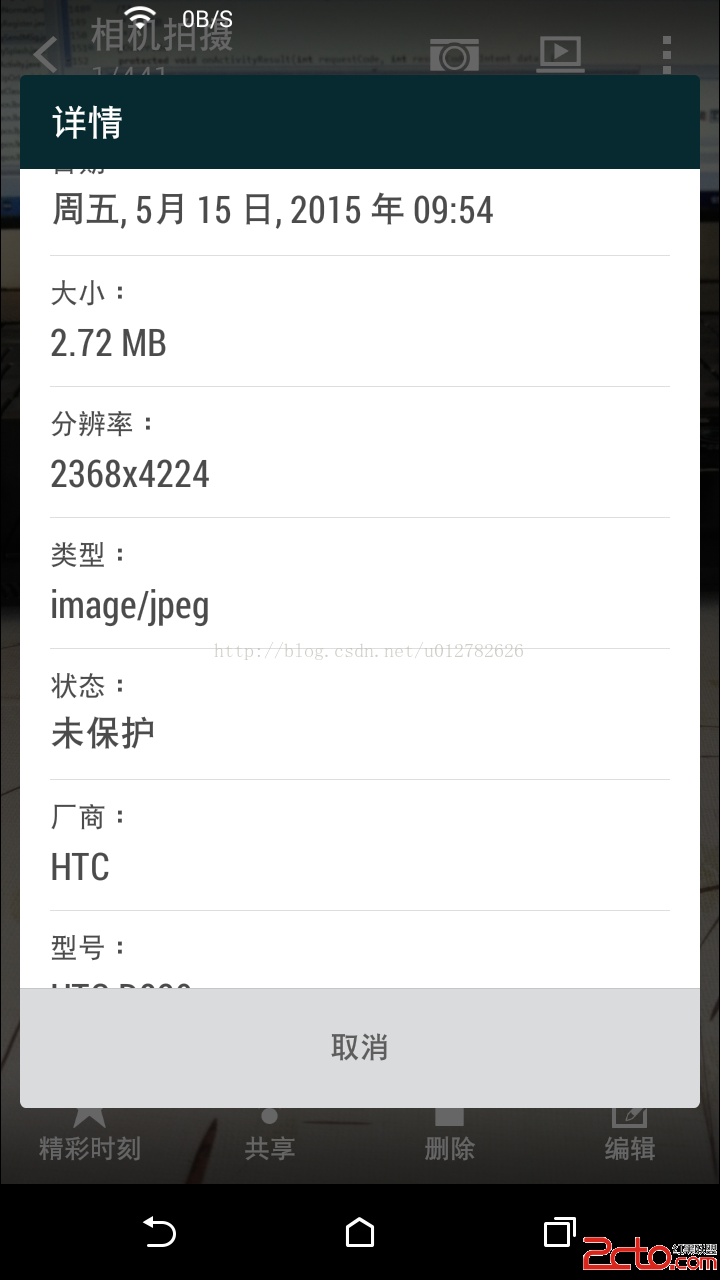
從圖中可以看出:
1、拍攝完的照片文件大小和讀取到內存中的文件流大小是一樣的,說明文件形式和流的形式對圖片體積大小並沒有影響。
2、當圖片以Bitmap形式存在時,占用的內存就大的多了,為什麼 呢,首先我們需要知道Bitmap大小計算的方式
bitmap大小=圖片長度(px)*圖片寬度(px)*單位像素占用的字節數
單位像素所占字節數又是什麼鬼,說白了就是圖片的色彩模式。
在BitmapFactory.Options.inPreferredConfig這裡可以找到,一共有4種, ARGB代表:A 透明度 , R 紅色, G 綠色, B 藍色
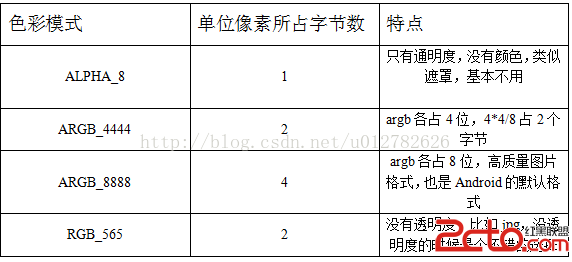
上面的bitmap在內存中的大小就可以計算了(默認色彩模式為ARGB_8888),
2368*4224*4/1024/1024=38.15625
看到bitmap占用這麼大,所以用完調用Bitmap.recycle()是個好習慣(推薦),不調用也沒關系,因為GC進程會自動回收。
問:我們從本地對圖片操作的目的。是
答:上傳(比如設置頭像,發表圖片)。
上傳的基本步驟
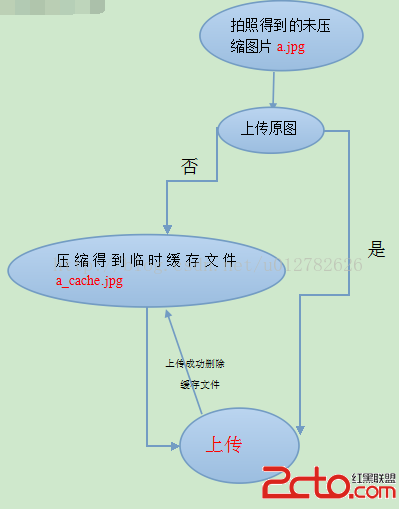
那麼問題來了
問:我們為什麼要壓縮圖片呢
答:目的無非就2個,一,避免占用內存過多。二,可能要上傳圖片,如果圖片太大,浪費流量。(有時候需要上傳原圖除外)
1、避免內存過多的壓縮方法:
歸根結底,圖片是要顯示在界面組件上的,所以還是要用到bitmap,從上面可得出Bitmap的在內存中的大小只和圖片尺寸和色彩模式有關,那麼要想改變Bitmap在內存中的大小,要麼改變尺寸,要麼改變色彩模式。
2、避免上傳浪費流量的壓縮方法:
改變圖片尺寸,改變色彩模式,改變圖片質量都行。正常情況下,先改變圖片尺寸和色彩模式,再改變圖片質量。
改變圖片質量的壓縮方法:
/**
	 *
	 * 根據bitmap壓縮圖片質量
	 * @param bitmap 未壓縮的bitmap
	 * @return 壓縮後的bitmap
	 */
	public static Bitmap cQuality(Bitmap bitmap){
		ByteArrayOutputStream bOut = new ByteArrayOutputStream();
		int beginRate = 100;
		//第一個參數 :圖片格式 ,第二個參數: 圖片質量,100為最高,0為最差  ,第三個參數:保存壓縮後的數據的流
		bitmap.compress(Bitmap.CompressFormat.JPEG, 100, bOut);
		while(bOut.size()/1024/1024>100){  //如果壓縮後大於100Kb,則提高壓縮率,重新壓縮
			beginRate -=10;
			bOut.reset();
			bitmap.compress(Bitmap.CompressFormat.JPEG, beginRate, bOut);
		}
		ByteArrayInputStream bInt = new ByteArrayInputStream(bOut.toByteArray());
		Bitmap newBitmap = BitmapFactory.decodeStream(bInt);
		if(newBitmap!=null){
			return newBitmap;
		}else{
			return bitmap;
		}
	}
改變圖片大小的壓縮算法:
public static boolean getCacheImage(String filePath,String cachePath){
		OutputStream out = null;
		BitmapFactory.Options option = new BitmapFactory.Options();
		option.inJustDecodeBounds = true;  //設置為true,只讀尺寸信息,不加載像素信息到內存
		Bitmap bitmap = BitmapFactory.decodeFile(filePath, option);  //此時bitmap為空
		option.inJustDecodeBounds = false;
		int bWidth = option.outWidth;
		int bHeight= option.outHeight;
		int toWidth = 400;
		int toHeight = 800;
		int be = 1;  //be = 1代表不縮放
		if(bWidth/toWidth>bHeight/toHeight&&bWidth>toWidth){
			be = (int)bWidth/toWidth;
		}else if(bWidth/toWidthtoHeight){
			be = (int)bHeight/toHeight;
		}
		option.inSampleSize = be; //設置縮放比例
		bitmap  = BitmapFactory.decodeFile(filePath, option);
		try {
			out = new FileOutputStream(new File(cachePath));
		} catch (IOException e) {
			// TODO Auto-generated catch block
			e.printStackTrace();
		}
		return bitmap.compress(CompressFormat.JPEG, 100, out);
	}
正常情況下我們應該把兩者相結合的,所以有了下面的算法(在項目中直接用,清晰度在手機上沒問題)
public static File scal(Uri fileUri){
		String path = fileUri.getPath();
		File outputFile = new File(path);
		long fileSize = outputFile.length();
		final long fileMaxSize = 200 * 1024;
		 if (fileSize >= fileMaxSize) {
	            BitmapFactory.Options options = new BitmapFactory.Options();
	            options.inJustDecodeBounds = true;
	            BitmapFactory.decodeFile(path, options);
	            int height = options.outHeight;
	            int width = options.outWidth;

	            double scale = Math.sqrt((float) fileSize / fileMaxSize);
	            options.outHeight = (int) (height / scale);
	            options.outWidth = (int) (width / scale);
	            options.inSampleSize = (int) (scale + 0.5);
	            options.inJustDecodeBounds = false;

	            Bitmap bitmap = BitmapFactory.decodeFile(path, options);
	            outputFile = new File(PhotoUtil.createImageFile().getPath());
	            FileOutputStream fos = null;
				try {
					fos = new FileOutputStream(outputFile);
					bitmap.compress(Bitmap.CompressFormat.JPEG, 50, fos);
					fos.close();
				} catch (IOException e) {
					// TODO Auto-generated catch block
					e.printStackTrace();
				}
	            Log.d(, sss ok  + outputFile.length());
	            if (!bitmap.isRecycled()) {
	                bitmap.recycle();
	            }else{
	            	File tempFile = outputFile;
	            	outputFile = new File(PhotoUtil.createImageFile().getPath());
	                PhotoUtil.copyFileUsingFileChannels(tempFile, outputFile);
	            }

	        }
		 return outputFile;

	}
上面算法中用到的兩個方法:
public static Uri createImageFile(){
	    // Create an image file name
	    String timeStamp = new SimpleDateFormat(yyyyMMdd_HHmmss).format(new Date());
	    String imageFileName = JPEG_ + timeStamp + _;
	    File storageDir = Environment.getExternalStoragePublicDirectory(
	            Environment.DIRECTORY_PICTURES);
	    File image = null;
		try {
			image = File.createTempFile(
			    imageFileName,  /* prefix */
			    .jpg,         /* suffix */
			    storageDir      /* directory */
			);
		} catch (IOException e) {
			// TODO Auto-generated catch block
			e.printStackTrace();
		}

	    // Save a file: path for use with ACTION_VIEW intents
	    return Uri.fromFile(image);
	}
	public static void copyFileUsingFileChannels(File source, File dest){
        FileChannel inputChannel = null;
        FileChannel outputChannel = null;
        try {
            try {
				inputChannel = new FileInputStream(source).getChannel();
				outputChannel = new FileOutputStream(dest).getChannel();
				outputChannel.transferFrom(inputChannel, 0, inputChannel.size());
			} catch (IOException e) {
				// TODO Auto-generated catch block
				e.printStackTrace();
			}
        } finally {
            try {
				inputChannel.close();
				outputChannel.close();
			} catch (IOException e) {
				// TODO Auto-generated catch block
				e.printStackTrace();
			}
        }
    }
最好的算法參考了coding客戶端上傳照片的操作算法,並簡化了操作,已經實際測試,沒有問題。
最後會上傳臨時根據這個算法做的從相冊和相機選取照片的小demo,功能完整。
 Android滑動優化高仿QQ6.0側滑菜單(滑動優化)
推薦閱讀:Android使用ViewDragHelper實現仿QQ6.0側滑界面(一)但是之前的實現,只是簡單的可以顯示和隱藏左側的菜單,但是特別生硬,而且沒
 Android ViewDragHelper完全解析 自定義ViewGroup神器
一、概述在自定義ViewGroup中,很多效果都包含用戶手指去拖動其內部的某個View(eg:側滑菜單等),針對具體的需要去寫好onInterceptTouchEvent
 Android通過startService實現文件批量下載
關於startService的基本使用概述及其生命周期可參見《Android中startService基本使用方法概述》。本文通過批量下載文件的簡單示例,演示startS
 魅族mx6跑分多少 魅族mx6性能跑分評測
相信一些有關注魅族的用戶都知道魅族即將要發布一款新機為魅族mx6,那麼魅族mx6這款新機怎麼樣?魅族mx6跑分多少呢?下文帶來魅族mx6性能跑分評測,一起和