編輯:關於Android編程
通知的主要功能是提示功能。例如:短信、推送信息等等。
大體使用步驟:
1.獲取狀態通知欄管理
NotificationManager 是一個系統Service,所以必須通過 getSystemService(NOTIFICATION_SERVICE)方法來獲取。
notificationManager = (NotificationManager) this
				.getSystemService(NOTIFICATION_SERVICE);
2.實例化通知欄構造器NotificationCompat.Builder
3.設置NotificationCompat.Builder
4.設置PendingIntent
5.顯示
方法或參數介紹:
1.PendingIntent
PendingIntent.getBroadcast(context, requestCode, intent, flags)
PendingIntent.getActivities(context, requestCode, intents, flags)
PendingIntent.getService(context, requestCode, intent, flags)
中的flags屬性參數:
FLAG_ONE_SHOT 表示返回的PendingIntent僅能執行一次,執行完後自動取消
FLAG_NO_CREATE 表示如果描述的PendingIntent不存在,並不創建相應的PendingIntent,而是返回NULL
FLAG_CANCEL_CURRENT 表示相應的PendingIntent已經存在,則取消前者,然後創建新的PendingIntent
FLAG_UPDATE_CURRENT 表示更新的PendingIntent
2.notification.flags參數介紹
Notification.FLAG_SHOW_LIGHTS //三色燈提醒,在使用三色燈提醒時候必須加該標志符
Notification.FLAG_ONGOING_EVENT //發起正在運行事件(活動中)
Notification.FLAG_INSISTENT //讓聲音、振動無限循環,直到用戶響應 (取消或者打開)
Notification.FLAG_ONLY_ALERT_ONCE //發起Notification後,鈴聲和震動均只執行一次
Notification.FLAG_AUTO_CANCEL //用戶單擊通知後自動消失
Notification.FLAG_NO_CLEAR //只有全部清除時,Notification才會清除 ,不清楚該通知(QQ的通知無法清除,就是用的這個)
Notification.FLAG_FOREGROUND_SERVICE //表示正在運行的服務
使用方法:
在設置完屬性後,設置
Notification notification =builder.build();
notification.flags =Notification.FLAG_ONLY_ALERT_ONCE;
3.setVibrate(long[] pattern)
設置震動,需要權限.
4.builder.setOngoing( )
設置為ture,表示它為一個正在進行的通知。簡單的說,當為ture時,不可以被側滑消失。
***************************************************************************************
使用自定義Notification,就要使用RemoteViews。
***************************************************************************************
使用實例:
圖片:
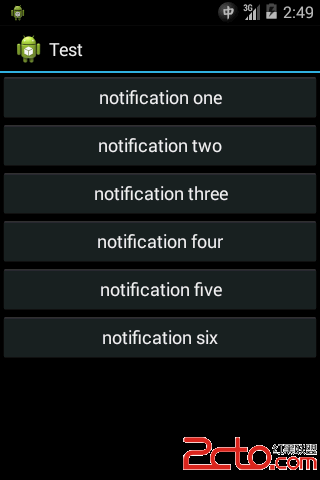
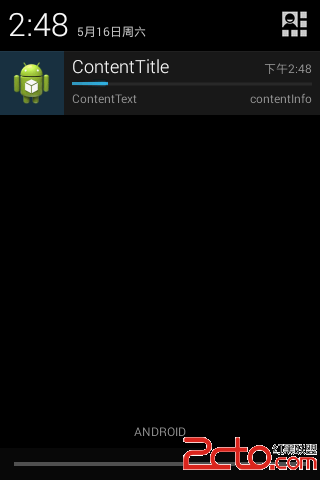
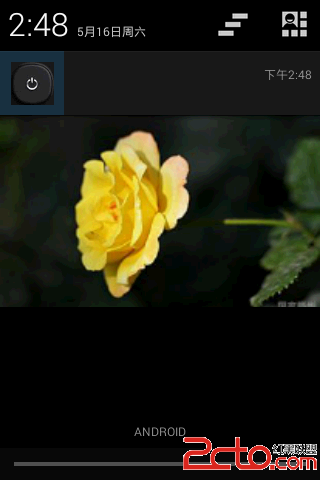
實現代碼:
MainActivity.java
public class MainActivity extends Activity {

	Button button, button2;
	NotificationManager notificationManager;
	public final static String NEWS_LISTEN = "broadcast";

	// 用於自定義Notification,點擊事件的驗證
	String remoteViewsText = "未點擊";

	@Override
	public void onCreate(Bundle savedInstanceState) {

		super.onCreate(savedInstanceState);
		setContentView(R.layout.activity_main);

		notificationManager = (NotificationManager) this
				.getSystemService(NOTIFICATION_SERVICE);

		IntentFilter filter = new IntentFilter();
		filter.addAction(NEWS_LISTEN);
		this.registerReceiver(broadcastReceiver, filter);

	}

	public void click(View v) {

		switch (v.getId()) {
		case R.id.but:// 使用普通的Notification

			Notification.Builder builder = new Notification.Builder(
					MainActivity.this);

			Intent intent = new Intent(MainActivity.this, SecondActivity.class);
			PendingIntent pendingIntent = PendingIntent.getActivity(
					MainActivity.this, 0, intent,
					PendingIntent.FLAG_UPDATE_CURRENT);

			builder.setContentIntent(pendingIntent);
			builder.setSmallIcon(R.drawable.close);// 設置圖標
			builder.setWhen(System.currentTimeMillis());// 設置通知來到的時間
			// builder.setAutoCancel(true);
			builder.setContentTitle("標題");// 設置通知的標題
			builder.setContentText("內容");// 設置通知的內容
			builder.setTicker("狀態欄上顯示");// 狀態欄上顯示
			builder.setOngoing(true);

			/*
			 * // 設置聲音(手機中的音頻文件) String path =
			 * Environment.getExternalStorageDirectory() .getAbsolutePath() +
			 * "/Music/a.mp3"; File file = new File(path);
			 * builder.setSound(Uri.fromFile(file));
			 */

			// 獲取Android多媒體庫內的鈴聲
			builder.setSound(Uri.withAppendedPath(
					Audio.Media.INTERNAL_CONTENT_URI, "5"));

			// builder.setVibrate(new long[]{2000,1000,4000}); //需要真機測試
			Notification notification = builder.build();
			// notification.flags =Notification.FLAG_ONGOING_EVENT;

			notificationManager.notify(0, notification);

			break;

		case R.id.but2:// 使用自定義的Notification
			// 3.0之前不支持Button
			MyNotification();

			break;

		case R.id.but3:// 使用下載的Notification,在4.0以後才能使用

			final Notification.Builder builder3 = new Notification.Builder(
					MainActivity.this);
			builder3.setSmallIcon(R.drawable.ic_launcher)
					.setTicker("showProgressBar").setContentInfo("contentInfo")
					.setOngoing(true).setContentTitle("ContentTitle")
					.setContentText("ContentText");
			// 模擬下載過程
			new Thread(new Runnable() {
				@Override
				public void run() {

					int progress = 0;

					for (progress = 0; progress < 100; progress += 5) {
						// 將setProgress的第三個參數設為true即可顯示為無明確進度的進度條樣式
						builder3.setProgress(100, progress, false);

						notificationManager.notify(0, builder3.build());
						try {
							Thread.sleep(1 * 1000);
						} catch (InterruptedException e) {
							System.out.println("sleep failure");
						}
					}
					builder3.setContentTitle("Download complete")
							.setProgress(0, 0, false).setOngoing(false);
					notificationManager.notify(0, builder3.build());

				}
			}).start();

			break;
		case R.id.but4:// 大布局通知在4.1以後才能使用,BigTextStyle

			Notification.BigTextStyle textStyle = new Notification.BigTextStyle();
			textStyle.setBigContentTitle("大標題")
					// 標題
					.setSummaryText("SummaryText")
					.bigText(
							"Big Text!!!!!!!!!!!!!!!!!!!!!!!!!!!!"
									+ "!!!!!!!!!!!"
									+ "!!!!!!!!!!!!!!!!!!!!!!!!!!!!!!!!!!!!");// 內容
			Notification.Builder builder2 = new Notification.Builder(
					MainActivity.this);
			builder2.setSmallIcon(R.drawable.icon);// 小圖標
			// 大圖標
			builder2.setLargeIcon(BitmapFactory.decodeResource(
					this.getResources(), R.drawable.close));
			builder2.setTicker("showBigView_Text")
					.setContentInfo("contentInfo");
			builder2.setStyle(textStyle);
			builder2.setAutoCancel(true);

			notificationManager.notify(0, builder2.build());

			break;

		case R.id.but5://大布局通知在4.1以後才能使用,大布局圖片

			Notification.BigPictureStyle bigPictureStyle = new Notification.BigPictureStyle();
			bigPictureStyle.bigPicture(BitmapFactory.decodeResource(getResources(), R.drawable.back));

			Notification.Builder builder4 = new Notification.Builder(
					MainActivity.this);
			builder4.setSmallIcon(R.drawable.icon);// 小圖標
			// 大圖標
			builder4.setLargeIcon(BitmapFactory.decodeResource(
					this.getResources(), R.drawable.close));
			builder4.setTicker("showBigView_Picture")
					.setContentInfo("contentInfo");
			builder4.setStyle(bigPictureStyle);
			builder4.setAutoCancel(true);

			notificationManager.notify(0, builder4.build());

			break;

		case R.id.but6://大布局通知在4.1以後才能使用,InboxStyle

			Notification.InboxStyle inboxStyle = new Notification.InboxStyle();
			inboxStyle.setBigContentTitle("InboxStyle");
			inboxStyle.setSummaryText("Test");
			for(int i =0 ;i<5;i++){
				inboxStyle.addLine("new:"+i);
			}

			Notification.Builder builder5 = new Notification.Builder(
					MainActivity.this);
			builder5.setSmallIcon(R.drawable.icon);// 小圖標
			// 大圖標
			builder5.setLargeIcon(BitmapFactory.decodeResource(
					this.getResources(), R.drawable.close));
			builder5.setTicker("showBigView_InboxStyle")
					.setContentInfo("contentInfo");
			builder5.setStyle(inboxStyle);
			builder5.setAutoCancel(true);

			notificationManager.notify(0, builder5.build());


			break;

		}

	}

	@Override
	protected void onDestroy() {
		super.onDestroy();
		// 取消廣播接收
		this.unregisterReceiver(broadcastReceiver);
	}

	/**
	 * 自定義Notification
	 */
	public void MyNotification() {

		RemoteViews remoteViews = new RemoteViews(getPackageName(),
				R.layout.form);
		remoteViews.setTextViewText(R.id.tv_form, remoteViewsText);

		Intent intent2 = new Intent(MainActivity.NEWS_LISTEN);

		// 使用廣播,所以INTENT必須用getBroadcast方法
		PendingIntent pendingIntent2 = PendingIntent.getBroadcast(
				MainActivity.this, 1, intent2,
				PendingIntent.FLAG_UPDATE_CURRENT);

		// 綁定
		remoteViews.setOnClickPendingIntent(R.id.but_form, pendingIntent2);

		Notification.Builder builderMain = new Notification.Builder(
				MainActivity.this);

		builderMain
				.setContent(remoteViews)
				.setSmallIcon(R.drawable.icon)
				.setLargeIcon(
						BitmapFactory.decodeResource(this.getResources(),
								R.drawable.open)).setOngoing(true)
				.setTicker("music is playing");
		notificationManager.notify(0, builderMain.build());
	}

	// 廣播接收器(自定義Notification使用到)
	BroadcastReceiver broadcastReceiver = new BroadcastReceiver() {

		@Override
		public void onReceive(Context c, Intent intent) {

			if (intent.getAction().equals(NEWS_LISTEN)) {

				remoteViewsText = "已點擊";
				MyNotification();

			}
		}
	};
}
activity_main.xml
form.xml(自定義通知的樣式)
SecondActivity.java 只是一個activity。
 Android學習筆記(十二)——使用意圖傳遞數據的幾種方式
使用意圖傳遞數據的幾種方式 點此獲取完整代碼 我們除了要從活動返回數據,也常常要傳遞數據給活動。對此我們可以使用Intent對象將這些數據傳遞給目標活動。
 Android 高仿微信語音聊天頁面高斯模糊(毛玻璃效果)
目前的應用市場上,使用毛玻璃效果的APP隨處可見,比如用過微信語音聊天的人可以發現,語音聊天頁面就使用了高斯模糊效果。先看下效果圖: 仔細觀察上圖,我們可以發現
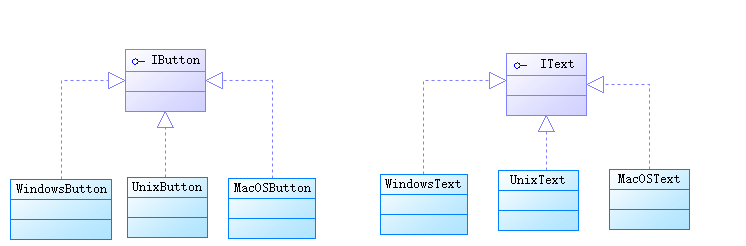 java/android 設計模式學習筆記(4)---抽象工廠模式
再來介紹一下抽象工廠模式(Abstact Factory Pattern),也是創建型模式之一。抽象工廠模式和工廠方法模式稍有區別。工廠方法模式中工廠類生產出來的產品都是
 Android自定義賬戶類型和同步適配器模式 Custom Account Type & SyncAdapter
自定義賬戶類型 Custom Account Type當有多個APP共用一個賬號系統的時候,在用戶的Android設備上創建一個自定義賬戶用以處理登錄認證會方便很多,比如