編輯:關於Android編程
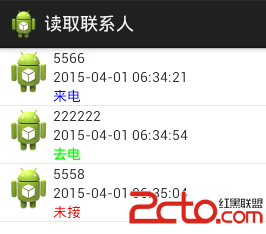
上一篇博客講的是獲取聯系人信息,這篇是獲取通話記錄
package cn.zxw.contact.domain;

/**
 * 通話記錄
 * @author zhan
 *
 */
public class CallLogInfo {
	public String number;
	public long date;
	public int type;
	public CallLogInfo(String number, long date, int type) {
		super();
		this.number = number;
		this.date = date;
		this.type = type;
	}
	public CallLogInfo() {
		super();
	}


}
獲取通話記錄
/** * 獲取所有的通話記錄 * * @param context * @return */ public Listactivity中代碼getCallLog(Context context) { List infos = new ArrayList (); ContentResolver cr = context.getContentResolver(); Uri uri = Calls.CONTENT_URI; String[] projection = new String[] { Calls.NUMBER, Calls.DATE, Calls.TYPE }; Cursor cursor = cr.query(uri, projection, null, null, null); while (cursor.moveToNext()) { String number = cursor.getString(0); long date = cursor.getLong(1); int type = cursor.getInt(2); infos.add(new CallLogInfo(number, date, type)); } cursor.close(); return infos; }
package cn.zxw.contact;

import java.text.SimpleDateFormat;
import java.util.List;

import cn.zxw.contact.domain.CallLogInfo;
import cn.zxw.contact.utils.ContactsMsgUtils;

import android.app.Activity;
import android.app.AlertDialog;
import android.content.Context;
import android.content.DialogInterface;
import android.content.DialogInterface.OnClickListener;
import android.content.Intent;
import android.graphics.Color;
import android.net.Uri;
import android.os.Bundle;
import android.provider.CallLog.Calls;
import android.view.LayoutInflater;
import android.view.View;
import android.view.ViewGroup;
import android.widget.AdapterView;
import android.widget.AdapterView.OnItemLongClickListener;
import android.widget.BaseAdapter;
import android.widget.ListView;
import android.widget.TextView;
/**
 * 獲取通話記錄
 * 根據電話類型分為 來電、去電、未接三種類型,顯示三種不同顏色標記
 * 長按號碼,彈出對話框選擇:復制號碼到撥號盤, 撥號, 發送短信
 * @author zhan
 *
 */

public class CallLogActivity extends Activity {
	private ListView lv;
	private MyAdapter adapter;

	@Override
	protected void onCreate(Bundle savedInstanceState) {
		super.onCreate(savedInstanceState);
		setContentView(R.layout.activity_contacts_msg_calllog);
		lv = (ListView) findViewById(R.id.lv);
		ContactsMsgUtils contactsMsgUtils = new ContactsMsgUtils();
		List infos = contactsMsgUtils.getCallLog(this);
		adapter = new MyAdapter(infos);
		lv.setAdapter(adapter);
		lv.setOnItemLongClickListener(new OnItemLongClickListener() {

			@Override
			public boolean onItemLongClick(AdapterView arg0, View arg1,
					int arg2, long arg3) {

				CallLogInfo info = (CallLogInfo) adapter.getItem(arg2);
				final String number = info.number;
				String[] items = new String[] { 復制號碼到撥號盤, 撥號, 發送短信 };
				new AlertDialog.Builder(CallLogActivity.this).setTitle(操作)
						.setItems(items, new OnClickListener() {

							@Override
							public void onClick(DialogInterface dialog,
									int which) {
								switch (which) {
								case 0:
									// 復制號碼到撥號盤
									startActivity(new Intent(
											Intent.ACTION_DIAL, Uri
													.parse(tel: + number)));
									break;
								case 1:
									// 撥號 權限
									startActivity(new Intent(
											Intent.ACTION_CALL, Uri
													.parse(tel: + number)));
									break;
								case 2:
									// 發送短信
									startActivity(new Intent(
											Intent.ACTION_SENDTO, Uri
													.parse(sms: + number)));
									break;

								default:
									break;
								}

							}
						}).show();

				return false;
			}
		});

	}

	// 創建baseadapter

	private class MyAdapter extends BaseAdapter {
		private List infos;
		private LayoutInflater inflater;

		public MyAdapter(List infos) {
			super();
			this.infos = infos;
			inflater = (LayoutInflater) getSystemService(Context.LAYOUT_INFLATER_SERVICE);
		}

		@Override
		public int getCount() {
			// TODO Auto-generated method stub
			return infos.size();
		}

		@Override
		public Object getItem(int position) {

			return infos.get(position);
		}

		@Override
		public long getItemId(int position) {

			return 0;
		}

		@Override
		public View getView(int position, View convertView, ViewGroup parent) {
			View view = inflater.inflate(R.layout.call_log_item, null);
			TextView tv_number = (TextView) view.findViewById(R.id.tv_number);
			TextView tv_date = (TextView) view.findViewById(R.id.tv_date);
			TextView tv_type = (TextView) view.findViewById(R.id.tv_type);
			// 新建一個對象
			CallLogInfo info = infos.get(position);
			tv_number.setText(info.number);
			// 格式時間
			SimpleDateFormat format = new SimpleDateFormat(
					yyyy-MM-dd hh:mm:ss);
			String dateStr = format.format(info.date);
			tv_date.setText(dateStr);
			String typeStr = null;
			int color = 0;
			switch (info.type) {
			case Calls.INCOMING_TYPE:
				typeStr = 來電;
				color = Color.BLUE;

				break;
			case Calls.OUTGOING_TYPE:
				typeStr = 去電;
				color = Color.GREEN;

				break;
			case Calls.MISSED_TYPE:
				typeStr = 未接;
				color = Color.RED;

				break;

			default:
				break;
			}
			tv_type.setText(typeStr);
			tv_type.setTextColor(color);
			return view;
		}

	}
}
 android的RecyclerView實現拖拽排序和側滑刪除示例
在平時開發應用的時候,經常會遇到列表排序、滑動刪除的需求。如果列表效果采用的是 ListView 的話,需要經過自定義 View 才能實現效果;但是如果采用的是 Recy
 Android 組件Service(一)之startService()、bindService()
1.服務Service簡介服務(service)是Android中實現程序後台運行的程序,非常適合去執行那些不需要和用戶交互還要長期運行的任務,其運行不依賴任何用戶界面。
 Android 動畫之AlphaAnimation應用詳解
android中提供了4中動畫: AlphaAnimation 透明度動畫效果 ScaleAnimation 縮放動畫效果 TranslateAnimation 位移動畫
 Android6.0權限系統
Android權限系統是一個非常重要的安全問題,因為它只有在安裝時會詢問一次。一旦軟件本安裝之後,應用程序可以在用戶毫不知情的情況下使用這些權限來獲取所有的內容。很多壞蛋
 Android學習筆記十二.深入理解LauncherActvity 之LauncherActivity、PreferenceActivity、PreferenceFragment
深入理解LauncherActvity 之LauncherActivit