編輯:關於Android編程
某些情況下我們可能需要與Mysql或者Oracle數據庫進行數據交互,有些朋友的第一反應就是直接在Android中加載驅動然後進行數據的增刪改查。我個人不推薦這種做法,一是手機畢竟不是電腦,操作大量數據費時費電;二是流量貴如金那。我個人比較推薦的做法是使用Java或PHP等開發接口或者編寫WebService進行數據庫的增刪該查,然後Android調用接口或者WebService進行數據的交互。本文就給大家講解在Android中如何調用遠程服務器端提供的WebService。
既然是調用WebService,我們首先的搭建WebService服務器。
下面演示的就是如何通過該網站提供的手機號碼歸屬地查詢WebService服務查詢號碼歸屬地
調用地址http://webservice.webxml.com.cn/WebServices/MobileCodeWS.asmx?op=getMobileCodeInfo。
首先,將請求消息保存在XML文件中,然後使用$替換請求參數,如下:
mobilesoap.xml
<span ><?xml version="1.0" encoding="utf-8"?>
<soap12:Envelope xmlns:xsi="http://www.w3.org/2001/XMLSchema-instance" xmlns:xsd="http://www.w3.org/2001/XMLSchema" xmlns:soap12="http://www.w3.org/2003/05/soap-envelope">
 <soap12:Body>
  <getMobileCodeInfo xmlns="http://WebXml.com.cn/">
   <mobileCode>$mobile</mobileCode>
   <userID></userID>
  </getMobileCodeInfo>
 </soap12:Body>
</soap12:Envelope></span>
其次,設計MainActivity布局文件,
main.xml
<span ><?xml version="1.0" encoding="utf-8"?>
<LinearLayout
  xmlns:android="http://schemas.android.com/apk/res/android"
  android:orientation="vertical"
  android:layout_width="fill_parent"
  android:layout_height="fill_parent">
  <TextView
    android:layout_width="fill_parent"
    android:layout_height="wrap_content"
    android:text="手機號碼" />
  <EditText
    android:id="@+id/mobileNum"
    android:layout_width="fill_parent"
    android:layout_height="wrap_content"
    android:text=""
    />
  <Button
    android:id="@+id/btnSearch"
    android:layout_width="wrap_content"
    android:layout_height="wrap_content"
    android:text="查詢"
    />
  <TextView
    android:id="@+id/mobileAddress"
    android:layout_width="fill_parent"
    android:layout_height="wrap_content"
    />
</LinearLayout></span>
下面貼出MainActivity,
在Android中調用WebService還是比較簡單的:請求webservice,獲取服務響應的數據,解析後並顯示。
<span >package com.szy.webservice;


import java.io.ByteArrayOutputStream;
import java.io.InputStream;
import java.io.OutputStream;
import java.net.HttpURLConnection;
import java.net.URL;
import java.util.HashMap;
import java.util.Map;
import java.util.regex.Matcher;
import java.util.regex.Pattern;


import org.xmlpull.v1.XmlPullParser;


import android.app.Activity;
import android.os.Bundle;
import android.util.Log;
import android.util.Xml;
import android.view.View;
import android.widget.Button;
import android.widget.EditText;
import android.widget.TextView;
import android.widget.Toast;


/**
 * @author coolszy
 * @date 2012-3-8
 * @blog http://blog.92coding.com
 */
public class MainActivity extends Activity
{
  private EditText mobileNum;
  private TextView mobileAddress;
  private static final String TAG = "MainActivity";


  @Override
  public void onCreate(Bundle savedInstanceState)
  {
    super.onCreate(savedInstanceState);
    setContentView(R.layout.main);


    mobileNum = (EditText) this.findViewById(R.id.mobileNum);
    mobileAddress = (TextView) this.findViewById(R.id.mobileAddress);
    Button btnSearch = (Button) this.findViewById(R.id.btnSearch);
    btnSearch.setOnClickListener(new View.OnClickListener()
    {
      @Override
      public void onClick(View v)
      {
        // 獲取電話號碼
        String mobile = mobileNum.getText().toString();
        // 讀取xml文件
        InputStream inStream = this.getClass().getClassLoader().getResourceAsStream("mobilesoap.xml");
        try
        {
          // 顯示電話號碼地理位置,該段代碼不合理,僅供參考
          mobileAddress.setText(getMobileAddress(inStream, mobile));
        } catch (Exception e)
        {
          Log.e(TAG, e.toString());
          Toast.makeText(MainActivity.this, "查詢失敗", 1).show();
        }
      }
    });
  }


  /**
   * 獲取電話號碼地理位置
   *
   * @param inStream
   * @param mobile
   * @return
   * @throws Exception
   */
  private String getMobileAddress(InputStream inStream, String mobile) throws Exception
  {
    // 替換xml文件中的電話號碼
    String soap = readSoapFile(inStream, mobile);
    byte[] data = soap.getBytes();
    // 提交Post請求
    URL url = new URL("http://webservice.webxml.com.cn/WebServices/MobileCodeWS.asmx");
    HttpURLConnection conn = (HttpURLConnection) url.openConnection();
    conn.setRequestMethod("POST");
    conn.setConnectTimeout(5 * 1000);
    conn.setDoOutput(true);
    conn.setRequestProperty("Content-Type", "application/soap+xml; charset=utf-8");
    conn.setRequestProperty("Content-Length", String.valueOf(data.length));
    OutputStream outStream = conn.getOutputStream();
    outStream.write(data);
    outStream.flush();
    outStream.close();
    if (conn.getResponseCode() == 200)
    {
      // 解析返回信息
      return parseResponseXML(conn.getInputStream());
    }
    return "Error";
  }


  private String readSoapFile(InputStream inStream, String mobile) throws Exception
  {
    // 從流中獲取文件信息
    byte[] data = readInputStream(inStream);
    String soapxml = new String(data);
    // 占位符參數
    Map<String, String> params = new HashMap<String, String>();
    params.put("mobile", mobile);
    // 替換文件中占位符
    return replace(soapxml, params);
  }


  /**
   * 讀取流信息
   *
   * @param inputStream
   * @return
   * @throws Exception
   */
  private byte[] readInputStream(InputStream inputStream) throws Exception
  {
    byte[] buffer = new byte[1024];
    int len = -1;
    ByteArrayOutputStream outSteam = new ByteArrayOutputStream();
    while ((len = inputStream.read(buffer)) != -1)
    {
      outSteam.write(buffer, 0, len);
    }
    outSteam.close();
    inputStream.close();
    return outSteam.toByteArray();
  }


  /**
   * 替換文件中占位符
   *
   * @param xml
   * @param params
   * @return
   * @throws Exception
   */
  private String replace(String xml, Map<String, String> params) throws Exception
  {
    String result = xml;
    if (params != null && !params.isEmpty())
    {
      for (Map.Entry<String, String> entry : params.entrySet())
      {
        String name = "\\$" + entry.getKey();
        Pattern pattern = Pattern.compile(name);
        Matcher matcher = pattern.matcher(result);
        if (matcher.find())
        {
          result = matcher.replaceAll(entry.getValue());
        }
      }
    }
    return result;
  }


  /**
   * 解析XML文件
   * @param inStream
   * @return
   * @throws Exception
   */
  private static String parseResponseXML(InputStream inStream) throws Exception
  {
    XmlPullParser parser = Xml.newPullParser();
    parser.setInput(inStream, "UTF-8");
    int eventType = parser.getEventType();// 產生第一個事件
    while (eventType != XmlPullParser.END_DOCUMENT)
    {
      // 只要不是文檔結束事件
      switch (eventType)
      {
      case XmlPullParser.START_TAG:
        String name = parser.getName();// 獲取解析器當前指向的元素的名稱
        if ("getMobileCodeInfoResult".equals(name))
        {
          return parser.nextText();
        }
        break;
      }
      eventType = parser.next();
    }
    return null;
  }
}</span>
最後注意,由於需要訪問網絡,需要加上權限
<span ><uses-permission android:name="android.permission.INTERNET"/></span>
通過上面簡單的例子,相信大家已經學習了如何在Android中調用WebService,最後運行效果: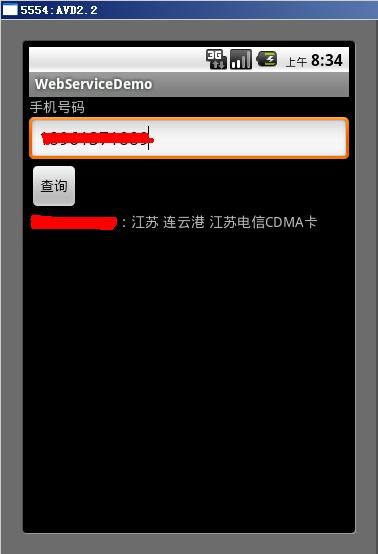
以上就是本文的全部內容,希望對大家的學習有所幫助,也希望大家多多支持本站。
 解析android中include標簽的使用
在一個項目中我們可能會需要用到相同的布局設計,如果都寫在一個xml文件中,代碼顯得很冗余,並且可讀性也很差,所以我們可以把相同布局的代碼單獨寫成一個模塊,然後用到的時候可
 微信朋友圈熱文在哪 微信朋友圈熱文怎麼看
新版的微信裡,細心的朋友應該能看到在搜索那裡多出了一個功能:朋友圈熱文。隨時了解朋友圈的熱門文章,不過有不少人都很疑惑微信朋友圈熱文要怎麼查看,下面就讓小編
 Android 6.0 - 動態權限管理的解決方案
Android 6.0版本(Api 23)推出了很多新的特性, 大幅提升了用戶體驗, 同時也為程序員帶來新的負擔.動態權限管理就是這樣, 一方面讓用戶更加容易的控制自己的
 Android游戲開發之黑白棋
黑白棋介紹黑白棋,又叫蘋果棋,最早流行於西方國家。游戲通過相互翻轉對方的棋子,最後以棋盤上誰的棋子多來判斷勝負。黑白棋非常易於上手,但精通則需要考慮許多因素,比如角邊這樣