編輯:關於Android編程
 // 向SD卡寫入數據
     private void writeSDcard(String str) {
         try {
             // 判斷是否存在SD卡
             if (Environment.getExternalStorageState().equals(
                     Environment.MEDIA_MOUNTED)) {
                 // 獲取SD卡的目錄
                 File sdDire = Environment.getExternalStorageDirectory();
                 FileOutputStream outFileStream = new FileOutputStream(
                         sdDire.getCanonicalPath() + "/test.txt");
                 outFileStream.write(str.getBytes());
                 outFileStream.close();
                 Toast.makeText(this, "數據保存到text.txt文件了", Toast.LENGTH_LONG)
                         .show();
             }
         } catch (Exception e) {
             e.printStackTrace();
         }
     }


     // 從SD卡中讀取數據
     private void readSDcard() {
         StringBuffer strsBuffer = new StringBuffer();
         try {
             // 判斷是否存在SD
             if (Environment.getExternalStorageState().equals(
                     Environment.MEDIA_MOUNTED)) {
                 File file = new File(Environment.getExternalStorageDirectory()
                         .getCanonicalPath() + "/test.txt");
                 // 判斷是否存在該文件
                 if (file.exists()) {
                     // 打開文件輸入流
                     FileInputStream fileR = new FileInputStream(file);
                     BufferedReader reads = new BufferedReader(
                             new InputStreamReader(fileR));
                     String st = null;
                     while ((st = reads.readLine()) != null) {
                         strsBuffer.append(st);
                     }
                     fileR.close();
                 } else {
                     Toast.makeText(this, "該目錄下文件不存在", Toast.LENGTH_LONG).show();
                 }
             }
         } catch (Exception e) {
             e.printStackTrace();
         }
         Toast.makeText(this, "讀取到的數據是:" + strsBuffer.toString() + "",
                 Toast.LENGTH_LONG).show();
     }
 }
 Android AlertDialog對話框詳解及實例
Android AlertDialog關系圖如下: Android主要提供四種對話框: 1:AlertDialog:功能最豐富,實際應用最廣的對話框。 2:P
 Android App開發中ViewPager組件的入門使用教程
首先讓大家有個全局的認識,直接上個項目,看看僅僅通過這幾行代碼,竟然就能完成如此強悍的功能。下篇再仔細講講為什麼要這麼寫。效果圖:實現了三個view間的相互滑動第一個VI
 Android編程實現ActionBar的home圖標動畫切換效果
本文實例講述了Android編程實現ActionBar的home圖標動畫切換效果。分享給大家供大家參考,具體如下:Material Design中一個重要特性是側滑菜單
 Android 反射調用資源和id
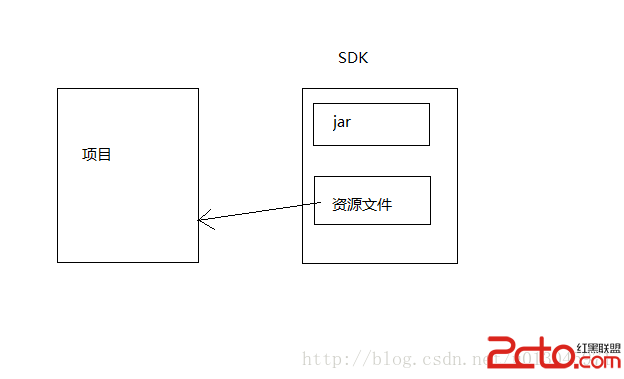
本文介紹利用反射調用資源和id 提出問題: app有一種叫應用牆的廣告,應用牆是在你的程序中彈出一個Activity來展示廣告,比如豌豆廣點通等,集成的時候