編輯:關於Android編程
  1  public class UpdataPeople extends Activity {
  2
  3     EditText updata_name;
  4     EditText updata_phone;
  5     EditText updata_address;
  6     Button updata_quxiao;
  7     Button updata_baocun;
  8
  9    String name;
 10     String phone;
 11
 12     //創建一個子線程對象
 13     UpdataThread updataThread ;
 14
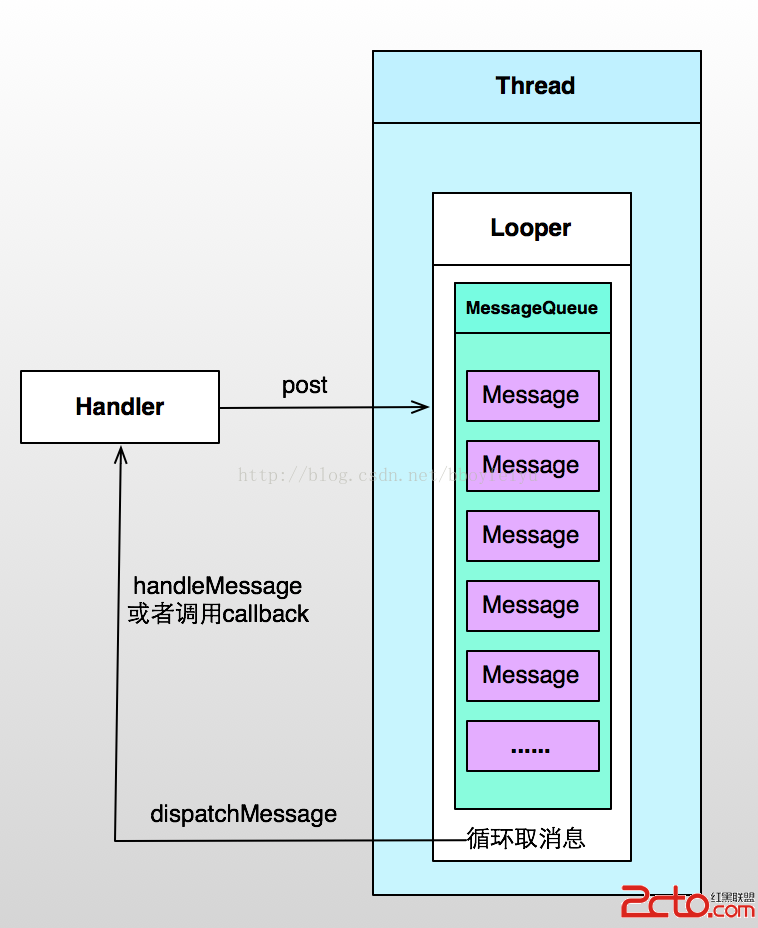
 15     //定義一個全局變量,該Handler在主線程中重寫HandleMessage。
 16     //若不定義成為全局變量,則在子線程中無發用到該Handler
 17     private Handler mainHandler = null;
 18
 19     //創建一個非UI線程
 20     class UpdataThread extends Thread {
 21
 22         public Handler mhandler;
 23
 24         public void run() {
 25             Looper.prepare();
 26             mhandler = new Handler() {
 27
 28                 //定義處理消息的方法
 29                 @Override
 30                 public voidhandleMessage(Message msg) {
 31                     //---這裡面做一些耗時操作
 32                     if (msg.what == 0x123) {
 33                         //獲取msg所攜帶的數據
 34                         Bundle bundle =msg.getData();
 35                         if (bundle != null) {
 36                             String name =bundle.getString("name");
 37                             String phone =bundle.getString("phone");
 38                             Toast.makeText(getApplication(), "傳值成功" +name + phone, Toast.LENGTH_LONG).show();
 39                         } else {
 40                             name = "";
 41                             phone = "";
 42                         }
 43                         //創建並連接數據庫,若該數據庫已經存在,則打開該數據庫
 44                         CreateDatabaseHelpercdh = new CreateDatabaseHelper(getApplication(), "myPeople.db3", 1);
 45                         //使用游標查詢數據庫,並返回結果集
 46                         Cursor cursor =cdh.getReadableDatabase().rawQuery("select * from people where name = ?and phone = ?", new String[]{name, phone});
 47                         //創建一個Bundle存儲查詢出來的結果
 48                         Bundle dataAll = newBundle();
 49                         //遍歷cursor,並將結果賦值給Bundle
 50                         while(cursor.moveToNext()) {
 51                            dataAll.putString("name", cursor.getString(1));
 52                            dataAll.putString("phone", cursor.getString(2));
 53                             dataAll.putString("address",cursor.getString(3));
 54                         }
 55     //↓↓↓↓↓↓↓這一塊便是子線程將查詢的結果返回給主線程↓↓↓↓↓↓↓
 56                         //創建Message
 57                         Message msg_main = newMessage();
 58                         msg_main.what = 0x456;
 59                         //為Message添加數據
 60                        msg_main.setData(dataAll);
 61                         //向主線程發送消息
 62                        mainHandler.sendMessage(msg_main);
 63
 64                     }
 65                 }
 66             };
 67             Looper.loop();
 68         }
 69     }
 70
 71     @Override
 72     protected void onCreate(BundlesavedInstanceState) {
 73         super.onCreate(savedInstanceState);
 74         //實例化Thread
 75         updataThread = new UpdataThread();
 76         //啟動新線程
 77         updataThread.start();
 78         setContentView(R.layout.updatapeople);
 79         //獲取布局文件裡的控件
 80         updata_name = (EditText)findViewById(R.id.updata_name);
 81         updata_phone = (EditText)findViewById(R.id.updata_phone);
 82         updata_address = (EditText)findViewById(R.id.updata_address);
 83         updata_quxiao = (Button)findViewById(R.id.updata_quxiao);
 84         updata_baocun = (Button)findViewById(R.id.updata_baocun);
 85
 86         //獲取啟動該Activity的Intent
 87         Intent intent = getIntent();
 88         //取出Intent所攜帶的數據包
 89         Bundle datas = intent.getExtras();
 90         //取出包中所攜帶的各種數據
 91         if (datas != null) {
 92             name =datas.getString("name");
 93             phone =datas.getString("phone");
 94         } else {
 95             name = "空";
 96             phone = "空";
 97         }
 98 //↓↓↓↓↓↓↓這一塊便是主線程向子線程發送消息↓↓↓↓↓↓↓↓
 99         //創建消息
100        Message msg = new Message();
101        //為msg標記一下(類似與--key--)
102        msg.what = 0x123;
103        //創建一個Bundle,並存放數據
104        Bundle bundle = new Bundle();
105        bundle.putString("name", name);
106        bundle.putString("phone", phone);
107        //將數據添加到msg
108        msg.setData(bundle);
109        //向新線程發送消息
110        updataThread.mhandler.sendMessage(msg);
111
112        //接受子線程返回的消息和子線程那邊的用法一樣
113         mainHandler = new Handler() {
114            @Override
115            public void handleMessage(Message msg_main) {
116                 if (msg_main.what == 0x456){
117                     //更新UI(因為在UI 線程中可以進行UI的更新。。。)
118                    updata_name.setText(msg_main.getData().getString("name"));
119                 }
120            }
121        };
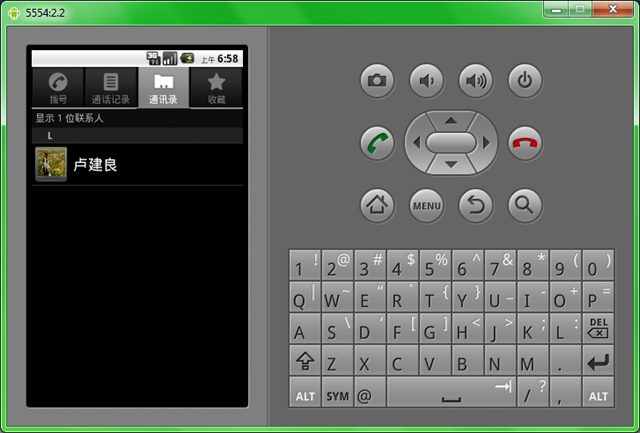 Android Content Provider詳解及示例代碼
Android:Content Provider的使用。1、Content Provider 簡介2、使用現成的Content Provider3、定義自己的Conten
 Android 編程之入門開發文件夾管理器開發詳細講解-1
在我們的手持設備中,一般都會自帶設備公司自己開發的文件管理系統、拍照系統之類的東東,今天我給大伙說說入門級開發的文件夾管理器,代碼贼少 總共就6個類吧,沒有
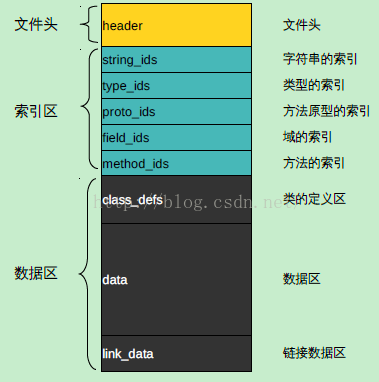 Android中dex文件的加載與優化流程
1、dex文件分析邏輯上,可以把dex文件分成3個區,頭文件、索引區和數據區。索引區的ids後綴為identifiers的縮寫。 headerdex文件裡的he
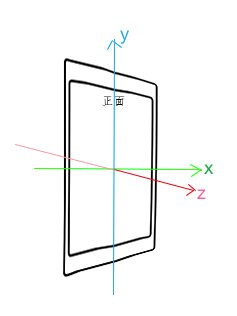 詳解Android 傳感器開發 完全解析
大家好,由於最近會有對智能硬件相關的開發需求,所以最近這些天分享的博文也就大致掛鉤智能硬件了,像上一篇的藍牙分享,相信很多讀者已經看過了,那麼今天我為大家帶來Androi