編輯:關於Android編程
                        File tempFile = Environment.getExternalStorageDirectory()
					.getAbsoluteFile();
			File file = new File(tempFile, (format.format(date) + .xml));
			HttpClient client = new DefaultHttpClient();
			HttpGet get = new HttpGet(RSS_URL);
			try {
				HttpResponse response = client.execute(get);
				if (response.getStatusLine().getStatusCode() == 200) {
					InputStream inputStream = response.getEntity().getContent();

					FileOutputStream fos = new FileOutputStream(file);
					int byteread = 0;
					byte[] buffer = new byte[1024];
					while ((byteread = inputStream.read(buffer)) != -1) {

						fos.write(buffer, 0, byteread);
					}
					fos.flush();
					fos.close();
					inputStream.close();
				}
			} catch (ClientProtocolException e) {
				// TODO Auto-generated catch block
				e.printStackTrace();
			} catch (IOException e) {
				// TODO Auto-generated catch block
				e.printStackTrace();
			}
                        list=new ArrayList>();
			SAXReader reader = new SAXReader();
			try {
				Document document = reader.read(file); // 通過reader對象的read方法獲得document對象
				Element rootelement = document.getRootElement(); // 獲得根節點
				Element channelelement = rootelement.element(channel);// 獲得channel節點
				Iterator channel_iterator = channelelement.elementIterator();

				 // 准備第一個模板,將需要改變的時間格式
				String pat1 = EEE, dd MMM yyyy HH:mm:ss Z ;
		        // 准備第二個模板,將提取後的日期數字變為指定的格式
		        String pat2 = yyyy年MM月dd日 HH時mm分 ;
		        Locale local=Locale.ENGLISH;
		        SimpleDateFormat sdf1 = new SimpleDateFormat(pat1,local) ;        // 實例化模板對象
		        SimpleDateFormat sdf2 = new SimpleDateFormat(pat2) ;        // 實例化模板對象
				while (channel_iterator.hasNext()) {
					//只能放在map裡,不能發在對象裡
					Mapmap1=new HashMap();
					Element itemelement = (Element) channel_iterator.next();
					if (item.equals(itemelement.getName())) {
						Iterator item_iterator = itemelement.elementIterator();
						rssItem = new RssItem();
						while (item_iterator.hasNext()) {

							Element itemChild = (Element) item_iterator.next();

							if (title.equals(itemChild.getName())) {

								rssItem.setTitle(itemChild.getStringValue());
								Log.i(RSS, itemChild.getStringValue());

							}
							if (link.equals(itemChild.getName())) {
								rssItem.setLink(itemChild.getStringValue());
								Log.i(RSS, itemChild.getStringValue());
							}
							if (description.equals(itemChild.getName())) {
								rssItem.setDescription(itemChild
										.getStringValue());
								Log.i(RSS, itemChild.getStringValue());
								if (getImgStr(itemChild.getStringValue())!=null) {
									//區第一個的url地址
									rssItem.setImage(getImgStr(itemChild.getStringValue()));
								}else{
									rssItem.setImage();
								}


							}
							if (pubDate.equals(itemChild.getName())) {

								Date date1= sdf1.parse(itemChild.getStringValue());
								String pubDate=sdf2.format(date1);
								rssItem.setPubDate(pubDate);
								Log.i(RSS, pubDate);
							}
							if (author.equals(itemChild.getName())) {

								rssItem.setAuthor(itemChild.getStringValue());
								Log.i(RSS, itemChild.getStringValue());
							}

						}
						if (rssItem.getImage().equals()) {

						}else {
							map1.put(rssItem, rssItem);
							list.add(map1);
						}

						//feed.addItem(map1);


					}
				}

			} catch (DocumentException e) {
				// TODO Auto-generated catch block
				e.printStackTrace();
			} catch (ParseException e) {
				// TODO Auto-generated catch block
				e.printStackTrace();
			}

			 Message message = new Message();
			 message.what = 1;
			 handler.sendMessage(message);
			 RSS_URL=null;
		}
        String a=Fri, 14 Aug 2015 02:20:10 +0800;//
	String pat1 = EEE, dd MMM yyyy HH:mm:ss Z ;    //EEE, dd MMM yyyy HH:mm:ss Z
        // 准備第二個模板,將提取後的日期數字變為指定的格式
        String pat2 = yyyy年MM月dd日 HH時mm分ss秒SSS毫秒 ;  //MOTH
        //由於local生成很費時間,提前生成
        Locale local=Locale.ENGLISH;
        SimpleDateFormat sdf1 = new SimpleDateFormat(pat1,local) ;        // 實例化模板對象
        SimpleDateFormat sdf2 = new SimpleDateFormat(pat2) ;        // 實例化模板對象
        try {
			Date date= sdf1.parse(a);
			System.out.println(sdf2.format(date));
		} catch (ParseException e) {
			e.printStackTrace();
		}
對於這個應該都會很常用。 3.手機大小適配 webView很強大,能夠顯示html的內容,這讓手機能夠解析html,而且到了5.0 webView增加了更大的功能。我需要顯示文章的圖片,但是圖片變會超出屏幕大小,為了能在每個機子裡顯示的效果,需要加上這兩行代碼:
            //是內容與手機適配
	    bodyHtml.getSettings().setUseWideViewPort(true);
	    bodyHtml.getSettings().setLoadWithOverviewMode(true);
這樣確實可以把圖片變得適合手機大小,但是字體隨著圖片同樣的變小了,因此我們需要把字體調大:
            //設置默認的字體大小
	    bodyHtml.getSettings().setDefaultFontSize(40);
這雖然不是最佳解決辦法,應該在RSS裡文章的內容寫設定好圖片的最大大小,但如果在重新修改img標簽,會讓圖片多的文章加載變得慢,因此只能委曲求全應這個辦法,(網上寫的大多數方法還是不能解決我的需求,還是在泡上在網上的日子找到解決的辦法,該網站做的不錯,風格我喜歡的類型,簡潔風格)把全部代碼顯示如下:
                Intent itent=getIntent();
		//文章內容
		String title=itent.getStringExtra(content);

		//去除超鏈接,保留字體
		String regex=<\s*a.*?/a\s*>;
		title=title.replaceAll(regex, );

		//添加html標頭
		String news=
+title+; //得到WebView組件 WebView bodyHtml=(WebView)this.findViewById(R.id.wv_paper_content); //設置默認的字體大小 bodyHtml.getSettings().setDefaultFontSize(40); //是內容與手機適配 bodyHtml.getSettings().setUseWideViewPort(true); bodyHtml.getSettings().setLoadWithOverviewMode(true); //能夠的調用JavaScript代碼 bodyHtml.getSettings().setJavaScriptEnabled(true); bodyHtml.getSettings().setDefaultTextEncodingName(utf-8); //加載HTML字符串進行顯示 bodyHtml.loadDataWithBaseURL(null, news, text/html, utf-8, null);總算把這個星期碰到的問題和解決辦法寫完了,雖然只是簡單寫下,而且還是學了兩個星期的安卓,就開始做項目,但是真的學到了很多知識,尤其運用到了web的知識,我也相信webApp才是未來的主潮!!!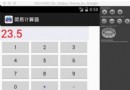 簡單實現Android計算器功能
自己寫的安卓的計算器:注:這個是在mac中開發的,如果要在windows的eclipse中運行可能會出現路徑問題,解決辦法從windows中已有的安卓工程根目錄下復制一下
 Android NDK學習筆記9-JNI調用Java方法
與域一樣,java中有兩類方法:實例方法和靜態方法。JNI提供訪問兩類方法的函數,例如:public class JavaClass {// 實例方法private St
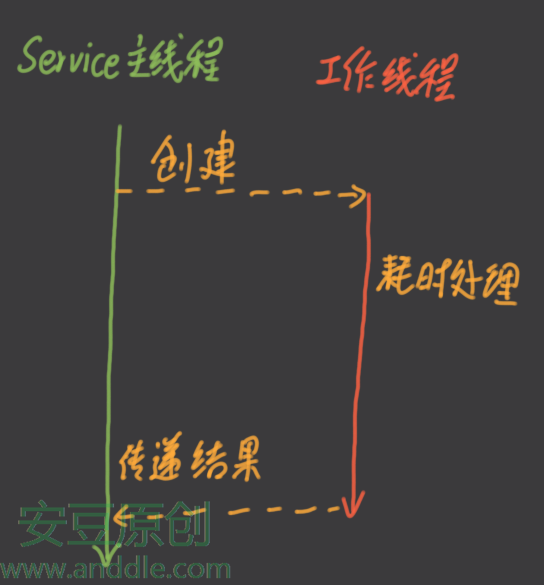 四大組件之Service(四)-Service的線程、工作線程、權限及系統Service
第5節 Service的線程和工作線程剛開始使用Service的時候,常常會有一個誤區:認為這個Service運行於應用中一個單獨的線程。其實Service組件和其他組件
 android圖片處理之圖像模糊
這篇文章將給大家介紹android圖片處理的高效做法,大家有需求的時候可以參考一下。首先我要說明一下本實例中實現的效果(我還不會制作gif圖,如果誰會的話,希望可以教一下